Writing Tools
I Used AI Deep Research to Write a 30-Page Report in 20 Minutes - Here’s Exactly How
AI deep research can produce a fully cited 30‑page report in 20 minutes with a focused brief, the right tools, data validation, and fast formatting.

I Used AI Deep Research to Write a 30-Page Report in 20 Minutes - Here’s Exactly How
Writing a 30-page report in just 20 minutes is now possible with AI deep research tools. These advanced tools handle the heavy lifting of gathering data, analyzing sources, and presenting well-structured, fully cited reports. Here's a quick breakdown of how it works:
- Start with a clear brief: Define the purpose, scope, and key questions for your report to guide the AI effectively.
- Choose the right tool: Options like Gemini Deep Research or Elicit excel at different tasks, from market analysis to academic research.
- Generate and validate data: Use precise prompts, verify citations, and refine the AI's output for accuracy.
- Build section-by-section: Expand your content using a structured outline to maintain clarity and flow.
- Polish and export: Edit for tone, format the document, and export as a professional PDF or other formats.
With the right approach, AI tools can cut research and writing time by up to 90%, making them ideal for professionals, students, and creators. Below, I’ll walk you through the exact steps to replicate this process.
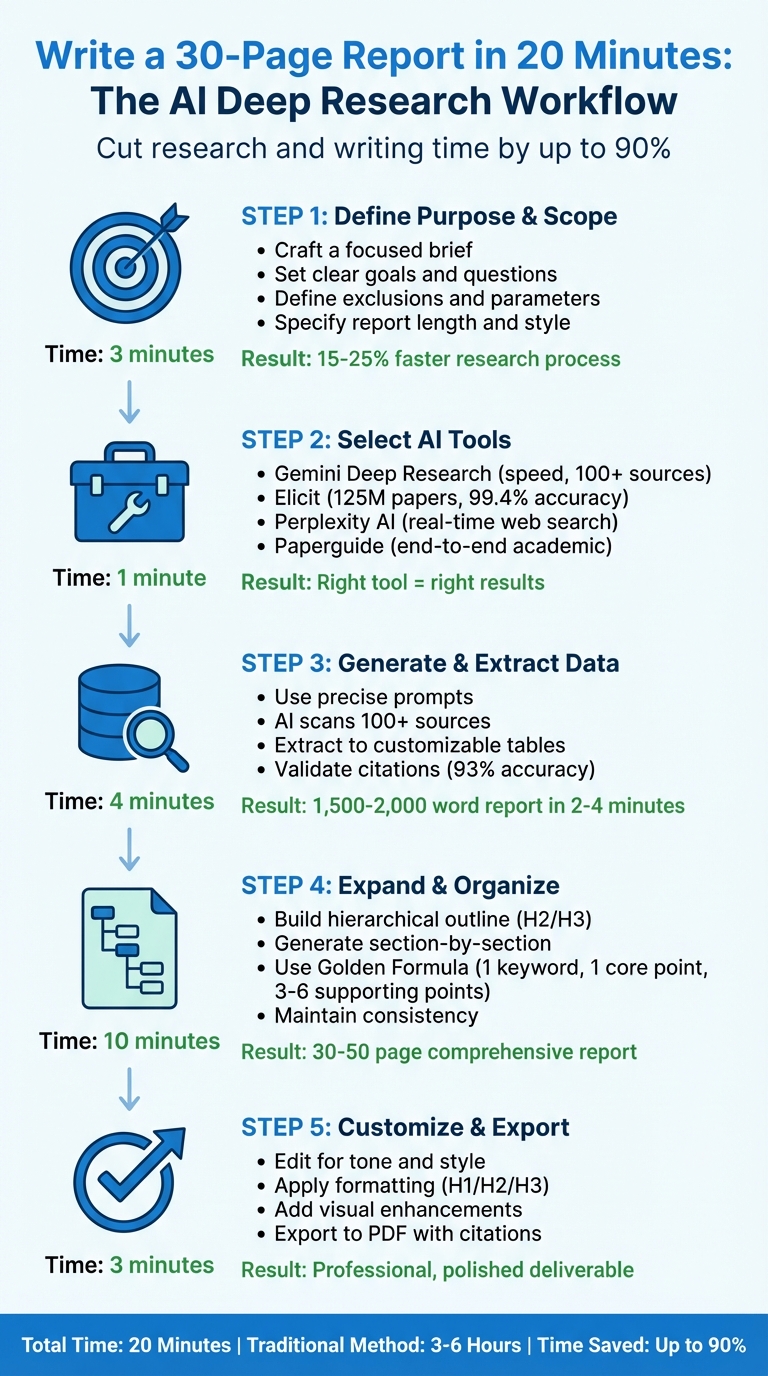
5-Step Process to Write a 30-Page AI Report in 20 Minutes
Google Gemini Deep Research AI Agent Tutorial
sbb-itb-212c9ea
Step 1: Define Your Report's Purpose and Scope
Before diving into any AI tool, take a moment to craft a focused brief. This step is the backbone of creating a concise and effective report within the goal of 20 minutes. A well-thought-out brief ensures your report is streamlined and avoids overwhelming you with irrelevant data. AI deep research tools rely on your initial input to create a multi-step research plan. If your prompt is too vague, the output will reflect that lack of clarity, resulting in scattered and less useful results.
Having a clear goal and defined scope allows the AI to break your query into manageable sub-tasks, such as analyzing market size, evaluating competitors, or identifying pricing trends (often using AI content strategy tools to automate the data gathering). Without this structure, you risk ending up with generic, surface-level information that wastes time. In fact, tests have shown that structured briefs with specific parameters can increase the use of authoritative sources in reports from 60% to 85%.
Clarify the Topic and Key Questions
Start by pinpointing the primary purpose of your report. Ask yourself: What are you trying to achieve? For instance, a goal like "Generate a market research report on short-form video editing tools for content creators" is much more effective than a broad query like "Research video editing tools". Once you've identified the main objective, break it down into smaller, targeted questions that align with your analysis.
Be explicit about what to exclude. For example, you might want to avoid outdated articles or non-cited blogs to maintain a professional standard. Define the scope clearly, including the timeframe (e.g., Q1–Q4 2024), geography (e.g., U.S. and EU markets), and preferred source types (e.g., prioritize official reports and analyst reviews over general online content).
"The quality of your prompt significantly impacts your results... Unlike standard Google searches where you only provide keywords, deep research queries benefit from detailed direction." - Jeremy Caplan, author of Wonder Tools
Set Parameters for Report Length and Style
Be specific about the report's structure and tone. Clearly outline what you need, such as an executive summary, methodology, key findings, and a product comparison table. Request a document format with headings (e.g., H1 for the title and H2 for main sections) to ensure the final output is well-organized and easy to navigate.
Tailor the tone to your audience. For example, a CFO-focused report should use precise, business-oriented language, while a technical team might need more detailed, jargon-friendly content. Provide clear tone guidelines, like "Use plain language with short paragraphs" or "Focus on direct, action-oriented sentences." This helps prevent the AI from creating overly complex or verbose text. Limit findings to 5 key points, each summarized in 2 concise sentences, so the AI prioritizes the most relevant information.
This level of preparation can make the research process 15% to 25% faster compared to manual workflows. As Hanks, an AI workflow tester at Skywork, observed:
"This framing reduced fluff in our tests and improved the odds of getting a clean, sectioned draft on the first run."
With a solid brief and defined parameters in place, you're ready to move on to selecting the best AI deep research tools in the next step.
Step 2: Select the Right AI Deep Research Tools from AI Apps
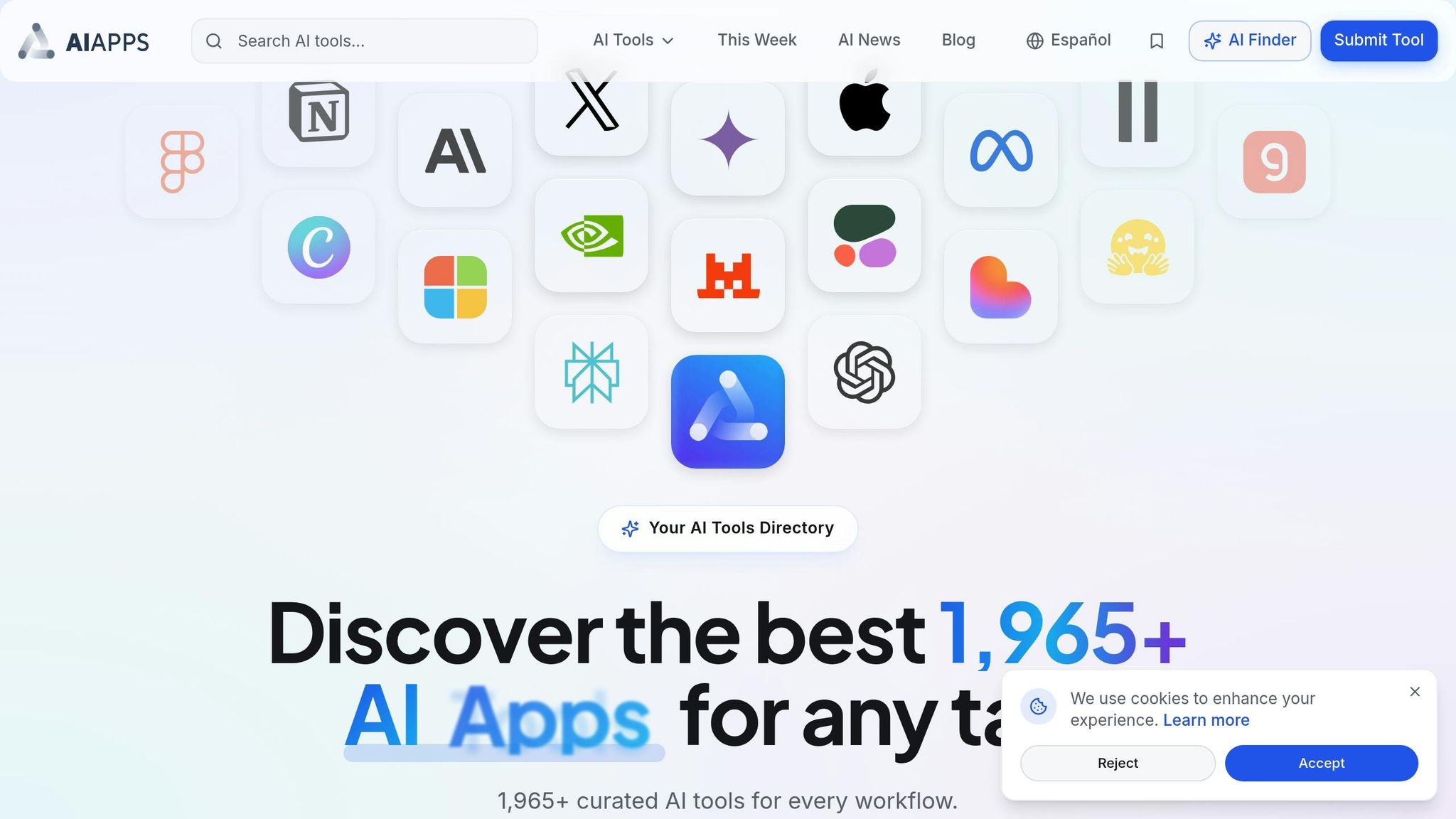
After outlining the scope of your report, the next step is finding the right AI tool for the job. The AI Apps directory simplifies this process by organizing a wide variety of AI tools into searchable categories. Whether you're focused on academic literature reviews, market research, or general web-based research, the directory allows you to filter tools based on your specific needs. This decision is crucial for streamlining your research process in the following steps.
Choosing the right tool means aligning its features with your project requirements. For instance, academic tools like Elicit can search through over 125 million peer-reviewed papers, offering sentence-level citations for precise referencing. On the other hand, tools like Gemini Deep Research and Perplexity AI excel at scanning live web sources - perfect for market analysis and competitor tracking. For marketing-focused projects, platforms such as Whatagraph pull data directly from analytics dashboards, generating visual reports in no time.
Explore AI Apps Directory for Research Tools
The AI Apps directory offers category filters to help pinpoint tools suited to your research type. For academic projects, explore the "AI Research Tools" or "AI Writing Assistants" categories to find options like Elicit, which grants access to an extensive library of academic papers with detailed quote extraction. If you're tackling business intelligence tasks, the "AI Business Tools" section includes platforms designed for competitor analysis and market data aggregation.
Advanced filtering options in the directory allow you to refine your search by data source (e.g., peer-reviewed journals or open web), export format (PDF, Word, CSV), and integration capabilities (such as compatibility with Zotero, Mendeley, or Google Drive). Tools with "Autonomous Research" features are particularly useful for tight deadlines, as they can analyze hundreds of sources with minimal manual input.
When evaluating tools, prioritize transparency in source citations. For example, Elicit provides inline citations linking directly to specific sentences in source PDFs, while Gemini Deep Research includes hyperlinked references to all consulted sources. Such traceability is essential for verifying the accuracy of your findings and ensuring your final report is reliable. A 2025 study involving 17 PhD-level researchers highlighted Elicit's citation model as a standout feature, making it more dependable than traditional search tools.
"We prioritize good process and transparency because that's necessary for trusting AI in high-stakes contexts."
– Shahid Ahmad, Growth Generalist, Elicit
After identifying potential tools, compare their key features to determine which one best suits your needs.
Compare Key Features of Selected Tools
| Tool | Automation Level | Report Generation Speed | Customization | Source Citation Capability |
|---|---|---|---|---|
| Elicit | High (Rapid Review) | Minutes | High (Edit every step) | Exact quotes and reasoning |
| Gemini Deep Research | High (Autonomous) | 2–15 Minutes | Moderate (Plan review) | Inline links to 100+ sources |
| Paperguide | High (End-to-End) | Minutes to Hours | High (Custom fields) | Full academic citations |
| Perplexity AI | Moderate (Search-based) | Seconds to Minutes | Low | Inline citations with links |
Automation levels indicate how much manual input is required. Tools like Gemini and Paperguide operate autonomously after receiving a prompt, while Elicit allows for fine-tuning of screening criteria and data extraction. Report generation speeds also vary - Gemini can create a 6–8 page report with 12–18 sources in just 2–4 minutes, making it 15–25% faster than manual methods.
Customization is another key factor. For instance, Gemini offers an "Interactive Planning" feature, letting you adjust the research strategy by adding or removing subtopics before diving into deep research. Meanwhile, Elicit enables precise adjustments to data extraction, making it ideal for systematic literature reviews where accuracy is critical.
Pricing is also worth considering. Elicit has a free tier with basic search capabilities, while its paid plans start at $10/month. Gemini Advanced costs $20/month, offering unlimited deep research queries and a 1 million token context window. For marketing teams, Whatagraph starts at $229/month, providing significant time savings for report creation.
"Whatagraph's AI saves time and energy for our marketing specialists. And the hours we're saving is just pure profit."
– Lars Maat, Co-founder, Maatwerk Online
Ultimately, select a tool that aligns with your report's focus. For a 30-page report, Gemini Deep Research offers speed, autonomous browsing of over 100 sources, and direct export to Google Docs. However, if your report demands academic rigor and systematic literature review standards, Elicit stands out with its 99.4% data extraction accuracy and reliable citation model.
With your tool in hand, you're ready to begin generating and validating your research data. This organized approach ensures you stay efficient while delivering comprehensive, well-referenced results.
Step 3: Generate Initial Research Briefs and Extract Data
This is where you start gathering and organizing research data. Essentially, you're turning your prompt into a structured research brief that becomes the backbone of your 30-page report. While AI handles the heavy lifting of sourcing and extracting data, your role is to validate and fine-tune the output.
Use AI Tools for Data Collection and Summarization
To get the most out of AI, craft a precise and detailed prompt. Include specifics like the topic, timeframe, criteria for evaluation, and desired output format. For instance, instead of a vague request like "Research AI note-taking apps", try something more structured: "Analyze the top 5 AI note-taking apps launched between January 2024 and February 2026, comparing pricing, features, and user reviews. Provide an executive summary with comparison tables and inline citations."
Once submitted, Gemini Deep Research breaks your query into smaller, manageable sub-questions. It then presents an interactive plan for you to review and refine. This tool scans over 100 sources at once, using both keyword and semantic search to pull data from diverse formats like web pages, PDFs, and news articles.
For academic projects, Elicit is an excellent choice for extracting specific data points into customizable tables. A real-world example of its effectiveness comes from 2025, when the German organization VDI/VDE used Elicit for a systematic review on education policy. The tool achieved a 99.4% accuracy rate, correctly extracting 1,502 out of 1,511 data points, enabling the team to review 11 times more evidence than manual methods. You can customize extraction columns like "Main Finding", "Sample Size", or "Methodology" to ensure the AI pulls exactly what you need.
To improve the quality of your research brief, include clear exclusions in your prompt. For example, you might specify, "Avoid outdated articles pre-2023" or "No Reddit summaries as primary sources" to filter out low-quality content.
Refine and Validate Extracted Data
Even with AI's capabilities, human oversight is critical to ensure the data is accurate and relevant. Spot-checking citations reveals high reliability - one test showed that 28 out of 30 citations (about 93%) correctly linked to the intended sources. However, for high-stakes reports, manually verify at least 10 claims against their original sources.
Some tools offer features like "visual grounding", which highlights the exact section of a source where the AI pulled its data. This makes it easier to confirm that the context hasn't been misinterpreted. Elicit, for example, provides sentence-level citations that link directly to the source text, simplifying fact-checking.
It's also a good idea to run a link audit to ensure all citations are active and accessible. Instruct the AI to "Audit all links for 200 OK status and replace redirects with final URLs" to tidy up your reference list. If your report requires authoritative sources, confirm that the AI prioritized official documents and peer-reviewed papers. Adding source constraints can boost the percentage of authoritative domains in your brief from 60% to 85%.
If your tool supports "human-in-the-loop QA", use it to review and correct AI-extracted data before moving forward. This step is especially important when dealing with technical details, financial figures, or medical information where precision is non-negotiable.
Once your data has been verified, you can start expanding the research brief into the full structure of your report. A well-validated brief is the cornerstone of building a comprehensive and reliable report in the next steps.
Step 4: Expand and Organize Content into a Full Report Structure
Now that you’ve got a solid research brief and selected your AI tools, it’s time to transform that groundwork into a well-structured report. This step is all about creating a logical framework and organizing your content into clear, digestible sections. Tackling the report section by section, rather than attempting to generate the entire document at once, helps maintain clarity and avoids unnecessary repetition.
Develop a Detailed Outline with AI
Start by instructing your AI to build a hierarchical outline with H2 and H3 headings. This ensures your report flows logically and remains easy to navigate, especially when exported as a PDF. Be specific when prompting the AI - define your goals and list the required sections, such as an Executive Summary, Methodology, or Market Overview.
Interactive planning is key to covering all necessary areas. Early on, decide whether your report will follow an Executive structure (focusing on outcomes, KPIs, and risks) or a Deep-Dive structure (emphasizing methodology, findings, and analysis). This choice sets the tone and ensures consistency throughout the document.
To guide the AI effectively, use "must include" constraints for each section. For instance, you can require the Market Overview to address market size, growth trends, and major players. At the same time, apply "do not assume" rules to prevent the AI from fabricating unsupported data, especially when dealing with financial figures or technical details.
Modern AI tools can handle extensive outlines, with some supporting context windows of up to 1,000,000 tokens. This allows you to create reports with over 100 sub-sections without risking data loss or truncation.
Once the outline is ready, you can begin fleshing out each section with detailed content.
Generate and Expand Content for Each Section
With your outline as a guide, generate content for each section individually. This step-by-step approach gives you more control over the structure and makes editing easier without affecting the entire document. When generating content, provide the AI with clear instructions on tone and length. Use the Golden Formula - 1 keyword, 1 core point, and 3–6 supporting points - to keep each section focused and concise. This ensures your content stays aligned with the research brief while remaining engaging for the reader.
To maintain a professional and cohesive tone throughout the report, instruct the AI to use consistent terminology, naming conventions, and verb tenses across all sections. This prevents any jarring shifts in style or tone as the content develops.
"The difference between 'clean report' and 'messy draft' is almost always your inputs: what the AI must include, and what it must not assume." - CustomGPT.ai
Many advanced AI tools can generate comprehensive reports spanning 30 to 50 pages. In performance trials, a 1,500–2,000-word report incorporating 18 sources was completed in just 2–4 minutes - saving 15–25% of the time compared to manual workflows. This efficiency lets you focus more on refining the content rather than starting from scratch.
As you expand each section, ask the AI to provide specific comparisons or deeper insights. For example, you might request a comparison of "X vs Y" across key aspects like pricing, features, user experience, integration options, and customer support.
Lastly, take the time to review all references for accuracy and ensure consistency across the report. This final check guarantees a polished and reliable document.
Step 5: Customize, Format, and Export the Final Report
Once your content is generated and organized, it’s time to refine it into a polished, professional document. This step transforms a solid draft into a report you’ll confidently present to clients or executives.
Edit for Tone and Style Consistency
Begin by reviewing the report’s tone to ensure it aligns with your audience. A formal and results-driven tone is ideal for executives, while a conversational style might better suit internal teams. To refine the tone, use the ICE Prompting Structure - Instruction (what needs to be done), Context (the audience), and Example (the desired format) - to guide adjustments.
If your AI tool allows, set a custom persona to maintain a consistent voice throughout the document. For instance, assigning the persona of a "research analyst specializing in AI safety" ensures the content remains authoritative and focused. If you notice any mechanical language or inconsistencies, prompt the AI to "formalize this section" or "make the topic sentences more engaging" to smooth out the flow.
Consider adding brief analyst notes or real-world examples to make the report more engaging. Once the tone is polished, shift your attention to formatting and visual presentation.
Apply Formatting and Visual Enhancements
Good formatting can make or break a report. Start by organizing the document with a clear hierarchy: use H1 for the title, H2 for main sections, and H3 for subsections. This not only improves readability but also creates functional PDF bookmarks for easier navigation.
Set the body text to a readable size - 11.5 to 12 pt - with 1.15 line spacing. Break up long paragraphs into smaller chunks of 2–4 sentences, leaving a single blank line between sections to avoid a cluttered look.
For tables, keep them concise with no more than 8 columns. Overloading tables can lead to compressed text and reduced readability in exported documents. If additional data is necessary, split it into multiple smaller tables. To enhance clarity, include a brief methodology note below each table to explain data sources and preempt questions.
For citations, use inline bracketed numerals (e.g.,) that correspond to a numbered "References" or "Works Cited" section at the end. Once the content and visuals are finalized, you’re ready to export.
Export and Share the Final Report
After refining and formatting the content, export the report in a professional format. PDFs are the go-to choice for final deliverables because they preserve styling, tables, images, and clickable citations - perfect for presentations or sharing with stakeholders.
"These aren't just plain text exports either. The PDFs come with properly styled text, tables, images, clickable citations, and sources."
– Jim Clyde Monge, Generative AI
For reports with extensive datasets or tables, exporting to Excel or Google Sheets might be more practical. These formats allow recipients to manipulate data or integrate it into larger systems. For raw data or logs, CSV files remain the most universally compatible option.
Before sharing, open the exported file to ensure all tables, links, and citations are correctly formatted and functional. A final review ensures your report is polished and ready for distribution.
Workflow Timings and Tips to Achieve 20-Minute Efficiency
Time Allocation for Each Step
Completing a detailed 30-page report in just 20 minutes might sound ambitious, but with AI automation tools to streamline your workflow and time management, it’s entirely possible. Here's how to break down your workflow into manageable chunks.
Start by spending 3 minutes on a mini-brief that clearly defines your report’s purpose. This should include your main goal, relevant date ranges (e.g., "Q1–Q4 2024 sources only"), and specific deliverables like an executive summary or a comparison table. This step ensures you have a clear roadmap and reduces the chances of major revisions later.
Next, allocate 4 minutes for the AI execution phase. Advanced AI research tools can generate a 6–8 page report (around 1,500–2,000 words) with 12–18 sources in just 2–4 minutes. While the AI works, use this time to review its research plan and confirm that the structure meets your needs.
Dedicate 10 minutes to refining the AI’s output. This includes verifying citations, consolidating similar trends, and adjusting the tone to match your desired style. Finally, reserve 3 minutes for formatting and exporting. Tools like Google Docs allow quick exporting to PDF, making this step almost instantaneous.
For perspective, independent tests conducted between March and November 2025 showed that AI-assisted workflows significantly cut down time. In one case, involving municipal contracts and budget spreadsheets, the time from document ingestion to a first-pass outline dropped from 3.2 hours to just 68 minutes.
With this timeline in mind, you can achieve a well-structured report quickly. Now, let’s look at some tips to fine-tune your process even further.
Efficiency Tips for Getting the Most from AI Tools
- Filter out irrelevant sources: Use exclusion prompts like "Avoid outdated articles pre-2023" to focus on current and relevant data.
- Encourage actionable insights: Use prompts such as "Compare X vs Y across 5 dimensions" to get structured, meaningful results rather than generic overviews.
- Streamline verification: Ask the AI to include each statistic’s original sentence along with an inline link for faster fact-checking.
- Leverage integrations: When working with internal documents, use workspace tools that can search Gmail, Drive, and Chat data directly. This eliminates the need to manually gather files.
- Use pre-formatted templates: Set up Google Docs or Word templates with your preferred fonts and styles. Exporting AI-generated content directly into these templates ensures a polished, professional look with minimal effort.
"The problem isn't lack of data; it's extracting signal from noise fast enough to meet deadlines without sacrificing accuracy."
– Hanks, AI Workflow Tester
These tips, paired with a well-structured timeline, can help you harness the full potential of AI tools while maintaining accuracy and efficiency.
Conclusion: Key Takeaways for Writing Reports with AI Deep Research
AI deep research tools have transformed the way reports are written, cutting down what used to take hours or even days into just minutes. These tools can produce detailed, fully cited reports spanning 10,000 to 15,000 words, complete with inline citations and formatted references, making verification straightforward.
Beyond saving time, these tools go a step further by performing autonomous, multi-step reasoning. They plan research strategies, browse numerous websites, and analyze data without constant input from users. For instance, in February 2025, an energy consulting firm used an AI deep research tool to study renewable energy trends. The result? A 10–40x reduction in research time and insights that identified ways to cut data center energy consumption by 15%.
"The magic of Deep Research isn't that you get a 20-page summary of a topic - it's that you can get a report customized to your situation as if you had a research analyst on your team." – Torsten Walbaum, Author, The Operator's Handbook
While these tools can be incredibly efficient, it’s important to treat their outputs as advanced drafts. Validate key statistics and check citation links (accuracy rates hover around 93% (as seen in Gemini AI reports)) before finalizing. Refine methodology sections with human oversight to ensure precision. Start with a detailed brief outlining parameters like timeframes and deliverables, use iterative prompts to fine-tune sections, and take advantage of export features to maintain proper formatting.
Different AI tools for scientists and researchers offer unique strengths. Some are designed for in-depth, 30–50 page reports, while others can deliver concise results in under three minutes. Many also integrate seamlessly with platforms like Google Docs, making it easier to incorporate findings into your workflow. By selecting the right tool, using strategic prompts, and validating results, you can consistently create polished, professional reports in a fraction of the time traditional methods require.
FAQs
How do I write a prompt that gets a usable 30-page report draft?
To craft a prompt for generating a 30-page report with AI, start by clearly defining your research objective and laying out the structure of the report. Be specific about the type of report, the intended audience, the sections to include, and any key data points or areas of focus. Additionally, instruct the AI to identify any gaps or assumptions in the content.
For instance, you might say: "Draft a 30-page report on [topic] tailored for [audience]. Structure it into sections: Introduction, Methodology, Results, Analysis, and Conclusion. Ensure all sources are cited and note any areas where data or assumptions need clarification."
This approach ensures the AI stays aligned with your goals while delivering a comprehensive and well-organized report.
How can I quickly verify the AI’s citations and key stats?
To ensure the accuracy of an AI's citations and key statistics, rely on tools that provide transparency by connecting claims to trustworthy sources. Many platforms make this process straightforward by embedding direct links to their references. Additionally, you can often export reports in formats like Markdown, which retain all source links, making it easier to manually review and verify the information. These features streamline the process of confirming the reliability of citations as you work.
Which AI deep research tool should I use for my type of report?
When choosing the best AI tool for your reports, it all comes down to the complexity of your project and what you need. If you're working on detailed reports that require citations from a wide range of sources, look for tools that specialize in autonomous, multi-source analysis. On the other hand, if speed is your priority, there are tools that can pull together web data and create structured reports in under 30 minutes. Pay attention to features like citation support, the depth of analysis provided, and export options to ensure the tool aligns with your workflow.