Digital Transformation
Best AI Search Engines in 2026: ChatGPT vs Perplexity vs Gemini vs Copilot
Compare ChatGPT, Perplexity, Gemini and Copilot on accuracy, speed, features and best use cases to pick the right AI search tool.
Best AI Search Engines in 2026: ChatGPT vs Perplexity vs Gemini vs Copilot
AI search engines have transformed how we find information in 2026. Instead of browsing multiple sites, these tools deliver fast, conversational, and citation-backed answers. The top contenders - ChatGPT, Perplexity, Gemini, and Copilot - each excel in specific areas:
- ChatGPT: Best for brainstorming, coding, and creative tasks; offers conversational depth and memory features.
- Perplexity: Ideal for research with its 92% accuracy and inline citations for fact-checking.
- Gemini: Perfect for Google Workspace users with multimodal capabilities and deep integration.
- Copilot: Tailored for enterprise productivity, integrating seamlessly with Microsoft 365 tools.
Quick Comparison:
| Feature | ChatGPT | Perplexity | Gemini | Copilot |
|---|---|---|---|---|
| Primary Strength | Conversational | Research | Multimodal | Productivity |
| Accuracy | 85% | 92% | 88% | 87% |
| Response Time | 6.2 sec | 2.3 sec | 3.5 sec | ~3 sec |
| Best Use Case | Creative tasks | Fact-checking | Google users | Office workflows |
Each tool shines in different scenarios, making it important to match the tool to your specific needs. Whether you're conducting research, coding, or managing large projects, there's an AI search engine designed to help you work smarter.
AI Search Engines Comparison 2026: ChatGPT vs Perplexity vs Gemini vs Copilot
We Found It! The Best AI Search Engine
sbb-itb-212c9ea
ChatGPT
ChatGPT now uses GPT-5 technology to offer a more advanced search experience. It processes billions of prompts daily and holds about 18% of the global AI search query market. One standout feature is its conversational memory, which allows you to ask follow-up questions without repeating prior details. It also adapts to preferences, such as your favorite programming language or location.
Unlike traditional search engines packed with ads and endless links, ChatGPT provides a streamlined, ad-free experience focused on direct answers. It relies heavily on its training data for established facts, performing real-time web searches only when up-to-date information is necessary. With its specialized citation engine, sources are displayed in an expandable sidebar, and responses typically arrive in 5–15 seconds.
Key Features
With GPT-5's advanced reasoning, ChatGPT can weigh tradeoffs and handle complex comparisons, going beyond simple information retrieval. Its academic capabilities are impressive, achieving top scores on benchmarks and excelling in high school-level math. For developers, it offers code-aware search, generating functional code snippets alongside clear explanations, solving 74.9% of real-world coding tasks.
Agent Mode enhances ChatGPT’s utility by handling multi-step tasks, making searches even more personalized. Its memory feature adjusts results based on your profession and previous interactions, delivering a tailored experience. While the free tier provides basic web search, the $20/month Plus plan unlocks GPT-5, unlimited browsing, and faster processing.
Strengths and Weaknesses
ChatGPT’s biggest strength is its conversational depth. It’s perfect for exploratory research, where refining questions through dialogue leads to better outcomes. Using ChatGPT Search feels like consulting a knowledgeable friend who has instant access to the internet. The platform generates 78% of AI referral traffic to websites, though its click-through rate is 96% lower than Google’s, as it focuses on keeping users engaged within the chat.
However, it’s not without flaws. GPT-5 occasionally "hallucinates", providing incorrect information with confidence about 4.8% of the time in "thinking" mode. Its accuracy rate of 85% is lower than Perplexity’s 92%, and its citation system, while functional, requires users to expand a sidebar rather than showing sources inline. Some users also wish for "Focus modes" and simpler, more concise answers when appropriate.
Best Use Cases
ChatGPT is an excellent choice for brainstorming, coding help, and creative writing projects where a conversational approach adds value. It’s particularly effective for technical "how-to" questions that need detailed explanations paired with working code examples. Multi-turn research also benefits, as broad initial queries can evolve into more specific insights through dialogue.
For professionals, Custom GPTs can be tailored for tasks like SEO analysis or market research, streamlining workflows. It’s wise to verify critical information - especially in areas like health, law, or finance - using the "Sources" sidebar. When tackling complex problems requiring deeper reasoning, enabling ChatGPT o1 Thinking mode ensures better results. These capabilities make ChatGPT a versatile tool, setting the stage for comparisons with other AI search engines.
Perplexity
Perplexity is a platform built for search and fact-checking, handling over 100 million queries every week. It delivers answers impressively fast, averaging just 2.3 seconds per response. By 2025, it had surpassed 100 million monthly active users, with 87% of its appeal tied to its standout feature: inline source citations.
Each answer includes numbered citations that link directly to original sources, making it easy to verify information instantly. This transparency has earned Perplexity a 92% factual accuracy score in independent assessments. Its ability to search the live web for every query makes it ideal for staying updated on current events, product launches, or any real-time developments.
"Perplexity is the specialist - it does one thing (search and research) better than anyone else." - SimilarLabs
The platform offers a free tier with unlimited basic searches and 5 Pro searches daily. For those needing more, the $20/month Pro plan includes over 300 Pro searches daily, access to premium models, and file uploads. Students with verified .edu accounts can access the Education Pro plan for just $5/month, while businesses can opt for Enterprise plans starting at $40 per user monthly, which include advanced security and team collaboration tools.
Spaces allow teams to collaborate on research projects with shared files and custom AI instructions, while Perplexity Pages transforms research threads into structured, publishable reports. With G2 ratings of 95% for ease of use and 97% for ease of setup, the platform is user-friendly and efficient.
Key Features
One of Perplexity's defining qualities is its citation transparency. Every claim is paired with a numbered inline citation, linking directly to the original source. This makes it particularly useful for high-stakes fields like law, medicine, and finance, where accuracy is critical.
Pro Search is another highlight. It breaks down complex queries, searches relevant sources, and delivers a concise, synthesized report. Tasks that might take 10–15 minutes manually are completed in about 30 seconds.
For Pro users, model flexibility is a key advantage. Users can switch between models like GPT-4o, Claude 3.5/4.5, and Gemini 3 Pro. The free tier uses Perplexity's Sonar model, which still provides unlimited basic searches and 5 daily Pro searches.
Focus Modes refine search results by narrowing the scope to specific domains. For example:
- Academic mode prioritizes peer-reviewed journals.
- YouTube mode searches video transcripts.
- Reddit mode highlights community opinions.
These specialized filters ensure users get the most relevant results for their needs.
Lastly, Spaces and Pages take Perplexity beyond individual queries. Spaces allow teams to collaborate with shared files and custom AI instructions, while Pages turn research threads into formatted, shareable reports. These tools are particularly helpful for ongoing projects like market research or competitive analysis.
Strengths and Weaknesses
Perplexity's strengths are clear. Its verifiable accuracy is unmatched, with 9 out of 10 correct answers in fact-checking tests - beating competitors like ChatGPT Search (8/10) and Gemini (7/10). The inline citations make it a reliable choice for research that requires evidence-backed answers.
Speed is another win. Searches typically take 0.8 to 2.3 seconds, faster than most competitors. Combined with its ad-free, streamlined interface, Perplexity offers a seamless research experience.
However, there are some limitations. Perplexity is primarily designed for information retrieval, so it’s less effective for creative tasks like brainstorming or writing. It also doesn’t include local utility features like maps or shopping comparisons, which some users might expect.
Another issue is the occasional second-hand hallucination, where the platform cites legitimate sources but misinterprets their content. As one developer put it:
"Perplexity cites real sources with fabricated claims... other AI systems don't exhibit this behavior." - Likhon
This makes it essential to double-check citations for critical decisions, especially in technical or legal contexts. Additionally, Perplexity struggles with programming queries - studies show that 52% of programming answers from models like GPT-3.5 contain inaccuracies.
Best Use Cases
Perplexity shines in research synthesis, pulling together information from various sources into clear, comprehensive summaries. Journalists use it for preliminary research and finding story angles, while marketers rely on it to track industry trends and competitor activities. Financial teams and business consultants also value its ability to aggregate market sentiment from earnings calls and macroeconomic updates.
In academic research, the Academic Focus mode is a game-changer. It helps students and researchers conduct literature reviews using only scholarly sources, similar to specialized tools like ScholarAI. Specialized modes like YouTube focus also save time by summarizing lengthy video content.
For fact-checking, Perplexity’s inline citations provide a layer of accountability that’s invaluable to legal and medical professionals. With its high accuracy score and fast response times, it’s a reliable tool for time-sensitive inquiries.
Finally, competitive intelligence is another strong use case. Teams use Spaces to track market trends, product launches, and strategic moves. The Pro Search feature simplifies complex queries, eliminating the need for multiple browser tabs. Reviewing citations ensures even intricate topics - like fusion energy or regulatory policies - are well-understood.
Gemini
By March 2026, Gemini had skyrocketed to 1.8 billion monthly visits - a 200% growth - thanks to its seamless integration with Gmail, Drive, Calendar, and Docs.
"Gemini's presence inside Gmail, Google Docs, Google Search, and Android makes it the path of least resistance for the hundreds of millions of people already living inside the Google ecosystem." - Marques Brownlee
Gemini offers multiple pricing tiers to cater to diverse user needs:
- Gemini Flash: Free, includes 5 daily Gemini 2.5 Pro prompts.
- Gemini Advanced: $19.99/month, featuring Gemini 3.1 Pro, a 1 million token context window, and full Workspace integration.
- Gemini Ultra: $249.99/month, providing unthrottled access and early feature releases.
- Business Plans: Starting at $7.20 per user monthly.
These plans pair with impressive performance metrics, boasting an 88% accuracy rate and faster response times than ChatGPT. For instance, Gemini averages 2.3 seconds for standard queries, compared to ChatGPT's 6.2 seconds. However, some users have noted that its responses can occasionally lean toward cautious or overly general answers, prioritizing safety over depth.
Key Features
Gemini's standout feature is its multimodal capability. The Gemini 3.1 Pro model can handle text, images, audio, and video within a single interface. For example, users can upload a YouTube link or video file for detailed, frame-by-frame analysis - perfect for troubleshooting technical issues.
Its 1 million token context window is a game-changer, enabling users to process hundreds of pages of text or hours of video simultaneously. In a 2024 demonstration, Google showcased this power by feeding Gemini 1.5 Pro 15 Alphabet earnings reports (152 pages total). The model accurately extracted YouTube ad and Google Cloud revenue figures for all 15 quarters, created markdown tables, and even generated Python code to visualize growth trends.
Gemini also offers a 65,000-token output limit, more than double ChatGPT's 32,000-token cap, making it ideal for generating lengthy reports or technical documentation in one go.
Other notable features include:
- NotebookLM: Converts large datasets into AI-assisted notebooks, ensuring responses are exclusively based on uploaded documents.
- Gems: Custom AI assistants tailored for repetitive workflows.
- Real-time data: Uses Google's live web index for breaking news and updates, pulling live ratings and operating hours directly from Google Maps for local searches.
While these capabilities are impressive, some areas still need improvement.
Strengths and Weaknesses
Gemini's integration with Gmail, Drive, and Calendar allows for real-time searches across these platforms, offering unparalleled convenience.
Performance-wise, Gemini 3.1 Pro has outshined GPT-5.4 on various benchmarks, such as ARC-AGI-2 (77.1% vs. 73.3%) and GPQA Diamond (94.3% vs. 92.8%). It also achieved a 95% score in the AIME 2025 high school math competition and a 91.9% score on GPQA Diamond, a PhD-level science test.
"The coding benchmarks tell the story - GPT-5.4 is still the developer's AI, but Gemini's closing fast." - ThePrimeagen, Former Netflix Senior Engineer
However, Gemini isn't without flaws. While it provides citations, they can be incomplete or vague compared to competitors offering inline references. Its deep integration, while convenient, raises privacy concerns due to the extensive access to personal data. Another issue is overconfidence - Gemini sometimes skips web searches, relying solely on its internal data, which can result in outdated information or broken links.
"Gemini's current, more conservative approach seems designed to minimize latency and computational cost... but it often sacrifices accuracy and timeliness in the process." - Fred SR, Platinum Product Expert, Google
Adopting Retrieval-Augmented Generation (RAG) could significantly reduce hallucination rates (from 15–20% to under 2%), though this requires additional setup.
Best Use Cases
Gemini shines in data-intensive workflows. Its 1 million token context window enables users to analyze entire books, large codebases, or extensive document collections in one session. This makes it invaluable for professionals needing to synthesize information quickly.
For researchers, Gemini's "Deep Think" mode uses extended reasoning to tackle complex problems. Uploading technical manuals or datasets can yield detailed, step-by-step analyses, supported by a 93.9% factual accuracy score on SimpleQA - ideal for high-stakes projects.
Developers benefit from Gemini's "vibe coding" feature, where natural language descriptions are converted into code, streamlining development and debugging processes.
Its multimodal analysis capabilities are another highlight. In a 2024 demo, Gemini processed a screenshot of a Google Play webpage, generating a JSON list of over 40 books, complete with prices (e.g., "Warriors: A Starless Clan #6" at $14.95) and star ratings.
For Google Workspace users, Gemini simplifies workflows by searching and synthesizing content directly from Gmail, Drive, and Calendar, reducing the need to juggle multiple apps.
Copilot
Copilot stands out among its competitors by going beyond simple search accuracy to seamlessly integrate with users' workflows. Unlike tools that merely retrieve information, Microsoft Copilot transforms data into actionable outcomes. For example, it can draft emails in Outlook, create Excel formulas, or summarize meetings in Teams. It achieves an impressive 87% accuracy in comparative search tests and delivers responses in an average of 6.2 seconds - slower than Perplexity's 2.3 seconds or Gemini's 3.5 seconds, but still highly functional.
"Microsoft's advantage is the Microsoft Graph, which provides a unified API across all Microsoft 365 services with rich relationship data."
– Errin O'Connor, Founder & Chief AI Architect, Copilot Consulting
Copilot's pricing structure offers flexibility, starting with a free version that includes basic chat and Bing access. Paid options include Copilot Pro at $20/month for individual users, Microsoft 365 Personal at $9.99/month with Office integration, and Microsoft 365 Premium at $19.99/month for higher usage limits and access to the "Researcher" agent. Enterprise users face higher costs, with Microsoft 365 Copilot priced between $30–$40 per user per month, requiring a base Microsoft 365 subscription.
The tool also boasts a low hallucination rate of 6.2%, and its integration with Windows 11 and Microsoft 365 adds significant utility for users already in that ecosystem. Below, we explore its standout features, performance metrics, and suitability for enterprise workflows.
Key Features
Copilot's deep integration with Microsoft Graph allows it to turn organizational data into actionable insights. For instance, it can handle requests like "find last month's budget discussion" by pulling relevant data from emails, calendar events, SharePoint files, and Teams transcripts.
It offers six specialized search modes tailored to different needs:
- Quick Response: Handles basic queries.
- Search: Provides real-time web data.
- Smart (GPT-5.1) and Smart Plus (GPT-5.2): Designed for complex reasoning.
- Study and Learn: Focused on educational content.
- Think Deeper: Ideal for advanced coding and multi-step problem-solving.
This router-based approach ensures the right model is used for the complexity of the task.
For developers, Copilot's GitHub roots provide highly accurate inline code completions and seamless IDE integration. Its "Think Deeper" mode is particularly effective for generating PowerShell scripts and debugging, often outperforming Gemini in technical scenarios.
Unique multimodal capabilities include "Copilot 3D", which converts images into 3D models, and "Audio Expressions", which delivers advanced text-to-speech with emotional nuances. Other features, like the "Pages" note-taking app and "Copilot Vision" for contextual desktop assistance, further enhance its functionality on Windows devices.
Strengths and Weaknesses
One of Copilot's strongest attributes is its enterprise-grade security and compliance. Through Microsoft Purview, it supports data loss prevention and sensitivity labeling, making it ideal for regulated industries like healthcare, finance, and government. Its FedRAMP High certification via GCC High gives it a distinct edge in the public sector.
"Copilot's robust, varied functionality, deep integrations with Windows and Microsoft apps, and bundled cloud storage make it a serious value among AI chatbots."
– PCMag
In performance tests, Copilot correctly answered 8 out of 10 fact-checking queries. Its 400K token context window allows it to handle large documents, although it falls short of Gemini's 1 million token capacity.
However, Copilot has its shortcomings. It struggles with geographic accuracy, such as misplacing cities in travel planning tests. Its formal tone can feel less conversational compared to ChatGPT, and its general web search capabilities often take a backseat to its productivity tools. While VirtualPBX praised its well-structured tables, they noted it lacks the exploratory depth of Perplexity.
Best Use Cases
Copilot shines for Microsoft 365 power users who need to efficiently search and synthesize information across their digital workspace. It excels at retrieving specific data from OneDrive, SharePoint, and Teams, making it invaluable for locating policy documents or meeting notes.
Developers can rely on Copilot for daily coding tasks, where its inline completions and GitHub integration significantly boost productivity. Its "Think Deeper" mode is particularly helpful for debugging and script generation.
Business analysts can use its Excel integration to uncover trends and create data visualizations through natural language prompts. Meanwhile, project managers benefit from its ability to generate live recaps and action items during Teams calls. For industries with strict compliance needs, Copilot ensures responses are based solely on verified, traceable company data, aligning with security policies and organizational standards.
Feature Comparison Table
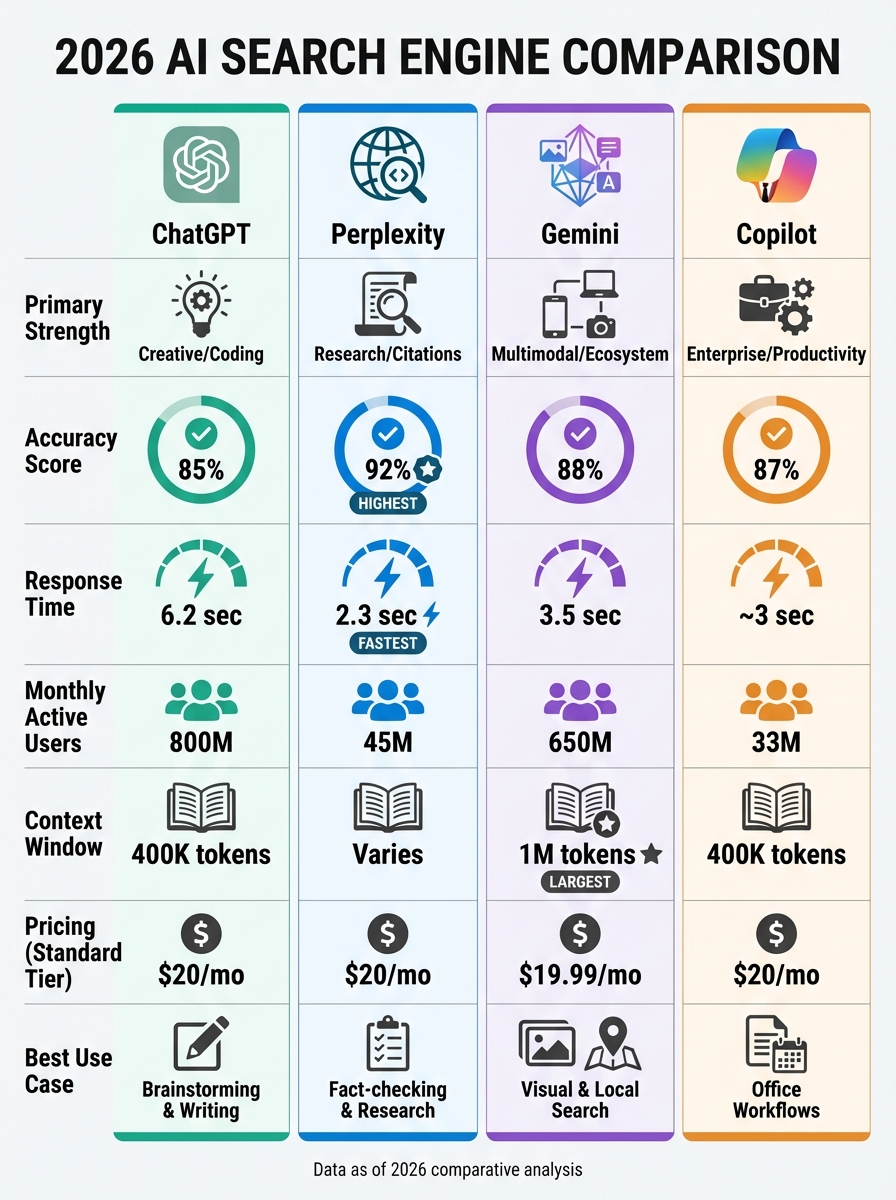
The table below offers a clear side-by-side comparison of ChatGPT, Perplexity, Gemini, and Copilot, focusing on their features, performance, and pricing. Each tool brings its own strengths to the table, making it easier to identify which one suits your needs best.
Perplexity stands out with an impressive accuracy score of 92%, while ChatGPT takes the lead in popularity, boasting 800 million monthly active users. Response speeds vary across tools, with Perplexity responding in just 2.3 seconds, Gemini at 3.5 seconds, ChatGPT at 6.2 seconds, and Copilot clocking in at about 3 seconds.
| Feature | ChatGPT | Perplexity | Gemini | Copilot |
|---|---|---|---|---|
| Primary Strength | Creative/Coding | Research/Citations | Multimodal/Ecosystem | Enterprise/Productivity |
| Accuracy Score | 85% | 92% | 88% | 87% |
| Avg. Response Time | 6.2 seconds | 2.3 seconds | 3.5 seconds | ~3 seconds |
| Citations | Sometimes | Always (Footnotes) | Yes (Overviews) | Yes |
| Context Window | 400K tokens | Varies by model | 1M tokens | 400K tokens |
| Monthly Active Users | 800 Million | 45 Million | 650 Million | 33 Million |
| Free Tier | $0 (GPT-5 mini) | $0 (5 Pro searches/day) | $0 (Gemini 2.5 Flash) | $0 (Basic chat) |
| Standard Tier | $20/mo (Plus) | $20/mo ($16.67 annual) | $19.99/mo (AI Pro) | $20/mo (Pro) |
| Premium Tier | $200/mo (Pro) | $200/mo (Max) | $249.99/mo (AI Ultra) | $30/mo (+ base Microsoft 365 fee) |
| Best Use Case | Brainstorming/Writing | Fact-checking/Research | Visual/Local search | Office workflows |
When considering these tools, pricing and bundled features play a big role. Most standard plans hover around $20/month. However, Google offers extra value by bundling 2 TB of cloud storage with Gemini AI Pro, effectively reducing its cost to $10/month for Google One subscribers. On the other hand, Microsoft's Copilot requires a Microsoft 365 subscription, bringing the total cost to about $42.50 per user per month.
These tools are part of the growing "Answer Economy", where AI synthesizes responses instead of presenting a list of links. This approach has been shown to boost conversion rates from 2.8% to approximately 14.2%.
Performance Benchmarks
When comparing four AI search engines side-by-side, Perplexity stood out as the most accurate, achieving a 92% accuracy rate across 50 varied queries. It was followed by Gemini at 88%, Copilot at 87%, and ChatGPT at 85%. This strong performance by Perplexity can be attributed to its emphasis on citing reliable sources for every claim.
"Perplexity was the most accurate, which aligns with its emphasis on source citations. When the answer is grounded in cited sources, there's less room for hallucination."
- Marcus Webb, AI Tools Researcher
Response speed is another area where these tools differ. For general queries, Perplexity averages a response time of about 2.3 seconds, significantly faster than ChatGPT's 6.2 seconds. However, for more complex questions requiring detailed reasoning, ChatGPT responds in 2–4 seconds, while Perplexity takes slightly longer at 3–5 seconds due to its method of breaking down queries into smaller steps. These differences highlight how each tool approaches both speed and complexity.
When it comes to breaking news, Gemini shines. It correctly answered 9 out of 10 queries about recent events, whereas ChatGPT struggled, returning outdated or incomplete information in 3 out of 10 cases. This makes Gemini particularly valuable for users who need real-time updates.
Hallucination rates also vary significantly. ChatGPT has a hallucination rate of around 6.2%, with fabricated details appearing in about 2.38% of cited URLs. Perplexity, thanks to its inline citations, reduces this risk substantially. Meanwhile, Gemini and Copilot show moderate levels of hallucination. For programming tasks, ChatGPT leads by correctly solving 8 out of 10 complex coding challenges, ranking among the best AI tools for developers, outperforming Gemini, which managed 6 out of 10.
User engagement metrics reveal additional insights into user satisfaction. In Google's AI Mode, 75% of sessions end without users clicking on an external link, indicating that users are generally satisfied with the synthesized responses. When users do click external links, they spend 8% more time on those sites and view 12% more pages compared to traditional search referrals. Furthermore, the average session in AI Mode lasts 49 seconds, more than double the 21 seconds typical for traditional search summaries.
"Google's indexing advantage shows up here. Gemini had access to stories that were only hours old, while other tools sometimes returned information from the previous day."
- Marcus Webb, AI Tools Researcher
These benchmarks provide a clear picture of how each AI search engine excels in different areas, helping users choose the best tool for their specific needs. Whether it's accuracy, speed, or real-time updates, these performance metrics are key to understanding each platform's strengths.
Use Case Recommendations
Based on the earlier feature and performance breakdowns, here are some tailored suggestions for students, professionals, and creatives to get the most out of these tools.
For students and researchers, Perplexity offers a simple interface with inline citations, making it perfect for assignments that require precise references. Its "Focus" mode is particularly helpful for narrowing searches to academic papers or avoiding low-quality SEO-driven content, which is ideal for fact-heavy projects. For broader research needs, ChatGPT stands out by adapting its responses to your background - like specifying "I am a biology student" - to provide more relevant insights. Meanwhile, Microsoft Copilot shines in tasks that demand rigorous verification, thanks to its sentence-level citations.
Business professionals can select tools based on their workflow requirements. For market research and fact-checking, Perplexity's impressive 92% accuracy rate makes it a reliable choice. If you're deeply integrated into the Microsoft 365 ecosystem, Copilot allows seamless access to private company documents, emails, and Teams conversations without needing to leave the app. Google Gemini, on the other hand, is ideal for accessing up-to-date business data or local insights, leveraging its connection to Google's vast index and Maps.
Creative professionals often prioritize tools that support brainstorming and innovation. ChatGPT excels here, acting as a "Creative OS" by maintaining a conversational flow for generating ideas and drafting content. Gemini is a go-to for designers, offering multimodal features like image uploads to analyze visual references or identify products. Perplexity, with its emphasis on verifiable citations, acts as a "Truth Engine", grounding trend analysis and strategic creative work in reliable data.
"The shift to AI search isn't just about technology; it's about trust. In an era of infinite AI-generated content, the only thing that stands out is verified human experience. Your brand needs to be the answer, not just a link."
- Ben Salomon, E-commerce Expert
Conclusion
By 2026, AI search tools have carved out specialized roles, with no single platform dominating the landscape. Perplexity shines in factual accuracy, boasting a 92% score and transparent inline citations, making it a go-to choice for research and fact-checking tasks. ChatGPT Search, on the other hand, stands out for its versatility, excelling in conversational depth and creative brainstorming, though it takes about 6.2 seconds to generate responses. For users deeply integrated into Google Workspace, Gemini offers seamless compatibility with Gmail, Drive, and Maps, plus a massive context window of up to 2 million tokens. Meanwhile, Microsoft Copilot caters to enterprise users, providing robust integration with Word, Excel, and Teams for productivity-centric workflows.
Given these distinctions, a complementary approach often works best. For example, you might use Perplexity to verify facts and sources, ChatGPT to develop creative ideas or expand on content, and Gemini or Copilot based on your existing tools and workflows. Each platform thrives in its specific domain, making the best choice highly dependent on your particular needs.
"The real winner is using 2-3 of these tools depending on the query." - Marcus Webb, AI Tools Digest
With traditional search volume expected to drop by 25% in 2026, understanding what each tool does best becomes increasingly important. Speed is another factor to consider - Perplexity averages just 2.3 seconds per response, while ChatGPT takes closer to 6.2 seconds. Your decision will likely hinge on whether you prioritize speed, accuracy, creativity, or enterprise integration.
Most premium plans hover around $20 per month, offering an affordable way to access these advanced tools. The key is to align the tool with the task at hand using an AI tools selection checklist for maximum efficiency.
FAQs
Which AI search engine is best for my specific work?
The best AI search engine in 2026 will depend on what you're looking for. Perplexity stands out for research-focused tasks, providing quick, web-based answers complete with citations. If you're after a conversational experience or need help brainstorming, ChatGPT Search shines with its ability to handle natural, follow-up interactions. For those deeply tied to Google services, Google Gemini is a great choice, seamlessly integrating AI-summarized answers right into your search results. Your decision should align with your specific workflow and priorities.
How can I verify AI answers and avoid hallucinations?
To ensure AI responses are accurate and avoid errors, several strategies can be employed. One effective method is using automated reasoning checks to match answers against established domain knowledge. Another is grounding AI outputs in verified and high-quality data, often by directly quoting reliable sources to maintain accuracy.
Human oversight plays a key role as well. Regular testing, combined with tools like hallucination detectors, adds another layer of validation, helping to ensure the responses are both accurate and well-supported. These combined approaches work together to minimize inaccuracies and improve reliability.
Do I need a paid plan, or is the free tier enough?
In 2026, deciding between a free tier or a paid plan boils down to what you need. Most free tiers include essential features such as real-time data access and source citations. However, paid plans, which usually cost around $15–$20 per month, often come with perks like quicker response times, priority access, and more advanced tools. If you're using the service casually, the free tier is likely enough. But for professionals seeking extra capabilities, a paid plan might be the better choice.