Digital Transformation
The Rise of the Agent: Moving from AI Chatbots to Autonomous "Copilot" Workflows.
AI is moving beyond chatbots to autonomous copilots that execute multi-step workflows, integrate tools, and self-correct.

The Rise of the Agent: Moving from AI Chatbots to Autonomous "Copilot" Workflows.
AI has moved beyond simple chatbots. Today, it powers autonomous workflows that manage tasks, make decisions, and self-correct, transforming how businesses operate. Here's the key evolution:
- Chatbots: Basic, reactive, single-turn Q&A tools.
- Copilots: Context-aware assistants that suggest actions but wait for human approval.
- Autonomous Agents: Fully independent systems executing multi-step workflows across tools.
This shift is already delivering results. Klarna's AI assistant saved $60M annually by resolving customer queries in under 2 minutes. H&M's virtual shopping assistant boosted sales by 25%. These tools handle repetitive tasks, freeing humans to focus on strategy.
Key technologies driving this transformation include:
- Agentic Primitives: Structured frameworks for predictable, scalable AI behavior.
- Workflow Integration: Standardized protocols like MCP enable seamless tool interaction.
- Self-Correction Loops: Systems that adjust errors autonomously.
Adopting these workflows starts with mapping a high-volume task, testing with small teams, and refining instructions for clarity. Businesses like Microsoft and GitHub are already integrating agents into daily operations, saving time and costs.
The takeaway: Autonomous AI isn't just about answering questions - it’s about completing the work itself.
From LLMs to Autonomous Agents: The Future of AI Workflows with Tools and MCP
sbb-itb-212c9ea
Chatbots vs. Autonomous Copilots: What's the Difference?
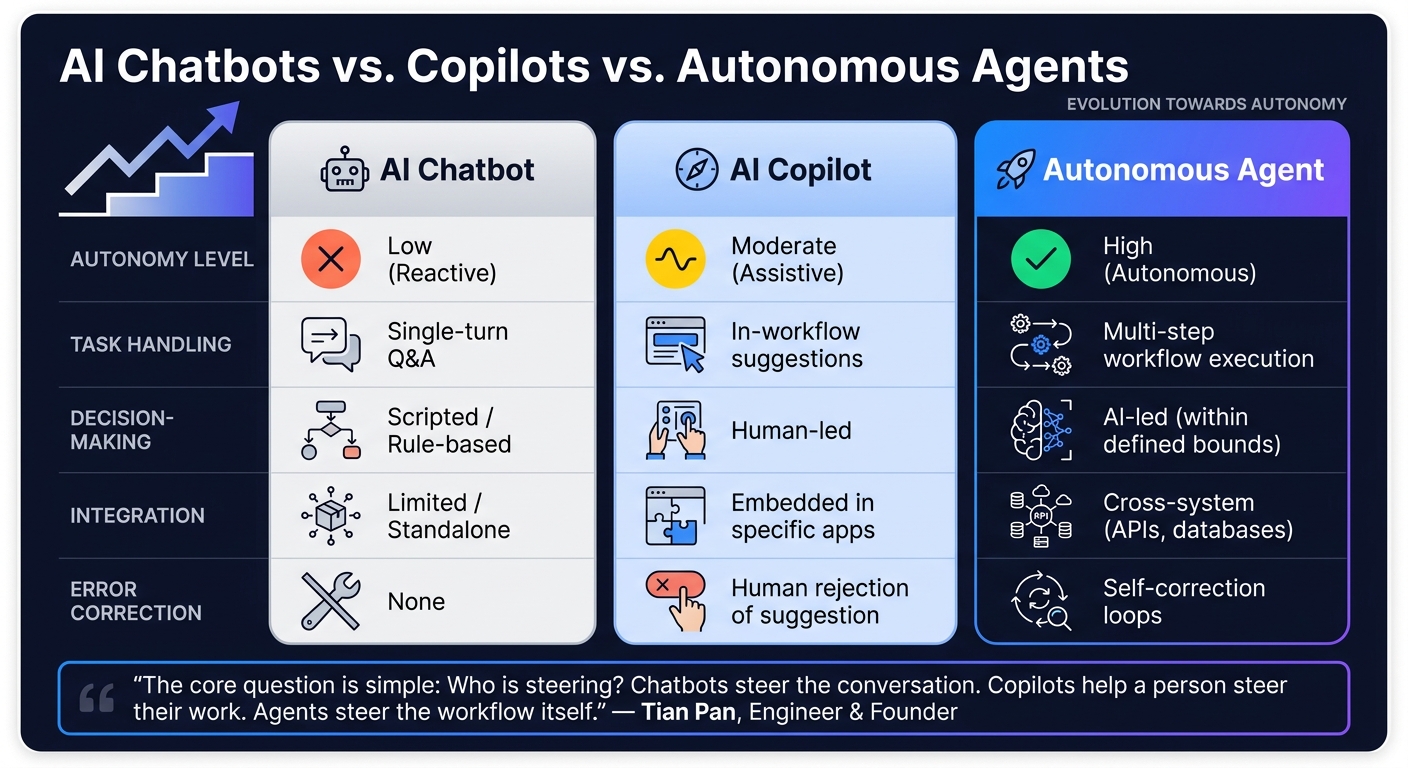
AI Chatbots vs. Copilots vs. Autonomous Agents: Key Differences
Building on the evolution outlined earlier, let's dive into how these AI tools differ and why their levels of autonomy matter. While terms like "chatbot", "copilot", and "autonomous agent" are often used interchangeably, they represent distinct tools with unique capabilities. Understanding these differences helps clarify which tool suits specific needs and what to expect from each.
Core Differences Between Chatbots and Copilots
The key distinction lies in who - or what - is in control. Tian Pan, an engineer and founder, explains it well:
"The core question is simple: Who is steering? Chatbots steer the conversation. Copilots help a person steer their work. Agents steer the workflow itself."
Here's how these tools stack up:
- Chatbots are straightforward and reactive. They respond to individual queries without retaining context or interacting with systems beyond their chat interface.
- Traditional copilots take things further, working within existing tools, understanding context, and offering suggestions. However, they still rely on human approval for every action.
- Autonomous copilots (or agents) operate on a different level. They can take a goal, break it into actionable steps, perform tasks across various systems, and even fix errors - all without constant supervision.
| Feature | AI Chatbot | AI Copilot | Autonomous Agent/Copilot |
|---|---|---|---|
| Autonomy Level | Low (Reactive) | Moderate (Assistive) | High (Autonomous) |
| Task Handling | Single-turn Q&A | In-workflow suggestions | Execution of multi-step workflows |
| Decision-Making | Scripted/Rule-based | Human-led | AI-led (within defined bounds) |
| Integration | Limited/Standalone | Embedded in specific apps | Cross-system (APIs, databases) |
| Error Correction | None | Human rejection of suggestion | Self-correction loops |
These differences highlight the growing capabilities of autonomous systems and their potential to transform workflows.
Why Autonomous Copilots Offer More Value
The shift from reactive chatbots to fully autonomous agents represents a leap in efficiency. For example, when H&M introduced a virtual shopping assistant in August 2025, it managed 70% of inquiries, boosted sales by 25%, and tripled issue resolution speed. Achieving such results would be impossible with a chatbot requiring human review for each response.
Jan Bosch from Software Driven World explains the impact of this evolution:
"The difference isn't merely one of capability; it's a difference in the unit of work. Whereas a copilot operates at the level of the individual interaction, an agent operates at the level of the workflow." – Jan Bosch, Software Driven World
Traditional copilots focus on assisting with individual tasks, speeding up workflows by offering recommendations. In contrast, autonomous copilots take over the entire process, from execution to error correction, within the boundaries you define. This shift is particularly effective in high-volume, repetitive tasks where constant human oversight creates bottlenecks. By automating these processes, humans can focus on higher-level responsibilities, such as setting goals, configuring workflows, and reviewing results - a role often described as the "agent boss" model.
However, more autonomy isn't always the right answer. For routine, low-risk tasks - like sending follow-up emails or updating CRM records - autonomous agents excel. But in high-stakes scenarios, such as legal filings or pricing major deals, a supervised copilot strikes a better balance.
The Technologies That Power Autonomous Copilot Workflows
To understand why autonomous copilots are so effective, it's essential to look at the technology behind them. These systems are built on a completely different framework compared to traditional chatbots.
Agentic Primitives and Skills-Based Architectures
Agentic primitives act as the building blocks for AI workflows. Instead of creating a new prompt every time, developers rely on structured files - like .instructions.md, .prompt.md, and .memory.md - to define how an agent behaves, remembers, and operates. This method transforms one-off experiments into repeatable, scalable processes.
These primitives are structured into three distinct layers:
| Layer | Role | What It Does |
|---|---|---|
| Agent | The Executive | Manages the global goal, tone, and overall workflow state |
| Prompt | The Specialist | Handles specific phases of work, like research or drafting |
| Skill | The Worker | Executes single, focused tasks, such as making an API call or performing file I/O |
"Building with AI isn't just about better prompting; it's about System Design." - Robin Tegg, Technical Blogger
This layered approach offers flexibility. For instance, if a tool needs to be replaced, developers only need to update the Skill layer, leaving the Agent and Prompt layers untouched. Systems designed this way can tackle up to 85% of Level 1 customer support tickets without human assistance, often resolving them in under 90 seconds.
Next, let’s look at how these components integrate seamlessly with existing systems.
Workflow Integration and Reusable Components
For an autonomous copilot to work with your existing tools, there needs to be a standard way for the agent to communicate with them. Enter the Model Context Protocol (MCP). Think of MCP as the AI equivalent of a USB-C port - it standardizes connections, allowing the agent to interact with APIs, databases, and file systems without requiring custom code for each integration.
This standardization simplifies development. Instead of creating unique integrations for every platform, developers can reuse Skills across multiple projects. According to Gartner, by the end of 2026, 40% of enterprise applications will include AI agents, a significant jump from less than 5% in 2025.
Moreover, production-grade workflows go beyond simple, step-by-step processes. They utilize Directed Acyclic Graphs (DAGs), which allow tasks to run simultaneously and handle errors at specific points without disrupting the entire workflow.
Instruction Design: Tone, Structure, and Actions
With solid building blocks and smooth integration, precise instruction design becomes the key to ensuring a copilot’s reliability. In fact, instruction design often matters more than the choice of model itself.
"The model only reasons about what is in its context window... what you put in the context window is the primary lever for agent quality, not the model itself." - CASYS Blog
Effective instructions rely on Markdown formatting - using headers, bullet points, and clear sections - to guide the AI’s reasoning in a predictable way. They also establish clear boundaries by specifying what the agent can and cannot do, as well as when it must pause for human approval. These validation gates are crucial for high-risk tasks like handling financial transactions or deploying code.
A great example comes from Danfoss, an industrial engineering firm. In early 2026, they automated 80% of their purchase order processing using AI agents with carefully designed instructions. This shift saved the company $15 million annually. Structured, precise instructions are what separate a dependable copilot from an unpredictable one.
Copilot Workflows in Action: Use Cases and Examples
Autonomous copilots are making a clear impact, transforming the way tasks are handled and boosting productivity across industries. By building on agent-driven technologies, these real-world examples showcase how businesses are moving beyond basic chatbots and adopting workflows that improve both efficiency and decision-making.
AI Apps Copilot Directory
Finding the right copilot tool in a crowded market can feel overwhelming. That’s where AI Apps steps in. With a directory featuring over 1,900 AI tools, neatly categorized by function and use case, it’s easier than ever to zero in on what you need - whether it’s a coding assistant, a customer support agent, or an enterprise automation solution. Each tool undergoes a rigorous multi-step verification process, ensuring you’re not wasting time sifting through subpar options. For teams exploring copilot solutions, this directory offers a solid place to start before committing to a specific platform. It’s a practical gateway to seeing autonomous copilots in action.
Coding and Development: GitHub Copilot
GitHub Copilot has grown from a simple autocomplete tool into a full-fledged workflow assistant. Its coding agent can autonomously address backlog tasks like fixing bugs, refactoring code, and running tests, delivering pull requests ready for human review. Impressively, this tool contributes to around 1.2 million pull requests per month, while GitHub Actions handles over 40 million daily jobs.
At Carvana, Senior VP of Engineering Alex Devkar noted how the agent "converts specifications to production code in minutes". Similarly, James Zabinski, DevEx Lead at EY, described it as giving developers "their own agent-driven team, all working in parallel to amplify their work".
One example that stands out is the GitHub Billing Team. In June 2025, software engineer Brittany Ellich used the coding agent to tackle technical debt, such as updating mocking libraries and standardizing error logging patterns. What used to take weeks was reduced to just hours of reviewing agent-generated pull requests. Ellich summed it up perfectly:
"The ability for us to tackle tech debt continuously while delivering features has grown exponentially... reducing the time it takes from weeks to a few minutes of writing an issue." - Brittany Ellich, Software Engineer, GitHub
While GitHub Copilot is reshaping development workflows, enterprise applications are achieving similar results on an even broader scale.
Enterprise Workflows: Microsoft Copilot Applications

On the enterprise side, Microsoft Copilot is empowering teams to automate intricate, multi-step processes without needing to code. The "Wave 3" update marked a shift toward embedded agent-driven workflows that operate over extended periods, rather than just offering single-response assistance.
Two organizations illustrate this evolution. Aker BP, a Norwegian oil and gas company, used Microsoft Copilot Studio to create "Knowledge Agents" that handle complex queries and streamline documentation searches. The result? A 96% active user rate among employees, demonstrating real adoption beyond a trial phase. Paula Doyle, the company’s Chief Digital Officer, emphasized their commitment to AI:
"If a team wants a new headcount, they now have to prove that a reallocation of tasks can't be handled by AI agents instead." - Paula Doyle, Chief Digital Officer, Aker BP
Another example comes from Teladoc Health, where Copilot was integrated into Power Automate to eliminate repetitive tasks. According to Heather Underhill, SVP of Client Experience, this saved employees five hours per week and allowed new hires to execute workflows 20% faster from their first day. These examples highlight how embedding copilot workflows into familiar tools can dramatically improve daily operations.
How to Start Using Copilot Workflows
Success in deploying copilot workflows depends heavily on having the right architecture, governance, and processes in place. As Vikas Agarwal, Founder of GrowExx, explains:
"The gap is not a model gap. It is an architecture, governance, and workflow gap."
Step-by-Step Guide to Building Reusable Skills
Copilot workflows are built on a three-layer system: Agent, Prompts, and Skills. This structure ensures workflows are reusable and deliver consistent results across teams.
A 30-day launch plan is a great way to get started:
- Week 1: Identify a repetitive, high-frequency workflow and map out each step.
- Week 2: Create a prototype using real data to verify that a large language model can complete the tasks, perhaps by using code intelligence to identify bugs early.
- Week 3: Test the workflow with five users to gather feedback.
- Week 4: Document all data sources, tool integrations, and safeguards before handing the project to engineering.
Christian Vismara of DK Studio highlights the importance of this process:
"The single biggest predictor of whether an agent project succeeds is scope clarity."
Once the architecture is in place, the focus shifts to improving the clarity of prompts to ensure consistent and reliable outputs.
Prompt Engineering for Better Results
Clear and well-structured prompts are key to achieving better results. Using Markdown headers and bullet points helps organize the AI’s reasoning more effectively than plain text. Start prompts with a role indicator, such as "You are an expert contract reviewer", to encourage domain-specific and focused responses.
Equally important is incorporating validation gates. These checkpoints pause the workflow for human approval before irreversible actions are taken, ensuring that critical decisions remain under human oversight.
Once the prompts are refined and reliable, the next step is to integrate these workflows into production environments.
Deployment Patterns for Reliable AI Processes
When moving from experimentation to production, two deployment patterns are particularly useful:
- Inner Loop: Used in environments like VS Code, this pattern allows developers to refine prompts and test outputs interactively in real time.
- Outer Loop: Moves validated workflows into CLI runtimes or CI/CD pipelines, enabling automated and repeatable execution on a larger scale.
For production deployments, governance is critical. This includes clearly defined permission scopes, strict approval workflows, and immutable audit trails. These measures ensure workflows are reliable and trustworthy. Without strong governance, many enterprise AI pilots fail to deliver measurable results. In fact, 95% of such pilots have shown no P&L impact due to gaps in architecture and governance. Addressing these elements from the start is key to creating a dependable and scalable tool.
Where Agentic AI Is Headed: Trends and Predictions
The future of agentic AI isn't just about refining models; it's about creating dependable, coordinated systems that businesses can trust in real-world applications. As Allen Warner from Nylas explains:
"Agentic AI is not being defined by theory. It is being defined by what teams can trust in production."
Building on the groundwork laid by autonomous copilot workflows, the next phase focuses on making these systems more reliable and scalable. These advancements aim to take the copilot architectures we've seen so far and turn them into practical tools that can handle production-level demands.
Enhancing Reliability and Task Management
One of the key shifts happening now is the transition from linear task chains to Directed Acyclic Graphs (DAGs). Unlike linear setups, DAG-based systems allow agents to handle multiple sub-tasks simultaneously. If one sub-task fails, the system can recover without disrupting the entire workflow. This makes AI deployments much more stable and dependable.
Another major improvement is the use of self-correction loops. In these setups, evaluator agents assess outputs against predefined goals, while persistent memory ensures that session context is retained. Together, these features make it possible for agents to tackle more complex, long-lasting workflows with greater precision.
The MCP (Multi-Channel Processing) interface is now a standard for integrating tools dynamically. According to Gartner, enterprise adoption of AI agents is on the rise, with predictions that 40% of enterprise applications will embed AI agents by the end of 2026 - up from less than 5% in 2025.
Scaling Copilot Workflows for Businesses
Improving reliability is just one piece of the puzzle. Scaling these workflows presents both technical and organizational hurdles. Despite enthusiasm, the gap between planning and execution is evident. By early 2026, only 11% of organizations are expected to have agentic AI systems running in production, although 64% of product roadmaps already include agentic AI as a priority. This discrepancy often comes down to challenges in infrastructure, governance, and selecting the right tools.
For businesses looking to adopt agentic AI, the strategy involves moving toward specialized agent ensembles. Instead of relying on a single, general-purpose model, these ensembles assign specific roles to individual agents. This mirrors how human teams operate, making workflows easier to manage, audit, and debug. Jared Spataro, Microsoft's Chief Marketing Officer for AI at Work, highlights the importance of this approach:
"Intelligence ensures AI is contextual, relevant, and grounded. Trust ensures AI can scale safely, securely, and responsibly."
The market for agentic AI is set to expand rapidly, growing from $3.35 billion in 2025 to $21.11 billion by 2030, with a compound annual growth rate of 44.5%. This growth will be fueled not just by large enterprises but also by startups and mid-sized businesses. These smaller teams often begin with one highly valuable workflow, prove its reliability, and then scale up from there.
Conclusion: Making the Move to Copilot Workflows
The transition from chatbots to autonomous copilot workflows is more than just adopting new technology - it's a game-changer for how work gets done. As MCooper puts it:
"The move from chatbots to agents is not incremental. It represents a fundamental change in what AI can do inside an organization - from answering questions to executing work." - MCooper
Take Klarna, for instance. Their assistant significantly accelerated resolutions while saving millions of dollars annually. Similarly, Unifi slashed legal contract processing time from days to mere minutes. These examples highlight how autonomous workflows can transform efficiency and productivity.
The approach to adopting these workflows is simple: start small, demonstrate value, and scale from there. Begin with a high-volume, low-risk process, and prioritize observability so every agent decision is transparent. This builds trust and confidence in the system over time.
By focusing on proven results and scaling strategically, organizations can quickly see measurable benefits. Choosing the right tool for each workflow is equally critical. Platforms like AI Apps simplify this process with a directory of over 1,900 AI tools. Whether your focus is development, operations, legal, or customer service, the directory's advanced filtering options make it easy to find the perfect solution for your needs.
Successful teams don’t wait for ideal conditions. They pick a workflow, deploy a supervised agent, monitor the outcomes, and refine the process. This practical approach is accessible to teams of all sizes today.
FAQs
When should I use a copilot vs an autonomous agent?
When you need help with tasks, insights, or decision-making but still want to stay in control, a copilot is your go-to choice. Copilots are designed to boost productivity and help you work more efficiently without taking over completely.
On the other hand, autonomous agents are built for independent operation. These agents can plan, make decisions, and carry out multi-step tasks across different applications with little to no human involvement. They're perfect for handling complex workflows, such as resolving customer support tickets or reconciling large sets of data.
How do autonomous agents connect to my existing tools safely?
Autonomous agents ensure secure connections through the use of governance frameworks, control mechanisms, and continuous monitoring. IT teams play a critical role by leveraging tools like objective signals to validate agent behavior and track usage patterns. Built on enterprise-grade infrastructure, these systems prioritize security, block unauthorized actions, and align with organizational policies. This setup allows for the safe and smooth integration of autonomous agents into your workflows.
What’s the fastest way to pilot an agent workflow in my team?
The quickest way to get an agent workflow up and running is by using guided tools that require little to no coding. These tools are built for ease of use and fast implementation. Begin by clearly identifying the workflow's purpose, then set up the agent to track relevant data, make decisions, and carry out tasks across various systems. Prebuilt templates and integrated features simplify the process, helping you launch autonomous agents efficiently without spending too much time on manual configurations.