Creative Tools
The New Sound of Music: How Suno AI is Turning Non-Musicians into Chart-Toppers.
Create pro-quality songs in under 60 seconds with AI—text or audio prompts, stem exports, and DAW-ready files.
The New Sound of Music: How Suno AI is Turning Non-Musicians into Chart-Toppers.
Making music is no longer limited to trained musicians. With Suno AI, anyone can create professional-quality songs in under 60 seconds, regardless of their musical background. This AI-powered platform handles everything - from lyrics and vocals to instrumentation and mastering - based on simple text descriptions or audio uploads. Here's what you need to know:
- Massive Output: Suno generates 7 million songs daily, equivalent to Spotify's entire catalog every two weeks.
- Accessibility: No instruments or music theory knowledge required; just describe your idea, and Suno does the rest.
- Professional-Grade Tools: Features like customizable song structures, audio uploads, and a built-in AI-native studio allow deeper control for users.
- Affordable Plans: Start free with 10 songs per day or upgrade for advanced tools starting at $10/month.
From casual creators to industry pros like Timbaland, Suno AI is reshaping music production for everyone. Whether you're humming a melody or envisioning a full track, Suno makes it possible to bring your ideas to life effortlessly.
How to Use Suno: From Beginner to Pro Features Explained
While Suno excels at vocal tracks, tools like Loudly offer specialized controls for generating royalty-free background music across various genres.
sbb-itb-212c9ea
What is Suno AI and How Does it Work?
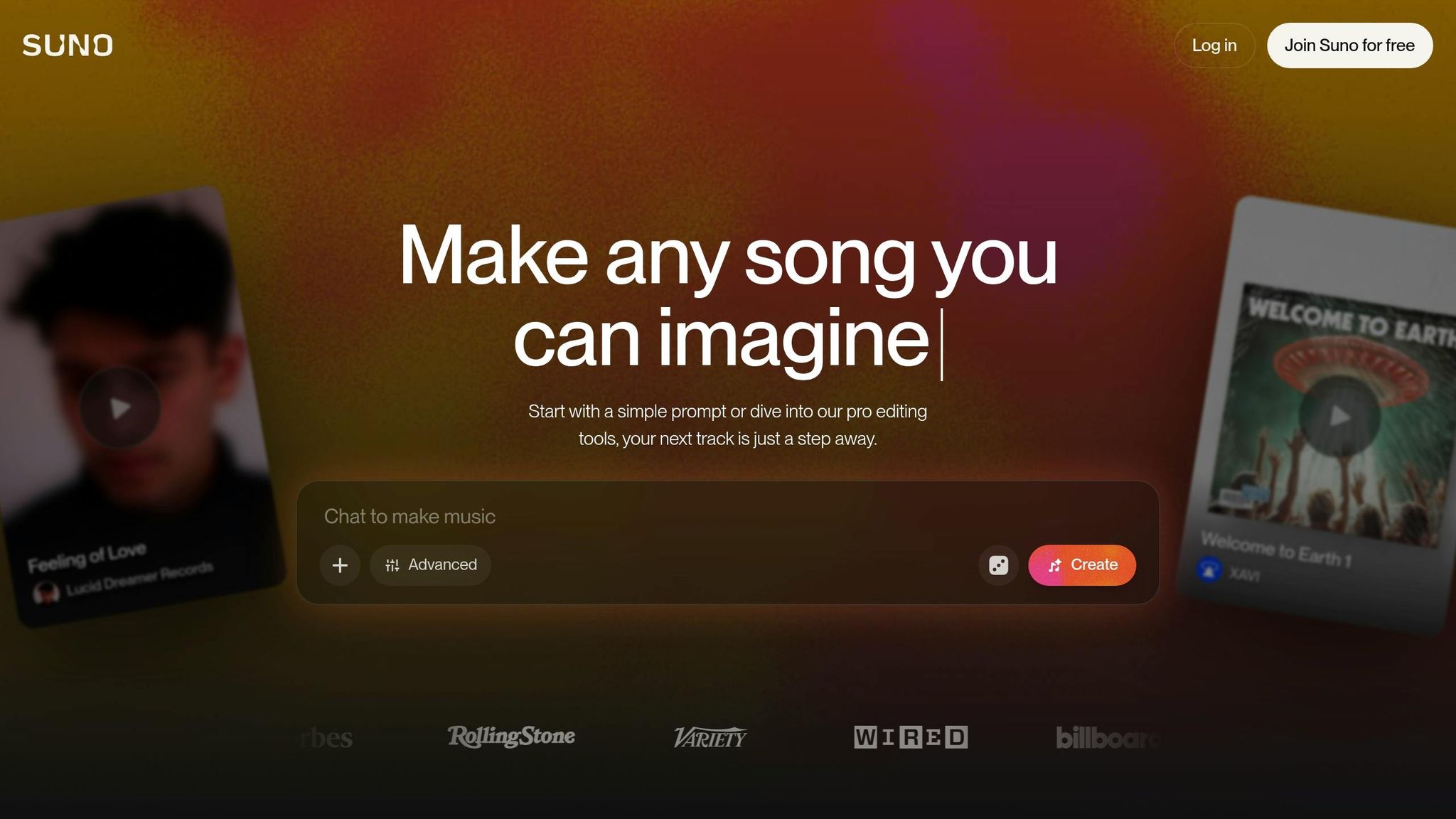
Suno AI is an AI-driven music creation platform that works seamlessly on web browsers and mobile devices (both iOS and Android). All you have to do is describe the type of song you want, and in just 60 seconds, it delivers a complete track - lyrics, vocals, instruments, mixing, and mastering included . You don’t need to know music theory, play an instrument, or have any experience with audio engineering to produce what the platform calls "mix-ready" tracks .
The system works by breaking music into tiny pieces called "tokens", analyzing 48,000 tokens per second. Using deep learning models, it processes patterns in music, lyric structures, and vocal styles to handle every part of production in one seamless step. This makes it easy for anyone, regardless of their musical background, to achieve professional-sounding results. In some cases, the platform even integrates ChatGPT to help generate lyrics and titles, while Suno’s proprietary model handles creating the audio.
Core Features of Suno AI
Suno AI offers two main ways to create music. Simple Mode allows you to describe your idea in plain English - like "upbeat pop song about summer" - and the AI takes care of everything. For those who want more control, Advanced Mode lets you customize specific elements. You can write your own lyrics, use tags like [Verse] and [Chorus] to define the song structure, set the tempo (BPM), and choose a musical key.
Beyond text-based prompts, you can also upload audio recordings. Whether it’s a hummed melody, a sung line, or a short instrumental loop, Suno can turn it into a fully produced song . The latest V4 model, introduced in late 2024, offers improved production quality, more realistic vocals, and a broader stereo sound compared to earlier versions. Users can even save AI-generated voices as "Personas" to ensure consistency across multiple tracks.
For those looking to dive deeper, Suno Studio serves as an AI-native digital audio workstation (DAW). It provides tools to edit tracks on a timeline, layer elements, and export MIDI files or individual stems for use in other professional software . This bridges the gap between quick AI-based creation and more detailed music production.
How Suno AI Converts Prompts into Songs
Suno AI takes your specific instructions and transforms them into fully realized tracks. The more detailed your prompt, the better the results.
You can shape the song’s structure using metatags in brackets - like [Intro], [Bridge], [Drum Solo], or even [silence] - to guide the AI on how to arrange the track. For example, instead of requesting a generic "happy song", you could specify "Contemporary R&B, 92 BPM, F minor, male soulful vocals, electric piano, and mellow drums", complete with structural tags for precision. If the initial result doesn’t quite fit your vision, you can generate multiple versions and refine them using features like "Extend" or "Remix" . Additionally, the "Continue From This Song" option allows you to build longer tracks by extending earlier sections seamlessly.
"Audio is not a discrete thing like words. It's a wave. It's a continuous signal." - Mikey Shulman, CEO of Suno
With the platform generating around 7 million songs daily, it’s clear that users find it intuitive and versatile enough to create music at scale.
Getting Started with Suno AI: Step-by-Step Guide
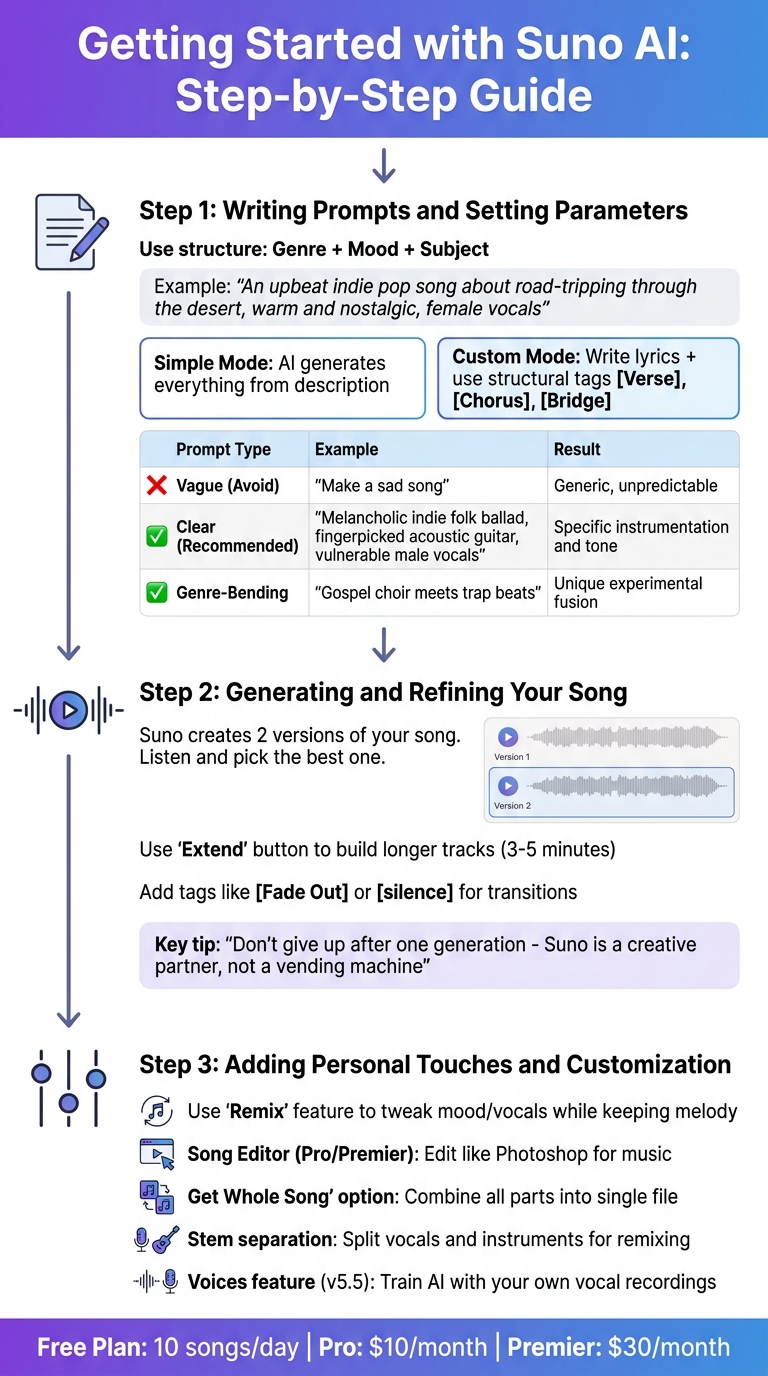
How to Create Your First Song with Suno AI in 3 Steps
Creating your first song on Suno AI is quick and straightforward. Head over to suno.com and sign up using your Google, Apple, Microsoft, or email account. The free plan gives you 10 songs per day - 5 prompts, each generating 2 variations - without needing a credit card. This is a great way to explore your creativity without spending a penny. Start by crafting a detailed prompt to shape your unique track.
Step 1: Writing Prompts and Setting Parameters
The magic of Suno lies in the details. A well-thought-out prompt can turn a plain track into something truly shareable. To get the best results, use a simple structure: Genre + Mood + Subject.
For example, instead of saying, "make a cool song", try something like "An upbeat indie pop song about road-tripping through the desert, warm and nostalgic, female vocals." Adding specifics like tempo, instrumentation, or AI-generated sound effects can refine the result further. For instance, "melancholy jazz ballad, piano-heavy, slow tempo" will produce a completely different vibe than a vague "sad song."
Suno offers two modes: Simple Mode and Custom Mode. Simple Mode generates music based on your description, while Custom Mode gives you more control by letting you write your own lyrics and use structural tags like [Verse], [Chorus], [Bridge], and [Outro].
| Prompt Type | Example | What You Get |
|---|---|---|
| Vague (Avoid) | "Make a sad song." | Generic, unpredictable output. |
| Clear (Recommended) | "Melancholic indie folk ballad, fingerpicked acoustic guitar, vulnerable male vocals." | Specific instrumentation and vocal tone. |
| Genre-Bending | "Gospel choir meets trap beats." | Unique, experimental fusion. |
Once your prompt is ready, you're set to generate your song. After your track is complete, you can even create lyric videos to share your music on social media.
Step 2: Generating and Refining Your Song
After hitting the generate button, Suno creates two versions of your song. Listen to both and pick the one that resonates with your vision. As AI Bytes wisely puts it:
"The single biggest mistake beginners make is giving up after one generation. Suno is a creative partner, not a vending machine."
If neither version feels quite right, tweak your prompt and try again. You can also use the "Extend" button to build on a specific timestamp, turning shorter tracks into full-length songs (around 3–5 minutes). If needed, tags like [Fade Out] or [silence] can help signal an ending or smooth transitions.
Experiment with descriptors like "clear enunciation" or "heavy reverb" to fine-tune the sound. Each adjustment brings you closer to capturing the essence of your vision.
Step 3: Adding Personal Touches and Customization
Once you've refined your song, it's time to make it your own. Suno's "Remix" feature lets you tweak the mood or vocals while keeping the melody intact. If you're using the Pro or Premier plan ($10/month or $30/month), you can access the Song Editor, which works like Photoshop for music. This tool allows you to keep the parts you love and regenerate sections that need improvement.
To create a cohesive track from multiple segments, use the "Get Whole Song" option. This feature combines all parts into a single downloadable file. Pro users also have access to stem separation, which splits vocals and instruments into separate tracks, making it easier to remix in professional software like Ableton or Logic Pro.
The v5.5 update, launched on March 26, 2026, introduced "Voices", a feature that lets Pro users train the AI using their own vocal recordings. Paired with Custom Models that learn from uploaded songs, Suno can adapt to your personal style instead of relying on preset templates.
Advanced Tools for Professional-Grade Music
Suno offers advanced features that let you refine your music with precision, giving you control over every element of your tracks.
Song Editor for Pro Users
The Song Editor (Edit V3) addresses a common frustration in music creation: loving one part of your song but wanting to tweak another. With this tool, you can select specific sections - like the intro, verse, chorus, or bridge - and replace them with fresh style prompts or revised lyrics without regenerating the entire track. Moe Lueker, an AI educator, highlights its value:
"The Song Editor solves a real problem: you create a song, love the chorus, hate the intro, and previously had no option except regenerating the whole thing and hoping."
The Alternates feature takes this further by generating 2 to 4 variations of a single section, allowing you to test different options and seamlessly insert the best one into your arrangement. Meanwhile, Warp Markers, introduced in February 2026, let you make non-destructive timing adjustments to tweak rhythm or add swing without starting over.
Another standout feature is Suno's generative stem extraction, which recreates up to 12 individual stems - such as drums, bass, vocals, and synths - from scratch. Unlike traditional splitters, this method avoids unwanted audio artifacts. Additionally, the Remove FX tool strips reverb and ambient effects from individual stems, making it easier to mix professionally in external software.
Once your segments are polished, exporting to professional DAWs is effortless.
Integration with Professional DAWs
Suno integrates smoothly with leading software like Logic Pro, Ableton Live, FL Studio, and GarageBand. After refining your track in Suno Studio, you can use the Export option to download a zip file containing time-aligned WAV stems. These stems drop directly into your DAW session, perfectly aligned - no manual adjustments required.
The MIDI extraction feature is another game-changer, converting audio stems into MIDI data. This allows you to replace AI-generated sounds with higher-quality virtual instruments or hardware synths. For example, if the AI-generated guitar doesn’t meet your standards, you can export the MIDI and trigger your favorite VST instead. Producer Alex Holmes shares his perspective:
"Suno Studio is technically still in Beta... However, it's an intriguing glimpse of a future that makes AI tools much more flexible and usable without it feeling like you're giving up all creative control."
For even greater control, you can use the Remove FX feature to strip Suno's default reverb and delay from vocals before exporting. This hybrid workflow - using Suno for initial creation and refining in a traditional DAW - has become a preferred method for professionals seeking both speed and customization.
Suno Studio also offers an integrated, AI-focused environment for detailed editing.
Suno Studio: AI-Native Digital Audio Workstation
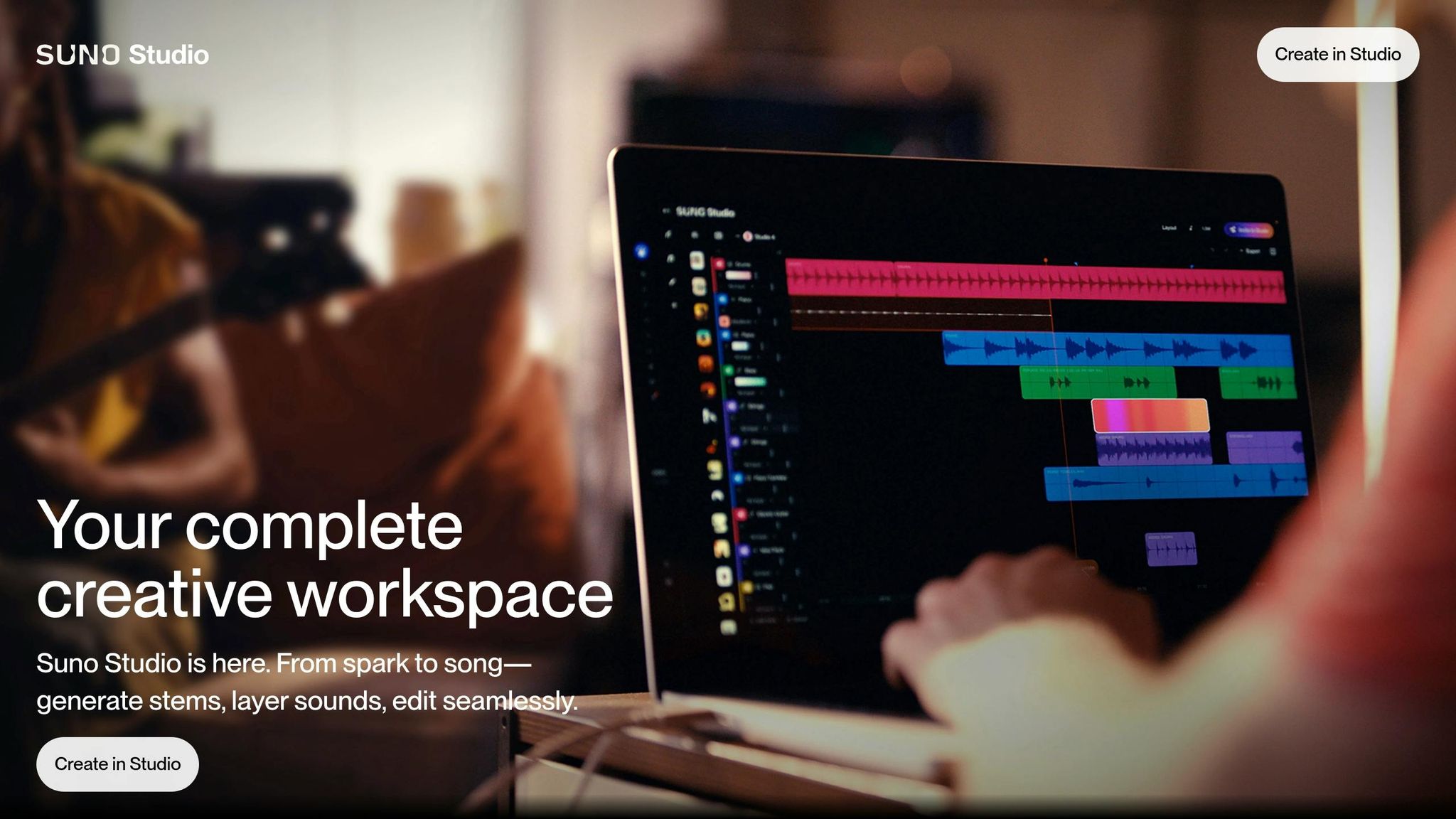
Suno Studio is a web-based Generative Audio Workstation (GAW) that combines traditional DAW features with AI-driven tools. Available through the Premier plan (priced between $18 and $30 per month), it handles roughly 80% of common editing tasks - like EQ adjustments, arrangement, and timing - directly in your browser. This makes professional-quality editing accessible, even for those without technical expertise.
The platform supports multi-track editing and features a dynamic Context Bar that displays relevant tools based on your timeline selection. You can layer instruments using natural language prompts, such as asking for an "energetic saxophone solo" in a specific section. The Take Lanes feature generates multiple variations of a single prompt, enabling you to combine the best parts into one polished track.
Suno Studio also includes a parametric EQ with six bands covering the full frequency spectrum, from 20 Hz to 20 kHz. It accommodates complex time signatures like 3/4, 6/8, 5/4, and 7/8. The Persona feature allows you to create a consistent vocal identity by uploading a reference vocal, ensuring uniformity across your album.
As of early 2026, around 7 million AI songs are created daily on Suno. Mikey Shulman, Suno's CEO and Founder, outlines the company's mission:
"We envision Suno as a core part of musical creativity, for everyone from novices to Grammy winners. Our new tools offer powerful ways to explore new sonic ideas, remix, and iterate."
The platform automatically saves project versions with time-stamped history, so you never lose progress. When you're ready to finalize your track, exporting Multitracks instead of a full song ensures precise mixing and mastering in external software.
Success Strategies for Non-Musicians Using Suno AI
Creating music without formal training doesn't have to feel intimidating. With Suno AI, the trick is to use the tool as a starting point for creativity, then add your own personal flair to make your tracks truly stand out.
Using Audio Uploads to Spark AI Compositions
For Pro and Premier users, Suno AI offers the ability to upload or record 6–60 second audio clips as the foundation for a full song. This feature allows you to turn everyday sounds into musical ideas - whether it's humming a quick melody, tapping out a beat on your desk or using AI-powered music generators, or capturing the ambient noise of a busy street.
Here’s how it works: record a clear 10-second clip of humming or tapping, then use the "Extend" option to build on it. Add a genre or style description to guide the AI's composition. Want to take it a step further? Suno’s Voices feature (introduced in v5.5 on March 26, 2026) lets you train a private vocal model. By uploading a clean recording of your voice, the AI can create new songs using your unique vocal tone.
When recording, aim for a quiet space and keep your microphone 6–8 inches away. To get professional results, it often takes 2–4 refinement cycles of tweaking prompts and extensions, so don’t settle for the first output. Once you’ve nailed the core, consider layering in live performances for a truly original sound.
Combining AI Tracks with Personal Performances
Blending AI-generated tracks with your own performances can create something truly special. With stem separation (available on Pro and Premier plans), you can isolate specific elements of an AI track and rework them in a traditional DAW alongside your own recordings.
Producer William H. Mason puts it best:
"The producers who stand out are the ones treating AI output as raw material, not finished product".
For example, you might use AI-generated drums and bass while recording your own vocals, or even combine 70% of your vocal with 30% of the AI’s to create a hybrid sound. When structuring your track in Custom Mode, use tags like [Verse], [Chorus], and [Instrumental Break] to clearly define where your live elements will fit.
Premier users can also export MIDI data from AI tracks. This allows you to bring the composition's structure and notes into software like Ableton or Logic Pro, where you can replace AI-generated sounds with high-quality virtual instruments.
Organizing Projects for Maximum Creativity
Beyond blending performances, staying organized is key to keeping your creativity flowing. Start by switching from Simple Mode to Custom Mode early on. This gives you more control over lyrics and song structure. Instead of stopping at your first draft, generate 12–20 variations with different prompts to find the strongest ideas to develop further.
Keep a library of effective prompts, BPMs, and keys for different genres. Each prompt should include 4 to 7 descriptors, such as genre, tempo, mood, instruments, and vocal style. For instance: "120 BPM, C Minor, gritty lo-fi". Treat your credits like studio time - this encourages thoughtful, intentional choices instead of endless random generations.
For quick ideas, use the mobile app to capture inspiration on the go, then switch to the desktop version for more detailed editing sessions. As Sakshi Dhingra explains:
"Suno stops feeling like 'AI that makes songs' and starts feeling like a production pipeline that just happens to accept text as input".
Conclusion
The music industry is undergoing a massive transformation. What once required years of practice, costly equipment, and exclusive studio access is now within reach for anyone with an internet connection. Suno AI, for example, has already amassed 2 million paid subscribers and generates millions of songs daily. This isn’t just an advancement in technology - it’s a shift toward effortless creativity.
As CEO Mikey Shulman puts it:
"We're trying to get a billion people much more engaged with music than they are now. We're not trying to replace artists."
The platform’s impact is undeniable. In 2025, AI-generated personas like Xania Monet climbed to the top of Billboard's Hot Gospel Songs chart. Independent creators, such as James 99, have licensed tracks to filmmakers for $900 - crafted in minutes without any formal training. Even legendary producer Timbaland has embraced the platform, showcasing its creative potential.
These examples highlight how accessible music creation has become. You can start exploring your own musical ideas with Suno’s free plan at suno.com. As your creativity expands, you can upgrade to Pro for $10/month or Premier for $30/month.
Step into the future of music - where every idea has the power to come alive.
FAQs
Can I legally release and monetize songs made with Suno AI?
With a Pro or Premier plan, you retain ownership of the songs you create using Suno AI and receive a license to monetize them. Make sure to check the specific terms of your subscription for detailed information on usage rights.
How do I make a Suno song sound consistent across an album?
To keep an album feeling unified, it's important to stick with a consistent style, mood, and instrumentation across all tracks. You can achieve this by using prompts that describe the mood, genre, and emotional tone in a similar way for each song. Additionally, Suno's editing tools can help fine-tune and align the tracks, ensuring they fit together seamlessly and deliver a cohesive listening experience.
What’s the best way to export stems or MIDI into my DAW?
Suno AI makes it simple to transfer your music projects into your DAW for further production. Use the multitrack export feature to save individual stems like vocals, drums, or bass. If you need a specific part, just right-click on the clip and choose "Download.WAV".
For additional flexibility, you can also export MIDI files for further tweaking or arranging. Once you've got your files, import them into your DAW of choice - whether it's Ableton, Logic Pro, or another - to pick up right where you left off.