Productivity
AI Agents for Small Business: 7 Automations You Can Set Up in 10 Minutes
Automate core small-business tasks with seven AI agents—set up chatbots, lead qualifiers, email nurture, social posting, scheduling, reporting and knowledge search in ~10 minutes each.

AI Agents for Small Business: 7 Automations You Can Set Up in 10 Minutes
Running a small business is tough - long hours, endless tasks, and limited resources. But AI agents can change that. These tools handle repetitive tasks like customer support, lead qualification, email follow-ups, scheduling, and more, saving you time and money. You don’t need technical skills to get started, and setup takes just 10 minutes for each automation.
Here are 7 AI automations you can implement today:
- Customer Support Chatbot: Handles 24/7 inquiries, reducing support tickets by 52% and saving 15–25 hours weekly.
- Lead Capture and Qualification: Boosts lead conversions by over 40% and filters out unqualified prospects automatically.
- Email Follow-Up and Nurture: Sends tailored emails based on user behavior, ensuring no lead slips through.
- Social Media Posting and Replies: Manages posts and engagement across platforms, cutting content creation time by 80%.
- Calendar Scheduling and Meeting Prep: Automates scheduling and generates meeting briefs, saving hours each week.
- Reporting and Metrics Summary: Creates real-time reports and summaries, saving 3–4 hours per week on data analysis.
- Internal Knowledge and Policy Search: Acts as a 24/7 help desk for employees, answering common questions instantly.
Each tool integrates effortlessly with platforms like Slack, HubSpot, Google Workspace, and more. Pricing starts as low as $8/month, making these solutions accessible for small businesses. By automating these tasks, you can reclaim up to 20 hours weekly and focus on growing your business.
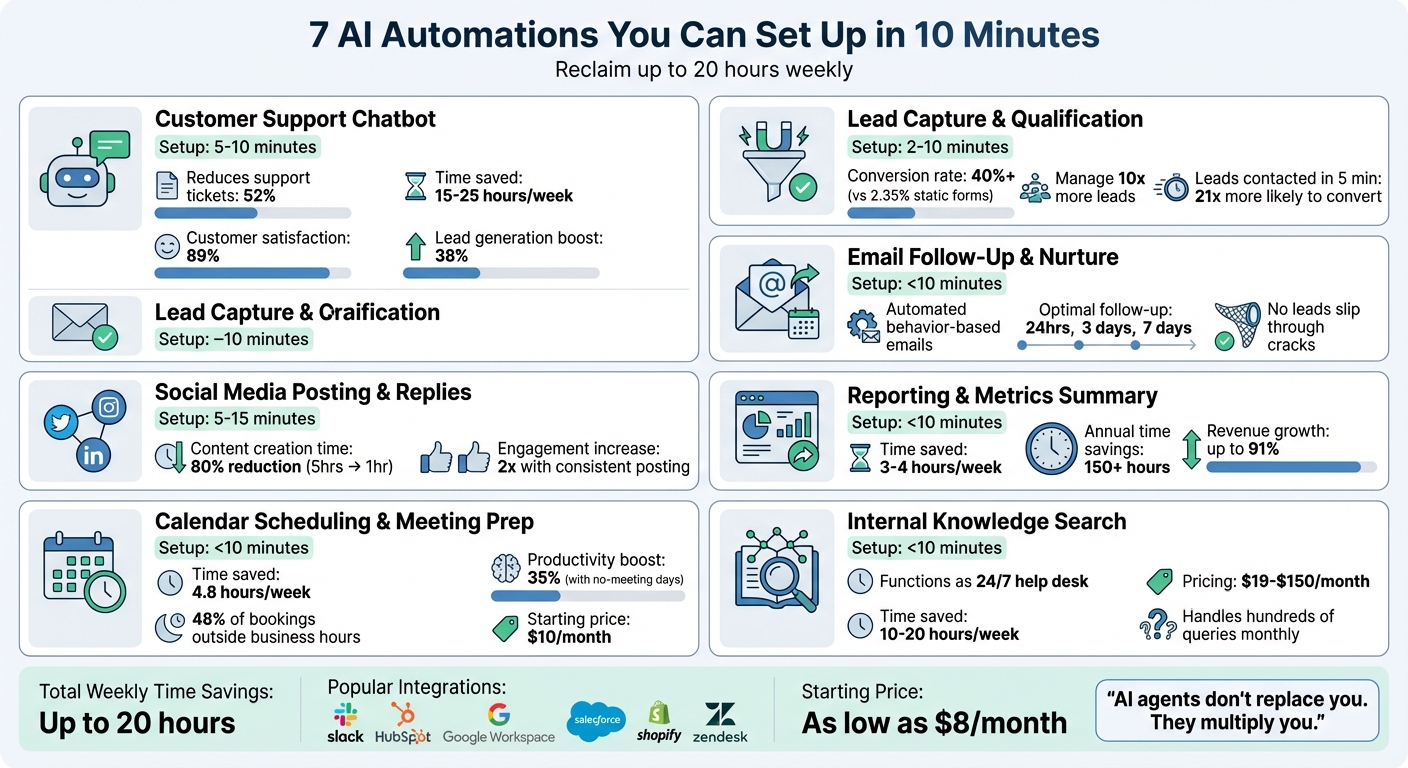
7 AI Automations for Small Business: Time Savings and Key Metrics
1. Customer Support Chatbot
Setup Time
Getting your chatbot up and running is quick and straightforward. In just 5–10 minutes, you can deploy it by pasting your website URL or uploading PDF guides. After that, simply add one line of JavaScript before the </body> tag on your site. If you're using WordPress or Shopify, the process is even easier thanks to one-click plugins. Once installed, the chatbot is ready to tackle routine customer inquiries right away.
Task Automation Effectiveness
Businesses have seen real results with these chatbots. By 2026, companies reported a 52% drop in support tickets and saved 15–25 hours per week on customer service tasks. The satisfaction rate for AI-handled inquiries reached an impressive 89% that same year, while conversational interfaces boosted lead generation by 38% compared to static forms. The chatbot doesn’t just stop at answering basic questions - it can also forward more complex inquiries to your team, complete with all the necessary context, ensuring no customer concern is overlooked. These features make the chatbot a practical ally for small business operations.
Relevance to Small Business Operations
For small businesses, time and customer satisfaction are critical. A whopping 67% of customers get frustrated when their issues aren’t resolved immediately. A chatbot operating 24/7 can resolve issues on the spot, book appointments directly into your calendar, and gather visitor details effortlessly to turn website traffic into leads. Bryce Conway, founder of 10xTravel, shared his experience: after implementing Wonderchat, he saw up to a 70% reduction in customer support emails flooding his inbox.
"The 10-minute investment to install BuiltABot pays dividends for years. Your customers get instant, accurate answers. Your team gets time back." - BuiltABot Team
Ease of Integration with Existing Tools
These chatbots are designed to fit seamlessly into your existing workflow. They easily connect to platforms like Shopify, HubSpot, Zendesk, and Salesforce using plug-and-play integrations. For messaging apps like WhatsApp, many tools simplify the process with QR code linking, so you can skip the hassle of setting up complex APIs. Pricing is budget-friendly too: BuiltABot starts at $29.99/month, Chatloom offers a free plan with up to 100 messages, and QuelpAI provides a free account with no credit card required. Plus, the chatbot widget is optimized for minimal impact on your website’s loading speed.
sbb-itb-212c9ea
2. Lead Capture and Qualification
Setup Time
Automating lead capture and qualification takes your sales process to the next level. With no-code platforms, deploying an AI agent is quick and hassle-free. For example, you can connect via WhatsApp by simply scanning a QR code or use pre-built templates on platforms like Wonderchat and Zapier. These setups can be ready in as little as 2 minutes. If you’re deploying a website chatbot, it’s just a matter of pasting your site URL or uploading FAQs, and you’ll be up and running in about 10 minutes. Compare that to traditional WhatsApp API setups, which can take 2–4 weeks for Meta Business verification - QR-based connections are ready to go in under 5 minutes.
Task Automation Effectiveness
Interactive AI chatbots are game-changers for conversions, boasting rates of over 40%, compared to the average 2.35% from static web forms. Businesses leveraging AI for lead qualification can manage 10 times more leads without hiring additional staff. Plus, leads contacted within the first five minutes are 21 times more likely to convert. Evan Nison, Founder and President of NisonCo, highlights this efficiency:
"What used to be done by a whole team of researchers is now handled by one person using AI, including Zapier Agents. We're actually generating more leads with fewer resources."
AI agents also categorize leads as Hot, Warm, or Cold based on criteria like budget, timeline, or email domain. They even pull firmographic data from tools like Clearbit or ZoomInfo, giving your sales team the context they need to act effectively.
Relevance to Small Business Operations
For small businesses, time is money - and manual lead qualification can waste 67% of a sales team’s time on unqualified prospects. Shockingly, sales reps spend only 28% of their time actually selling. AI agents eliminate this inefficiency by filtering out spam and unqualified leads automatically. They also work around the clock, capturing visitor details and answering FAQs even after hours, so you never miss a promising lead. Despite the benefits, only 8.8% of small businesses had adopted AI by September 2025, with 73% still relying on manual processes for critical tasks like lead follow-up. Adopting AI for lead capture and qualification can give small businesses a much-needed edge.
Ease of Integration with Existing Tools
AI agents are designed to integrate smoothly with over 8,000 applications through platforms like Zapier, ensuring that your leads are instantly synced with your CRM, calendar, and communication tools. Popular integrations include Facebook Lead Ads, Typeform, LinkedIn, Slack, Gmail, HubSpot, and Salesforce. For WhatsApp users, platforms like Clarivo (starting at $79/month) and Waslo (offering a 7-day free trial with no credit card required) simplify the process by bypassing complicated API setups. You can also set up "pause for approval" workflows, where the AI drafts personalized follow-up emails but waits for your review before sending. Wonderchat even offers a free trial, letting you test a website chatbot before making any commitments.
3. Email Follow-Up and Nurture
Setup Time
You can set up AI-driven email follow-ups in less than 10 minutes. Start by choosing a workflow template, such as "Call Follow-Up" or "New Lead Nurture." Then, connect your email account (like Gmail or Outlook) and CRM (options include HubSpot, Salesforce, or Zoho). Define the trigger event - this could be anything from a meeting ending to a form submission. Add your business context, select your tone, and configure SMTP authentication to ensure emails are delivered reliably. Many platforms even offer free tiers, so you can test these features without an upfront commitment.
Task Automation Effectiveness
Once in place, these automations are incredibly efficient. AI tools for sales professionals monitor prospect behavior and send tailored messages at the perfect moment. For example, if someone visits your pricing page or downloads a case study, the AI adjusts follow-up timing and content accordingly. When it comes to proposals, follow-ups are most effective when sent at intervals like 24 hours, 3 days, and 7 days after the initial contact. This keeps your business top-of-mind without overwhelming the prospect. Evan Nison, Founder and President of NisonCo, highlights the benefits:
"Before this, we'd often forget to follow up on casual commitments made during calls. Now, nothing slips through the cracks."
AI can also personalize emails by analyzing meeting transcripts from tools like Fireflies.ai or Zoom, ensuring your follow-ups align with the tone and details of the original conversation.
Relevance to Small Business Operations
For growing businesses, manual follow-ups can drain time and lead to missed opportunities. Speed matters - responding to new inquiries within 10 minutes is crucial, as delays often result in prospects losing interest. Small businesses, often working with limited staff, find it especially challenging to nurture every lead manually. Automation takes over repetitive tasks like abandoned cart reminders, post-purchase feedback requests, and re-engagement emails for leads that have gone quiet for a week or two. This ensures a steady, professional presence without overwhelming your team.
Ease of Integration with Existing Tools
Email automation integrates seamlessly with tools you likely already use, including CRMs, email clients, and meeting transcription software. Popular integrations include Gmail, Slack, Asana, HubSpot, Salesforce, Fireflies.ai, and Otter.ai. Many platforms also let you review and tweak emails before they’re sent, blending automation with a human touch. This balance helps maintain quality while cutting down on time spent on repetitive tasks.
4. Social Media Posting and Replies
Setup Time
Getting started with AI-driven social media tools is quick and hassle-free. You can link your social accounts and start scheduling posts in just 5–15 minutes. For instance, platforms like Bika.ai and Relay.app allow you to connect accounts like X (formerly Twitter), LinkedIn, Instagram, and Facebook using OAuth 2.0 - a secure and straightforward process that typically takes about 2 minutes per account. Once connected, you can upload your brand guidelines to help the AI understand your tone, audience, and visual preferences. From there, you can configure the tools to scan RSS feeds or trending topics, review previous posts to avoid duplication, and draft fresh, engaging content. Many platforms also offer a "write to chat" feature, sending drafts to Slack or email for quick review and approval. With these steps completed, the tools are ready to not only post content but also actively engage with your audience using AI agents to automate interactions.
Task Automation Effectiveness
Once set up, these tools work around the clock, handling both posting and audience engagement. AI automation can cut down content creation time significantly - from 5 hours a week to just 1 hour of review. In just 10 minutes, these tools can transform a single blog post into dozens of platform-specific snippets. They adapt content for each platform, whether it’s crafting concise posts for X, adding a professional tone for LinkedIn, or designing eye-catching carousels for Instagram. Beyond posting, these tools monitor mentions and comments, drafting personalized replies using your knowledge base to address customer questions at any time.
Relevance to Small Business Operations
For small business owners who are already balancing multiple responsibilities like managing customers, inventory, and payroll, keeping up with social media can feel overwhelming. But neglecting it can hurt visibility - irregular posting can reduce engagement by 15–20%. On the flip side, consistent posting can double engagement and increase conversions by 67%. Small businesses using these tools have reported impressive results, including a 25% boost in inquiries and a 20% increase in foot traffic within just 60 days. As PostQuickAI puts it:
"Social media usually competes with real priorities - customers, inventory, payroll. AI helps you write faster and know they'll publish automatically."
Ease of Integration with Existing Tools
These platforms are designed to work seamlessly with the social networks you already use, including Instagram, Facebook, LinkedIn, X, TikTok, YouTube, and Bluesky. Most tools provide a single dashboard for managing multiple platforms and feature server-side auto-publishing, ensuring your posts go live as scheduled - even if your computer is turned off. Affordable pricing makes these tools accessible for small businesses, with options like PostQuickAI starting at $8/month, Publer at $12/month, and Ocoya at $19/month. Many platforms also integrate with workflow tools like Zapier, connecting your social accounts with your CRM or Slack. Plus, you can batch-create 20–30 posts at once and queue them for automated posting, ensuring consistent activity without daily effort.
5. Calendar Scheduling and Meeting Prep
Setup Time
Connecting your calendar is quick and straightforward. By linking your Google Calendar or Outlook account through secure OAuth2 authentication, the AI gains instant access to manage your scheduling needs. Simply connect your Google or Microsoft account, define your appointment preferences, and specify required fields like name and email before deploying. Most users complete the setup in under 10 minutes. The AI can also sync across multiple calendars - Google, Outlook, and iCloud - to avoid double-booking between personal and professional commitments. This fast setup paves the way for a smoother, automated scheduling process.
Task Automation Effectiveness
Once your calendar is connected, AI takes over the scheduling process entirely, eliminating the need for manual input. It can qualify leads via email or chat, identify mutually available time slots, and send calendar invites automatically. This efficiency reduces the average 4.8 hours spent on scheduling each week to just minutes, freeing up time for professionals who dedicate hours to managing meetings. Beyond just booking, the AI creates detailed meeting briefs 30 minutes before calls by scanning emails and notes for key talking points, participant details, and action items. It can even reprioritize meetings, rescheduling lower-priority ones to make room for urgent calls.
Relevance to Small Business Operations
For small business owners, manual scheduling can be a significant time drain. In fact, the administrative effort tied to scheduling costs the U.S. economy an estimated $532 billion annually. As RhinoAgents points out:
"The hidden cost isn't just the meetings themselves - it's the administrative overhead of scheduling them."
AI scheduling tools operate around the clock, with nearly 48% of appointments being booked outside typical business hours, allowing prospects to schedule at their convenience. Businesses that implement strategies like a "no-meeting day" each week have seen productivity jump by as much as 35%. Additionally, AI can safeguard focused work time by reserving "Deep Work" hours, ensuring uninterrupted productivity.
Ease of Integration with Existing Tools
These AI tools are designed to integrate seamlessly with the platforms you already use. They work natively with Google Calendar, Microsoft Outlook, iCloud, and Calendly, ensuring real-time syncing of availability. They also connect with communication apps like Slack and Microsoft Teams, enabling you to schedule meetings with simple natural language commands - for instance, "Book 30 minutes with @user". Automatically generated video conferencing links from Zoom or Google Meet are included in your invites. Calendly’s AI-powered plans start at $10/month, offering features like smart rules to optimize scheduling. For example, you can set 15-minute gaps between meetings, enforce minimum notice periods (like four hours), and include qualification questions to ensure you’re meeting only with high-value leads.
6. Reporting and Metrics Summary
Setup Time
Creating an AI-powered reporting agent is incredibly quick - less than 10 minutes. With platforms like Zapier, all you need to do is describe what you need, such as, "Summarize weekly revenue from Stripe and compare it to last week." The agent then connects to your business APIs like Google Ads, Meta, Stripe, or Shopify, pulling real-time data to fulfill your request.
Task Automation Effectiveness
AI reporting agents save small businesses a significant amount of time - up to 3 to 4 hours weekly - by automating tasks like transferring data between platforms such as Google Ads and Google Sheets. These tools don’t just gather data; they calculate week-over-week changes and provide clear, narrative summaries that explain key metric shifts. As Ibby Syed, Founder of Cotera, puts it:
"The agent does the thorough analysis that a human skips because they ran out of patience at 10:45am".
Additionally, these agents can detect unusual patterns, flagging them and sending alerts through Slack, email, or SMS. This proactive approach ensures reports are actionable, empowering businesses to focus on growth rather than tedious data crunching.
Relevance to Small Business Operations
For small businesses, AI-driven reporting solves a major pain point: limited resources. Manual reporting can eat up more than 150 hours a year - time that could be better spent on scaling operations. By adopting top AI tools for small business, businesses typically save over 20 hours per month in labor and cut costs by $500 to $2,000 monthly. Some early adopters have even seen revenue grow by as much as 91% after automating their processes. Instead of wading through complex dashboards, you get straightforward summaries like, "Your ad spend increased 18% this week," allowing for quicker, more confident decisions without needing a dedicated data analyst.
Ease of Integration with Existing Tools
AI reporting agents work seamlessly with tools you already rely on, such as Google Ads, Meta Ads, HubSpot, Salesforce, QuickBooks, Shopify, and Google Sheets. Reports can be delivered through platforms like Slack, WhatsApp, Gmail, or even SMS. With Zapier connecting to over 8,000 apps, building custom workflows is a breeze. Pricing is also accessible for small businesses. For example, DashThis AI Insights Pro costs $19 per month (or $15 per month with annual billing), while Zapier offers free plans with premium options reaching up to $299 per month. As Michelle Henderson, Founder of Bad Cat Digital, explains:
"With 10 minutes of set up, I can create a custom report for a client that speaks to their digital marketing goals".
7. Internal Knowledge and Policy Search
Setup Time
Creating an AI agent to manage internal document and policy searches can be done in under 10 minutes. The process is straightforward: define the agent's role (e.g., "You are an internal policy assistant"), upload documents in supported formats, connect it to platforms like Slack or your company portal, and test it with sample queries. The platform takes care of processing your content into searchable segments, so there’s no need for technical expertise on your part.
Task Automation Effectiveness
Once the AI agent is live, it immediately reduces the time employees spend digging through outdated files or emails. Questions like "What is our remote work policy?" or "How do I submit expense reports?" are answered instantly. For example, in March 2025, a company connected their handbook to an AI agent and deployed it as a Slack bot. The bot now handles hundreds of employee inquiries every month. To ensure accuracy, you can set up guardrails during configuration, such as instructing the agent to respond with, "I don’t have that information, but I can connect you to HR", if it’s unsure.
Relevance to Small Business Operations
This AI agent functions as a 24/7 help desk, making it especially helpful for small businesses without dedicated HR or IT teams. Many small business owners report saving 10 to 20 hours weekly by integrating AI agents into their workflows. The agent can manage routine tasks like answering questions about vacation policies, benefits, printer troubleshooting, or onboarding, freeing you up to focus on business growth. Costs are reasonable too, with pricing ranging from $50 to $150 per month for a custom AI agent, and some entry-level options starting at just $19 per month.
Ease of Integration with Existing Tools
Setting up this tool is quick and works seamlessly with popular business platforms like Slack, Microsoft Teams, Notion, Google Workspace, Airtable, Zendesk, HubSpot, and Salesforce. You can deploy it as a Slack bot for internal queries or embed it as a widget on your company intranet. With Zapier’s ability to connect to over 8,000 apps, the agent can pull information from nearly any cloud-based tool your team uses. A good starting point is uploading a high-traffic document, such as your employee handbook or FAQ, and expanding as you identify common inquiries.
10 AI Automations That Run My Business (Steal These)
Conclusion
Now that we've reviewed these automations, it's time to put them into action. From customer support to internal knowledge search, AI tools for small businesses can handle repetitive tasks, freeing up your team to focus on what truly matters.
"AI agents don't replace you. They multiply you." - Kateryna Quinn, Founder, Uplify
This quote perfectly captures the essence of the article: using intelligent automation to amplify your productivity and impact. Let it inspire your next move.
Start by tackling your biggest bottleneck. Is your inbox overwhelming? Consider automating email follow-ups with tools like HubSpot Email Writer. Losing potential leads? Focus on lead capture solutions. A simple rule of thumb is the "Loom Test" - if you can explain a task in a 5-minute video, it’s a good candidate for automation.
Kick things off in Draft Mode for 30 days to experiment and refine. Clean your data to ensure accuracy and begin with one key task that offers the most impact. By 2026, the most successful businesses will be those that leverage smart automation to multiply their efficiency.
FAQs
Which automation should I set up first?
Start by automating the tasks you find yourself doing over and over again - things like answering customer questions, managing your schedule, or handling lead follow-ups. For many small business owners, setting up AI tools to manage customer inquiries or send follow-up messages can make a noticeable difference. These systems are quick to set up, save you hours of work each week, and help streamline your processes effortlessly.
How do I keep an AI agent from giving wrong answers?
To keep mistakes to a minimum, it's important to regularly monitor and adjust your AI agent. Make it a habit to evaluate its responses, particularly after any updates, to maintain accuracy. Set up a clear process for reviewing and improving its performance. Actively oversee interactions and offer feedback to address errors - this helps improve its responses over time. Consistent maintenance is key to keeping your AI dependable and effective.
What data do I need ready before I start?
To get started with AI automations, it's important to have some key details ready. Begin by identifying your business objectives and the specific tasks you want to automate. Gather essential information like customer data, email contact lists, calendar schedules, and existing workflows.
Take time to understand your target audience and pinpoint use cases that will have the biggest impact on your goals. With all this information in hand, you'll be better equipped to create AI workflows that are efficient and aligned with what you want to achieve. A little preparation upfront can make the setup process much smoother.