Creative Tools
The Best AI Video Generators of 2026: Tested for Business, Creators & Social Media
AI video generators now let businesses and creators produce cinematic or social videos faster, cheaper, and with professional results.
The Best AI Video Generators of 2026: Tested for Business, Creators & Social Media
AI video generators have transformed how videos are made, offering faster, cheaper, and highly efficient alternatives to traditional production. Whether you're a marketer, content creator, or business professional, these tools can save you time and money while delivering impressive results.
Here are the top AI video generators of 2026, tested across key criteria like output quality, ease of use, and value:
- AI Apps Video Generator: Combines multiple AI engines for seamless workflows, ideal for social media ads. Pricing starts at $19/month.
- Runway: Focused on filmmakers and agencies, with advanced creative controls and 4K rendering. Starts at $12/month.
- HeyGen: Perfect for talking-head videos with 700+ avatars and multilingual capabilities. Pricing begins at $24/month.
- OpenAI Sora: Hollywood-level cinematic realism for storytelling. Available via ChatGPT Plus at $20/month.
- Kling AI: High-quality 4K video generation with synchronized audio. Plans start at $6.99/month.
- Synthesia: Tailored for corporate training with over 240 avatars and enterprise-grade features. Starts at $22/month.
- Luma Dream Machine: Budget-friendly option for cinematic videos with physical simulation. Plans start at $7.99/month.
- Google Veo 3: Mobile-friendly with strong audio-video integration. Pricing varies, starting at $20/month.
Quick Comparison:
| Tool | Best For | Price | Key Feature | Limitation |
|---|---|---|---|---|
| AI Apps Video Gen | Social Media | $19/mo | URL-to-video ads in minutes | Not for cinematic production |
| Runway | Filmmakers | $12/mo | Advanced creative controls | Steep learning curve |
| HeyGen | Business Videos | $24/mo | Multilingual avatars | Limited emotional range |
| OpenAI Sora | Cinematic Storytelling | $20/mo | Hollywood-level realism | Lacks iteration options |
| Kling AI | High-Quality Motion | $6.99/mo | 4K resolution with audio sync | Occasional rendering artifacts |
| Synthesia | Corporate Training | $22/mo | Enterprise-grade security | Robotic avatar expressions |
| Luma Dream Machine | Budget Cinematics | $7.99/mo | Realistic physics simulation | Limited artistic flexibility |
| Google Veo 3 | Quick Mobile Content | $20/mo | Audio-video integration | Short 4K clip cap (8 seconds) |
These tools cater to diverse needs, from quick social media ads to high-quality cinematic productions. Choose the one that aligns with your goals and budget to streamline your video creation process.
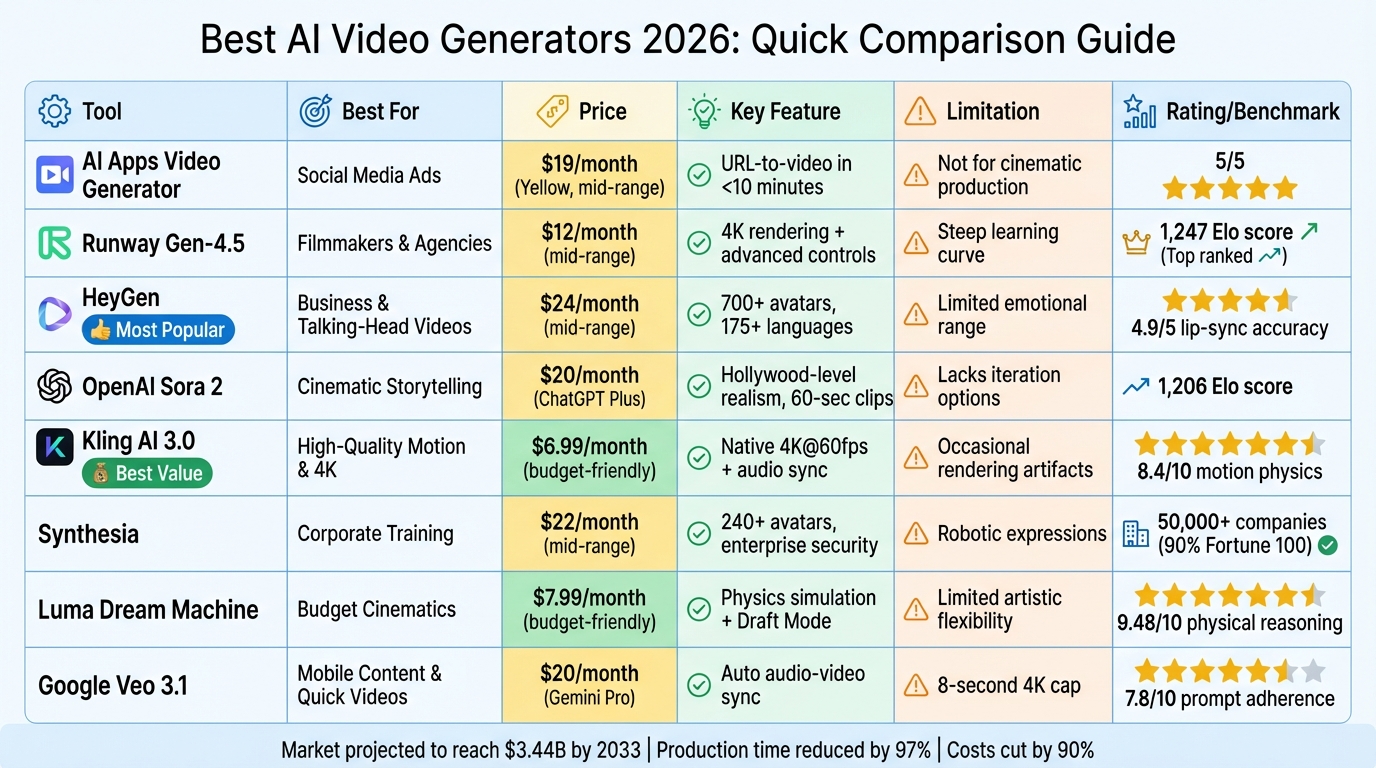
AI Video Generator Comparison Chart 2026: Features, Pricing and Best Use Cases
The Best AI Video Generators in 2026 (Ranked)
sbb-itb-212c9ea
1. AI Apps Video Generator
The AI Apps Video Generator brings together top-tier AI engines - like Google Veo 3, Kling, Hailuo, PixVerse V5, and Luma Ray2 - into one streamlined subscription. This means no more juggling multiple accounts or billing cycles, making life easier for businesses and creators working across different video styles.
One standout feature is its URL-to-Video workflow, which can transform product URLs into fully polished video ads in less than 10 minutes. Using the Aurora AI Model, the platform creates lifelike avatars specifically designed to perform well in paid advertising campaigns. It even includes an AI Script Writer that generates 5–10 script variations per project, leveraging insights from thousands of successful ad campaigns. This makes it a powerful tool for social media content creation.
For platforms like TikTok, Instagram Reels, and YouTube Shorts, the generator supports 9:16, 16:9, and 1:1 formats, ensuring your videos look great no matter where they’re posted. Plus, it delivers smooth motion and polished visuals.
Another key feature is its hybrid workflow, which allows users to create both cinematic videos and high-quality images using the same credit pool. This integrated approach simplifies production and eliminates the hassle of switching between tools.
With a single subscription, users gain access to all these AI models, offering a cost-effective solution and a more efficient workflow for businesses and creators who need high-quality content regularly.
2. Runway
Runway is designed for professional filmmakers, VFX artists, and marketing agencies who require precise creative control and consistent character portrayal. Its Gen-4.5 model, launched in December 2025, currently leads the Artificial Analysis Text-to-Video leaderboard with an impressive Elo score of 1,247, outpacing competitors like Google Veo 3 and OpenAI Sora 2 Pro.
One standout feature is native audio generation, which integrates dialogue, ambient soundtracks, and sound effects directly into the video. This eliminates the need for additional post-production steps. Another key capability is multi-shot sequencing, allowing creators to produce connected scenes in a single workflow while maintaining visual continuity. Videos can be up to 60 seconds long and rendered in 4K resolution for those on professional plans.
When it comes to speed, the Gen-4 Turbo model generates a 10-second clip in just 30 seconds. The Gen-4 Standard takes 2–5 minutes, while Gen-4.5 delivers even better motion fidelity, making it a go-to for high-quality, high-volume campaigns. This tiered system is especially beneficial for businesses running fast-paced social media campaigns, as it supports Runway's focus on narrative-driven storytelling.
Runway uses a credit-based pricing model. The Standard plan costs $12 per month and includes 625 credits. The Pro plan, priced at $28 per month, offers 2,250 credits and 4K rendering, while the Unlimited plan is $76 per month and provides unlimited relaxed-quality generations. Credit usage depends on the model: Gen-4.5 consumes 25 credits per second, whereas Gen-4 Turbo uses only 5 credits per second, making Turbo an economical choice for conceptual work.
"Runway Gen-4.5 is positioned as 'the world's best video model' - and independent benchmarks largely support that claim." - AdCreate Blog
Runway also shines in maintaining character consistency across multiple scenes and offers advanced camera controls. Users can issue natural language commands for techniques like tracking shots, dolly movements, and rack focus - features that are crucial for narrative storytelling and brand-focused advertising. However, it’s worth noting that failed generations still deduct credits.
3. HeyGen
HeyGen provides a platform for creating scalable talking-head videos tailored for business, sales, and content creation. Instead of focusing on cinematic effects or intricate artistic controls, it operates as what Adam Treister, founder of Better Products, calls a "reusable AI video studio" - essentially, a production setup designed for frequent publishing needs. Its approach introduces a range of advanced tools and features.
The platform boasts over 700 realistic avatars, complete with natural expressions and animations, alongside a voice cloning feature that works with just 2–3 minutes of audio input [26, 28]. One of its standout tools, Video Translate, can translate videos into more than 175 languages while syncing lip movements and retaining the original speaker's voice [29, 30]. Sales teams using personalized videos created with HeyGen have reported a 300% increase in response rates compared to traditional text-based emails. Another feature worth highlighting is generative clothing swaps, enabling a single avatar to seamlessly switch between formal attire for corporate presentations and casual outfits for social media content - all managed within the same platform [26, 27].
HeyGen strikes a balance between speed and quality. Videos under two minutes typically render in 5–15 minutes, ensuring consistent visuals without compromising efficiency [29, 27, 32]. In January 2026, Adam Treister showcased HeyGen's potential by using it to launch GoGovGo, an AI-powered newsroom capable of producing dozens of videos on a $60/month budget.
The platform offers several pricing tiers: a Free plan ($0) includes 3 videos per month at 720p with watermarks; the Creator plan ($24–$29/month) allows unlimited 1080p videos with voice cloning; the Pro plan ($79–$99/month) supports 4K exports and higher usage limits; and custom Enterprise solutions are available for larger needs [28, 33].
"HeyGen's real value proposition is not realism for its own sake. It is removing the psychological and operational tax of video creation." – Adam Treister, Founder and Editor, Better Products
HeyGen has earned high marks from users, with a 4.6/5 rating on SmartTrendsAI and 8.6/10 from Better Products. Many users appreciate its responsive support team and the stability of its avatars [29, 25]. However, some critiques include a limited emotional range in avatars and minimal timeline editing options. For enhanced voice quality in longer scripts, pairing HeyGen with Eleven Labs is recommended.
4. OpenAI Sora
OpenAI Sora is designed with filmmakers, creative directors, and marketers in mind, offering tools for creating visuals that match Hollywood standards. Its standout feature is its ability to produce footage with cinematic realism. As Noah Bennett from Alici.AI puts it, "Sora 2 from OpenAI represents the pinnacle of AI video generation, producing footage rivaling professional cinematography". With a benchmark score of 1,206 Elo, Sora ranks among the top three AI video models worldwide as of early 2026.
The platform can generate continuous 60-second clips. One of its key tools, Storyboard Mode, allows users to plan multi-shot sequences while maintaining consistent character appearances - an essential feature for professional workflows. Sora shines in creating intricate scenes, handling multiple characters, specific movements, and detailed backgrounds. It boasts impressive ratings of 4.8/5 for visual realism and 4.7/5 for temporal consistency, making it a standout choice for cinematic AI video production.
Generating these complex scenes typically takes 5–15 minutes. Sora is powered by ChatGPT subscriptions, with two main pricing tiers: the Plus plan at $20/month, which provides approximately 50 720p watermarked 5-second clips, and the Pro plan at $200/month, offering around 500 1080p watermark-free 60-second clips [34, 36]. As of 2026, there is no permanent free tier available.
Despite its high-quality output, Sora has faced criticism. Its strict content moderation policies, which block copyrighted material and real public figures, have contributed to a 2.9-star rating on the App Store [34, 36]. Additionally, it lacks image-to-video support for faces and occasionally produces technical artifacts, such as "finger counting" errors. By late March 2026, OpenAI announced plans to discontinue the standalone Sora app, although the model will still be accessible through ChatGPT subscriptions.
"Sora's physics simulation is superior to Kling, but it currently lacks the fine-grained motion brush controls of Runway." – AI Coding Flow
5. Kling AI
Kling AI caters to professional filmmakers, marketing teams, and social media creators who want broadcast-quality videos without the usual hassle. For those focusing on repurposing content, tools like Vidyo.ai can further streamline the workflow. Created by Kuaishou Technology, the platform has attracted over 6 million users and facilitated the production of more than 600 million videos as of early 2026 [43,44]. One of its standout features is its ability to deliver native 4K resolution at 60fps - producing true 3840×2160 output, a significant upgrade from standard 1080p [43,45].
The platform's technical capabilities are impressive. Its Omni model can generate synchronized dialogue, ambient sounds, and music in a single pass. Additionally, the multi-shot storyboarding tool allows users to create up to six camera cuts in a 15-second clip, eliminating the need for external editing tools [43,45,49].
"Kling AI is the only major platform that generates video AND synchronized audio in a single pass. Voice, sound effects, music - all created together." – GenMediaLab
Rendering times are efficient for most users. Standard 5-second clips take just 1–3 minutes to render, though peak-hour waits may extend to 7–12 minutes [43,46,49]. The platform supports continuous video generation for up to 15 seconds, with options to extend clips to as long as 3 minutes. Testing shows that Kling 3.0 delivers visually impressive results in 17 out of 20 scenarios.
Kling AI uses a credit-based subscription system. Monthly plans start at $6.99 for 660 credits and go up to $127.99 for 26,000 credits. Annual subscriptions save users around 34%. Creating a 10-second video typically costs 100 credits. There’s also a free tier offering 66 daily credits for non-commercial use, one of the most generous in the industry. However, paid credits must be used before the end of each billing cycle [49,52,53,54].
The platform's advanced rendering capabilities add to its appeal. It excels at simulating complex physics, such as flowing water and fabric movement, using reinforcement learning techniques. On the downside, users have reported occasional issues like "melting" artifacts in human interactions, unstable text rendering, and delays in customer support [43,44].
Kling 3.0 has received strong reviews, scoring 9.5/10 on Kling3Video and 8.1/10 on Curious Refuge [45,51].
"Kling has recently taken the seat as the world's best AI video generator, but when it comes to the world of AI video, the crown is constantly shifting." – Tyler Smith, Curious Refuge [45,51]
6. Synthesia
Synthesia is designed primarily for enterprise users, with over 50,000 companies - including 90% of the Fortune 100 - relying on it for corporate training, HR communications, and internal updates. Its standout feature is its avatar-driven presentation format, which delivers scripted content in more than 160 languages with precise lip-syncing.
The platform provides access to over 240 studio-quality avatars, enhanced by a feature called "Contextual Emotion." This allows avatars to adjust their tone based on the script - making an HR video sound empathetic or a sales pitch come across as energetic. Users can also create Digital Twins, which are custom avatars with cloned voices and natural backgrounds. Additionally, Synthesia includes a shared workspace for timeline comments and asset sharing, streamlining collaboration and branded content creation for enterprise workflows.
Synthesia is particularly efficient for corporate video production. It can generate a five-minute training video in under an hour at 1080p/30 FPS. The platform also integrates cinematic B-roll through tools like OpenAI Sora and Google Veo 3. Plus, it can transform PDFs, URLs, blog posts, and PowerPoint presentations into videos, with SCORM-compatible exports for e-learning purposes.
"Synthesia is expensive because it's solving an expensive problem." – Emily Park, Digital Marketing Analyst
The pricing model is based on video duration. The Starter plan costs $22–$29 per month for about 10 minutes of video featuring 125+ avatars. The Creator plan, at $67–$89 per month, includes 30 minutes of video and custom avatars. Enterprise plans, which offer unlimited videos along with SSO and API access, start at around $500 per month. Traditional localization for a training video across 23 countries could cost approximately $47,000, but Synthesia provides similar results faster and at a lower cost. The platform has an 8.6/10 rating on ProPicked and was named G2's "Best AI Video Generator" for Winter 2026.
However, Synthesia does have limitations. One of the most noticeable is the "uncanny valley" effect. Avatars remain stationary, unable to interact with their environment, and their micro-expressions can feel robotic, especially in videos longer than two to three minutes. This makes Synthesia a strong choice for functional content like training and compliance materials, but for emotionally driven brand storytelling, real human footage is often a better fit.
7. Luma Dream Machine
Luma Dream Machine takes a fresh approach to creating cinematic videos, making high-quality production accessible to creators, small businesses, and social media marketers working within tighter budgets. Its standout feature is the Ray 3.14 Physical Reasoning Engine, which simulates real-world physics with impressive accuracy - like how a glass shatters differently on concrete versus carpet. This technology earned it a 9.48/10 in professional benchmarks for physical reasoning and HDR fidelity.
The tool offers keyframe control, allowing users to define precise start and end frames. This is especially useful for tasks like product reveals or creating seamless loops. You can also upload up to four reference angles to ensure 91% zero-shot consistency in your videos. For those in a hurry, the Draft Mode speeds up rendering by 4–5 times, with a standard 5-second clip taking just about 120 seconds to preview.
In March 2026, Aisha T., a Marketing Lead for a small e-commerce brand in Chicago, shared how switching to Luma Dream Machine transformed her workflow. Her team moved from spending $3,200 a month on freelance videographers to a $96/month Luma subscription. By animating existing product photos, they boosted their monthly video output from 8 to over 40 pieces and slashed their content production timeline from 14 days to just 2 days.
"We went from being the slowest brand in our niche at launching campaign content to being the fastest. That speed has a direct dollar value." – Aisha T., Marketing Lead
Luma Dream Machine offers flexible pricing plans. The Free tier includes 8 draft videos with watermarks, while the Lite plan at $7.99/month ups the limit to 50 videos with 4K upscaling. The Plus plan at $23.99/month adds HDR export and commercial rights for 160 videos, and the Unlimited plan at $75.99/month removes all credit limits. However, users should note occasional morphing artifacts and that free-tier credits expire. With over 22,000 verified reviews on Tooliverse, Luma holds a solid 8.94/10 consensus score.
8. Google Veo 3
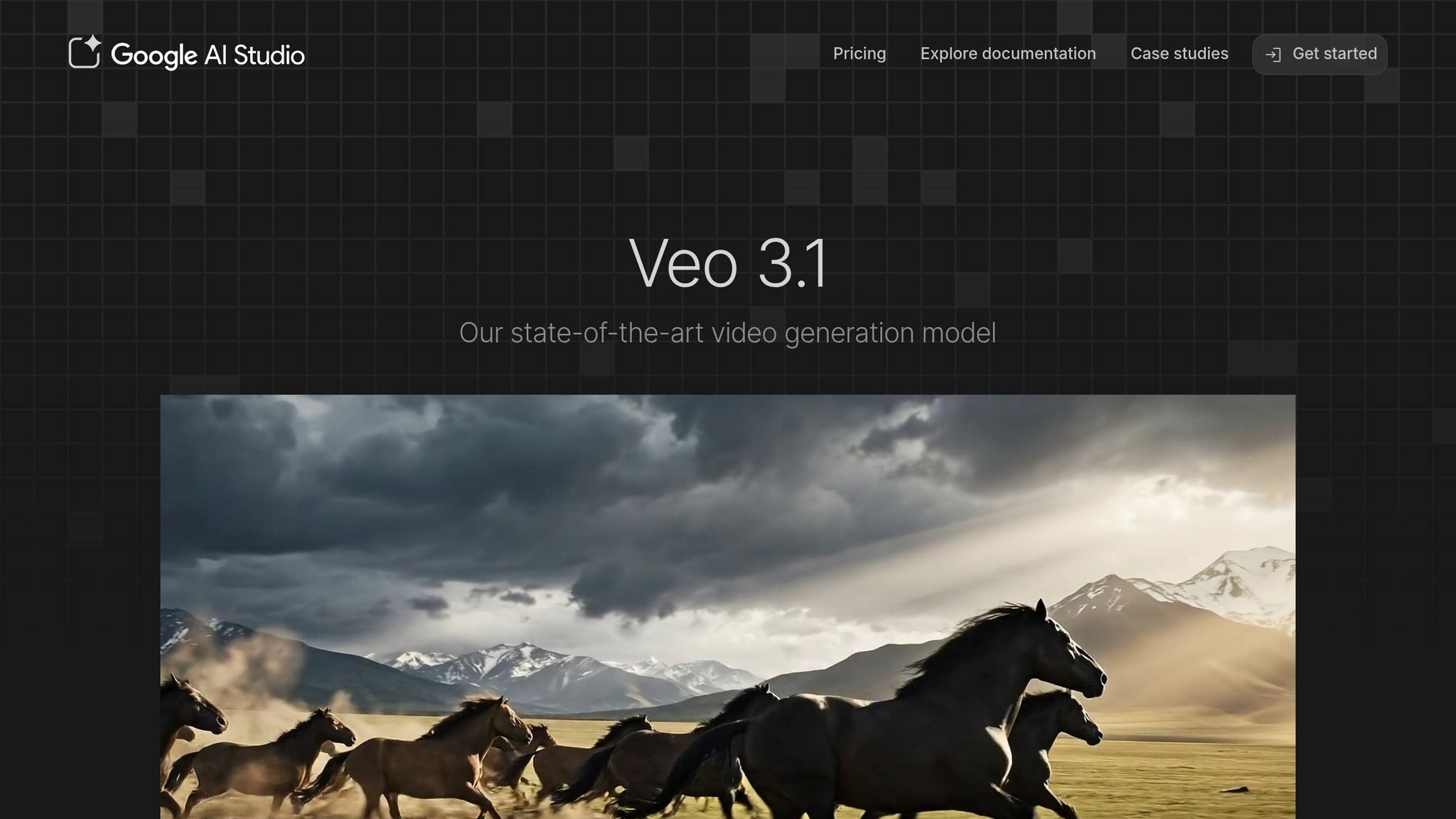
Let’s dive into Google Veo 3, a tool that stands out for its audio integration and mobile-friendly features.
Google Veo 3 is a pioneer in automatically generating synchronized dialogue, sound effects, and background music. This feature alone can save creators between $50 and $200 in AI video editing tools and audio editing costs. Paired with cinematic 1080p rendering and advanced camera techniques like dolly zooms, it’s a great option for businesses and social media creators who need professional-looking content quickly.
The January 2026 Veo 3.1 update brought native 9:16 vertical video support, a must-have for platforms like TikTok, Instagram Reels, and YouTube Shorts. This update eliminates the quality loss that often comes with manual cropping. Another impressive feature is its use of reference images to ensure character consistency across scenes, a game-changer for brands aiming to tell cohesive stories. On the MovieGenBench test, Veo 3.1 secured the top spot out of 1,003 prompts, outperforming competitors like Sora 2 Pro, Runway Gen 3, and Kling 2.5.
"I used to shoot $500k pharma commercials. I made this for $500 in Veo 3." – Professional Filmmaker
Pricing depends on how you access the tool. Gemini Pro users pay about $20/month, while Gemini Ultra, at $249.99/month, removes watermarks and offers higher usage limits. Google Workspace plans range from $7 to $22 per user/month and include collaborative features. For API users, Fast Mode costs around $0.15 per second, and Standard Quality comes in at $0.40 per second. In terms of speed, standard clips take 2–4 minutes to generate, while 4K upscaled versions can take 10–15 minutes.
However, there are limitations. The tool has an 8-second cap for 4K clips, meaning longer videos require manual stitching. Early testers reported failure rates of 75–90%, which can drive up the cost per usable clip. Despite these drawbacks, Google Veo 3 earned a 3.8/5 rating, with users appreciating its Google Vids integration and collaborative features. On the downside, the AI storyboarding feature still needs improvement.
Pros and Cons
Here’s a breakdown of the strengths and drawbacks of the AI video generators we reviewed. AI Apps Video Generator stands out for its seamless integration of video creation with direct scheduling to major social platforms. It’s a top choice for marketing teams, earning a 5/5 rating, though it’s not designed for cinematic productions.
Runway Gen-3 Alpha offers impressive tools like advanced timeline controls and motion brushes, catering to professional editors. However, it comes with a steep learning curve and starts at $12/month.
HeyGen shines in avatar realism and lip-sync accuracy, scoring 4.9/5. That said, its premium avatar models require credits, which could be a limitation for some users.
Kling 3.0 delivers exceptional visual fidelity, achieving benchmark scores of 8.1/10 overall and 8.4/10 for motion physics. Its interface, however, feels less refined.
Synthesia is tailored for corporate training, with features like enterprise-grade security and LMS integration, earning it a 4.8/5 rating. On the downside, longer videos sometimes suffer from an uncanny valley effect.
OpenAI Sora (Sora 2) is ideal for narrative storytelling, offering multi-shot character coherence. Included with ChatGPT Plus at $20/month, it’s a great tool for creative projects but lacks some iteration capabilities needed for commercial production.
Luma Dream Machine (Ray 3.14) provides a unique "Draft Mode" that previews video generations using 50% fewer credits, priced at $9.99/month. However, its artistic style might not align with every brand’s needs.
Google Veo 3.1 excels in precise compositional control through ingredient-based prompting, achieving a 7.8/10 rating for prompt adherence. Still, some outputs bear a noticeable "AI look".
Here’s a side-by-side comparison for quick reference:
| Tool | Best For | Price | Key Strength | Key Weakness |
|---|---|---|---|---|
| AI Apps Video Generator | Social Media | $19/mo | Integrated scheduling & captions | Not suitable for cinematic production |
| Runway Gen-3 Alpha | Professional Editors | $12/mo | Advanced timeline and creative control | Steep learning curve; higher cost |
| HeyGen | Business Presentations | $24/mo | Superior lip-sync and avatar cloning | Premium models require credits |
| OpenAI Sora (Sora 2) | Narrative Content | $20/mo | Multi-shot character coherence | Limited iteration for commercial use |
| Kling 3.0 | Realistic Motion | $8/mo | High visual fidelity | Less polished interface |
| Synthesia | Corporate Training | $18/mo | Enterprise security and LMS integration | Uncanny valley effect in lengthy videos |
| Luma Dream Machine (Ray 3.14) | Quick Concepting | $9.99/mo | Draft Mode for credit-efficient previews | Artistic style may not fit all brands |
| Google Veo 3.1 | Precise Control | $0.40/sec | Ingredient-based prompting | "AI look" in some outputs |
Luma Dream Machine (Ray 3.14) is particularly fast, generating draft previews in minutes, while OpenAI Sora (Sora 2) is much slower, with a reported rendering ratio of 10-to-1. For teams managing high-volume social media content, tools like Kling 3.0 or Luma Dream Machine (Ray 3.14) are better suited for quick iterations. On the other hand, tools like Runway Gen-3 Alpha and OpenAI Sora (Sora 2) focus on delivering higher-quality results, even if it takes more time.
Conclusion
Pick a tool that aligns with your specific workflow and objectives.
For enterprise-level needs, platforms like Synthesia and HeyGen set the bar high. Synthesia is a standout choice for corporate training and enterprise communication, offering SOC 2 compliance and support for over 140 languages. HeyGen shines with its lifelike avatars and real-time interaction capabilities, earning a stellar 4.9/5 rating for lip-sync accuracy.
If you're a content creator or filmmaker aiming for cinematic quality, tools like Kling 3.0 and Runway Gen-4.5 are excellent options. Kling 3.0 achieves a visual fidelity benchmark score of 8.4/10, while Runway Gen-4.5 offers advanced features like the Motion Brush and camera choreography. For multi-shot storytelling, OpenAI Sora 2 stands out as a go-to solution.
Social media managers looking to optimize workflows will appreciate the AI Apps Video Generator. It simplifies video creation by integrating directly with TikTok, Reels, and YouTube Shorts, eliminating the hassle of manual downloading, resizing, and uploading. For e-commerce teams, its URL-to-video feature can turn product links into compelling e-commerce ads in under 10 minutes. This approach helped the brand 1MORE boost purchases by 200% in March 2026.
For those seeking a versatile all-in-one tool, Google Veo 3.1 delivers strong prompt adherence and seamless audio-video integration within the Google Workspace ecosystem. Meanwhile, Luma Dream Machine's Draft Mode allows you to preview concepts using 50% fewer credits, all for just $9.99 per month.
With the AI video market projected to reach $3.44 billion by 2033, these tools are game-changers, cutting production time by up to 97% and reducing costs by 90%. Choose the right tool for your pipeline - whether it’s avatar platforms for message delivery, prompt-based generators for B-roll, or integrated solutions for fast content production.
FAQs
Which AI video generator is best for my use case?
The best AI video generator for you hinges on factors like the type of content you need, the platform you're targeting, and your budget. For cinematic, high-quality videos, Veo 3 is an excellent choice. If you're focusing on creating social media content, PostEverywhere shines in that area. For avatar-based presentations, Synthesia or HeyGen are top options. Pick the tool that aligns best with your content format and platform objectives.
What video length and resolution limits should I expect?
Most AI video generators in 2026 can produce videos that are a few minutes long and support resolutions up to 4K. However, as technology advances, some tools might offer even higher resolutions and longer video durations. It's a good idea to review the specific features of the tool you're considering to make sure it aligns with your requirements.
How do credits and pricing affect my monthly cost?
The monthly cost of an AI video generator depends on the subscription fee tied to the platform you choose. Prices generally start at $9.99 per month and can go beyond $99 per month, depending on the features and capabilities offered. The specific cost will vary based on the tool's functionality and the plan you select.