Digital Transformation
How to Build a Full Web App in 20 Minutes Using Only Plain English AI Agents
Create a usable MVP from a plain-English prompt: keep scope small, let AI agents scaffold frontend, backend, DB, auth, then test.
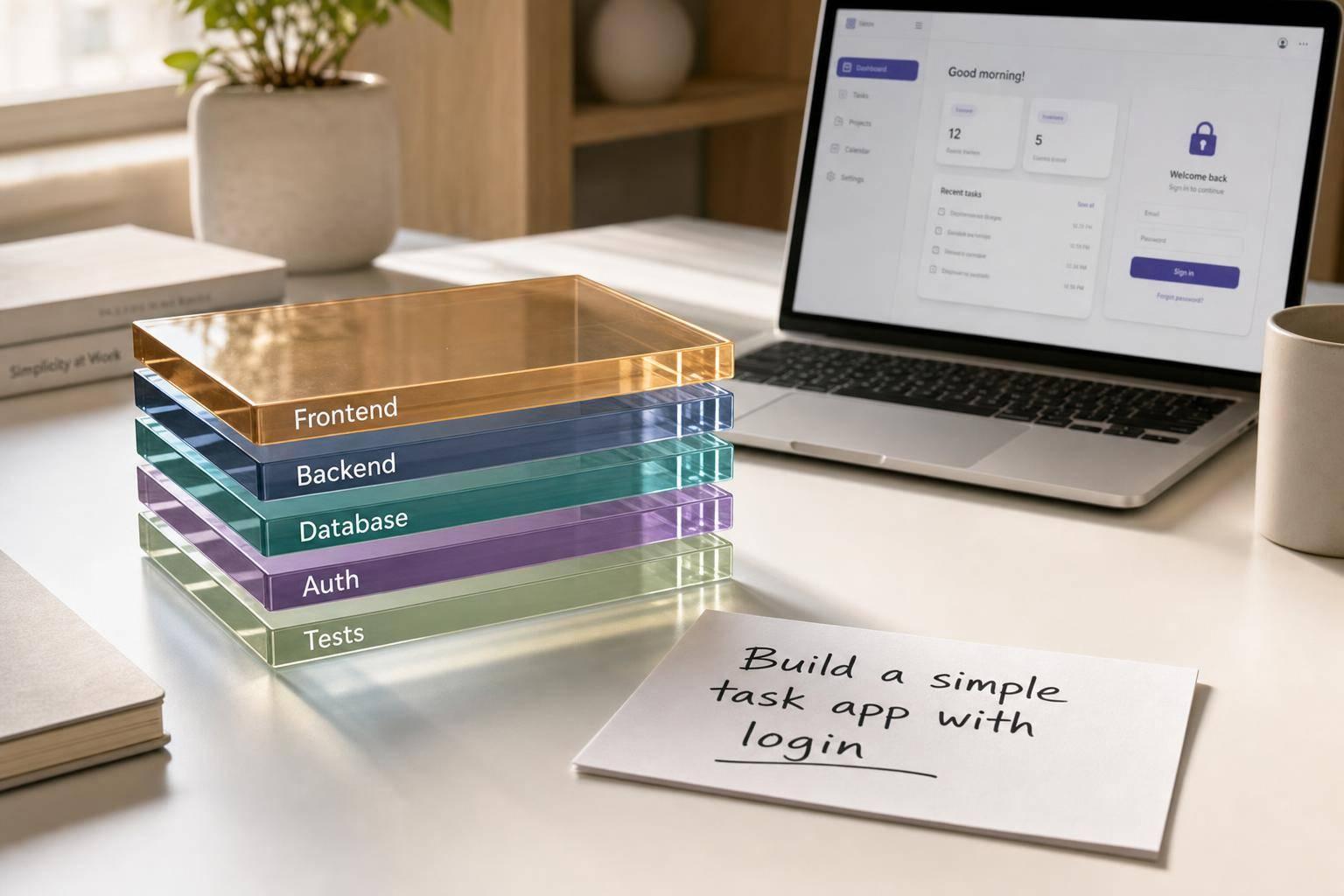
How to Build a Full Web App in 20 Minutes Using Only Plain English AI Agents
Yes - you can get a working web app from a plain-English prompt in about 20 minutes. But in most cases, that means a version 0.1 with one clear job, not a polished SaaS.
If I had to sum up the article in plain terms, it’s this: keep the app small, write a specific prompt, let the agent build the stack, then test the main flow before you share it. That short process works best for apps like booking tools, internal dashboards, and lead forms for entrepreneurs.
Here’s the core idea at a glance:
- What fits in 20 minutes: front end, back end, database, login, and a live URL
- What usually needs more time: styling, edge cases, access rules, and security checks
- Best app ideas: booking apps, dashboards, and lead capture tools
- Best prompt inputs: roles, pages, fields, actions, and mobile + database + login requirements
- Best launch rule: ship small internal tools fast, review customer-facing apps more closely
One stat stands out: AI builders often get a project 60% to 90% of the way there. That means the first draft can be usable, but the last part still needs review.
I’d treat this workflow like a shortcut to getting started with AI and building a working MVP: fast for structure, slower for polish.
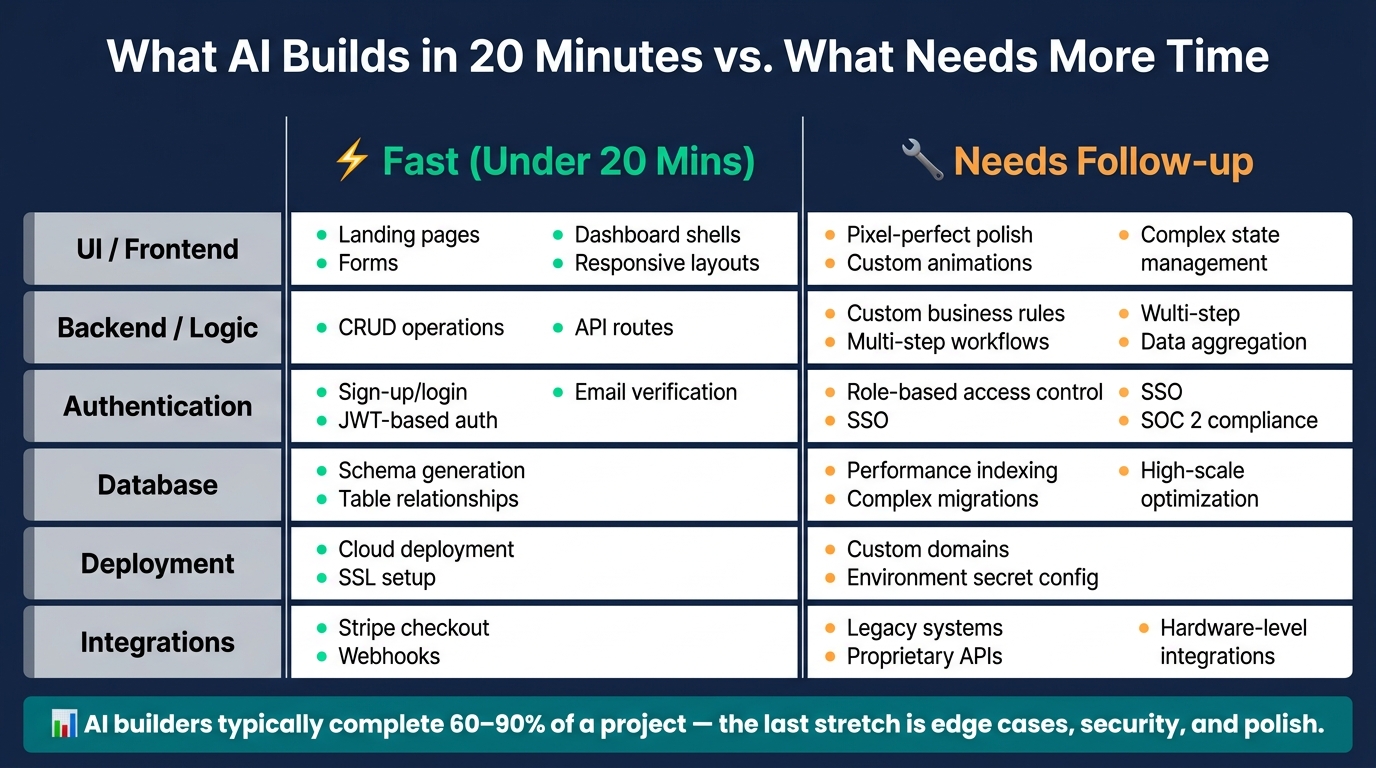
What AI Builds in 20 Minutes vs. What Needs More Time
I Built an App with 5 AI Agents (Claude Code Agent Teams)
sbb-itb-212c9ea
1. What 'a full web app in 20 minutes' actually means
Here, "full web app" means a usable first version that does one main job well. In that time, AI agents can scaffold the core parts of the app from a plain-English prompt.
What gets built in one short session
A focused 20-minute session can turn out the main layers of a web app when the requirements are simple and clearly described.
| Layer | What AI generates |
|---|---|
| Front end | Responsive UI components, navigation routes, forms, and a basic dashboard |
| Back end | API routes, server-side business logic, and request handling logic |
| Database | A schema with relationships and starter database migrations |
| Authentication | Login, registration, and basic user roles, or email login links |
| Deployment | A live, shareable URL through an automated pipeline |
The key is to keep the app built around one core action. Think booking a time slot, logging an invoice, or viewing a data dashboard. That’s where AI builders tend to move fastest: simple CRUD workflows.
A good rule of thumb: if your app needs more than one main flow, it’s no longer a 20-minute build.
What usually needs a second pass
Speed helps with structure. It helps less with polish.
A 20-minute build is a usable draft, not a finished product. As Emily Watson, Software Reviewer at SoftVerdict, put it: "AI-generated apps often look ready before they are ready. That's the little trap."
UI polish is one of the most common gaps. Spacing, colors, and custom styling often need another round. The same goes for complex business logic, multi-file refactors, and edge cases like empty states or long inputs. Row-level security policies usually need a second pass too, so users can’t access each other’s data.
Some features also push past the “done in 20 minutes” line. More than three external APIs, complex billing logic, and real-time features often need manual work or longer agent sessions.
AI builders can lay down the base fast. After that, the work is usually polish, edge cases, and review.
That’s why the best 20-minute builds start with the right kind of app idea.
2. Pick an app idea that fits the 20-minute workflow
Not every app idea works in a 20-minute AI build. The best ones solve one clear problem for one kind of user, such as software developers and engineers. A simple rule helps here: if you can explain the app in one sentence, it probably fits this workflow.
That matters because the agent needs one clear job it can finish from start to finish. If the app tries to do too much, things get messy fast.
Best app types: booking, dashboard, and lead capture
Three app types tend to work well in this setup: booking apps, internal dashboards, and lead capture apps. They usually need only a few screens, simple data, and not many decision paths.
A booking app can let users choose open time slots, confirm appointments, and, if needed, pay a deposit with Stripe. An internal dashboard can pull in data you already have and show it in tables, KPI cards, or simple charts. A lead capture app can collect a name, email, and a few other fields, then save each submission with a status column for follow-up.
The fastest builds usually stick to basic actions:
- Create
- Edit
- View
That’s the sweet spot. Once the app idea is set, the next step is giving the prompt the right inputs.
Start with simple data and user flows
The best first-pass apps use a small set of fields, one or two user roles, and basic actions. When the AI doesn’t have to deal with complex permissions or layered data relationships, it often produces cleaner code on the first try.
Keep the app aimed at one outcome for one user type. That’s where this workflow shines. In February 2026, the Autoflowly team built a full-stack freelancer invoice tracker in 4 minutes with a Next.js frontend, FastAPI backend, PostgreSQL database, JWT authentication, and an income dashboard across four database tables. That’s a good example of the right level of scope.
Lead capture fits this model. Social feeds don’t.
Once the app idea is this focused, the next step is writing the plain-English prompt.
3. Write the plain-English prompt that builds the app
Write the prompt like a build spec, not a search query.
Include pages, roles, fields, and actions
Include these every time: users, screens, data, actions, and the version 1 goal. The more specific the brief, the better shot you have at getting a first draft you can use.
Roles matter more than many people think. If you name roles like Admin and Client, the AI is more likely to set up the right permissions, navigation, and page views from the start.
For data fields, be literal. Don’t say “store booking info.” Say: “store the client’s name, email, selected service, booking date in MM/DD/YYYY format, booking time in 12-hour format, and total fee in USD.” That kind of detail helps cut down on placeholder fields and formatting errors.
| Prompt Element | What to Specify |
|---|---|
| User Roles | Admin, Client |
| Core Screens | Login, Dashboard, Detail Pages, Settings |
| Data Fields | Name, email, status, date (MM/DD/YYYY), price ($0.00) |
| Actions | Create, edit, delete, search, approve, notify, export |
Ask for deployment-ready basics from the start
Put login, database, and mobile layout in the first prompt. Good phrases to use include “include a secure login and signup page,” “use a PostgreSQL or Supabase database,” and “make the layout mobile responsive.” If you want a faster first pass, ask for demo data or seed records too, so you can test the app instead of staring at a blank shell.
Those basics help keep the first draft close to something you can review like a live product.
Example prompt for a simple business app
Use one prompt to define the app, the users, and the data model. Here’s a concrete prompt for a local U.S. service business, adapted from the sample booking prompt in the research:
"Build a class-booking app for a local U.S. yoga studio. Users are Clients and the Admin. Clients see a list of classes with MM/DD/YYYY dates and 12-hour time slots (e.g., 2:00 PM). Clients can book a spot for a $49.00 fee (display as USD). The Admin can log in to a dashboard to see all bookings, add new classes, and cancel sessions. Store classes and bookings in a PostgreSQL database. Ensure the design is mobile responsive and includes a secure login page."
While agents handle the heavy lifting, you can further optimize your workflow by using the best free AI tools for developers to refine the output. With the brief written, the next step is to see which AI agent can turn it into the fastest working build.
4. Build the app step by step and see what AI finishes fastest
Once the prompt is ready, the next step is simple: find out which agent can turn it into a working app the fastest.
Generate the front end, back end, database, and auth
The fastest workflow looks like this: generate, check, fix, publish. You're not chasing perfect code at this stage. You want a first version that works and can go from prompt to live app without a lot of friction.
The quickest builds usually start with the UI layout and app structure, then move into the data model, then authentication, and finally the business logic. After the first draft shows up, check three things before you do anything else:
- Does data save?
- Does login work?
- Do empty states render?
AI tends to finish the main user flow first. Edge cases and error handling usually show up later.
That’s why tool choice matters almost as much as the prompt itself. Keep follow-up prompts tight. Change one thing at a time, and tell the AI not to touch unrelated screens.
Use AI Apps to filter for the fastest full-stack builders
Not every AI builder handles the full stack the same way. Some are good at UI but only produce placeholder backend logic. Others connect a real database but give you rough, plain screens.
AI Apps is a curated directory of 1,900+ AI tools with filtering, search, and side-by-side comparison. Use AI Apps to filter agents by speed, full-stack support, deployment, and database integration - and spot tools that can handle frontend, backend, database, auth, and deployment from a single prompt before you start building.
Comparison table: what fits inside 20 minutes vs. what takes longer
The fastest builders move through parts of the stack at different speeds. You can see this most clearly in booking tools, dashboards, and lead capture apps.
| Stack Layer | Fast (Under 20 Mins) | Needs Follow-up |
|---|---|---|
| UI / Frontend | Landing pages, forms, dashboard shells, responsive layouts | Pixel-perfect polish, custom animations, complex state management |
| Backend / Logic | CRUD operations, API routes | Custom business rules, multi-step workflows, data aggregation |
| Authentication | Sign-up/login, JWT-based auth, email verification | Role-based access control, SSO, SOC 2 compliance |
| Database | Schema generation, table relationships | Performance indexing, complex migrations, high-scale optimization |
| Deployment | Cloud deployment, SSL setup | Custom domains, environment secret config |
| Integrations | Stripe checkout, webhooks | Legacy systems, proprietary APIs, hardware-level integrations |
The pattern stays the same: static structure and standard flows move fast, while custom rules and outside connections almost always need a second pass. Booking, login, and CRUD often fit inside the 20-minute window. Advanced permissions and integrations usually don’t.
5. Test the result, fix the gaps, and decide if it is ready to launch
The first build is done. Now comes the part that saves you from sharing a half-working app.
Once the app is live, test it before you send the link to anyone. This is the pass that catches the gap between “it works” and “it’s ready.”
Check the core flows before sharing it
Set aside about 30 minutes for a clean user pass, or hand the app to someone who hasn’t seen it before. The goal is simple: make sure the core loop works from start to finish.
Start with a few direct checks:
- Sign-up, login, and permissions - Can a new user register, log in, and only see the pages they’re supposed to see? If they refresh the page, does the session stay active?
- Form submission and data save - When a user submits a form, does the data actually get written to the database? Refresh the page and make sure the record is still there.
- Page navigation - Click every button. Follow every route. Broken links and dead ends tend to show up fast when you move through the app like a first-time user.
- Mobile layout - Open the app on a phone or shrink the browser window and see what breaks.
- Basic error handling - Try an empty form. Enter an invalid email. Does the app respond cleanly, or does it fall apart?
A short, focused test pass often turns up a few critical bugs. The good news: those are usually easy to fix with clear follow-up prompts.
When you spot a bug, be precise. A prompt like "After the user submits feedback, show a thank-you message for 2 seconds, then close the widget" is much better than "fix the popup." The more specific you are, the less likely you are to mess up parts that already work.
Know when the 20-minute app is ready to launch
Not every working app needs the same level of review. Simple CRUD apps, internal dashboards, and lead capture pages are often ready to share almost right away. In many cases, feedback from real users beats another round of polishing.
Customer-facing apps are a different story. If the app handles payments, stores sensitive user data, or runs multi-step workflows, look more closely. AI-generated code often skips rate limiting, input validation, and CSRF protection. If your app touches any of that, run a security-focused prompt before launch: "Review this app for vulnerabilities and add rate limiting to all API endpoints."
"Vibe coding is a starting point, not an ending point. The tools get you to version 0.1 fast. Getting from 0.1 to 1.0 still requires engineering judgment." - Ayush Pant, Founder, Aurelius Media
A good rule of thumb: AI builders typically get a project 60–90% of the way there. The last stretch is usually edge cases, security, and polish. For an internal tool or a landing page, that may not stop you from shipping. For a production SaaS, it matters a lot more.
Key takeaways
Keep the MVP tight: one user type, one core action, one data model. Define the pages, fields, roles, and actions in plain English. Then test the main flow, fix gaps with specific prompts, and launch once it works end to end.
FAQs
Do I need coding experience to use AI agents to build a web app?
No. You can build a working web app with AI agents just by describing what you want in plain English, including the frontend, backend, database, and authentication.
Your role is closer to a product manager. You need to spell out what the app is for, what problem it solves, and what users need to do inside it. What matters most isn’t coding experience. It’s giving clear directions, testing what the agent builds, and refining it step by step.
What kinds of web apps are too complex for a 20-minute build?
Apps with complex backend logic, real-time sync like collaborative editors, or deep proprietary integrations are usually too much for a 20-minute build.
The same goes for projects with advanced multi-user state management or workflows that stretch across many data sources. A simple rule of thumb: if you can’t explain the app’s core job in one sentence, the scope is probably too broad for a fast first version.
How do I know if an AI-built app is safe to launch?
Don’t rely on visual checks alone. AI-built apps can look fine on the surface, especially at the MVP stage, but that doesn’t mean they’re ready to handle real user data.
A proper security review matters before launch. Common problems include:
- Missing input validation
- Broken access control
- Weak authentication setup
Before you go live, test every form with real data. Push on edge cases. Watch how people use the app, not just how it looks in a demo.
Treat AI-generated code as a starting point. It still needs a professional review before you trust it in production.