Productivity
What is ClawdBot? - Full Review, Features & Security
Review of ClawdBot (now Moltbot): self-hosted AI assistant with persistent memory, browser and shell control, messaging integrations, and security trade-offs.
What is ClawdBot? - Full Review, Features & Security
ClawdBot, now renamed Moltbot as of January 27, 2026, is an open-source AI assistant that connects language models like Claude or GPT to tools such as web browsers, file systems, and messaging apps. It stands out by being self-hosted, offering users control over their data while automating tasks like email management, coding, and scheduling - all through platforms like WhatsApp, Telegram, and Slack.
Key Features:
- Self-hosting: Runs on local hardware (macOS, Windows, Linux) for privacy.
- Persistent memory: Stores and retrieves data using Markdown files.
- Tool integrations: Connects to terminal, browsers, and APIs.
- Model flexibility: Supports Claude, GPT, or local models via Ollama.
- Messaging support: Works with WhatsApp, Discord, iMessage, and more.
Security Considerations:
- Data is stored locally, not in the cloud.
- Includes tools for audits and sandboxing to limit risks.
- Users must manage shell access carefully to prevent misuse.
While Moltbot is powerful, it requires technical skills to set up and maintain. Costs range from $5 to $30 per month for cloud-based models, but local use is free with sufficient hardware. It's ideal for software developers and engineers, privacy-conscious users, and those seeking advanced task automation.
Main Features of ClawdBot
Persistent Memory with memory.md
ClawdBot employs a two-layer memory system designed to store information locally as plain Markdown files within its workspace. The first layer consists of daily interaction logs saved as memory/YYYY-MM-DD.md, which capture day-to-day exchanges and any details you ask it to remember. The second layer, stored in MEMORY.md, holds carefully selected long-term data like user preferences, key decisions, and other enduring facts.
To retrieve stored information, ClawdBot uses a hybrid search mechanism. This combines semantic search (using vector similarity via sqlite-vec) with keyword matching (using BM25 through FTS5). The system applies a weighted scoring formula - 70% based on vector similarity and 30% on keyword relevance - while maintaining a minimum relevance threshold of 0.35. To ensure accuracy, memory files are segmented and re-indexed for semantic consistency.
"Memory is stored as plain Markdown, ensuring transparency and ease of editing."
- Manthan
Users can manually edit these Markdown files to adjust or update the bot’s knowledge as needed. Before summarizing conversation history, ClawdBot performs a "pre-compaction memory flush" to safeguard important details. Additionally, it supports creating multiple agents, ensuring that memory remains isolated across different contexts.
Beyond memory management, ClawdBot integrates seamlessly with system tools for broader functionality.
Terminal Access and Headless Browser Control
ClawdBot can execute shell commands, run scripts, and manage system processes directly through chat platforms like Telegram or WhatsApp. Its headless browser feature extends its capabilities to website navigation, data extraction, and task automation.
"A smart model with eyes and hands at a desk with keyboard and mouse. You message it like a coworker and it does everything a person could do with that Mac mini."
- Nathan Clark
This functionality simplifies remote development, error monitoring, and AI automation tools to streamline workflows. The bot is even capable of solving its own issues. For example, one user shared, "My @moltbot realised it needed an API key… it opened my browser… opened the Google Cloud Console… Configured oauth and provisioned a new token". The headless browser can handle tasks such as taking screenshots, generating PDFs, running custom JavaScript, and managing file uploads or downloads, making it a powerful tool for automating web-based processes.
These features are complemented by ClawdBot’s flexible architecture, which supports a variety of AI models.
Model-Agnostic Architecture
ClawdBot’s architecture is built to adapt to a range of operational needs while balancing cost and performance, following an AI tools selection checklist. It supports major AI providers as well as local models, offering users the flexibility to choose based on their preferences. Real-time usage tracking and an automatic failover system further enhance its reliability.
Users can integrate their own API keys or use OAuth for subscriptions like Claude Pro/Max or ChatGPT/Codex. For those prioritizing privacy or offline functionality, local models such as Llama and Mistral can be deployed through Ollama.
The Model Failover feature ensures uninterrupted functionality by automatically switching to a backup model if the primary one becomes unavailable or hits a rate limit. Multi-agent routing allows users to assign specific models to different agents or workspaces, optimizing both performance and cost. These models can be managed directly via the CLI with commands like moltbot models scan to detect available options and moltbot models set to assign primary or fallback models.
"First I was using my Claude Max sub and I used all of my limit quickly, so today I had my clawd bot setup a proxy to route my CoPilot subscription as a API endpoint so now it runs on that."
- @jonahships_
This setup empowers users to make the most of their subscriptions while maintaining control over resources and performance.
ClawdBot Explained: Setup Guide, Real Use Cases & Safety Tips
Setup and Integration
To get started with ClawdBot, ensure you have Node.js version 22 or higher installed. The bot runs natively on macOS (both Intel and Apple Silicon) and Linux (Ubuntu, Debian). If you're using Windows, you'll need to install Windows Subsystem for Linux 2 (WSL2), preferably with Ubuntu. Installation is straightforward and can be done with a single command:
curl -fsSL https://clawd.bot/install.sh | bash
Alternatively, you can use npm:
npm install -g moltbot@latest
Once installed, run the following command to launch the interactive setup wizard:
moltbot onboard --install-daemon
This wizard will guide you through configuring AI models, messaging platforms, and background services. ClawdBot operates as a background service using launchd on macOS and systemd on Linux/WSL2. Configuration files are stored at ~/.clawdbot/moltbot.json, and the workspace is located at ~/clawd.
Self-Hosting Options
ClawdBot can run locally on your machine or on a private server, giving you complete control over your data and uptime. By default, it uses port 18789 for its local Gateway WebSocket. For continuous availability, consider deploying ClawdBot on a Linux-based VPS, such as AWS EC2 or Hetzner. However, avoid exposing the Gateway port to the public internet unless you have proper authentication in place.
After installation, run this command to check for potential security risks:
moltbot security audit --deep
For Linux users, ensure the Gateway service stays active after logout by enabling lingering:
sudo loginctl enable-linger $USER
If you encounter any issues, use the following command to run health checks and apply fixes:
moltbot doctor
"Clawd disaster incoming if this trend of hosting ClawdBot on VPS instances keeps up, along with people not reading the docs and opening ports with zero auth... I'm scared we're gonna have a massive credentials breach soon."
- @fmdz387, Security Researcher
Once hosting is secure, you can move on to integrating your messaging platforms.
Connecting Messaging Platforms
ClawdBot supports a variety of messaging platforms, including:
- Telegram
- Discord
- Slack
- Google Chat
- iMessage (macOS)
- MS Teams
- Signal
- Line
- Matrix
- Zalo
- Mattermost
To connect these platforms, follow these steps:
- Run the onboarding wizard.
- Enter the required credentials, such as API tokens or session logins.
-
Start the Gateway process using:
moltbot gateway
For WhatsApp, execute the following command and scan the QR code using the "Linked Devices" feature in the mobile app:
moltbot channels login
For Telegram, obtain a Bot API token from @BotFather and add it to your configuration file or set it as the TELEGRAM_BOT_TOKEN environment variable. Similarly, for Discord, you'll need a Bot API token, which is configured in the channels.discord section of your settings.
By default, ClawdBot uses a pairing security approach for direct messages. Unknown contacts receive a code that you must approve with:
moltbot pairing approve <channel> <code>
To verify connection health, you can run:
moltbot status --all
or
moltbot health
For group chats, you can toggle between "mention-only" and "always respond" modes using the /activation command.
Customizing Features and Workflows
ClawdBot offers extensive customization options through Markdown files in your workspace:
AGENTS.md: Define core instructions.SOUL.md: Set the bot's personality.IDENTITY.md: Provide background details.TOOLS.md: List available capabilities.
The main configuration is stored in ~/.clawdbot/moltbot.json.
For advanced tasks, you can create multiple agents with isolated workspaces, session histories, and system prompts. Use this command to add a new agent:
moltbot agents add [name]
You can also install pre-built skills from the ClawdHub marketplace or develop custom plugins. ClawdBot even has the ability to generate new skills dynamically.
To keep your workspace organized, convert the ~/clawd directory into a private Git repository for version control. For added security, enable sandbox mode for group chats by setting agents.defaults.sandbox.mode to "non-main." This ensures tools run in a Docker container, protecting your host system from untrusted input.
Finally, use the following command to adjust settings interactively without editing JSON files manually:
moltbot configure
sbb-itb-212c9ea
How to Use ClawdBot
Research and Data Collection
ClawdBot is a powerhouse when it comes to handling operations. It can navigate websites, fill out forms, click buttons, and pull data straight into your workspace. For instance, it can extract structured information, such as email addresses and names, from PDFs while automatically removing duplicates.
You can also create custom skills to connect with external APIs, simplifying your research process. A great example comes from January 2026, when user Sharoni_k configured ClawdBot to pull data directly from their WHOOP fitness tracker. This setup delivered proactive daily updates and health metric summaries through chat.
For those diving into web research, you can integrate the Brave Search API by using the command: moltbot configure --section web. To ease into the platform, start with low-stakes tasks like organizing files or compiling weekly research briefs before tackling more advanced integrations.
And yes, these research capabilities naturally extend to content creation.
Content Creation and Automation
ClawdBot’s persistent memory is a game-changer for creating consistent content. It stores brand voices, style guides, and content preferences, making it easier to draft social media posts, emails, and other written materials [3, 25].
The platform also supports automated skill creation. For example, it can transform YouTube videos or articles into reusable agent tasks. When working on more complex projects, like detailed content drafts or coding, you can use the /think high command to enable deeper reasoning and improve the quality of the output.
Monitoring and Notifications
ClawdBot doesn’t stop at research and content - it’s also a vigilant monitor. It uses cron jobs, background tasks, and heartbeats to take proactive actions [12, 25]. By connecting to APIs for weather updates, cryptocurrency data, or health trackers, ClawdBot can send real-time updates directly to your favorite messaging platforms [3, 25].
In January 2026, developer Braydon Coyer created a "Jarvis" persona with ClawdBot. This setup handled daily briefings and calendar checks, even providing reminders on when to leave for appointments based on live traffic updates. Another example is user Antonplex, who integrated ClawdBot with a Winix air purifier to monitor biomarker goals and adjust room air quality settings based on real-time data.
"Proactive AF: cron jobs, reminders, background tasks. Memory is amazing, context persists 24/7." - Dan Peguine
You can also enable periodic status updates to receive regular summaries [12, 17]. For secure remote monitoring from a VPS, tools like Tailscale or Cloudflare Tunnels are recommended instead of exposing ports directly to the public internet.
Security and Privacy
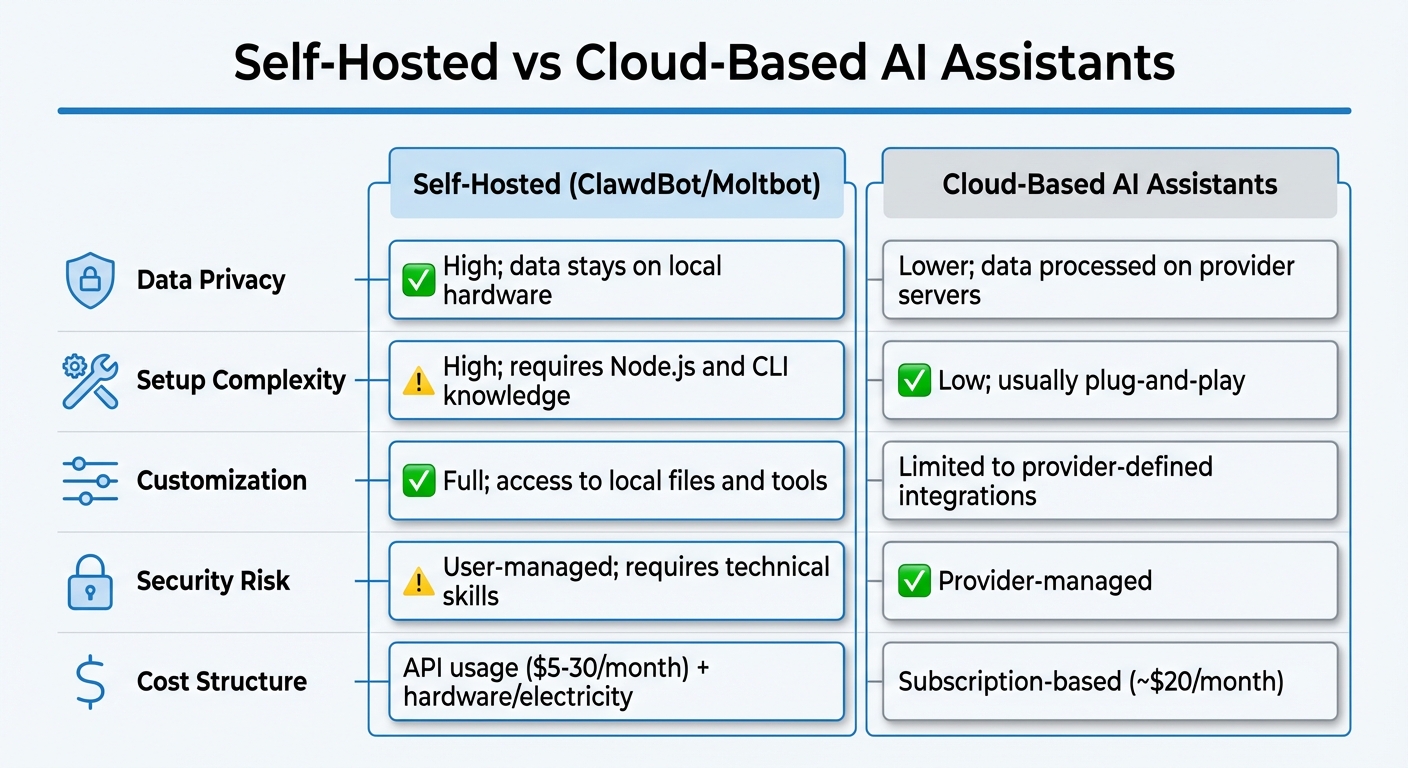
Self-Hosted ClawdBot vs Cloud-Based AI Assistants Comparison
ClawdBot isn't just about functionality - it also prioritizes secure and private operations to keep your data safe.
Local Control for Better Privacy
One of ClawdBot's standout features is its commitment to local control. Instead of relying on third-party servers, it stores session transcripts, credentials, and logs directly on your hardware. By default, it operates on 127.0.0.1, ensuring all connections remain local. For those who need secure remote access, integration with Tailscale is an option, eliminating the need to expose public ports. On top of that, ClawdBot automatically redacts sensitive information in logs, such as tool arguments and secrets, to protect your data.
Risks and Limitations
Running an AI agent with shell access isn't without risks. As Peter Steinberger, the creator of ClawdBot, aptly puts it:
"Running an AI agent with shell access on your machine is… spicy" [27, 28].
This is no exaggeration. The bot's ability to execute commands, modify files, and even control your browser means that mistakes can lead to serious consequences. One significant concern is prompt injection, where untrusted inputs - like those from web pages, emails, or attachments - could manipulate the bot's behavior. For instance, during early testing, a tester's find ~ command ended up dumping their entire home directory structure into a group chat.
To help users navigate these risks, ClawdBot includes a security audit tool. By running moltbot security audit --fix, you can automatically tighten permissions and secure gateway defaults. For high-risk tools like shell execution, the platform offers optional sandboxing to limit access to your filesystem. Additional safeguards include DM pairing with codes that expire after an hour, user-specific allowlists, and mention gating in group chats [27, 8].
The Moltbot Security Documentation underscores this point:
"There is no 'perfectly secure' setup. The goal is to be deliberate about: who can talk to your bot, where the bot is allowed to act, and what the bot can touch."
Using modern, instruction-hardened models like Anthropic Claude 3.5 or 4.5 further reduces the risk of hijacking. Additionally, setting file permissions to 600 for your configuration file and 700 for your state directory ensures that other local users cannot access your credentials.
Cost and Security Trade-Offs
Self-hosting ClawdBot offers unparalleled privacy and customization, but it comes with its own challenges. It requires technical know-how and regular maintenance. The software itself is free and open-source, but you'll need to budget for API usage costs, which typically range between $5 and $20 per month, along with any hardware or VPS expenses [8, 28].
Here’s a quick comparison of self-hosting ClawdBot versus using cloud-based AI assistants:
| Feature | Self-Hosted (ClawdBot) | Cloud-Based AI Assistants |
|---|---|---|
| Data Privacy | High; data stays on local hardware | Lower; data processed on provider servers |
| Setup Complexity | High; requires Node.js and CLI knowledge [28, 8] | Low; usually plug-and-play |
| Customization | Full; access to local files and tools | Limited to provider-defined integrations |
| Security Risk | User-managed; requires technical skills | Provider-managed |
| Cost Structure | API usage plus hardware/electricity | Subscription-based (e.g., around $20/month) |
As tech editor Timothy Beck Werth explains:
"Clawdbot isn't a normal piece of software... you'll need some technical competence to use it properly and keep it secure".
Conclusion
Key Takeaways
ClawdBot, rebranded as Moltbot in January 2026, has gained recognition with over 10,000 GitHub stars for its unique approach to AI. Unlike traditional AI tools that focus on answering questions, Moltbot is designed to execute tasks, making it a powerful ally for developers, system administrators, and other technical users aiming to streamline their workflows. Key features include persistent memory and seamless messaging integration, both of which enhance task automation and operational efficiency.
On the security front, Moltbot’s local-first architecture ensures your data stays on your hardware, not on external servers. Tools like the moltbot security audit --fix command simplify the process of tightening permissions, while optional sandboxing adds an extra layer of protection by restricting filesystem access during high-risk operations. While the software itself is free and open-source, users typically spend between $5 and $30 monthly on API costs.
Final Recommendations
To use Moltbot effectively and securely, it’s important to balance innovation with caution. This tool is best suited for users who are comfortable with terminal commands and have a solid understanding of the risks associated with granting an AI shell access. Basic command-line skills and awareness of potential prompt injection vulnerabilities are crucial. Start with simpler, low-risk tasks to build confidence before tackling more complex operations.
For uninterrupted availability, consider deploying Moltbot on a dedicated machine like a Mac Mini or Raspberry Pi instead of a personal laptop. Setting strict spending limits on your AI provider accounts is also a smart move to avoid unexpected costs. As Artifact Innovations aptly states:
"The agent reduces friction and accelerates building - but it does not eliminate the need to define the workflow".
With the right technical know-how and a cautious approach, Moltbot offers capabilities that go far beyond what standard AI assistants can achieve.
FAQs
How does Moltbot protect my data and ensure security when self-hosted?
Moltbot, formerly known as ClawdBot, is designed with privacy and security at its core. As a locally-hosted AI assistant, it operates directly on your own hardware - whether that’s a personal computer or a dedicated server. This means your sensitive data stays with you, without being processed or stored in external cloud services. By keeping everything local, the risks of data breaches or unauthorized access are significantly reduced.
To ensure your setup remains secure, proper configuration is key. Some best practices include:
- Using strong authentication methods to protect access.
- Securing administrative interfaces to prevent unauthorized changes.
- Disabling public access to sensitive parts of the system.
- Regularly updating the software to patch vulnerabilities.
By following these steps, you can confidently use Moltbot while keeping your data private and secure.
What skills do I need to set up and manage Moltbot effectively?
To manage Moltbot effectively, you'll need a bit of technical expertise. Having a basic understanding of command-line interfaces (CLI) is essential since installation and setup often require running commands in a terminal. Familiarity with server management tools like Docker or Ansible can simplify deployment and updates, particularly if you're hosting Moltbot on a local server or a cloud platform. Additionally, knowing how to configure integrations with messaging platforms like WhatsApp, Telegram, or Discord is vital for ensuring smooth functionality.
Day-to-day management involves keeping things secure and running efficiently. This means monitoring performance, applying updates, and protecting data privacy. If you have skills in scripting or automation, you can take things further by customizing Moltbot’s features or linking it to other tools and services. A combination of CLI skills, server management know-how, and integration expertise will help you get the most out of Moltbot.
Can Moltbot work with multiple messaging platforms at the same time?
Moltbot works effortlessly with a variety of messaging platforms at the same time. These include WhatsApp, Telegram, Discord, Slack, Signal, iMessage, Microsoft Teams, Nextcloud Talk, Matrix, Nostr, Tlon Messenger, and Zalo, among others.
This capability makes it a great option for businesses and teams aiming to simplify communication across multiple channels while maintaining smooth and effective interactions.