Productivity
From Senior to Lead: How Cursor and Claude Code are Doubling Developer Velocity.
AI code assistants streamline IDE edits and terminal automation, cutting rework and doubling developer velocity.

From Senior to Lead: How Cursor and Claude Code are Doubling Developer Velocity.
By 2026, developers are spending less time writing code and more time orchestrating workflows and making architectural decisions. Tools like Cursor and Claude Code are transforming how developers work, automating tedious tasks and enabling higher-level problem-solving. Here's what you need to know:
- Cursor integrates into VS Code and excels at rapid code editing, refactoring, and debugging with features like natural language editing and multi-agent workflows.
- Claude Code operates in the terminal, automating large-scale tasks like multi-file refactors and CI/CD pipelines, with advanced capabilities like a 200,000-token context window and parallel agent teams.
- Both tools significantly reduce coding time, with Cursor improving task speeds by up to 38% and Claude Code cutting rework by 30%.
Key takeaway: These tools aren't about replacing developers - they're about enabling them to lead. Whether you're managing pull requests and commit messages or tackling system-wide changes, combining Cursor for quick edits with Claude Code for large-scale automation can double your productivity.
1. Cursor
Core Features
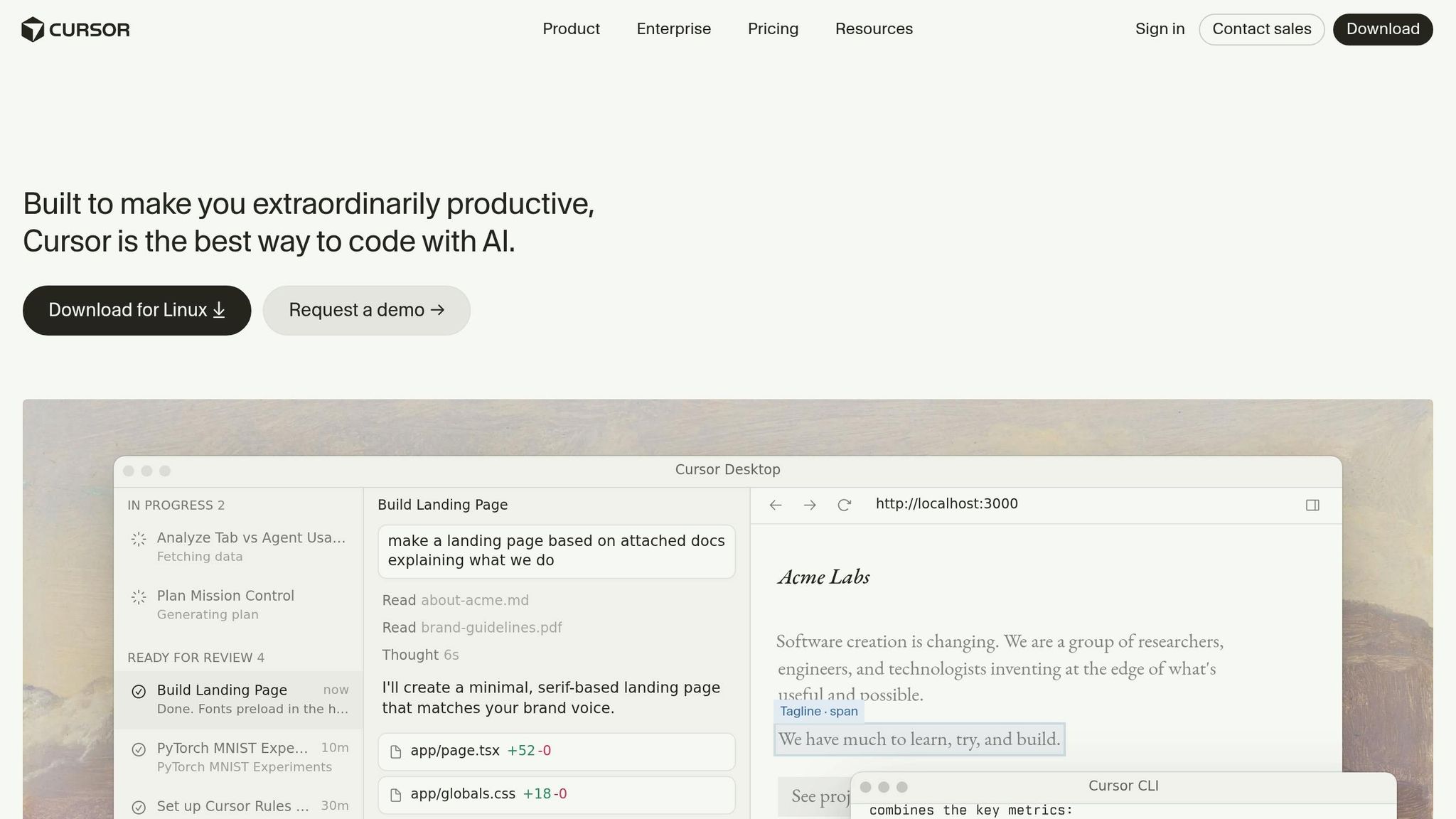
Cursor blends AI capabilities with the familiar environment of VS Code, incorporating its extensions, keybindings, and themes. One standout feature, Composer, lets you describe multi-file edits using natural language. It then proposes a detailed plan for your review before applying changes across the codebase. Another feature, Agent Mode, operates autonomously, navigating your code, running terminal commands, and executing multi-step plans without requiring constant input.
The tool’s cloud agent infrastructure supports running 10–20 cloud agents on isolated virtual machines simultaneously. These agents can handle tasks like building features, running tests, and executing parallel workflows. BugBot, an autofix agent, identifies and resolves logic and security issues in pull requests, fixing over 70% of flagged bugs automatically. For developers working on large codebases, Instant Grep provides lightning-fast searches in monorepos, while its semantic search goes beyond keyword matching to understand symbol relationships. Together, these features aim to boost productivity significantly.
Productivity Gains
Cursor users have reported considerable productivity improvements. Developers who have mastered the tool see a 38% performance boost, with companies like Sisense experiencing task completion speeds two to three times faster than before. Ray Luxembourg, Staff Engineer at Sisense, shared:
"When using Cursor at Sisense, Cursor's AI context engine helped me trace unfamiliar logic in a few minutes. That used to take an hour. It's like pairing with an engineer who never gets tired."
However, new users may initially experience a 19% slowdown compared to non-AI users due to the learning curve and adjusting to the tool’s interface. To make the most of Cursor, it’s essential to set time limits for AI interactions and avoid getting caught up in tasks where the AI doesn’t quite deliver.
Integration and Workflow
Cursor fits neatly into existing workflows through .cursorrules files, which store project-specific knowledge. Instead of relying on a single extensive rules file, developers can organize standards, tech stack constraints, and architectural guidelines into modular .mdc files within the .cursor/rules/ directory.
The Agents Window serves as a central hub, allowing you to manage both local and cloud agents from one interface (Cmd + Shift + P). Cloud agents tackle heavy-duty tasks on isolated virtual machines, providing demos or screenshots for review. Once reviewed, you can shift the session back to your local environment to refine the work using Composer 2. Risky edits are handled in isolated worktrees, enabling side-by-side comparisons of multiple AI-generated solutions without affecting the primary code branch.
Leadership Enablement
Cursor goes beyond coding assistance by enabling senior developers to focus on higher-level responsibilities like system design. Its "Two-Pass" protocol minimizes errors by separating implementation and review phases. For example, you can use a command like /build-widget to implement a feature, then follow up with /qa-review to have the AI act as a reviewer.
Custom slash commands and executable Skills allow you to bundle complex workflows into reusable commands. Additionally, BugBot automates the initial code review, identifying an average of 0.7 bugs per pull request. This frees up developers to concentrate on architectural decisions and broader project goals.
sbb-itb-212c9ea
2. Claude Code
Core Features
Claude Code stands out by functioning as a terminal-native autonomous agent rather than an IDE extension. It operates directly in the command line, acting as a programmable operator capable of handling entire codebases and executing multi-step workflows autonomously. This includes writing code, running tests, fixing issues, and managing Git operations without manual input.
One of its most impressive features is its 200,000-token context window, which remains fully functional for mid-sized apps or even large monorepos. Beta versions with a 1 million-token window have also been reported. Another highlight is the Agent Teams feature, allowing multiple Claude Code instances to communicate directly. Sub-agents can manage focused tasks in parallel while keeping their contexts isolated, enabling large-scale architectural changes across numerous files. Every change is auto-checkpointed, making it easy to roll back after bold refactors.
Additionally, the Model Context Protocol (MCP) connects Claude Code to over 200 standardized services like GitHub, Slack, Google Drive, and various databases. This allows workflows to extend beyond local codebases and into broader operational tasks.
These capabilities are designed to enhance productivity and workflow efficiency significantly.
Productivity Gains
Claude Code has been independently tested to use 5.5 times fewer tokens for the same tasks, cutting costs and speeding up execution. It reduces code rework by about 30%, often delivering the correct implementation within one or two iterations. Its autonomous execution loop handles the entire "test-fix-commit" cycle by running tests, analyzing errors, patching files, and repeating until all tests pass - without requiring human intervention.
In benchmarks, Claude Code achieved a 100% test pass rate during complex Express.js refactors. One multi-file feature implementation consumed just 33,000 tokens compared to 188,000 tokens used by competing tools [20, 9]. On average, developers spend around $6 per day on Claude Code, with 90% of users keeping costs below $12. The Pro plan, priced at $20 per month, offers approximately 44,000 tokens within a five-hour rolling window, while Max plans - ranging from $100 to $200 per month - provide nearly unlimited usage.
Integration and Workflow
Claude Code integrates seamlessly into the terminal and works alongside any editor, such as Vim, Neovim, VS Code, or JetBrains, allowing developers to keep their preferred setups. With Git worktree support, developers can run parallel sessions across different branches, facilitating simultaneous development. Hooks can be configured to validate changes or trigger tests, while scheduled Routines or GitHub-triggered events automate repetitive tasks like formatting or safeguarding against destructive commands.
The CLAUDE.md file serves as a repository for project-specific guidelines, coding standards, and architectural principles, ensuring consistent context across teams and reducing the time spent re-explaining project requirements. As of April 2026, Claude Code reported a 300% growth in usage.
This integration not only improves day-to-day workflows but also positions Claude Code as a key tool for managing complex projects.
Leadership Enablement
Claude Code empowers senior developers to focus on strategic leadership tasks, such as planning, architecture, and workflow orchestration. For example, in January 2026, Alejandro Saucedo, Engineering Director at Seldon, used Claude Code to build a complete Kubernetes Agent Orchestration System (K.A.O.S.) in just two days. The project included a Golang control-plane, Python data-plane, React UI, and full CI/CD with end-to-end testing - work that would typically take weeks and involve multiple specialists.
"The new 10x isn't typing faster; it's steering better. When you can generate and integrate at a higher level, the differentiator becomes what you choose to build, how precisely you specify it, and how aggressively you verify it." - Alejandro Saucedo, Engineering Director at Seldon
The tool’s Analytics API provides usage metrics and cost data, which can be integrated into KPI dashboards to showcase productivity gains. Boris Cherny, Head of Claude Code at Anthropic, led a team to develop "Cowork", a file management agent for non-coders, in just 1.5 weeks during January 2026 - primarily using Claude Code.
"Engineers feel unburdened by routine tasks." - Boris Cherny, Head of Claude Code at Anthropic
In the 2026 Pragmatic Engineer survey, Claude Code was rated "most loved" by 46% of developers, far surpassing the 19% rating for other tools. This highlights how it enables senior developers to focus on setting team standards and making high-level architectural decisions.
Cursor vs Claude Code | The Ultimate Comparison Guide
Pros and Cons
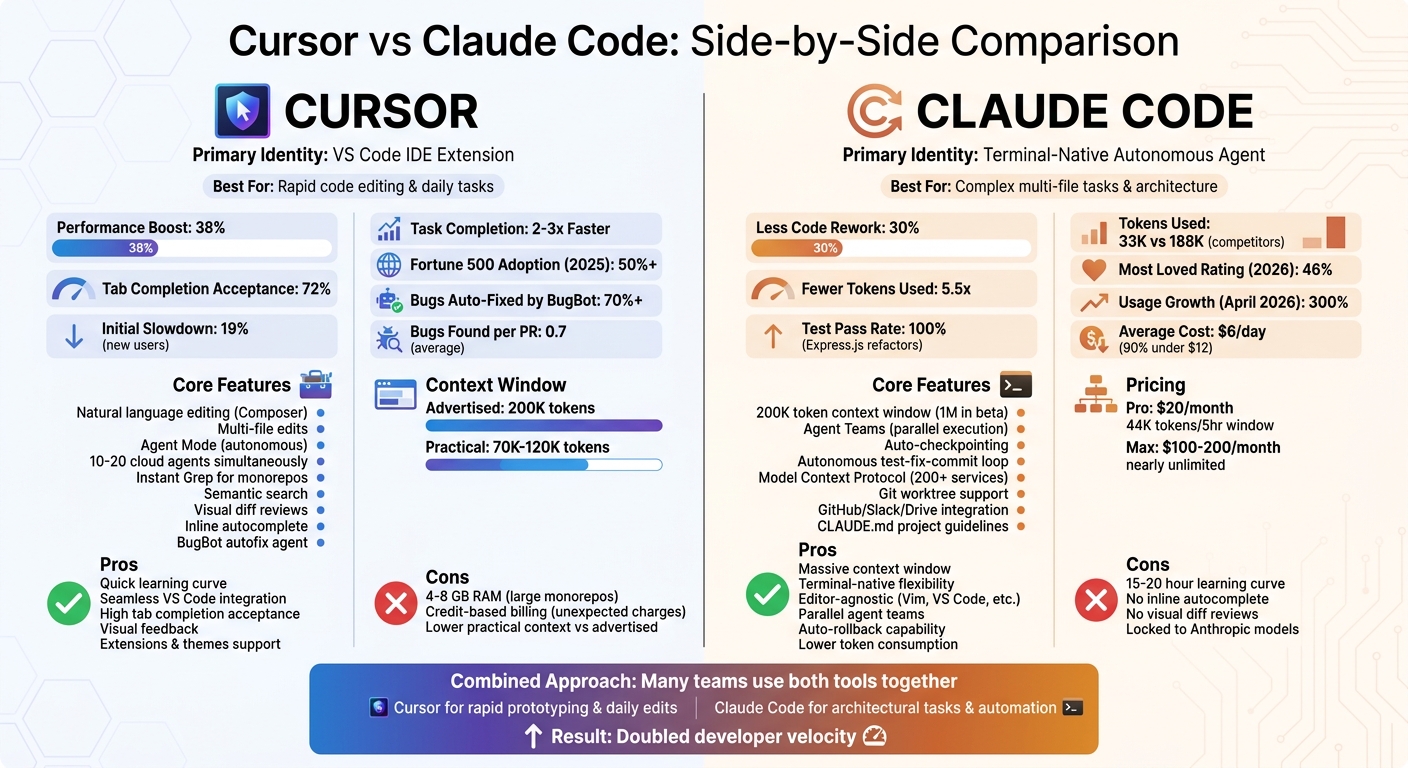
Cursor vs Claude Code: Feature Comparison and Productivity Metrics for Developers
Cursor and Claude Code serve different purposes within the development workflow. Cursor enhances VS Code by adding precise features like inline editing, visual diff reviews, and tab completions. Impressively, its tab completions boast a 72% acceptance rate. With a quick learning curve and adoption by over 50% of Fortune 500 companies projected by 2025 [6,26], Cursor is a solid choice for developers looking to integrate AI into their IDE seamlessly.
On the other hand, Claude Code functions as a terminal-native autonomous agent focused on the "execution layer." It excels at handling complex, multi-file tasks by automating the test-fix-commit loop. Its efficiency comes from reduced token consumption and about 30% less code rework compared to alternatives [31,9].
Trade-offs
Cursor has some limitations. In large monorepos, it can use between 4–8 GB of RAM, and while it advertises a 200K context window, the practical range often falls between 70K–120K tokens [31,9]. Additionally, its credit-based billing system can lead to unexpected charges [6,7].
Claude Code also has its challenges. It requires 15–20 hours for users to become proficient and lacks features like inline autocomplete and visual diff reviews [5,6,7]. Moreover, it restricts users to Anthropic's models [6,7].
These differences influence how developers approach productivity. Cursor is ideal for accelerating daily coding tasks, while Claude Code focuses on strategic, large-scale architectural work.
Combining Tools for Maximum Impact
Many teams now use Cursor and Claude Code together to leverage their strengths - Cursor for rapid prototyping and Claude Code for automating complex architectural tasks [7,8]. To avoid unexpected costs, developers should enable spend limits in Cursor [6,7]. Meanwhile, Claude Code’s automatic checkpoints offer a safety net, allowing teams to roll back significant changes with ease [3,6].
Conclusion
Cursor and Claude Code both offer powerful ways to boost productivity, each excelling in specific areas of a developer's workflow. Cursor shines when it comes to speeding up routine edits, while Claude Code simplifies complex tasks like refactoring and debugging. This shift - from writing every single line of code to managing AI agents - allows senior developers to take on more strategic roles, such as reviewing multiple pull requests simultaneously instead of tackling them one by one. Your choice between these tools should depend on what your workflow demands most.
"AI doesn't kill software engineering. It just kills the illusion that writing the code was ever the hard part." - Boris Cherny, Creator of Claude Code
To make the most of these advancements, pick the tool that aligns best with your daily tasks. If your work revolves around building features in an IDE and you need quick, visual feedback, Cursor is likely the better match. On the other hand, for tasks like architectural shifts, debugging in production, or automating CI/CD pipelines, Claude Code can save you significant time. Many developers are now combining Cursor's speed in editing with Claude Code's capabilities in terminal automation.
FAQs
When should I use Cursor vs. Claude Code?
Use Cursor when you need a visual and interactive coding workspace. With features like inline code completions, diffs, and real-time editing directly in your IDE, it's perfect for tasks that demand precision, refactoring, or seamless collaboration in team settings.
On the other hand, Claude Code shines in terminal-based automation. It's designed to manage complex refactors or system-level changes with ease. By analyzing your codebase, planning, and executing with minimal input, it's an excellent choice for handling large-scale and intricate projects efficiently.
How do I use both tools together safely?
To make the most of Cursor and Claude Code together, it's essential to play to their strengths. Assign Cursor tasks like precise, file-specific edits and code reviews directly within the IDE. On the other hand, turn to Claude Code for larger-scale operations, such as multi-file refactoring or system-level tasks, using its terminal interface.
Keep their roles distinct to avoid overlap. This approach reduces potential conflicts and ensures smoother collaboration between the tools. Many users have reported noticeable productivity gains when combining their workflows in this way.
How can I measure real velocity gains on my team?
To get a sense of how much faster your team is moving, keep an eye on metrics like task completion times, features shipped, code quality (such as revert rates), and developer throughput. These metrics offer valuable insights into productivity shifts and show how AI tools are influencing your team's workflows. By consistently tracking these over time, you'll gain a better understanding of how AI-driven development boosts both efficiency and results.