Productivity
The Ultimate Showdown: Why Developers are Switching from ChatGPT to Gemini in 2026.
Why developers are switching: faster code processing, huge context windows, multimodal inputs, and native Workspace integration.

The Ultimate Showdown: Why Developers are Switching from ChatGPT to Gemini in 2026.
Software developers and engineers in 2026 are choosing Gemini over ChatGPT for its faster performance, larger context window, and deep integration with Google Workspace. Gemini processes entire codebases, handles multimodal inputs (text, images, video, and audio), and delivers results in seconds. With API costs 20-60% lower and seamless compatibility with tools like Gmail, Drive, and Docs, it's becoming the go-to choice for coding and collaboration, ranking among the best AI tools for developers.
Key Takeaways:
- Context Window: Gemini supports up to 2 million tokens, while ChatGPT caps at 400K.
- Speed: Gemini processes code 5x faster (5 seconds vs. 25 seconds).
- Multimodal Inputs: Gemini handles text, images, video, and audio; ChatGPT is text-only.
- Integration: Gemini works natively with Google Workspace, unlike ChatGPT's plugin-based approach.
- Cost: Gemini's API pricing is more affordable, with batch processing discounts.
Quick Comparison Table:
| Feature | Gemini 3.1 Pro | ChatGPT (GPT-5.4) |
|---|---|---|
| Context Window | 1M–2M tokens | 128K–400K tokens |
| Response Speed | ~5 seconds | ~25 seconds |
| Multimodal Support | Yes | No |
| Workspace Integration | Native (Gmail, Drive, Docs) | Limited (via plugins) |
| API Cost (Input) | $2/1M tokens | $2.50/1M tokens |
Gemini is redefining how developers interact with AI tools, offering better speed, scalability, and ecosystem compatibility for modern workflows.
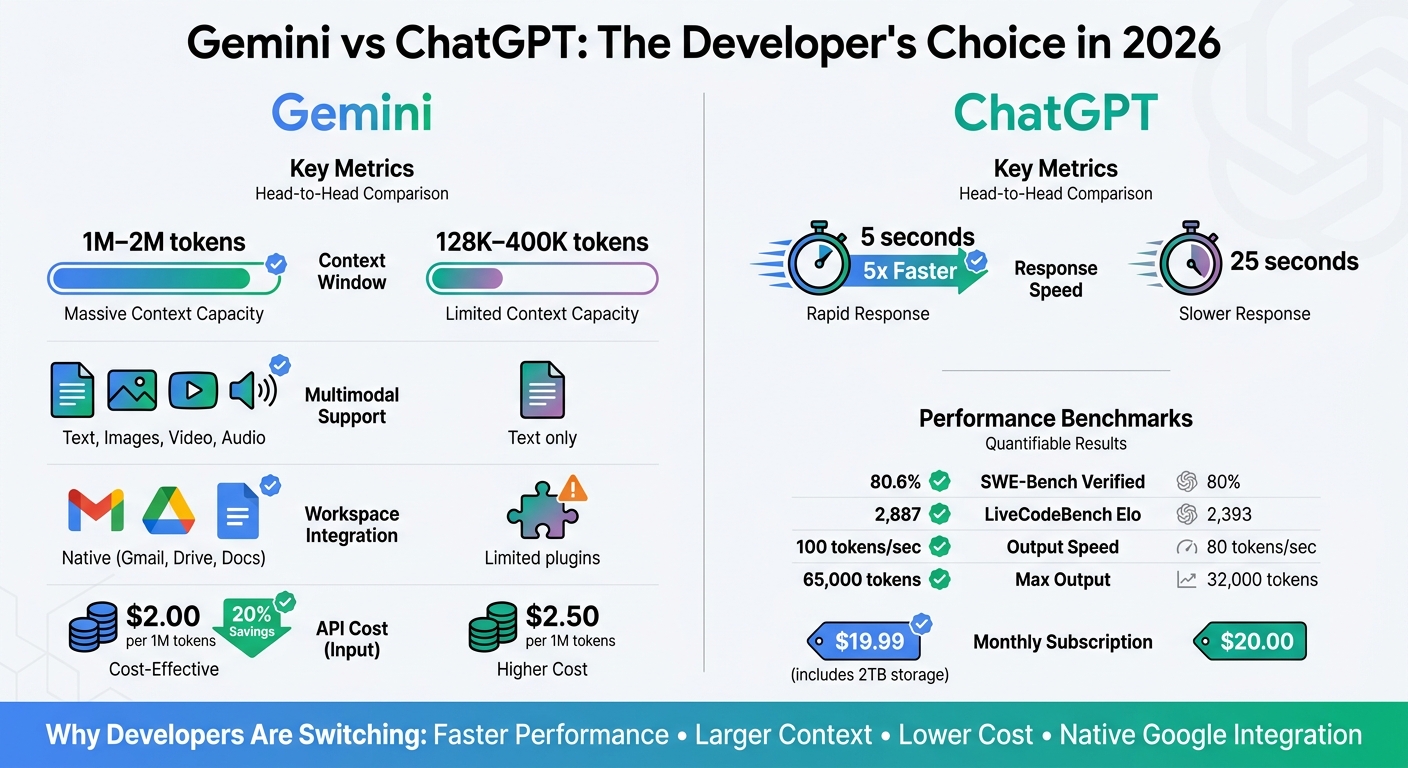
Gemini vs ChatGPT Developer Comparison 2026
Gemini's Performance and Productivity Advantages
Better Code Generation and Debugging
Gemini 3.1 Pro’s 1-million-token context window is a game-changer for developers. It eliminates the need for file chunking and resolves cross-file dependency issues by processing entire codebases in one go. For instance, during testing, developers were able to handle a 35,000-line Node.js application without breaking it into smaller parts - a task that previously required workarounds with ChatGPT.
Gemini also excels in reasoning. It scored 80.6% on the SWE-Bench Verified benchmark, which measures how well an AI resolves real GitHub issues, and achieved a LiveCodeBench Pro Elo of 2,887, outperforming ChatGPT’s 80% score and Elo of 2,393.
"Gemini follows modern best practices by selecting up-to-date solutions over frequently repeated, outdated ones."
– Kumar Harsh, Software Developer
Another standout feature of Gemini is its ability to adhere to modern framework standards. For example, when working with Angular 19.2, it identified the correct, non-deprecated solution, while ChatGPT suggested an outdated approach due to older training data. This capability is further enhanced by Gemini’s integration with Google Search, which cross-references real-time documentation to avoid deprecated patterns. Its multimodal capabilities also allow developers to upload visual assets, such as UI screenshots, for precise code improvements.
In addition to its debugging prowess, Gemini’s speed adds another layer of efficiency for developers.
Faster Response Times and Scalability
Gemini doesn’t just handle code better - it does it faster. Code lookups are completed in about 5 seconds, significantly quicker than ChatGPT’s 25 seconds.
"Gemini's speed advantage accumulates across dozens of daily interactions."
– Tool Sorted
For teams working at scale, Gemini’s architecture is built to handle heavy workloads without compromising performance. Powered by Google’s custom TPU hardware, it ensures low-latency inference even under demanding conditions. Its API supports batch processing with a 50% discount on token costs, making it an economical choice for high-volume tasks like nightly code analysis or automated documentation generation. With API pricing set at $2 per million input tokens and $12 per million output tokens, teams processing millions of tokens each month can achieve substantial savings.
The massive context window also eliminates the inefficiencies of switching between tools to transfer code snippets. Additionally, integration with Google Workspace (Gmail, Drive, Docs) enables seamless data retrieval and summarization, allowing teams to compile information from client briefs, performance reports, and other project documents in a single step.
Performance Metrics Comparison Table
Here’s a quick look at how Gemini stacks up against ChatGPT:
| Metric | Gemini 3.1 Pro | ChatGPT (GPT-5.2) |
|---|---|---|
| Context Window | 1M – 2M tokens | 128K – 400K tokens |
| Response Speed (Lookup) | ~5 seconds | ~25 seconds |
| SWE-Bench Verified | 80.6% | 80% |
| LiveCodeBench Elo | 2,887 | 2,393 |
| GPQA Diamond | 94.3% | ~93% |
| MMLU-Pro | 89.8% | 87.4% |
| API Input Cost | $2/1M tokens | Higher |
| API Output Cost | $12/1M tokens | $14/1M tokens |
sbb-itb-212c9ea
Integration and Ecosystem Advantages
Built-in Google Services Integration
Gemini works seamlessly with Gmail, Drive, Docs, Sheets, Slides, Meet, Calendar, Tasks, and Keep. This integration allows developers to access workflow context without needing to switch between apps or manually upload files. By using the @ command (like @Gmail or @Drive), users can pull up specific services for more precise information retrieval.
For those working on the Google Cloud Platform, the Jules coding agent (available with Google AI Pro/Ultra) integrates directly with Google Colab and the Gemini CLI. It’s designed to understand GCP service configurations and Android-specific patterns. Beyond Google's ecosystem, Gemini can securely connect with third-party developer tools such as Jira and HubSpot, as well as Microsoft OneDrive, grounding its outputs in specific business or project data. On Android devices, Gemini replaces Google Assistant at the system level, offering features like "Ask about screen" to analyze visible code or documentation in other apps.
"Gemini's native integration with Gmail, Docs, Drive, Meet, and Calendar is functional in ways that ChatGPT's plugins and connectors are not."
– Favais Blog
Pricing starts at $7.20/user/month for Google Workspace Business (billed annually), while the Gemini Enterprise Standard/Plus edition, which includes Gemini Code Assist, is priced at $30/user/month.
These integrations set the stage for Gemini's advanced multimodal capabilities.
Multimodal Input Support
Gemini 3 employs a single neural architecture to handle text, images, audio, video, and code simultaneously. This means developers can upload a mix of inputs - like a product design mockup (image), client feedback session (audio), and a research report (text) - to uncover UI conflicts or other issues in one go.
By default, Gemini relies on Google Search for real-time research, ensuring up-to-date results on libraries, APIs, and pricing. In comparative tests, Gemini correctly answered 85% of queries on recent events, outperforming ChatGPT, which managed 65%. Its ability to analyze entire video files (not just transcripts) opens up new possibilities for developers working with video documentation or user testing recordings.
Team Collaboration Features
Gemini’s multimodal capabilities also enhance team collaboration. For example, it offers automated meeting transcription and summarization directly within Google Meet. Teams can also use NotebookLM to transform datasets, research papers, or meeting notes into AI-assisted notebooks with audio overviews available in over 50 languages. The Canvas workspace provides a side-by-side interface, enabling developers to brainstorm, write code, and preview AI edits in real time while preserving a separate chat history.
Customizable "Gems" let teams create specialized AI assistants tailored to specific workflows - like a coding mentor or a technical writing coach - that retain instructions and expertise across projects. With a context window of up to 2 million tokens, Gemini allows entire teams to analyze extensive monorepos, technical manuals, or hours of meeting transcripts in a single prompt.
"Gemini's 1 million token context window is not just a marketing number - it changes what is possible."
– Favais Blog
For Workspace customers, Google ensures that customer data is not used for training AI models without explicit consent, providing a secure framework for handling sensitive development data.
How to Switch from ChatGPT to Gemini
Exporting Your ChatGPT Data
If you're considering the shift to Gemini, you're likely drawn by its faster performance and integration with Google's ecosystem - both of which can streamline work for developers. Before diving in, though, you'll need to export your ChatGPT data.
To start, go to Settings > Data controls > Export data in ChatGPT. Once requested, you'll receive a ZIP file, typically within 24 hours, though it can take as long as 7 days. Keep in mind that Custom Instructions and Memory entries aren't included in the export. You'll need to manually copy these from ChatGPT's settings. To make the transition smoother, create a "Digital Passport" by using a prompt to summarize your writing style, key projects, and professional background in Markdown format.
"The question isn't 'ChatGPT or Claude?' It's 'how do I keep my context portable so switching platforms becomes a 30-minute task instead of a 30-day headache?'"
– Toni Dos Santos, Co-Founder, Spicy Advisory
Before exporting, take a moment to delete outdated memory entries, like old projects or irrelevant job titles, to ensure your Gemini profile stays accurate. If you've been using Custom GPTs, make sure to save your system prompts separately. You'll need these later to recreate them as "Gems" in Gemini.
Once your data is exported and organized, you’re ready to move on to setting up Gemini 2.0 Pro.
Setting Up Gemini
To import your ChatGPT data into Gemini, visit gemini.google.com/imports/chats or select "Import chats" from the sidebar. Upload your ZIP file (up to 5GB) and let Gemini process it, which usually takes a few minutes. Your imported chats will appear in a dedicated "Imports" section and will be fully searchable.
Next, transfer your personal context. Paste the structured summary you prepared earlier into Gemini's "Add memory" window under the "Memory Import" feature. This tool, available globally as of April 2026 (except in the UK, Switzerland, and the European Economic Area), helps Gemini understand your key preferences, relationships, and personal details.
"Our new memory import feature can easily bring an understanding of your key preferences, relationships, and personal context directly into Gemini."
– Google Blog Post
To enhance Gemini's functionality, connect it to Google Workspace (Docs, Drive, Gmail). This allows the AI to access your project documents directly. Then, recreate your Custom GPTs as "Gems" by pasting your saved system prompts and linking them to relevant Google Drive files for better context. Before fully transitioning, test Gemini by running 5–10 of your most important development prompts. Compare the results with ChatGPT to fine-tune your prompting style.
Once everything is imported and set up, you’re good to go. But how does this process play out in real life? Let’s look at some migration experiences.
Developer Migration Stories
In April 2026, tech journalist Lance Whitney successfully moved his profile from ChatGPT to Gemini. The transition allowed Gemini to immediately understand his profession, his taste for "the classics", and details about his writing portfolio and personal life.
"The AI switching cost that once felt insurmountable - losing your context, your custom tools, your carefully trained digital memory - turns out to be mostly psychological."
– Yahoo Tech/Tom's Guide
One thing to keep in mind: by default, imported data in Gemini may contribute to model training. If you're working with sensitive code or proprietary information, make sure to review the "Gemini Apps Activity" settings and opt out as needed.
Why Developers Prefer Gemini in 2026
Top Reasons to Choose Gemini Over ChatGPT
Gemini has gained traction among developers thanks to its clear performance and integration benefits. One standout feature is its massive context window, which can handle up to 2 million tokens. This means developers can process entire codebases in one go, without needing to split inputs - a significant time-saver.
"Gemini 2.5 Pro's 1-million-token context is genuinely transformative. I've dumped entire Python monorepos into it and asked for cross-module refactoring suggestions, and it actually works."
– Aegis AI Blog
Another major advantage is native Google Workspace integration, which simplifies workflows. With Gemini, developers can seamlessly access data from Gmail, Drive, and Docs, making it feel like a natural extension of their existing tools. On top of that, its compatibility with Google Cloud Platform, Firebase, and Android Studio ensures a smooth experience for those already in the Google ecosystem.
Cost efficiency is another area where Gemini stands out. Its API pricing is 20% to 60% lower than comparable options, and it offers a 50% discount for batch processing. Plus, the $19.99/month Gemini Advanced subscription includes 2TB of Google Drive storage along with full Workspace integration.
When it comes to speed and output capacity, Gemini delivers impressive results. The Gemini 2.5 Pro model processes around 100 tokens per second, compared to ChatGPT's 80 tokens per second. It also outputs up to 65,000 tokens per response, more than doubling ChatGPT's limit.
These features make Gemini a compelling choice for developers looking to optimize their workflows and handle complex tasks with ease.
Pros and Cons Comparison Table
| Feature | Gemini 3.1 Pro | ChatGPT (GPT-5.2/5.4) |
|---|---|---|
| Context Window | 1M – 2M tokens | 128K – 400K tokens |
| Max Output Tokens | 65,000 | 32,000 |
| Native Video Input | Yes | No (screenshot/transcript based) |
| Google Workspace Integration | Native (Gmail, Drive, Docs) | Limited (via plugins) |
| API Cost (Input) | $2.00 per 1M tokens | $2.50 per 1M tokens |
| Coding (SWE-Bench Verified) | 80.6% | 80% |
| Speed | ~100 tokens/second | ~80 tokens/second |
| Best For | Multimodal tasks, research, Google ecosystem | Creative writing, complex reasoning |
| Monthly Subscription | $19.99 (includes 2TB storage) | $20 (ChatGPT Plus) |
Gemini's Roadmap and Future Updates
Gemini is not slowing down. Its upcoming features aim to make the platform even more personalized and efficient. For example, the introduction of "pcontext" (personalized context) will allow Gemini to pull insights from Google Photos, Calendar, and YouTube. This will enable the AI to better understand project timelines and team dynamics.
Another exciting update is the "thinking level" parameter, which lets developers adjust the balance between reasoning depth and latency based on their needs. Additionally, Gemini is set to launch "Jules," a coding agent built on Gemini 3 Pro. Jules will be capable of autonomously navigating codebases and performing multi-file refactoring, signaling a shift toward more independent, agent-driven workflows.
Conclusion
Key Takeaways
Developers are turning to Gemini for its speed, seamless integration, and cost-effectiveness. With a 1-million to 2-million token context window, Gemini can process entire codebases in one go. Its response time averages just 5 seconds, far outpacing ChatGPT's 25-second average for time-critical tasks. Plus, its native integration with Google Workspace tools like Gmail, Drive, and Docs eliminates the hassle of copy-pasting workflows.
Gemini 3.1 Pro shines in real-world development scenarios, boasting an 80.6% score on SWE-Bench Verified and a 2,887 Elo rating on LiveCodeBench Pro. Its multimodal abilities allow it to handle diverse input types in a single session. Priced at $19.99 per month, Gemini offers excellent value, especially for high-volume API users who can take advantage of a 50% discount on batch processing.
These features encapsulate Gemini's strengths and highlight its role in reshaping expectations for AI tools.
Final Thoughts
Gemini is setting a new standard for what developers expect from AI tools. The introduction of autonomous agents like Jules marks a move toward ambient AI, which works seamlessly in the background. As one developer aptly put it:
"ChatGPT is the deeper thinker. Gemini is the faster, more connected worker." - Axis Intelligence
Its combination of speed, integration, and scalability makes Gemini an obvious choice for developers in 2026, especially those managing large-scale projects or working within the Google ecosystem. With upcoming features like personalized context, adjustable reasoning, and agent-driven automation, Gemini is poised to strengthen its lead. Whether you're refactoring a monorepo or analyzing hours of video content, Gemini provides the tools to tackle the job faster and more effectively. Simply put, Gemini is redefining AI assistance for developers in 2026.
ChatGPT 5.2 vs. Gemini 3 Pro (Head To Head Test)
FAQs
How safe is my code and data in Gemini?
Gemini is expected to include strong security protocols, which are common in enterprise-level AI tools, especially considering its integration with Google’s ecosystem. That said, specific details about how it handles code and data security haven’t been disclosed. To ensure peace of mind, it’s a good idea to confirm these security measures directly with Google.
What’s the fastest way to move my chats and workflows?
The fastest way to move your chats and workflows to Gemini in 2026 is by taking advantage of its migration tools and integration features. Gemini integrates effortlessly with Google Workspace and other tools, making data and workflow transitions straightforward. Plus, with its support for multimodal analysis and real-time web integration, the setup process becomes even smoother - especially for those already using Google’s productivity tools and APIs.
When does the 2M-token context window actually matter?
The 2M-token context window plays a key role in handling tasks that require processing extensive information. Whether you're dealing with lengthy documents, conducting detailed research, or analyzing several documents simultaneously, this capability allows the AI to manage and retain a much larger volume of data within a single prompt. This ensures improved comprehension and better context retention, making it ideal for tackling intricate projects.