Productivity
Stop Doing It Manually: Insane New AI Tools That Just Launched
Pick one repeat task, try a matching AI tool for a week, and reclaim hours from follow-ups, docs, coding, and multi-app flows.

Stop Doing It Manually: Insane New AI Tools That Just Launched
If you do the same task every week, there’s now a tool that can take it off your list.
I’d sum up this roundup in one line: pick one repeat task, match it to one tool, and test it for one week. The article points to tools for email follow-ups, Slack task chasing, CRM updates, shared docs, coding, desktop work, and multi-app flows. It also gives pricing points like $100 in free credits, free unlimited non-AI workflows, $35/month entry plans, and 10+ to 15+ hours saved per week for some use cases.
Here’s the short version of what matters most:
- For team work across many steps: ChatGPT Work
- For Slack follow-ups: Chaser
- For shared docs and trackers: Superhuman Docs
- For desktop tasks across sites and apps: Simular Pro
- For coding and file edits: ZCode
- For bug fixes and migrations: Muse Spark 1.1
- For Gmail follow-ups: Replyify
- For CRM sync from chats: Telebiz
- For multi-app business flows: Cyndra AI
- For email-triggered automation: Carly
- For fast agent setup from plain English: Vellum
- For briefs, prep docs, and spreadsheet cleanup: Claude Cowork
- For research-to-draft writing: Ghosts.app
11 AI Tools Taking Over 2025 (You’ll Use These Daily)
Quick comparison
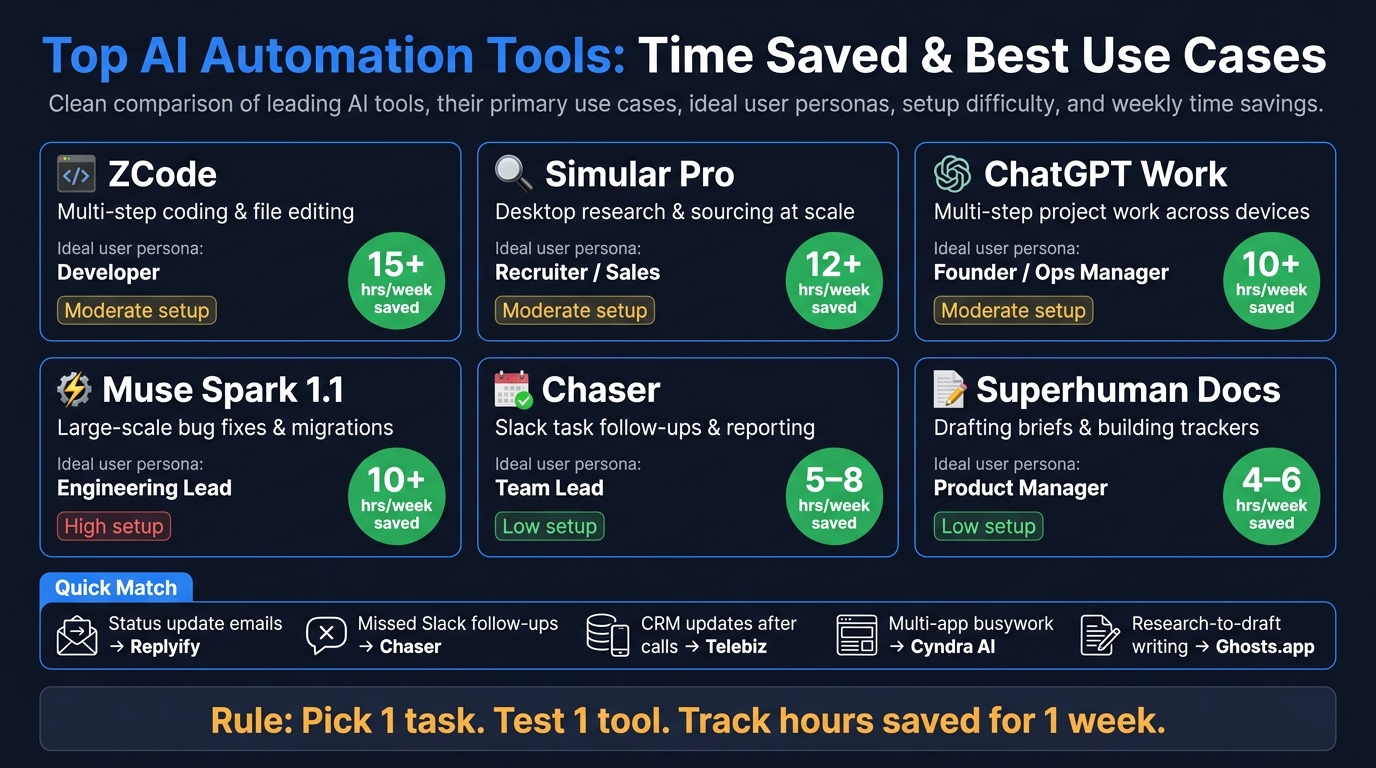
Top AI Automation Tools 2024: Time Saved & Best Use Cases
| Tool | Best for | Setup | Price note | Weekly time saved |
|---|---|---|---|---|
| Vellum | Team tasks from plain-English prompts | Low to medium | $100 free credits | Not stated |
| Claude Cowork | Briefs, prep, spreadsheet work | Low | Not stated | Not stated |
| ChatGPT Work | Multi-step work across devices | Medium | Up to $100/month + usage | 10+ hours |
| Superhuman Docs | Docs, trackers, summaries | Low | Not stated | 4–6 hours |
| Carly | Multi-app workflow automation | Low to medium | Free for non-AI flows; AI from $35/month | Not stated |
| Simular Pro | Desktop research and sourcing | Medium | Not stated | 12+ hours |
| Chaser | Slack follow-up and reporting | Low | Not stated | 5–8 hours |
| ZCode | Coding and file editing | Medium | Not stated | 15+ hours |
| Muse Spark 1.1 | Migrations and bug fixes | High | From $1.25/M input tokens and $4.25/M output tokens | 10+ hours |
| Replyify | Gmail follow-ups | Low | Not stated | Not stated |
| Telebiz | CRM sync from messaging apps | Low to medium | Not stated | Not stated |
| Cyndra AI | Cross-system business workflows | Medium | Not stated | Not stated |
| Ghosts.app | Research-to-draft writing | Low | Not stated | Not stated |
What I like about the article is that it doesn’t push shiny demos. It sticks to one filter: what manual work disappears? That’s the right test.
If I were picking a first trial today, I’d start with one of these:
- Missed follow-ups → Chaser or Replyify
- Too much copy-paste between tools → Carly or Cyndra AI
- Weekly reports and trackers → Superhuman Docs
- Research across many tabs and sites → Simular Pro
- Code cleanup or migration work → ZCode or Muse Spark 1.1
The main point is simple: don’t start with five tools. Start with one task with a clear start and finish, then track hours saved, error fixes, and handoff quality. That gives you a clean yes-or-no answer fast.
New AI tools worth trying first, sorted by type of work
Start with the work your team repeats most. Begin with operations, then support, then automation. That order lines up with where teams usually lose the most time.
Vellum and Claude Cowork for operations, research, and daily coordination
Vellum is made for operations, finance, sales, and marketing teams. You describe a task in plain English, answer a few follow-up questions, and Vellum builds a working agent in minutes. It can handle CRM updates, demo prep, keyword research, and ticket sorting. New users get $100 in free credits to try it.
Claude Cowork is a strong fit for admin, HR, and finance teams that need briefing docs, client prep, and spreadsheet reconciliation.
If writing, documentation, or support is the bigger drag on your team, the next set of tools makes more sense.
Vellum and Claude Cowork for support, writing, and document work
ChatGPT Work from OpenAI is built for teams that need multi-step work across devices. It can take over manual budget analysis, sales meeting prep, and the creation of marketing assets from research. Plans go up to $100/month, with usage-based billing for heavier workloads.
For writing and team docs, Superhuman Docs is an AI-first document workspace. It uses auto-fill rows to fill in data across a table and generates live summaries of team activity. Its new database product supports up to 1 million rows per database for enterprise-scale data management.
Carly and Simular Pro for workflow automation and desktop agents for team output
When a task moves across multiple apps or includes desktop actions, workflow automation is usually the better route.
Carly is a workflow automation tool for solo creators, recruiters, and sales teams. You send an email with a plain-language description of what you want, like routing new leads from a form into HubSpot or sending a Slack alert when a Stripe payment fails. Carly then drafts and tests the workflow against your real account data before it goes live. Repeatable workflows without AI steps are free and unlimited. AI-powered steps start at $35/month. With 200+ app integrations, it covers most tools that small teams already use.
Simular Pro is built for power users, developers, and enterprises. It uses a two-part agent system: a Neural Agent that reads and interprets any UI, paired with a Symbolic Agent that turns those actions into deterministic code. It works well for repeated desktop tasks like research across multiple sites or LinkedIn sourcing.
sbb-itb-212c9ea
Side-by-side comparison of the top new tools
After the category breakdown above, this table helps you cut the shortlist fast.
Comparison table: task replaced, best user, setup level, and time saved
| Tool | Primary Task Replaced | Ideal User | Setup Level | Estimated Weekly Time Saved |
|---|---|---|---|---|
| ChatGPT Work - AI project assistant | Multi-step project work | Founder / Ops Manager | Moderate | 10+ hours |
| Chaser - Slack task follow-up | Task assignment, follow-ups, and reporting | Team Lead | Low | 5–8 hours |
| Superhuman Docs - AI document workspace | Drafting briefs and building trackers | Product Manager | Low | 4–6 hours |
| ZCode - coding agent | Multi-step coding and file editing | Developer | Moderate | 15+ hours |
| Simular Pro - desktop automation agent | Research and sourcing at scale | Recruiter / Sales | Moderate | 12+ hours |
| Muse Spark 1.1 - engineering migration agent | Large-scale bug fixes and migrations | Engineering Lead | High | 10+ hours |
For Slack-heavy teams, Chaser stands out. It handles task assignment, follow-ups, and reporting right inside Slack.
For engineering teams, Muse Spark 1.1 is the more specialized pick. It needs API-level setup, and pricing starts at $1.25 per million input tokens and $4.25 per million output tokens.
Which tools work better for solo users versus teams
If two tools solve similar work, the big thing to compare is coordination. Some tools shine when one person wants to move fast. Others make more sense when work passes through handoffs, shared docs, and repeated check-ins.
| Tool | Best Fit | Key Reason |
|---|---|---|
| ChatGPT Work | Solo and teams | Operates autonomously for hours and supports enterprise controls |
| Chaser | Teams only | Slack-native task assignment and automatic follow-ups |
| Superhuman Docs | Solo and teams | Shared documents keep AI and humans editing together |
| ZCode | Solo and teams | Developers can steer long-running tasks from Telegram or WeChat |
| Simular Pro | Solo and teams | Repeatable, auditable desktop workflows work for both single users and teams |
| Muse Spark 1.1 | Solo and teams | Personal automation tasks for solo developers and enterprise migrations for teams |
Superhuman Docs shows the team use case especially well. As Lane Shackleton, Head of Superhuman Docs, said:
"When AI lives inside the same surface where teams already collaborate, it stops being a private tool one person uses in a side window and becomes a true team multiplier."
ZCode and Simular Pro tend to work well for solo users because they can keep long-running work moving without constant handoff.
How to pick the first AI tool to test
Match the tool to the task you repeat every week
Use the comparison above to choose the easiest workflow to swap out first.
Start with the task you repeat most often each week. Then match the tool to the place where your team already works. If your team spends most of the day in Gmail, Replyify can handle follow-ups right inside the inbox. If sales conversations happen in Telegram, Telebiz can sync those chats to HubSpot or Pipedrive. If Slack is where work moves, Chaser is the better fit.
Here’s a simple way to match the problem to the tool type:
| Repeating Pain Point | Tool Type to Try First | First Test |
|---|---|---|
| Status update emails piling up | Gmail-native AI reply | Replyify |
| Missed follow-ups | Slack-native task agent | Chaser |
| CRM updates after calls | Messaging-layer CRM sync | Telebiz |
| Shared project updates and trackers | AI-native docs | Superhuman Docs |
| Multi-app operational busywork | Multi-app workflow agent with 1,000+ integrations | Cyndra AI |
Start with one workflow and track the result
Pick one process, not five.
A strong first test is a weekly task with a clear beginning and end, like inbound email triage, client status reporting, or lead follow-up. Run the tool on that single workflow for one week before you expand to anything else.
Track three simple things:
- hours saved
- how often you had to correct the output by hand
- whether handoff quality got better
For example, Cyndra AI’s supervised mode lets you approve sensitive actions, like sending emails or updating a CRM record, with one click before anything goes out. The approval log makes it easy to see how often you need to step in.
"The goal is not to make AI feel impressive. The goal is to make work disappear safely." - Johann Sathianathen, Co-founder, Cyndra AI
That kind of test gives you a clear yes-or-no answer before you move to the next workflow.
Conclusion: The best new AI tools are the ones that remove real busywork
The best AI tool is usually the one that cuts out the most repeat work. The tools that change your day-to-day work tend to handle the same weekly chores over and over - status emails, follow-ups, and trackers - without much setup.
Key takeaways from this roundup
The winners here aren’t the tools that sound flashy. They’re the ones that take a repeat task off your plate.
A simple way to judge any tool is to ask: what busywork does this remove? That’s the final filter:
- Replyify: Gmail follow-ups
- Cyndra AI: ops workflows across business systems
- Ghosts.app: research-to-draft writing
- Superhuman Docs: project trackers and narratives
Start with low-risk, high-repeat work like status check-ins, follow-ups, and weekly reports. Pick one task, match it to one tool, and test it once.
AI Apps tracks newly launched tools across writing, design, business, and productivity in one curated directory.
FAQs
How do I choose the first AI tool to test?
Start by spotting the repeat tasks that eat up your day, like email follow-ups, document drafting, or project updates.
Then pick a tool that fits the way you already work, gives you a clear trigger or use case to build around, and includes a free tier so you can try it with your own data before spending money.
Which tools are best for solo users versus teams?
For solo users, desktop-based agents like ChatGPT Work and Claude Cowork are the best fit for deep, complex tasks. They can access local files and browsers, work on their own for hours, and keep running in the background while you focus on something else.
For teams, Superhuman Docs works well for shared work across live documents, trackers, and project hubs. Replyify helps automate repetitive customer service follow-ups inside existing workflows, while ChatGPT Work adds enterprise controls like spend limits and usage monitoring.
How can I measure whether an AI tool is actually saving time?
Measure whether it handles end-to-end workflows, not just one-off tasks. A tool that saves time should cut manual handoffs, like moving data from one platform to another, by working right inside your browser, docs, or messaging apps.
It should also finish full sequences on its own, like researching, drafting, and updating a tracker, instead of forcing you to copy and paste at every step. Other signs are less setup time for automation and the option to check progress or approve work from your phone.