Productivity
5 Real MoltBot / ClawdBot / OpenClaw Use Cases That Will Blow Your Mind (With Examples)
Five real MoltBot/ClawdBot/OpenClaw use cases showing how a self-hosted AI agent automates email, invoicing, meetings, daily briefings, and code tasks.

5 Real MoltBot / ClawdBot / OpenClaw Use Cases That Will Blow Your Mind (With Examples)
MoltBot (formerly ClawdBot) is an open-source, self-hosted AI assistant that doesn’t just respond - it takes action. It works entirely on your hardware, ensuring privacy and control, while connecting to over 10 messaging platforms like WhatsApp, Telegram, and Slack. With 61,500 GitHub stars and 565+ community-built skills, it automates tasks like email management, invoicing, team collaboration, and even code refactoring.
Here’s what MoltBot can do for you:
- Email Automation: Clean up your inbox, draft replies, and create tasks in tools like Notion.
- Business Operations: Automate order processing, stock checks, and invoice generation.
- Team Collaboration: Manage calendars, send meeting summaries, and integrate with tools like Slack and GitHub.
- Daily Briefings: Get tailored updates on your schedule, emails, and tasks directly to your phone.
- Code Assistance: Run commands, debug errors, and automate repetitive development tasks with free AI tools for developers.
MoltBot is free under the MIT License, with optional hosting costs starting at $5/month. It uses AI models like GPT-4 or local options, balancing cost and performance. Whether you’re managing emails, running a business, or coding, MoltBot saves time and simplifies workflows.
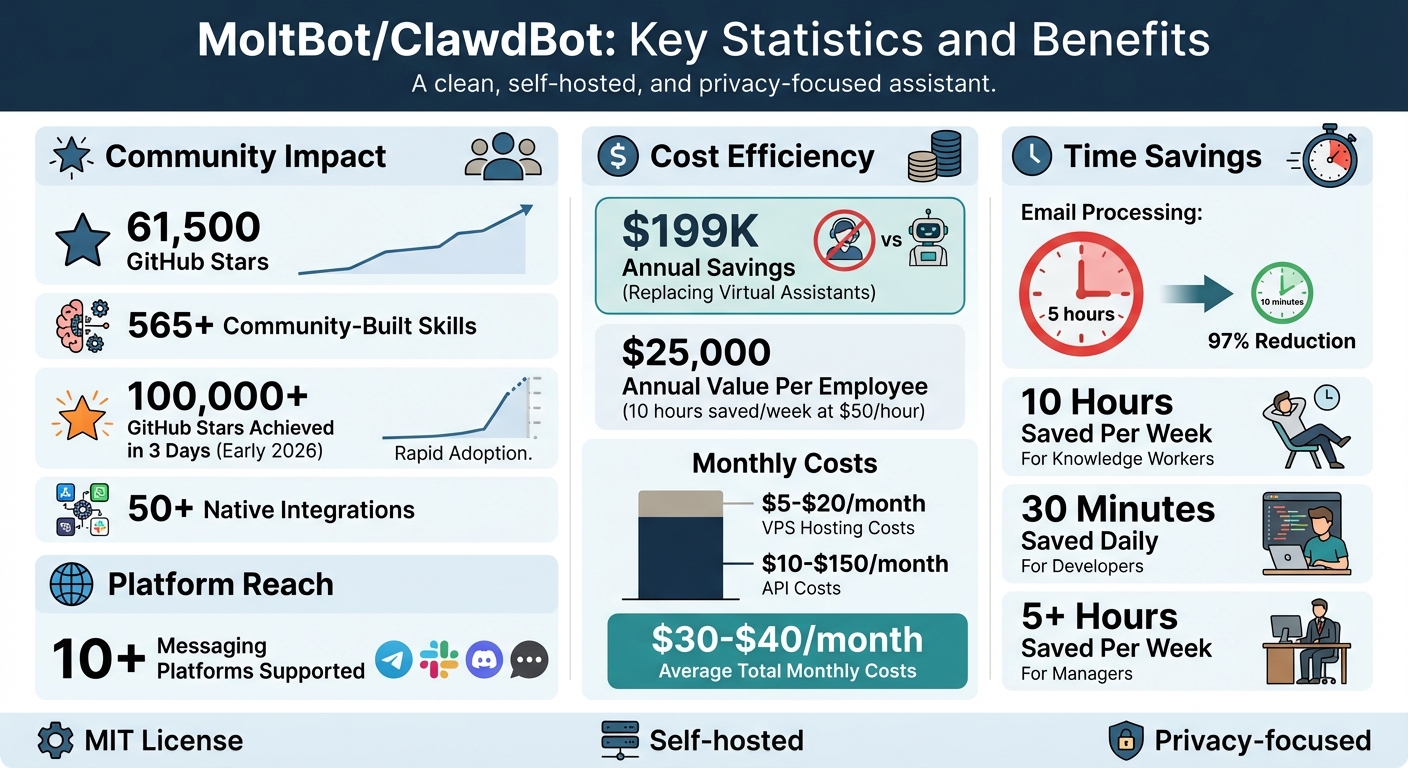
MoltBot Key Statistics: Cost Savings, Time Efficiency, and Community Adoption
How People Are Using Moltbot Right Now (6 mins)
sbb-itb-212c9ea
1. Email Management and Inbox Automation
Email plays a vital role in daily operations, and MoltBot takes it a step further by turning your inbox into a self-sufficient productivity tool.
Automation Capabilities
MoltBot handles your inbox automatically using cron jobs, seamlessly connecting to Gmail or Outlook to manage emails for you. It identifies patterns to categorize messages - archiving newsletters, discarding promotional content, and flagging important emails from VIPs. It can even draft replies to frequently asked questions, summarize lengthy email threads, and send these drafts to your phone via WhatsApp or Telegram for quick approval.
The bot also adapts to your formatting preferences and prioritizes interactions with specified contacts. One satisfied user shared:
"Helped me clean up hundreds of emails. Inbox 0. Then setup a weekly cron job. All on WhatsApp." - @andrewjiang
This level of automation doesn’t stop at email - it integrates with other tools to streamline your entire workflow.
Integration with Tools and Platforms
MoltBot works with popular messaging platforms for easy access and control. It can extract actionable items from emails and create tasks in Notion, keeping your to-do list updated without manual effort.
For added security, you can limit the bot’s permissions to only what’s necessary, such as “read” or “write,” avoiding unnecessary access. If privacy is a concern, you can run MoltBot locally or on a private VPS, costing around $5–$20 per month, ensuring your email data stays within your infrastructure. Depending on the AI model you choose - Claude Sonnet, GPT-4o, or DeepSeek - operating costs range from $10–$100 per month. These features not only simplify email management but also improve productivity by automating task creation.
Real-World Impact
Founder @therno highlights how MoltBot autonomously handles company support, order management, and more. For small businesses, it can monitor work emails for new orders, check inventory spreadsheets, generate invoices, and even email suppliers for restocks - all without human intervention. By replacing traditional virtual assistants, users report saving over $199K annually.
MoltBot’s email automation capabilities showcase its potential to transform repetitive tasks into efficient workflows, helping businesses save time and resources.
2. Invoice Generation and Business Operations
MoltBot isn’t just about simplifying email workflows - it’s also a game-changer for financial operations. By automating tasks like monitoring emails and CRMs, verifying stock, and generating invoices, MoltBot transforms how businesses handle their finances.
Automation Capabilities
MoltBot takes care of the entire order-to-invoice process. It scans work emails and CRM systems for incoming orders, checks stock availability in spreadsheets, generates invoices, and even sends restock requests to suppliers when inventory levels dip below set thresholds.
It also organizes financial data by extracting key details from PDFs stored locally. Using pattern recognition, it pulls invoice amounts and compiles them into neat CSV files or summary spreadsheets. Business owners receive daily updates via Telegram or WhatsApp, summarizing invoices and stock levels.
Real-World Impact
This automation isn’t just theoretical - it’s already transforming businesses. For example, Dan Peguine's Parents' Tea Company began using MoltBot in January 2026 to fully automate their order fulfillment process. MoltBot monitors their work email and CRM for orders, verifies stock levels, generates customer invoices, and sends restock requests to suppliers when needed. The owner receives a daily Telegram summary, allowing the business to operate with zero human intervention for routine tasks.
"The tea business still runs autonomously every day. That's not a demo. That's the new baseline." - Rocky Fu
For professionals managing financial operations, MoltBot can save up to 10 hours per week, equating to around $25,000 annually based on a $50 hourly rate. In production environments, email processing time has dropped dramatically - from 5 hours to just 10 minutes of review time.
Scalability and Customization
MoltBot offers flexibility and security, whether you run it locally or on a dedicated VPS. The software is free and open-source under the MIT License. API costs vary, typically ranging from $10 to $150 per month. As for infrastructure, self-hosting on an old computer costs nothing, while a new Mac Mini is priced around $599, and VPS hosting starts at approximately $5 per month.
To avoid errors with critical tasks like sending invoices or making payments, you can configure MoltBot to "wait for approval" or send drafts for review. Protect sensitive data by setting up dedicated "agent credentials" with limited permissions, such as read-only access for specific folders. Running the bot on a dedicated machine or VPS ensures it’s always available to monitor orders and generate invoices around the clock.
3. Meeting Support and Team Collaboration
MoltBot transforms how teams coordinate by managing calendars, summarizing notes, and keeping everyone on the same page - all without human intervention.
Automation Capabilities
MoltBot does more than just wait for commands. Using its "Heartbeat Engine", it identifies upcoming meetings and proactively sends daily briefings or reminders to team members. Need help finding a meeting time? MoltBot can handle that, too. It sends calendar invites through platforms like Telegram or Slack and provides pre-meeting summaries 15 minutes before scheduled calls. These summaries pull data from sources such as Notion pages or GitHub pull requests.
The bot also takes charge of note-taking. It processes voice messages, emails, or even Reddit threads, turning them into clear Markdown summaries. With its {{Transcript}} template, audio files are seamlessly converted into concise summaries. Managers report saving 5+ hours per week by automating updates from tools like Jira, Slack, and GitHub.
On top of scheduling tasks, MoltBot integrates effortlessly with your communication tools, streamlining collaboration.
Integration with Tools and Platforms
MoltBot works hand-in-hand with popular collaboration tools, including Slack, Microsoft Teams, Discord, Telegram, WhatsApp, and Matrix, making real-time communication a breeze. It also connects with task and documentation platforms like Notion, Trello, GitHub, Obsidian, and Apple Notes. With 565+ community-built skills and over 50 native integrations, it’s ready to adapt to your team’s needs. Plus, it supports advanced models like Claude 4.5 (Opus), GPT-5, and Gemini 2.5 Pro for enhanced functionality.
For added security, users can assign the bot its own calendar identity (e.g., assistant.name@company.com) and have it send invites instead of granting full access to their primary calendar. In group chats, you can configure the bot to respond only when mentioned (e.g., @openclaw), ensuring it doesn’t interrupt ongoing discussions while staying ready for collaborative tasks.
Scalability and Customization
To keep operations smooth, MoltBot can run on a dedicated machine or a $5–$20/month VPS, with total monthly costs averaging $30–$40, including $10–$20 for LLM API usage. All conversation logs and memories are stored locally as Markdown files, ensuring sensitive meeting data doesn’t end up on third-party servers.
"The future of AI assistants isn't in Silicon Valley building closed-source systems. It's in your terminal, doing your work, remembering who you are, and actually getting things done." - Axelut, Managing Partner, Creative Tim
4. Daily Briefings and Automated Reminders
MoltBot takes the hassle out of starting your day by delivering a personalized morning briefing directly to your phone. No more jumping between your calendar, email, and weather apps - it’s all in one place, ready before you even think to ask.
Automation Capabilities
MoltBot simplifies your routine with two standout features. First, its "Heartbeat Engine" scans your emails and calendar every 30 minutes, gathering urgent updates so nothing slips through the cracks. Second, it uses cron jobs to schedule briefings - like a 7:00 AM update that includes weather, events, and important emails. What sets MoltBot apart is its proactive nature. Instead of waiting for you to ask, it reaches out when specific triggers occur, such as a high-priority email landing in your inbox or a new file appearing in a monitored folder. For added convenience, it offers text-to-speech delivery, letting you listen to your briefing while you’re on the go.
Integration with Tools and Platforms
MoltBot delivers your daily briefings through popular platforms like WhatsApp, Telegram, Discord, iMessage, or Slack. It pulls information from tools like Apple Reminders, Things 3, Google Calendar, and Gmail to create a detailed snapshot of your day. It even supports location-based reminders - imagine getting a notification as soon as you arrive at the office. For professionals working with remote systems, MoltBot can check disk usage or trigger batch jobs right from your phone. These seamless integrations make sure your briefings are not just thorough but also tailored to your workflow.
Real-World Impact
Federico Viticci, founder of MacStories, adopted MoltBot’s daily briefing system in January 2026 and saw firsthand how transformative it could be. In just one month, the system processed 180 million tokens to help him manage his schedule and priorities.
"MoltBot has completely changed my perspective of what it means to have an intelligent, personal AI assistant in 2026." - Federico Viticci
Beyond scheduling, MoltBot handles complex tasks like analyzing Reddit for product feedback and generating Markdown reports. It eliminates the need for constant manual monitoring, saving time and effort.
Scalability and Customization
MoltBot’s briefing system grows with you. It stores information locally in files like USER.md and MEMORY.md, allowing it to adapt to your preferences over time. Want more control? Add community-built skills or tweak the bot’s tone using the SOUL.md file to make its communication style match your needs. API costs are flexible, ranging from $10 to $150 per month, with token pricing at approximately $3 per million input tokens and $15 per million output tokens.
This combination of adaptability and cost-efficiency ensures that MoltBot fits seamlessly into your life while keeping overhead low.
5. Code Refactoring and App Development
MoltBot isn't just reshaping email and business workflows - it’s also making waves in software development. Operating as a headless background service, MoltBot can directly execute shell commands like mv or npm test, cutting down on errors and speeding up development processes.
Automation Capabilities
MoltBot takes care of the repetitive tasks developers often face. It can clone repositories, switch branches, run linters, execute test suites, and even catch security issues or bugs in pull request diffs. Got an error? Send the log via Telegram or WhatsApp, and MoltBot will analyze it within context. It can then either suggest fixes or apply them directly to your local files. What’s more, MoltBot evolves its abilities, writing and modifying code based on the situation. Developers using it for automated triage and daily updates report saving an average of 30 minutes every day.
And it doesn’t stop there - these features integrate seamlessly with widely used development tools.
Integration with Tools and Platforms
MoltBot connects with over 50 popular development tools, including GitHub, Kubernetes (kubectl), Azure CLI, and Supabase. Through the ClawdHub marketplace, you can access more than 565 community-developed skills, all installable with a single command:
npx clawdhub@latest install <skill>
For teams juggling multiple machines, the "Nodes" feature enables smooth command execution across different servers or workstations by linking them to a central Gateway. It also supports various AI models - Claude 3.5 Sonnet (recommended), GPT-4, AWS Bedrock, or local models via Ollama - offering flexibility to balance privacy and performance.
These integrations have already delivered impressive results in actual projects.
Real-World Impact
In January 2026, Claire Vo, the CEO of ChatPRD, utilized MoltBot to create a Next.js conversation viewer app. Over just 24 hours, she guided the agent to redact secrets, toggle between terminal and messaging interfaces, and generate the Next.js repository locally - all while receiving regular status updates through screenshots. MoltBot even gathered product feedback from Reddit and compiled a structured Markdown report delivered straight to her inbox. Reflecting its rapid adoption, OpenClaw achieved over 100,000 GitHub stars within three days of its early 2026 release, and more than 61,500 developers have joined the community.
Scalability and Customization
MoltBot is built to grow with your needs while staying budget-friendly. Hosting costs are manageable, with VPS options like Hetzner priced around $5.41 per month and Claude Pro API access costing roughly $20 per month. For those prioritizing privacy, models like CodeLlama can be run locally via Ollama, ensuring your code remains entirely on your machine. Security-conscious teams can add more safeguards by running MoltBot in a dedicated VM or container with scoped permissions and using restricted OAuth tokens instead of broad access credentials. Additionally, MoltBot remembers your project preferences and technical details over time by maintaining persistent memory in local Markdown files, enabling seamless long-term interactions.
Conclusion
MoltBot and ClawdBot are reshaping how AI assistants function. Instead of passively waiting for commands, these tools take initiative - executing tasks, reaching out when needed, and remembering your preferences over time. This shift from reactive to proactive assistance translates into tangible productivity gains, making them more than just tools - they become partners capable of handling real-world tasks like managing operations or fixing bugs overnight.
The impact is clear in the numbers: Knowledge workers report saving about 10 hours per week, equating to $25,000 in annual value per employee (based on a $50/hour rate). Meanwhile, tasks like email processing, which once took five hours, now require only 10 minutes of review. Users frequently share how these tools have reshaped their expectations for personal AI assistants in 2026.
Another standout feature is their adaptable, privacy-focused design. The self-hosted architecture ensures full data control. These tools integrate seamlessly with familiar platforms like WhatsApp, Telegram, and Slack, and let you choose between cloud-based AI models or fully local setups via Ollama. With more than 565 community-built skills available through ClawdHub and operating costs starting as low as $5 per month, access is both affordable and user-friendly.
From automating email workflows to streamlining invoicing, team collaboration, and development tasks, MoltBot and ClawdBot are designed to adapt to your needs. A practical approach is to start small - grant read-only permissions, run the agent on dedicated hardware, and expand its capabilities as you gain confidence.
Think about the repetitive tasks that dominate your weekly schedule. Could an AI agent manage your inbox? Automate reports? Keep systems running while you sleep? By starting with small, controlled implementations, you could unlock new levels of efficiency in your daily operations.
FAQs
How does MoltBot protect my data and ensure privacy?
MoltBot takes your privacy seriously by keeping all data processing on your local device. This means your chats, files, and tasks stay on your machine unless you decide to connect external integrations. By skipping cloud storage and external servers, MoltBot minimizes the chances of data breaches or unauthorized access.
Your information is saved locally as markdown files, giving you complete control. You can easily read, back up, export, or delete them whenever you want. Plus, MoltBot doesn’t include telemetry or "phone home" features, ensuring no data is shared without your clear consent. This approach puts you in control, making MoltBot a dependable option for managing sensitive data.
What costs should businesses expect when using MoltBot?
Using MoltBot for your business operations can save money, but it's important to account for a few associated costs. First off, MoltBot is open-source and free, so you won’t need to worry about licensing or subscription fees. That said, the primary expense comes from the API services that drive its AI capabilities. These costs are usage-based, typically depending on the number of tokens processed. For most businesses, this can range from $50 to over $500 per month, especially with heavy usage.
You'll also need to consider hosting costs. Whether you choose cloud servers or local hardware, hosting typically runs between $5 and $25 per month, depending on your setup. While there are no upfront software expenses, planning for API and hosting fees is essential. These costs are generally modest when compared to the productivity boost MoltBot can bring to your operations.
Can MoltBot be tailored to meet specific collaboration needs for teams?
Yes, MoltBot can be tailored to match your team's specific collaboration needs. This self-hosted AI assistant handles a variety of automation tasks, such as managing emails, scheduling, controlling smart devices, and integrating with over 50 platforms. Teams can set up workflows, automate repetitive tasks, and link MoltBot with messaging apps like Slack, WhatsApp, and Discord to simplify communication.
What makes MoltBot stand out is its ability to act like a proactive team member. It executes tasks based on detailed instructions and context. With a local-first design, it prioritizes data privacy, and its flexible architecture allows for seamless integration and task chaining. This makes it an excellent fit for teams looking to streamline workflows and boost productivity.