Digital Transformation
Ultimate Guide to AI Automation for Small Businesses
Practical steps for small businesses to implement affordable AI automation — save time, cut costs, measure ROI, and scale safely.

Ultimate Guide to AI Automation for Small Businesses
AI automation is transforming how small businesses operate, enabling small teams to achieve more with fewer resources. By automating repetitive tasks like lead follow-ups, appointment reminders, and invoice processing, businesses can save time, cut costs, and boost productivity. With tools starting as low as $30 per month, even businesses with limited budgets can leverage AI to handle tasks that previously required larger teams.
Key Takeaways:
- Efficiency Boost: AI can save up to 20+ hours per month and reduce manual errors.
- Cost Savings: Automating tasks like customer service or marketing can save businesses thousands annually compared to hiring additional staff.
- Revenue Growth: Businesses using AI have reported revenue increases of up to 3.5x.
- Ease of Use: No-code platforms make setup simple, even for non-technical users.
AI tools for small business are not a replacement for your team but a way to free them from routine tasks, allowing them to focus on higher-value work. Start small by identifying repetitive processes, choose AI automation tools that integrate well with your existing systems, and track your results to ensure ROI. AI automation isn’t just for large enterprises anymore - it’s accessible, affordable, and effective for small businesses too.
How Small Business Owners Should Adopt AI Automation in 2025
sbb-itb-212c9ea
Key Uses and Benefits of AI Automation
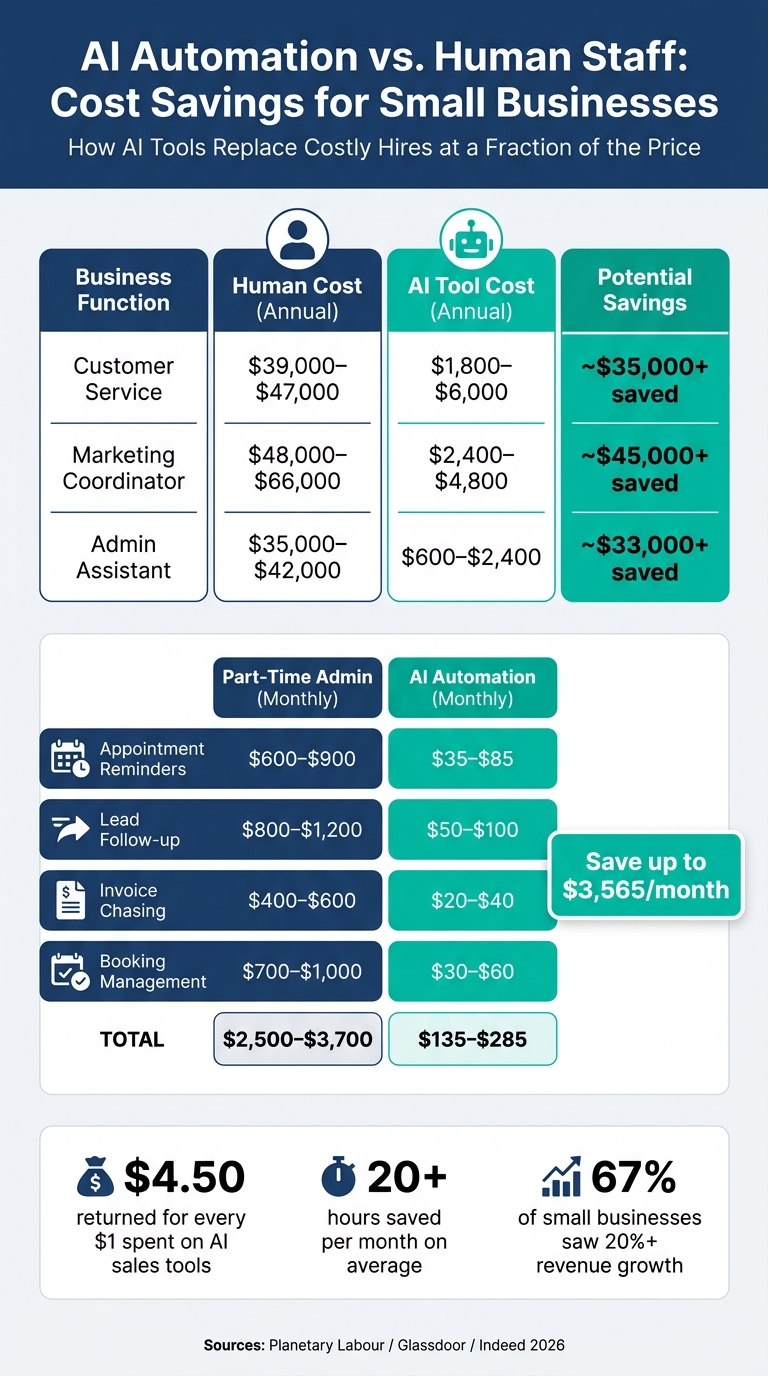
AI Automation vs. Human Staff: Cost Savings for Small Businesses
Popular Ways Small Businesses Use AI Automation
AI automation is making its mark across nearly every aspect of business, from customer interactions to back-office operations. Many small businesses start with customer-facing tools, like AI chatbots, that can handle inquiries around the clock, qualify leads, and even schedule appointments - all without human intervention. These chatbots boast an impressive 98% resolution rate for common queries, significantly reducing the need for human involvement.
In sales and marketing, AI takes on tasks like managing follow-up emails, updating CRM records based on call notes, creating social media posts, and recovering abandoned shopping carts. Meanwhile, in administrative roles, it can process invoices, categorize transactions, prioritize emails, and generate reports - tasks that often consume hours of manual effort each week.
Take this example: In February 2026, a regional HVAC company with just 12 employees implemented an AI-powered call answering system and automated scheduling. Within a month, their call answer rate skyrocketed from 60% to 98%, booking conversions improved from 35% to 58%, and they saved $3,000 monthly while reclaiming 20 hours of admin time per week.
These kinds of applications not only simplify day-to-day operations but also lead to measurable, bottom-line benefits.
Benefits of AI Automation for Small Businesses
For small businesses, AI automation translates into significant time and cost savings. On average, small businesses report saving over 20 work hours per month, with 67% experiencing a revenue boost of more than 20% in 2025. Employees using AI tools have also seen a 66% increase in productivity, demonstrating the clear impact on efficiency and output.
When it comes to costs, the numbers speak for themselves:
| Function | Human Cost (Annual) | AI Tool Cost (Annual) | Potential Savings |
|---|---|---|---|
| Customer Service | $39,000–$47,000 | $1,800–$6,000 | ~$35,000+ |
| Marketing Coordinator | $48,000–$66,000 | $2,400–$4,800 | ~$45,000+ |
| Admin Assistant | $35,000–$42,000 | $600–$2,400 | ~$33,000+ |
| (Source: Planetary Labour/Glassdoor/Indeed 2026) |
As Adam Alfano, Salesforce's EVP of Global SMB, puts it:
"AI isn't just a tool for enterprises anymore, but a new way for SMBs to compete."
In fact, many small businesses see a return on investment (ROI) in as little as 60 to 90 days. AI tools for sales professionals, in particular, deliver an average return of $4.50 for every $1 spent.
While the benefits are undeniable, adopting AI does come with its own set of challenges.
Potential Challenges and Risks
AI automation isn't a one-size-fits-all solution, and businesses need to be aware of potential pitfalls. Common issues include data privacy concerns, integration difficulties, and the risk of AI generating incorrect outputs - such as providing inaccurate regulations or pricing information.
For example, many free AI tools use your data for training purposes by default. If your business deals with sensitive client information, it's safer to opt for paid "Business" or "Team" tiers, which generally exclude your data from training. Integration is another hurdle; new AI tools may not seamlessly connect with your existing software. In fact, 85% of AI projects fail due to poor data quality. To avoid this, ensure your processes are well-organized before introducing automation.
Another consideration is managing subscription costs. AI tools can quickly add up, and unused subscriptions might quietly drain your budget. A good rule of thumb: if a tool doesn’t save at least three hours per week within the first month, it’s time to cancel it. For customer-facing AI outputs, it’s wise to have a human review process in place - at least during the initial rollout - to catch any errors before they reach clients.
With careful planning and monitoring, these challenges can be addressed, allowing businesses to scale their AI adoption effectively and sustainably.
How to Get Started with AI Automation
Now that we've covered the benefits and challenges of AI automation, let’s dive into how you can begin automating your business processes.
Assessing Your Business Needs
Start by tracking how your team spends their time over a week or two. This will help you separate strategic tasks from repetitive, operational ones.
Use the 3-Filter Framework to identify tasks that are ideal for automation. Focus on those that are:
- Repetitive: Tasks done the same way every day.
- Time-consuming: Activities taking up at least 30 minutes per week.
- Error-prone: Processes prone to human mistakes.
A good rule of thumb? If a task eats up more than 30% of an employee’s day and follows a clear “if this, then that” structure, it’s a strong candidate for automation.
However, don’t rush to automate broken processes. As Nicole Replogle from Zapier puts it:
"Automating a broken process... will just make bad things happen faster."
Before you introduce AI, fix any inefficiencies in your workflows. AI will magnify whatever foundation you’ve built - whether it’s solid or flawed.
Once you’ve mapped out your needs, you’re ready to choose the right tools.
Choosing the Right AI Tools
Start with a specific pain point in your operations. Then look for an AI tool designed to solve that problem. Avoid the common mistake of picking a tool first and then searching for ways to use it.
When evaluating tools, focus on these four factors:
- Cost: Many tools for small businesses are budget-friendly, often starting under $50 per month. For example, workflow platforms like Make range from $9 to $30 per month, while Zapier plans cost between $20 and $70 per month.
- Ease of use: Choose tools that your team can adopt quickly without extensive training.
- Integration: Ensure the tool works seamlessly with your current systems, either directly or through connectors.
- Data privacy: Check whether the tool uses your data to train its models. If you handle sensitive client information, consider upgrading to a paid “Business” or “Team” tier that keeps your data private.
Need help narrowing down your options? Platforms like AI Apps feature directories of over 1,900 AI tools, organized by categories like business automation, writing, and productivity.
After selecting your tools, the next step is to set clear goals and track your progress.
Setting Goals and Measuring Success
Clear goals are key to successful automation. Before implementing any tools, document your current metrics: how long tasks take, their labor costs, and error rates. Then set specific, measurable targets. For example, instead of vaguely aiming to “save time,” aim to reduce invoice processing from 30 hours to 5 hours per month.
Ask yourself: What would need to happen for this automation to pay for itself within six months?. To calculate potential ROI, use this formula:
(Hours saved per week × Hourly rate) × 52 weeks.
For instance, if automation saves an employee 5 hours per week and they earn $20 per hour, that’s $5,200 in annual value. This makes it easier to justify spending $50 per month on a tool.
Check your results at 30, 60, and 90 days to see if you’re hitting your targets. Many small businesses find that automation pays off within this 90-day period.
Implementing AI Automation in Your Business
Starting with a Pilot Project
Once you've outlined your goals, focus on one high-impact task that's relatively simple to automate - like lead capture or email sorting. Build your first automation around that process. Start small: automate about 20% of the tasks for the first 48 hours. Keep a close eye on how it performs. If there are no errors or surprises, gradually scale up to 50%, and eventually to 100%. This step-by-step approach minimizes risks and ensures the system is ready to handle your full workload.
For budgeting, a small business can start a pilot project for around $200–$500 per month. This range is enough to explore AI tools for entrepreneurs without requiring a hefty upfront investment.
A great example comes from April 2026, when Popl implemented an automated lead management system using Zapier and OpenAI. When demo requests came through HubSpot, the system verified data, sent notifications to Slack, and routed leads to the right sales rep based on region. This setup saved the company $20,000 annually while managing hundreds of leads daily.
Once your pilot proves successful, the next step is preparing your team for a full-scale rollout.
Training Your Team
One common misstep during AI implementation is neglecting team preparation. Before rolling out the system, map out your current workflow. Identify every trigger, step, and point where human judgment is essential. A successful pilot builds confidence and lays the groundwork for broader adoption.
Start by assigning a "power user" to oversee the pilot. Train this individual thoroughly so they can showcase the system's benefits to the rest of the team. Gradually bring others on board. Keep in mind: AI is there to handle repetitive tasks, not to replace your staff.
It's also critical to address concerns about job security. As Delta Labs AI explains:
"AI automation is not about replacing your staff with robots. It's about making your current 2–10 person team do the work of a 15-person operation."
Reframe the team's role from performing tasks to overseeing and validating the system's work. AI takes care of routine jobs, while your team focuses on customer-facing and high-stakes decisions. Allow for a 2–4 week adjustment period to build trust and integrate the system fully.
Measuring and Refining Results
Once your automation is live, treat it as an evolving system. Compare its performance against the baseline metrics you recorded before implementation - like task completion times, error rates, and conversion rates.
A simple Green/Yellow/Red framework can help assess results at the 30-day mark:
| Outcome | What It Means | Next Step |
|---|---|---|
| Green | Strong ROI and high-quality outputs | Scale up |
| Yellow | Mixed results, some inconsistencies | Tweak and refine |
| Red | Poor ROI or low-quality results | Reassess or pivot |
If the results don't meet expectations, adjust the system's prompts or rules to better align with your workflow and brand voice. Also, establish clear protocols for when human intervention is needed - like handling frustrated customers or resolving complex queries.
Plan to dedicate about 2–4 hours a month for maintenance tasks, such as reviewing error logs, updating workflows as your processes change, and ensuring API connections remain intact. This small, regular effort keeps your automation running smoothly and prevents minor hiccups from escalating into major issues.
Scaling AI Automation Over Time
Expanding Automation to More Areas of Your Business
Once your initial automation setup is running smoothly, it's time to extend it to other parts of your business. Use the earlier 3-Filter Framework to pinpoint additional tasks that could benefit from automation.
Before diving in, take a moment to perform a data quality check. Make sure your CRM, product databases, and contact lists are up-to-date and accurate. Automating a messy manual process will only magnify existing inefficiencies. By addressing these issues first, you ensure that automation continues to deliver measurable business benefits.
A good approach here is to apply the 80/20 rule: focus on automating the repetitive 80% of a process - like answering FAQs or logging data - while leaving the more nuanced 20% to your team. Also, check if your current software already includes AI features before investing in new tools. Simplifying your tech stack can save you money and reduce complexity.
With a clear plan for expanding automation, the next step is to keep an eye on costs and measure your returns.
Managing Costs and Tracking ROI
Scaling automation doesn't have to mean skyrocketing expenses. Many AI tools offer usage-based pricing, so costs increase only as your business grows. Professional-grade tools have become much more affordable, with entry-level prices dropping by about 60% between 2024 and 2026. Today, you can get started for as little as $50–$200 per month.
To figure out if scaling automation makes sense financially, use this simple ROI formula:
(Hours saved weekly × Hourly rate × 52) − (Annual tool + setup costs) = Net annual savings
Keep tracking ROI to ensure automation continues to deliver value. On average, small businesses see a return of $3.50–$3.70 for every dollar spent on AI tools. Tasks like invoice processing or data entry often yield even higher returns, with ROIs ranging from 400% to 1,000%. Here's a quick comparison of costs for common tasks:
| Task | Part-Time Admin (Monthly) | AI Automation (Monthly) |
|---|---|---|
| Appointment Reminders | $600–$900 | $35–$85 |
| Lead Follow-up | $800–$1,200 | $50–$100 |
| Invoice Chasing | $400–$600 | $20–$40 |
| Booking Management | $700–$1,000 | $30–$60 |
| Total | $2,500–$3,700 | $135–$285 |
To stay flexible, opt for monthly billing instead of locking into annual contracts. The AI landscape evolves quickly, and monthly plans give you the freedom to switch if a better tool comes along.
Keeping Up with New AI Tools
As you grow your automation efforts, staying informed about the latest AI tools becomes essential. What was cutting-edge a year ago might already have been surpassed by newer, more efficient alternatives. A major trend to watch is the shift from basic rule-based workflows to autonomous AI agents - systems that can handle complex, multi-step tasks across different tools without constant input from you.
"AI handles the judgment calls, while automation handles the execution." - Nicole Replogle, Senior Content Specialist, Zapier
To keep up without spending hours researching, consider subscribing to newsletters like The AI Operator Newsletter or COREIntel Weekly. These provide curated updates on the latest tools and trends. For a broader view, AI Apps offers a directory of over 1,900 AI tools with advanced filters to help you find the perfect solution for your needs.
Finally, when testing new tools, follow a simple rule: if a tool doesn’t save you at least three hours per week within 30 days, cancel it. This approach helps you maintain a lean tech stack and ensures your investments are worthwhile.
Conclusion
AI automation has evolved far beyond being a luxury for large corporations. By 2026, it has become a game-changer for small businesses, driving efficiency and accelerating growth. As Delta Labs AI aptly states:
"The businesses that will win in the next 3 years aren't the ones with the most staff - they're the ones who deploy automation for the repeatable, time-sensitive work."
This guide highlights how small businesses can approach AI thoughtfully, starting with manageable projects and scaling up as confidence and results grow. The key takeaway? Begin with small, measurable steps, analyze the outcomes, and expand on what delivers results.
The numbers speak for themselves: businesses leveraging AI automation have experienced 3.5x revenue growth, and 67% of small businesses reported revenue increases of at least 20% in 2025. Even a well-executed pilot project can significantly enhance weekly productivity.
The purpose of AI isn't to replace your team but to empower them. It allows small teams to handle more, reduce errors, and eliminate repetitive tasks, enabling them to focus on creativity, strategy, and building relationships. AI takes care of the routine, but human judgment and innovation remain irreplaceable.
From assessing your needs to scaling your efforts, this guide is designed to help you integrate AI in ways that deliver real results. For those ready to explore, AI Apps provides access to over 1,900 AI tools, complete with advanced filters to find the perfect match for your needs. This is especially crucial given the launch of over 3,000 new AI products in 2025.
"The question is no longer whether you can afford AI automation - it's whether you can afford not to implement it." - Crescent AI Team
FAQs
What should I automate first in my small business?
Start by streamlining tasks that are repetitive, follow clear rules, and take up a lot of time. Some great places to start include:
- Customer service: Handling inquiries or FAQs.
- Scheduling: Managing calendars and appointments.
- Email management: Organizing, responding to, and following up on emails.
- Marketing tasks: Creating content or managing social media posts.
- Financial admin: Bookkeeping and other routine financial tasks.
These kinds of tasks don’t usually require complex decision-making, but automating them can free up a lot of time. That means your team can shift their energy to projects that need creativity or strategic thinking.
How do I calculate ROI for an AI automation tool?
To figure out the ROI of an AI automation tool, you’ll need to weigh the financial benefits - like cost savings and productivity boosts - against your investment. Many small businesses have reported saving anywhere from $500 to $2,000 per month while also reclaiming over 20 hours of time. ROI is usually represented as the return for every dollar spent, such as earning $3.50 for each $1 invested. To calculate this, keep an eye on reduced expenses, higher revenue, and time saved. Most businesses can see measurable results within 60 to 90 days.
How can I keep customer data private when using AI?
To keep customer data safe when working with AI tools, start by reviewing the privacy and security policies of any tool before using it. Check how the tool stores data, whether it complies with relevant regulations, and if safeguards like encryption are in place. Avoid sharing personally identifiable information (PII) and opt for anonymized data whenever possible. For an extra layer of protection, enable features like multi-factor authentication and data retention controls. These steps not only boost security but also help ensure compliance with both federal and state privacy laws.