spacecake is an AI Code tool. Integrates AI coding and project management in one desktop app for Claude Code. Key features include WYSIWYG Markdown Editor, Integrated Terminal with Ghostty, and Real-Time Context Window and Usage Tracking. Best for software developers and engineers, data scientists and analysts and business consultants.
About spacecake
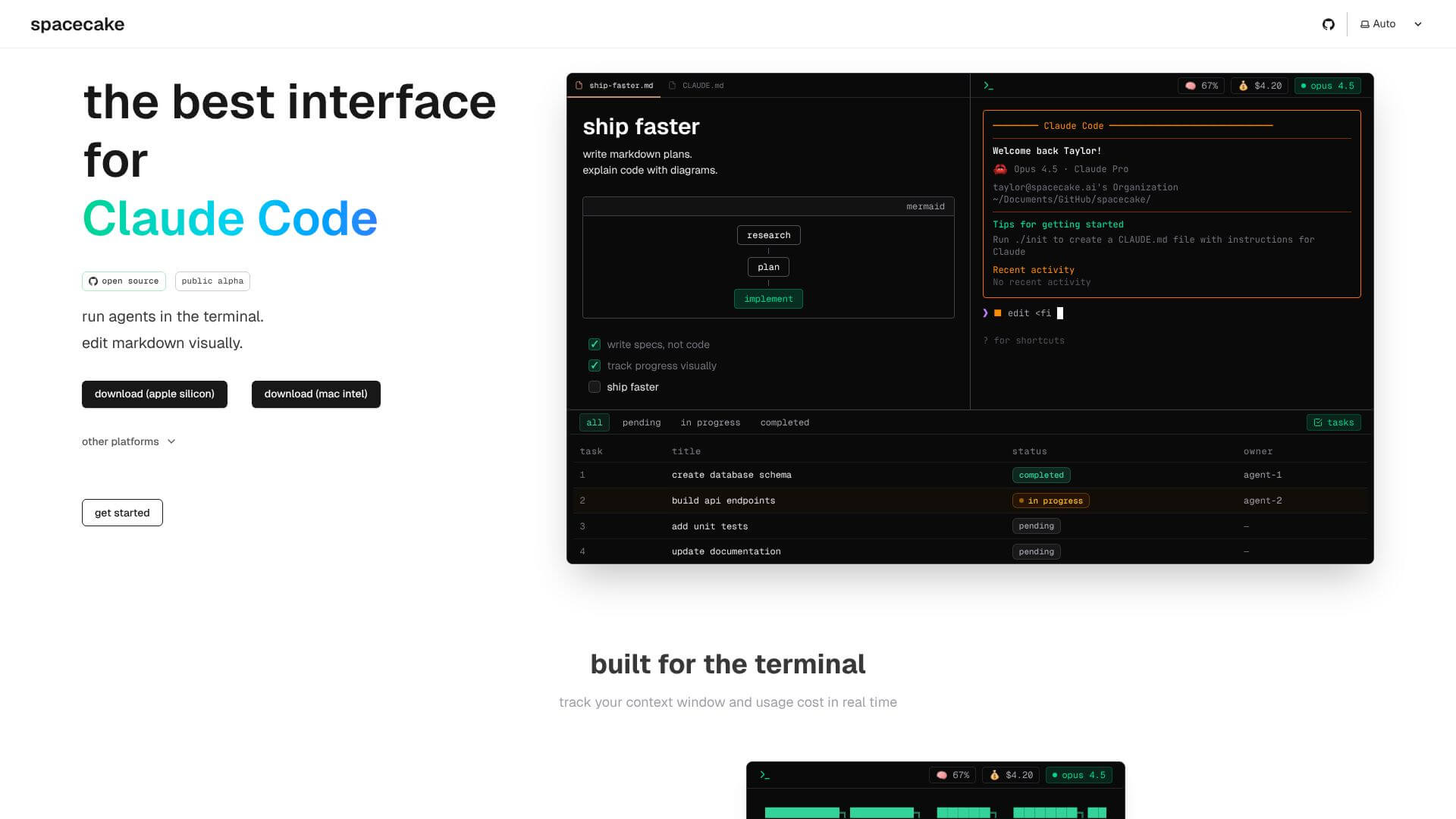
Spacecake is an open-source desktop app. It helps developers use Claude Code better. It combines a writing area like Notion with a special terminal. This makes one place to plan, code, and run things. It works on macOS and Linux. It helps teams work with AI by keeping track of their projects.
Key Features
WYSIWYG Markdown Editor.
Integrated Terminal with Ghostty.
Real-Time Context Window and Usage Tracking.
Frequently Asked Questions
Spacecake is an open-source desktop app. It works as a special interface to make Claude Code even better. It launched as a public alpha in 2026. Spacecake mixes a Notion-style editor with a Ghostty terminal. This creates one place where developers can manage plans and terminal tasks. It works on macOS and Linux.
Spacecake connects human developers and AI coding agents, specifically Claude Code. When you start Claude Code from Spacecake, it automatically shares information about your files and project. This helps Claude make smarter decisions about code. Spacecake helps with writing specifications, managing tasks, and running code in real-time. It tracks Claude's context window usage and costs for each API call. Spacecake supports "specification-driven development." This means detailed plans guide the AI, ensuring it understands what to build.
Spacecake comes with six main features. It has a WYSIWYG Markdown editor for easy writing. It also has an integrated Ghostty terminal, so you don't have to switch apps. Spacecake shows real-time context window usage and API costs. It offers task management and agent orchestration. Spacecake also manages file context, letting you quickly find and open files. Lastly, it’s designed for a keyboard-driven workflow, with many shortcuts to work faster.
Spacecake brings everything together into one environment. This means developers don't have to switch between different tools, which saves time. It connects directly with Claude Code, giving the AI immediate context. This helps developers focus on building instead of explaining. For teams that use specification-driven development, Spacecake helps enforce good practices. It also shows the cost of API calls in real-time. This helps developers understand and manage their expenses.