Digital Transformation
AI Tools by Category: The Ultimate 2026 Directory (100+ Apps Reviewed)
Curated 2026 directory of 100+ tested AI tools across productivity, marketing, design, coding, and education to help teams pick the right apps.

AI Tools by Category: The Ultimate 2026 Directory (100+ Apps Reviewed)
By 2026, AI tools have become essential for productivity, marketing, design, coding, and education. This directory simplifies the overwhelming landscape of over 10,000 AI applications introduced in recent years, organizing 100+ tested tools into clear categories. Each tool was reviewed for usability, security, and real-world performance, helping professionals save time and reduce inefficiencies.
Key Highlights:
- Productivity Tools: Automate workflows, manage tasks, and improve meeting efficiency with tools like Notion AI, ClickUp Brain, and Zapier Agents.
- Marketing Tools: Boost ROI and streamline campaigns using Jasper AI, Surfer SEO, and HubSpot AI.
- Design Tools: Create professional visuals with Midjourney, Adobe Firefly, and Ideogram for tasks ranging from image generation to typography.
- Coding Tools: Speed up development with GitHub Copilot, Cursor, and Devin AI for code generation, debugging, and autonomous workflows.
- Education Tools: Optimize research and learning with Consensus, Elicit, and NotebookLM for organizing knowledge and conducting academic work.
Quick Takeaway:
Companies using 5–7 core AI tools save 40–60% on tool sprawl, while AI-driven workflows cut manual hours significantly. This guide helps you identify the right tools for your needs, whether you're improving team productivity, launching marketing campaigns, or developing software.
Explore the most effective AI tools of 2026, tailored to deliver measurable results.
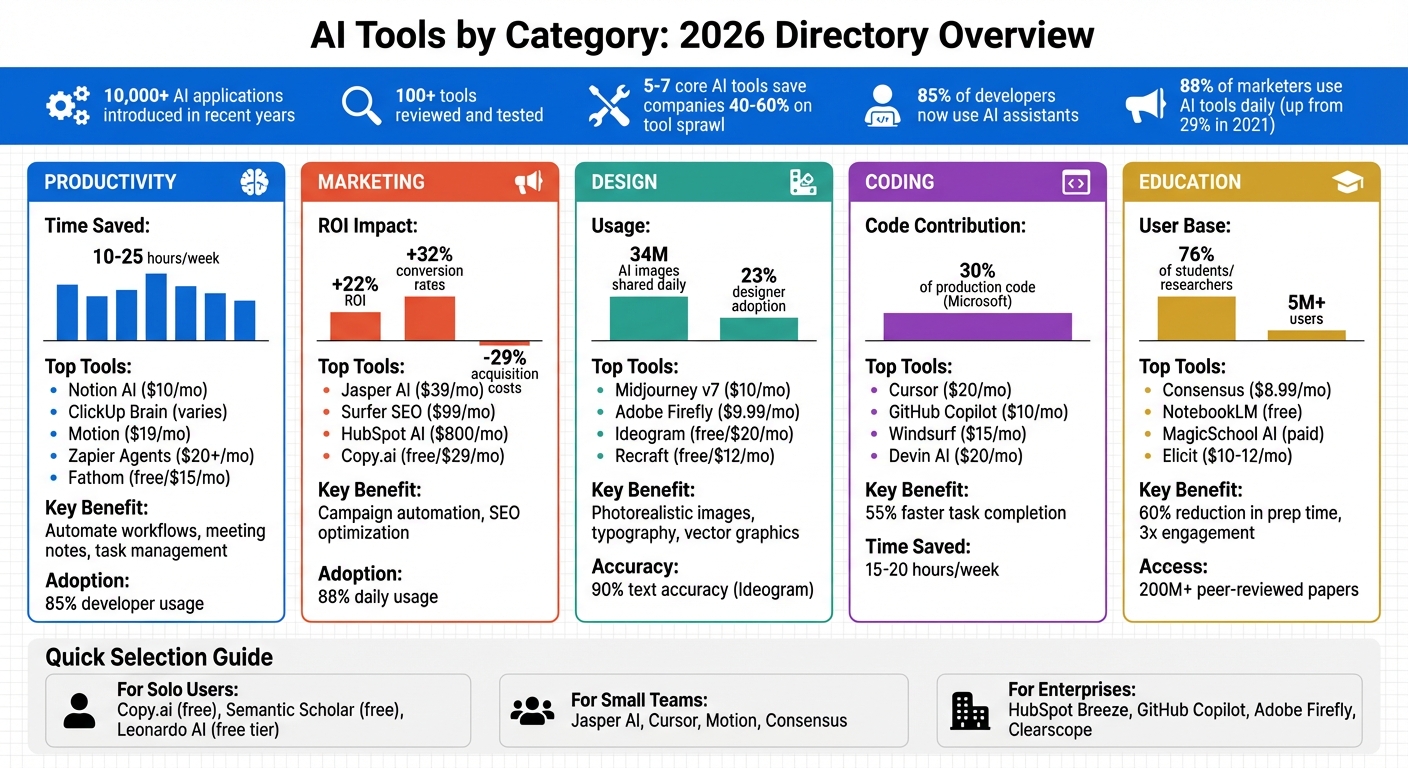
AI Tools Comparison by Category: Features, Pricing, and Time Savings 2026
The Only 8 AI Tools You Need in 2026
sbb-itb-212c9ea
Productivity Tools
By 2026, AI productivity tools have become indispensable for professionals, acting as "cognitive amplifiers" that handle complex workflows autonomously. These tools are saving users between 10 to 25 hours per week by automating tasks such as meeting notes, email sorting, and project updates. With agent-based AI now capable of handling multi-step tasks, team workflows have undergone a fundamental shift. Below, we dive into some of the standout tools driving these efficiencies.
The most effective tools prioritize seamless integration within existing workspaces instead of functioning as standalone apps. Notion AI stands out for knowledge-focused teams by combining documentation with an AI-powered Q&A feature, which searches across workspace data for answers. Airtable has become a go-to for project management, offering natural language tools that let users create custom databases and workflows simply by describing their needs. For scheduling, tools like Motion ($19/month) and Reclaim automatically arrange tasks, meetings, and focus blocks based on team availability.
Meeting Intelligence and Workflow Automation
For distributed teams, meeting intelligence tools have become a must-have. Platforms like Fathom (free or $15/month) and Otter.ai provide real-time transcription, extract key action items, and generate summaries, eliminating the need for manual note-taking. Meanwhile, tools like Zapier Agents and Miniloop allow businesses to automate multi-step workflows across thousands of apps, streamlining operations.
"The real value in AI tools comes from integration. Platforms that embed AI inside the apps you already use tend to reduce friction and see higher adoption." – Fluidwave
When selecting a productivity tool, it’s essential to evaluate its ability to handle context-aware tasks. Tools like Claude Pro ($20/month) offer expansive context windows - ranging from 200K to 1M tokens - making them ideal for analyzing codebases, project histories, or multi-document reports. Additionally, tools like ClickUp Brain and Notion AI ($10/month add-on) provide grounded responses by leveraging internal data, such as company wikis and documentation. Always ensure the tool is SOC2 compliant and that sensitive data won’t be used for model training.
Task Automation and Management Tools
ClickUp Brain has redefined project management by serving as a centralized "workspace brain." It allows teams to ask questions like, “What’s blocking the Q2 launch?” and receive instant, data-driven answers from scattered updates and comments. The tool also automates subtasks, assigns ownership, and estimates timelines using historical data, saving teams an average of four hours per week.
Similarly, Fluidwave ($10/month) bridges AI-driven task management with a human assistant marketplace, combining automation with tasks that need personal oversight.
For businesses looking for fully autonomous workflows, Zapier Agents offer a no-code solution to execute multi-step tasks, such as booking meetings, updating spreadsheets, and sending follow-up emails based on triggers. AI adoption is growing rapidly, with 85% of developers now using AI assistants, and AI contributing to 30% of production code at companies like Microsoft.
Productivity Tools Comparison
| Tool | Starting Price | Core Features | Limitations |
|---|---|---|---|
| Notion AI | $10/mo (add-on) | AI-powered Q&A, document generation, internal data search | Requires an existing Notion workspace |
| ClickUp Brain | Varies (add-on) | Context-aware task and document AI, auto-generates subtasks | Best for teams already using ClickUp; learning curve |
| Airtable | Free / Paid tiers | Natural language app generation, flexible database creation | Free tier limits records and automations |
| Motion | $19/mo | AI scheduling, task prioritization, focus block management | Premium pricing; calendar integration needed |
| Zapier Agents | $20+/mo | Autonomous agents for workflows across 8,000+ apps | Costs increase with task volume; setup time required |
| Fathom | Free / $15/mo | Real-time transcription, automated summaries, action item extraction | Free tier has limited storage |
| Fluidwave | $10/mo | AI task triage with human assistant marketplace | Hybrid model may not suit teams needing full automation |
| ChatGPT Plus | $20/mo | Multimodal assistant with reasoning capabilities | Generic; lacks workspace-specific tailoring; potential data privacy concerns |
Each of these tools brings something unique to the table, whether it's the ability to automate tasks, provide context-aware insights, or streamline project management. The key lies in selecting the right tool that aligns with your team’s specific needs and workflows.
Marketing Tools
AI marketing tools are now at the heart of modern campaigns, with a staggering 88% of marketers using them daily - a massive leap from just 29% in 2021. These tools are making campaigns not only faster but also more precise, delivering a 22% boost in ROI, 32% higher conversion rates, and a 29% drop in customer acquisition costs. They connect seamlessly with CRM systems, optimize content for AI-driven search engines, and even handle entire campaigns autonomously.
Some platforms excel in maintaining brand consistency. Jasper AI, for example, stands out with its "Jasper IQ" feature, which learns a company's style guidelines and applies them across all content. For instance, Old Dominion Freight Line used Jasper IQ to incorporate industry-specific terminology, slashing content production time by 93% and quadrupling their blog output. Cushman & Wakefield also reported saving over 10,000 hours annually by using Jasper for marketing proposals and white papers.
HubSpot AI (Breeze), priced at $800/month, integrates CRM data to create context-aware content and score leads. On the other hand, Copy.ai, starting at $29/month, is ideal for crafting a full suite of campaign materials - emails, ads, and social posts - from just a single brief. A trend to watch in 2026 is Generative Engine Optimization (GEO), which focuses on making content discoverable by AI engines like ChatGPT, Perplexity, and Google AI Overviews. These engines now account for over 40% of searches. Tools like Surfer SEO, starting at $99/month, even include an "AI Tracker" to monitor if your brand is cited in AI-generated answers. A case study by Atlas Marketing revealed that a client using Semrush's AI Visibility Toolkit saw a 78% increase in AI-driven referral traffic over four months by expanding on topics cited in ChatGPT.
"Jasper has the potential to fundamentally transform the way marketing teams operate by boosting efficiency, accelerating execution, and delivering high-quality campaigns faster."
– Bryan Olshock, Chief Marketing Officer
When selecting tools, prioritize those that fit your tech stack and can enforce brand guidelines through uploaded style guides and knowledge bases. For those on a tighter budget, Copy.ai offers a free tier with 2,000 words per month, while Writesonic, starting at $20/month, features a "Factual Mode" that uses live Google Search data to ensure accuracy [20,21].
Content Creation and SEO Tools
AI tools are also reshaping content creation and SEO workflows. Jasper AI is a go-to solution for enterprises, thanks to its ability to automate the creation of blog posts, social media content, and email campaigns from a single brief [23,24]. Adidas leveraged Jasper's bulk generation feature to create 7,500 product descriptions in just 24 hours. Pricing starts at $39/month for the Creator plan, with Pro plans ranging from $59 to $99 per user [24,25]. It has earned a 4.7/5 rating on G2 from over 1,200 reviews, with users praising its brand voice capabilities but noting its steep learning curve.
For SEO teams, Surfer SEO and Clearscope are top contenders. Surfer SEO starts at $99/month and offers real-time NLP scoring, helping users improve their rankings - on average, by 5.7 positions within 30 days of optimization. One client improved an article's ranking from position 17 to position 4 within three weeks by adding a comparison table and new sections. Clearscope, with plans starting at $189/month, focuses on semantic depth and editorial quality, making it a favorite for enterprises [23,30]. Unlike Surfer, Clearscope doesn’t include AI writing but serves as a powerful optimization tool. Both platforms now track AI visibility, measuring how often content is cited in AI-generated answers [23,33].
Writesonic’s "Factual Mode", priced at ~$20/month, minimizes inaccuracies by using live Google data, though its output can vary. HubSpot AI (Breeze) leverages CRM data for context-aware content and automated lead scoring but requires the Professional tier at $800/month. Emerging tools like Seenos.ai are taking things further, managing the entire content lifecycle from research to execution. Mega's SEO Agent, priced between $799–$999/month, even automates code changes and content updates, streamlining the entire process.
"Our marketing teams have cracked the code of using Jasper as an agentic partner in our day-to-day lives, transforming how we work, collaborate and evolve as an organization."
– Elaina Shekhter, Chief Marketing & Strategy Officer
When deciding between tools, consider your team size and workflow. Solo marketers might find Copy.ai’s free tier or Rytr’s forever-free plan a good starting point [20,23]. Small teams should look at Jasper or Writesonic for their mix of quality and affordability, while enterprises needing strict brand oversight might invest in Jasper IQ or Writer for their advanced governance features [23,25].
Marketing Tools Comparison
| Tool | Starting Price | Core Features | Limitations |
|---|---|---|---|
| Jasper AI | $39/mo | Brand voice governance (Jasper IQ), automated Content Pipelines | High cost for solo users; SEO features require extra subscription; steep learning curve |
| Surfer SEO | $99/mo | Real-time NLP scoring, AI visibility tracking, SERP analysis | Not a standalone writer; high per-article generation cost; metric-heavy interface |
| Clearscope | $189/mo | Semantic depth analysis, editorial quality optimization | Expensive; no free trial; lacks built-in AI writing |
| Copy.ai | Free / $29/mo | Free tier with 2,000 words, short-form copy automation | Long-form quality trails Jasper; limited brand voice customization on free tier |
| Writesonic | ~$20/mo | Factual Mode with live Google citations, budget-friendly SEO | Inconsistent quality between modes; weaker brand governance |
| HubSpot Breeze | $800/mo | CRM integration, context-aware content, automated lead scoring | High entry cost; ecosystem lock-in; requires existing HubSpot setup |
| Frase | $39/mo | AI visibility tracking, content research automation | Limited brand voice features; smaller template library than Jasper |
Design and Image Generation Tools
AI design tools have become incredibly versatile, producing everything from photorealistic product images to vector logos in mere seconds. With 34 million AI-generated images shared daily and 23% of designers now incorporating AI into their workflows, these tools are reshaping creative industries. They combine aesthetics with time-saving functionality, making them indispensable for modern design.
These tools generally fall into three categories: generators, editors, and enhancers. For artistic imagery, Midjourney v7 sets the standard, delivering stunning concept art and cinematic visuals. However, it lacks built-in editing features and relies on a Discord-based interface. For ultra-realistic textures and lighting, Flux 1.1 Pro is unmatched, generating lifelike images in just 4.5 seconds. If legal safety is a priority, Adobe Firefly 5 shines by training exclusively on licensed Adobe Stock and public domain content, offering businesses IP indemnification to mitigate legal risks.
Typography, traditionally a weak spot for AI, has seen major breakthroughs with tools like Ideogram, which achieves about 90% text accuracy. This makes it ideal for creating posters, packaging, and other text-heavy designs. For vector graphics, Recraft stands out as the only major platform generating native SVG files, eliminating the need for manual raster-to-vector conversion. Meanwhile, Leonardo AI impresses with its AI Canvas, enabling interactive in-painting and out-painting, which is particularly useful for asset editing workflows.
"The challenge is no longer finding an AI tool that makes pretty pictures. The challenge is finding the one that fits your design workflow, budget, and output requirements."
– Pascal Strasche, Founder, TOOOLS.design
Platforms like Kittl are gaining popularity by offering access to multiple AI engines, including OpenAI and Google, all within a single browser-based editor. It also features over 10,000 premium templates for branding and merchandise. For e-commerce teams, tools like PhotoRoom and Pixelcut simplify batch processing, standardizing framing, padding, and backgrounds across product catalogs. These tools empower designers to work faster without sacrificing quality.
Choosing the right tool depends on the task. For artistic concepts, Midjourney is a go-to. Need accurate typography? Ideogram is a smart choice. For vector assets, Recraft is unmatched, while Adobe Firefly ensures commercial safety. Designers working on rapid prototyping can rely on tools like Uizard, which converts hand-drawn sketches into interactive UI prototypes. Regardless of the tool, human oversight remains essential to guide creative direction.
With these powerful generation tools in hand, the next step is exploring how integrated editing features can streamline professional design workflows.
Graphic Design and Image Editing Tools
Integrated editing tools are transforming design workflows by reducing time spent switching between platforms. Adobe Firefly 5, for instance, integrates seamlessly with Photoshop and Illustrator, allowing designers to use Generative Fill directly within their primary workspace. While some users find its outputs less adventurous than those from Midjourney, its commercial safety and ease of use make it highly rated, earning a 4.4/5.
Midjourney v7, with its exceptional texture and color depth, holds a 4.8/5 rating for artistic quality. However, its Discord-only interface and lack of editing tools make it better suited for concept art and moodboarding rather than production-ready assets. For real-time feedback during edits, Krea offers a canvas that updates visuals instantly, with pricing options ranging from a free tier (100 units/day) to $105/month for advanced features like 22K upscaling.
Leonardo AI's AI Canvas is a standout for iterative asset editing, supporting both in-painting and out-painting. While the interface can feel overwhelming to beginners, it provides precise control over generated elements, making it ideal for professional teams. Typography-heavy projects benefit greatly from Ideogram 3.0, which delivers legible text where other models falter. It offers a free plan with 10 slow credits per week and a Plus plan at $20/month for priority access.
For vector-based workflows, Recraft v4 allows direct editing of results in Illustrator or Figma, bypassing the need for manual tracing. For simpler tasks like photo compositing, Pixlr offers a lightweight alternative to Photoshop, though it lacks advanced features. Background removal tools like ClipDrop Cleanup and remove.bg further streamline tasks for social media and e-commerce teams, saving hours of manual work.
"Recraft is the only major AI image generator that produces native vector graphics."
– Pascal Strasche, Founder, TOOOLS.design
For budget-conscious users, Reve Image's "Halfmoon" model delivers images at just $0.01 each, offering significant savings compared to Midjourney. If resolution is a concern, Google's Nano Banana Pro supports native 4K output, eliminating the need for separate upscaling. When editing real photos, it’s best to work in smaller increments to preserve natural textures and ensure shadows are adjusted for realism.
Below is a summary of key design tools and their features:
Design Tools Comparison
| Tool | Starting Price | Core Features | Limitations |
|---|---|---|---|
| Midjourney v7 | $10/mo | Stunning artistic quality, cinematic visuals, concept art | Discord-only interface; lacks editing tools |
| Adobe Firefly 5 | $9.99/mo (2,000 credits) or $54.99/mo (Creative Cloud) | Licensed training data, Photoshop/Illustrator integration, Generative Fill | Conservative artistic range; credit-based system |
| Flux 1.1 Pro | Varies | Photorealistic textures, fast generation (4.5 seconds) | Limited artistic flexibility; minimal editing options |
| Ideogram | Free / $20/mo | Accurate typography, ideal for posters and logos | Slower on free tier; limited for fine art |
| Recraft | Free / $12/mo (1,000+ credits) | Native SVG output, direct editing in design software | Free images are public; restrictive for heavy users |
| Leonardo AI | Free (150 daily tokens) / $12/mo | AI Canvas for precise editing, in-painting/out-painting | Steep learning curve for beginners |
| Kittl | Free / $15/mo | Multi-AI engine access, branding templates | Credit-based system; complex pricing for heavy users |
| Canva | Free / $18/mo | Easy-to-use templates, Quick Actions | Lacks advanced features for professionals |
These tools cater to a wide range of needs, from artistic exploration to production-level design. Whether you're crafting a logo, editing photos, or creating a marketing campaign, there's a tool tailored to your goals.
Coding and Development Tools
AI tools for coding have come a long way, evolving from basic autocomplete features to sophisticated agents capable of planning, executing, and verifying entire features across multiple files. Today, around 85% of developers use AI assistants, with AI contributing to 30% of Microsoft's code and over 25% of Google's codebase. By 2026, the landscape is divided into four main categories: Assistants (inline code suggestions), Agents (autonomous task execution), Agentic IDEs (deeply integrated development environments), and App Builders (platforms that turn prompts into apps).
In the AI-native IDE space, Cursor and Windsurf lead the pack with their advanced codebase awareness. Cursor's Composer mode allows developers to edit multiple files while maintaining architectural consistency, earning it a professional-grade score of 17/20. Windsurf, on the other hand, excels with its persistent session memory and multi-agent orchestration, enabling specialized agents to collaborate on tasks like frontend development and testing. For developers working in terminal environments, Claude Code stands out with its extended reasoning capabilities and a context window of over 1 million tokens, making it particularly useful for debugging tricky edge cases.
"The developers getting the most out of AI tools are those who treat them as junior engineers - fast and capable, but requiring clear direction and code review."
– Addy Osmani, Engineering Director at Google
GitHub Copilot remains a favorite for enterprise teams, priced at $10 per month for individuals or $19 per month for businesses. It helps developers complete tasks up to 55% faster. However, caution is warranted: MIT researchers found a 41% increase in bugs in codebases that relied heavily on AI-generated code without adequate review. Tools like CodeRabbit and Qodo address these concerns by catching security flaws, style issues, and generating unit tests to handle edge cases.
Meanwhile, no-code platforms are lowering the barriers to development. Tools like Bolt.new and Lovable can transform natural language prompts into deployed prototypes in minutes, making them ideal for MVPs and internal tools. Devin AI takes this a step further by autonomously planning, writing, and debugging code in a cloud sandbox. It’s available for $20 per month, with additional costs of $2.25 per Agentic Computing Unit. This shift allows developers to focus more on intent and architecture, treating AI agents as collaborators rather than mere tools.
Coding and No-Code Development Tools
The no-code space is also embracing AI to streamline app development. Cursor Pro ($20/month) and Windsurf Pro ($15/month) bridge traditional and no-code development by allowing developers to guide the code generation process. Cursor's success is evident, generating over $500 million in annualized revenue by early 2026. For industries requiring strict data security, Tabnine offers local model execution to keep sensitive code on-premises.
Claude Code, available with Claude Pro at $20/month or through higher-tier plans, excels in handling complex refactoring tasks. For projects with high security requirements, Amazon Q Developer provides specialized scanning to uncover vulnerabilities like hardcoded credentials and SQL injection risks.
For rapid prototyping, Bolt.new ($20/month Pro) and Devin AI are standout tools, though complex applications can incur token costs ranging from $100 to $200 per month. However, a study by Anthropic revealed that developers heavily reliant on AI experienced a 17% decline in code mastery over time, highlighting the importance of maintaining core coding skills.
In testing, Verdent outperformed competitors in SWE-bench Verified testing in January 2026, achieving a 76.1% score for autonomous issue resolution, compared to GitHub Copilot's 12.3%.
"The future isn't about AI replacing developers - it's about developers who know how to leverage these tools outpacing those who don't."
– Dora, Principal Engineer, Verdent
For quality assurance, tools like Qodo (formerly CodiumAI) and Diffblue Cover generate unit tests to cover edge cases and boundary values. Sentry AI enhances error detection by grouping related errors, predicting user impact, and offering fix suggestions based on stack traces. Additionally, platforms like Kiro are advancing spec-driven development, using structured specifications to guide AI for more predictable and maintainable code.
Development Tools Comparison
| Tool | Type | Starting Price | Best For | Key Limitation |
|---|---|---|---|---|
| Cursor | IDE | $20/mo (Pro) | AI-native IDE experience, multi-file edits | |
| Windsurf | IDE | $15/mo (Pro) | Multi-agent workflows, persistent sessions | |
| Claude Code | CLI Agent | $20/mo (Pro) | Complex reasoning with 1M+ token context | Higher-tier pricing may be steep |
| GitHub Copilot | Plugin | $10/mo (Individual) | Enterprise integration within GitHub | |
| Bolt.new | App Builder | $20/mo (Pro) | Rapid prototyping, full-stack MVPs | High token costs for complex apps |
| Devin AI | Agent | $20/mo + $2.25/ACU | Autonomous task execution for scoped projects | |
| CodeRabbit | PR Review | $12/seat/mo | Security scanning and code review automation | |
| Tabnine | Plugin | Varies | Privacy-focused, local model execution |
Between 2022 and 2024, entry-level programming job postings dropped by 60%, reflecting the industry's shift toward AI-augmented development. These tools empower developers to iterate quickly and maintain high code quality, reshaping how software is built in the modern era.
Education and Research Tools
AI is making waves in education and research, transforming how students, educators, and researchers approach their work. These tools are designed to streamline tasks, improve efficiency, and produce better results. Gone are the days of generic chatbots - modern AI tools now rely on verified sources, working exclusively with validated documents to minimize errors. By 2026, 76% of students and researchers will be using or testing AI tools, with teachers cutting their prep time by 60% and student engagement levels tripling.
Research Tools: Discovery and Organization
AI research tools fall into two main categories: discovery platforms, like Consensus and Elicit, which search massive databases of peer-reviewed papers, and knowledge management platforms, such as NotebookLM and Atlas, which help users organize and synthesize their research materials.
- Consensus is a standout in evidence-based search, accessing over 200 million peer-reviewed papers. Its "Consensus Meter" visually displays the balance of supporting and contradicting evidence for any research question.
- Elicit speeds up systematic literature reviews by extracting data from hundreds of papers into structured comparison tables, saving weeks of manual effort.
- Semantic Scholar provides access to over 220 million papers, complete with AI-generated summaries ("TLDRs") for quick insights. Best of all, it’s free.
"Consensus makes research easier for all students, from undergraduates to PhDs. They quickly grasp how to use it and engage with high-quality academic sources."
– Christopher Chan, University Librarian
Tools for Educators and Students
AI tools are also revolutionizing education, helping teachers simplify lesson planning and offering students personalized learning experiences.
- MagicSchool AI supports over 5 million users with tools for lesson planning, rubric generation, and even drafting Individualized Education Programs (IEPs).
- NotebookLM is particularly innovative, creating audio overviews from uploaded PDFs and notes. A Stanford study found that using audio study materials improved retention by 0.28 standard deviations compared to text-only review.
- Khanmigo provides step-by-step tutoring, guiding students through problems without giving away the answers.
For teachers, EduGenius offers a three-tiered system for creating customized study guides, reducing prep time from over four hours to just 30 minutes. Pricing starts at $4 per month. For students focused on active recall, tools like Knowt and Quizlet automatically turn notes into flashcards and practice tests, boosting retention.
Visual and Network-Based Tools
Some AI tools go beyond text, offering visual aids and network-based insights:
- Napkin AI converts text into diagrams and charts, making complex ideas easier to understand.
- Research Rabbit and Connected Papers visualize citation networks, helping users identify key papers and research clusters.
- Atlas allows students to connect ideas across subjects using AI-generated mind maps. It offers a free tier, with Pro plans starting at $12 per month.
"Integrating Gemini and NotebookLM into Google Workspace has transformed how students learn, faculty teach, and staff operate."
– Dr. James P. Frazee, VP for Information Technology and CIO, SDSU
Advanced Research Platforms
For researchers looking for even more specialized tools:
- PapersFlow provides access to over 474 million academic papers, using advanced systems for search, analysis, and critique.
- Scite classifies citations as "supporting", "contradicting", or "mentioning", helping researchers quickly assess the reliability of findings.
- ATLAS.ti and NVivo include AI-assisted coding, making it easier to identify patterns in large datasets, interviews, and multimedia content.
Choosing the Right Tools
The most effective approach is to combine tools based on specific needs. For example, researchers might use Semantic Scholar for discovery, Elicit for data extraction, and NotebookLM or Atlas for synthesis. It’s crucial to treat AI as an assistant, not a replacement, ensuring human oversight for accuracy and critical thinking.
Education Tools Comparison
| Tool | Research Depth | Free Access Limits | Pricing (USD) |
|---|---|---|---|
| Consensus | High (Peer-reviewed) | 20 searches/month | $8.99/month |
| Elicit | Very High (Systematic) | 5,000 credits | $10–$12/month |
| Semantic Scholar | High (220M+ papers) | Unlimited | Free |
| NotebookLM | High (Source-grounded) | 100 notebooks/50 sources | Free |
| Atlas | High (Cross-document) | Functional free tier | $12/month |
| MagicSchool AI | Low (Planning focus) | 60+ tools (limited) | Paid upgrades |
| EduGenius | Medium (Differentiation) | 100 credits | $4–$15/month |
| Perplexity AI | High (Web + Academic) | Unlimited basic search | $20/month |
| Claude Pro | Very High (200K context) | Limited daily messages | $20/month |
| Research Rabbit | Moderate (Discovery) | Unlimited | Free |
From simplifying lesson planning to automating systematic reviews, AI tools are reshaping the way we learn and conduct research. By integrating the right mix of platforms, users can save time, improve accuracy, and focus on what matters most.
How to Use the AI Apps Directory
With over 27,000 AI tools available, finding the right one can feel overwhelming. That’s where this directory steps in, offering a streamlined way to discover 1,900+ verified tools across a wide range of categories.
Start by exploring tools based on specific use cases. Instead of searching for a tool by name, navigate through categories like "AI for Marketers" or "AI for Founders". The directory organizes tools into practical areas such as content creation, marketing automation, finance, and healthcare, making it easier to find something that fits your needs. If you want more precision, take advantage of feature-specific filters like "Vector (SVG) Art" for designers or "Lip-Sync" for video creators [77, 80]. This approach ensures your search is tailored to your workflow.
The directory also includes an advanced filtering system to help you avoid unnecessary subscriptions. You can sort tools by pricing tiers - "Free", "Freemium", "Paid", and "Enterprise" [77, 78]. Additionally, you can discover tools by filtering for "Trending", "New Arrivals", or "Featured" options [78, 79]. This setup not only saves time but also helps you make informed decisions about which tools to explore further. Developers can even submit their own tools for inclusion in the directory.
For developers, the "Submit Your AI Tool" form offers a chance to boost visibility and improve SEO. Submissions go through a review process where tools are categorized by use case and rigorously tested for reliability before being listed. This ensures users only see the top-performing tools.
Whether you’re comparing 16 different LLMs side by side or checking free tier limits like "10 reports per month" or "125 one-time credits", you can trust that every tool listed has been verified for its practical utility [77, 79]. Look for "Verified" badges to identify tools that have been thoroughly tested.
Conclusion
By March 2026, AI has transitioned from experimental to essential. Leading companies now rely on 5–7 core AI tools that consistently deliver measurable outcomes. This directory connects you to over 1,900 verified tools spanning productivity, marketing, design, coding, and education.
The rise of specialized AI agents has redefined workflows. While general tools like ChatGPT handle around 70% of ad-hoc tasks, specialized solutions excel at producing professional-grade results that generic platforms can't achieve. For instance, in March 2026, the coding tool Aider helped command-line developers save an average of 15 hours weekly, and Lovable, an app development platform, saved users 20 hours per week. These time savings translate directly into increased productivity and profits.
"The 'best' AI tool is the one that fits your specific needs and workflow. Rather than searching for the perfect all-in-one solution, build a toolkit of the right AI for each task."
– John V. Akgul, Founder & CEO of PxlPeak
This tailored approach not only simplifies processes but also enhances overall efficiency. AIapps.com's advanced filters let you sort tools by price, category, and features, making it easy to find the right match. Start by identifying your biggest bottleneck - whether it’s lead generation, content creation, or development - and incorporate one specialized tool at a time.
With 75% of students using AI for academic purposes and AI personal assistants reaching 700 million weekly users by early 2026, staying ahead requires tools that integrate seamlessly with your existing systems and offer proven results. The directory’s comparison features, verified badges, and time-saved metrics ensure you can make informed decisions and avoid wasting time on subpar options.
FAQs
How do I pick the 5–7 AI tools my team actually needs?
To get started, pinpoint the main tasks or goals you want to address - whether that's boosting productivity, creating content, coding, conducting research, or automating workflows. Once you’ve outlined your needs, explore highly rated tools in each category that fit both your objectives and budget. Prioritize tools that have a strong track record for delivering results and avoid choosing multiple tools that do the same thing. Aim to select 5–7 key tools that offer the greatest value. Don’t forget to regularly evaluate their performance to make sure they’re still meeting your team’s changing demands.
What should I check for data privacy and security before using an AI tool?
Before diving into any AI tool, it's crucial to check its data privacy features. Look for measures like encryption to secure your data and anonymization to protect user identities. Make sure the tool adheres to established security standards and has transparent governance policies in place.
To stay ahead of potential issues, conduct regular risk assessments. These evaluations can uncover vulnerabilities and help you take steps to protect sensitive information. By following these practices, you can better safeguard your data and maintain confidence in the tool you’re using.
Should I use one general AI assistant or specialized tools for each task?
Choosing the right tool often comes down to what you need. General AI assistants, like ChatGPT, are great for a range of tasks - whether it’s drafting content, conducting research, or handling basic coding. But when it comes to more specialized, intricate tasks - like advanced coding projects or creating detailed images - dedicated tools tend to shine. Using a mix of both can give you the best of both worlds: flexibility from general tools and precision from specialized ones.