Digital Transformation
Don't Fall Behind: The Biggest AI Launches & Trends This July 2026
Frontier AI models split by cost and job while agents and connected tools automate email, docs, calendars, and code.

Don't Fall Behind: The Biggest AI Launches & Trends This July 2026
If I had to boil this month down to a few points, here’s the short version: frontier models got split by price and job, AI tools moved deeper into email, files, calendars, and code, and background agents started doing more of the busywork teams used to handle by hand with automation.
That means if you use AI for work, I’d focus on three things right now:
- Pick the right model tier for the job. High-end reasoning is no longer the only option. Lower-cost models now make more sense for summaries, routing, and repeat tasks.
- Watch tools that connect to your stack. The shift is less about chat and more about AI working across Slack, Gmail, GitHub, docs, and calendars.
- Test one workflow, not ten tools. A 14-day trial on one bottleneck will tell you more than a long feature list.
A few numbers stood out to me:
- GPT-5.6 launched July 9, 2026 with three tiers: Sol, Terra, and Luna
- Sol claims 54% better token efficiency for coding
- Muse Spark 1.1 offers a 1 million-token context
- Anthropic data says 33% of agent use is now tied to business process work
- ChatGPT Work pricing goes up to $100/month
Top AI Tools & Trends You NEED to Know – July 2026 Update 🤖
sbb-itb-212c9ea
Quick Comparison
| Item | Best for | Main point | Price |
|---|---|---|---|
| GPT-5.6 Sol | Hard reasoning, coding, agent tasks | Top-end model in the lineup | $5.00 / $30.00 per 1M tokens |
| GPT-5.6 Terra | Team production work | Mid-tier balance of cost and output | $2.50 / $15.00 per 1M tokens |
| GPT-5.6 Luna | High-volume jobs | Lower-cost option for pipelines and basic tasks | $1.00 / $6.00 per 1M tokens |
| Muse Spark 1.1 | Long context, dev workflows | 1M-token context and subagent handoffs | $1.25 / $4.25 per 1M tokens |
| Grok 4.5 | Coding and agent use | MoE model with lower output token use | $2.00 / $6.00 per 1M tokens |
| ChatGPT Work | Team automation | Handles multi-step work across apps | Up to $100/month |
| GPT-Live | Voice use | Live voice with background reasoning | Included in paid ChatGPT plans |
My takeaway: July did not just bring new models. It pushed AI further into the place where work already happens. So if I were choosing what to test next, I’d start with the tool that saves me time on a job I already do every week.
The Biggest AI Launches in July 2026
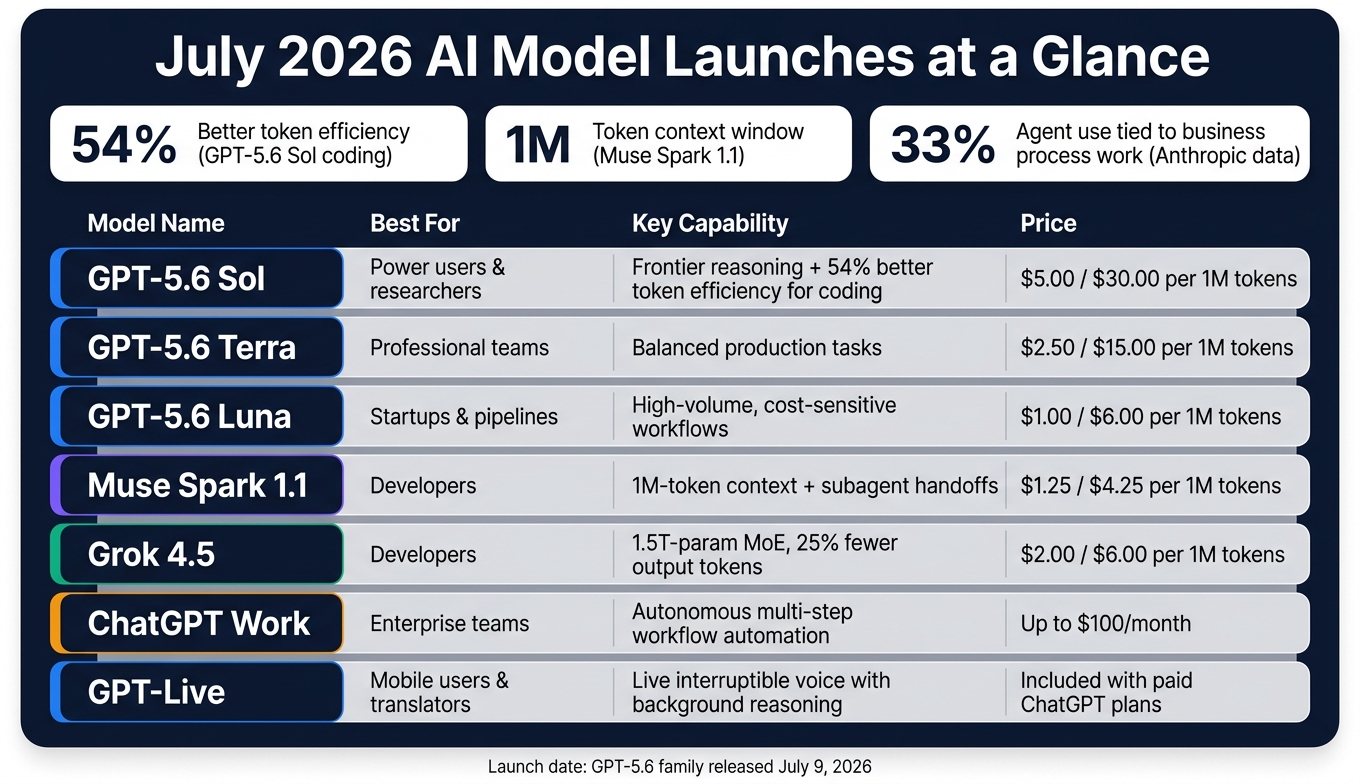
July 2026 AI Model Launches: Pricing & Capabilities Compared
Frontier model releases now in wider use
July’s biggest launches fall into two camps: new frontier models, and tools that plug straight into day-to-day work.
The main release this month is OpenAI's GPT-5.6 family, launched on July 9, 2026, as a three-tier lineup: Sol, the flagship; Terra, the balanced middle option; and Luna, the lower-cost tier. Ultra mode runs four agents in parallel for harder tasks. Sol leads the family on coding and agent tasks, with strong gains in token efficiency - 54% more token-efficient for coding than its predecessor. If you're after top output quality on complex work, Sol is the one others have to catch.
Other major releases this month include Meta's Muse Spark 1.1 and SpaceXAI's Grok 4.5. Muse Spark 1.1 is Meta's first paid developer API. It adds a 1M-token managed context that keeps working state in place and supports subagent handoffs. Grok 4.5 is a 1.5-trillion-parameter MoE model trained on real agent-use data, while using about 25% fewer output tokens.
The bigger change is simple: these models aren't just sitting on benchmark charts anymore. They're being built into the tools people use to get work done.
Platform updates that affect daily work
ChatGPT Work handles multi-step work for teams that spend their day in Slack, Gmail, and GitHub. It runs as a persistent cloud-based virtual machine connected through the Model Context Protocol, so it can manage projects on its own without manual handoffs. Teams can now define the test and let ChatGPT Work or Codex run it.
GPT-Live adds live, interruptible voice, with a background model taking on heavier reasoning while you speak. For people who use voice often, that’s a meaningful step.
July 2026 launches compared: capability, access, and cost
Here’s the quickest way to compare the launches by task, cost, and buyer.
| Launch | Primary Capability | Ideal User | Cost |
|---|---|---|---|
| GPT-5.6 Sol | Frontier reasoning, Ultra mode | Power users, researchers | $5.00 / $30.00 per 1M tokens |
| GPT-5.6 Terra | Balanced production tasks | Professional teams | $2.50 / $15.00 per 1M tokens |
| GPT-5.6 Luna | High-volume, cost-sensitive workflows | Startups, pipelines | $1.00 / $6.00 per 1M tokens |
| Muse Spark 1.1 | 1M-token context, subagent handoffs | Developers | $1.25 / $4.25 per 1M tokens |
| Grok 4.5 | Efficient coding and agentic workflows | Developers | $2.00 / $6.00 per 1M tokens |
| ChatGPT Work | Autonomous workflow automation | Enterprise teams | Up to $100/month |
| GPT-Live | Live, interruptible voice | Mobile users, translators | Included with paid ChatGPT tiers |
For startups keeping a close eye on spend, Luna is the clearest way in. For developers who need long context and subagent support, Muse Spark 1.1 stands out. The next section looks at the tool categories starting to see actual adoption because of these launches.
New AI Tool Categories Gaining Real Adoption
Writing, communication, and meeting support
The biggest shift in writing tools this month isn’t better autocomplete. It’s scope.
Notion AI 2.5 now includes Workspace Mode, which can pull context from company docs and calendars to draft or summarize across multiple files. For a solo founder or a teacher managing a pile of active projects, that’s the difference between a nice writing aid and something that can save an entire morning.
Meeting tools are moving in the same direction. Fathom v4 and Tactiq now do more than transcription. They pull out action items and push decisions into CRM records. If your team works across time zones, that can cut a lot of back-and-forth. In plain terms, more work is moving from manual drafting into automated workflows.
Automation and agent-style workflows
Agent-style tools are showing some of the biggest time savings in July 2026. They also take more setup.
The upside is pretty concrete: less coordination work, cleaner CRM updates, and fewer manual handoffs. ChatGPT Work coordinated 10 bug-bash meetings from a single prompt, cutting about 30 minutes of manual scheduling.
For small teams, the best use cases are pretty down to earth:
- Lead follow-up emails
- CRM field updates after calls
- Weekly report generation
- Customer support routing
Tools built around the Model Context Protocol (MCP) can connect to Gmail, Slack, and Google Calendar with connectors that cut setup time in a big way. A simple place to start is one workflow, like a weekly briefing, and keep human approval gates on anything that sends external communications. That keeps risk low while you figure out what the agent can handle. After that, the goal is to turn those one-off wins into repeatable business processes.
Tool category comparison: which fits which job
The table below maps the main tool categories to day-to-day business functions, so you can spot where to start based on your role and budget.
| Tool Category | Primary Function | Setup Difficulty | Typical Payoff | Best For | Budget Range (USD) |
|---|---|---|---|---|---|
| Writing & Research (e.g., Notion AI 2.5) | Cross-project research, drafting, summarization | Low | Faster drafts, fewer context switches | Solo founders, creators | $10–$25/user/mo |
| Meeting Assistants (e.g., Fathom v4, Tactiq) | Transcription, action item extraction, CRM logging | Low | Fewer follow-up tasks after calls | Team leads, ops | $15–$30/user/mo |
| Workflow Agents (e.g., ChatGPT Work) | Multi-step task execution across apps | Medium | Eliminated manual coordination | Operations, developers | Usage-based ($20+ base) |
| Calendar Automation (e.g., Reclaim AI v4) | Conflict resolution, priority scheduling | Low | Reclaimed focus time | Managers, teams | $10–$20/user/mo |
Essential tools for beginners in writing and meeting support are the easiest way in. The bigger gains usually show up when those tools start feeding into automation.
July 2026 AI Trends Businesses Should Watch
July’s bigger story is the move from standalone AI tools to connected business workflows. AI isn’t just about one-off launches anymore. It’s becoming part of business systems that do the work.
You can see that shift most clearly in marketing automation and persistent agents.
Marketing workflows are getting more automated
Marketing teams are watching AI move far beyond content drafting. This month, the shift is toward campaign automation across audience research, creative testing, and real-time reporting.
Adobe Firefly 4’s Style Match helps keep AI-generated content strictly on-brand. Meta’s Muse Image allows conversational editing and @-mentioning Instagram profiles to pull references into creative assets.
The upside is pretty simple: faster campaign decisions and clearer ROI. When audience research, creative generation, and performance reporting are connected, teams can cut weak campaigns faster or scale winning ones without waiting on manual analysis.
That same pattern is now showing up in operations, support, and internal workflows.
Persistent AI agents are moving from demos to daily operations
That capability is shifting from demos into back-office operations. Anthropic’s usage data from 1.2 million anonymized sessions shows that 33% of agent use is for business process work - finance, HR, and operations - while software development accounts for less than 9%.
These launches are turning into always-on systems for routine business work. The clearest use cases right now are onboarding checklists, sales follow-up sequences, and internal knowledge retrieval. These repetitive tasks eat up hours every week.
Nvidia used ChatGPT Work to review thousands of sales leads and check product launch readiness across Jira and go-to-market plans ahead of GTC 2026, and Virgin Atlantic used it to automate customer feedback analysis across multiple platforms.
Trend comparison: business impact and who should care
The table below shows how these trends differ by impact, adopter, and first use case.
| Trend | Business Impact | Best Fit | Near-Term Use Case |
|---|---|---|---|
| Persistent AI Agents | High: Replaces manual follow-ups and scheduling | RevOps, Customer Support, IT | Onboarding checklists, sales follow-ups, and scheduled data pulls |
| Automated Marketing | Medium: Faster creative cycles, better campaign decisions | Small marketing teams, Agencies | Audience research, creative testing, and campaign reporting |
| Connected Workspaces | High: Reduces app-switching friction | Knowledge workers, Project Managers | Generating reports from connected email, CRM, and files |
| Simple tasks to cheaper models | High: Cost savings and better margin control | Startups, Enterprise IT | Routing simple summaries to cheaper models and strategy to frontier models |
The table also shows which trends can pay off fastest and who should move first. Automated marketing workflows make sense to pilot if your team already has a repeatable creative process.
Connected workspaces can be powerful, but there’s a catch. Permission and data access questions deserve careful thought before giving any AI tool access to emails, calendars, and local files.
How to Track New AI Tools with AI Apps and What to Do Next
Use AI Apps to find the right tools faster
If you want to act on July's launches, start by cutting the list down to tools that fit the way you already work. AI Apps sorts 1,900+ tools into searchable categories, use cases, and pricing, with new and featured tools clearly marked. That makes it much easier to build a shortlist without digging through every single announcement.
Once you have that shortlist, put each tool up against one actual task. Not a demo task. Not a “maybe someday” use case. A job you already do.
What startups, creators, and teams can do next
The fastest way to judge a tool is to test it against one bottleneck, not a feature list. Feature lists can look great on paper. They don't tell you much when deadlines hit.
Here's a simple way to do it:
- Pick three bottlenecks
- Match one tool to each bottleneck
- Test each one for 14 days
- Track time saved and error rates
That scorecard will tell you faster than any review whether a tool deserves a permanent spot in your stack.
Builders can choose Free Listing for search visibility or Featured Listing for homepage and category placement.
Conclusion: The July 2026 launches worth your attention
July 2026 shows just how fast the AI launch cycle has sped up - stronger frontier models, more capable productivity platforms, and AI agents moving into actual business operations. The smart move is to focus on the tools and trends that clearly improve a workflow you already have. The rest can wait.
FAQs
Which GPT-5.6 tier should I choose?
Choose based on task complexity:
- Sol: best for demanding, high-stakes work and multi-agent projects.
- Terra: a balanced mid-tier for everyday professional tasks.
- Luna: fastest and most cost-efficient for high-volume, routine work.
Use Sol for complex or ambiguous tasks, Terra for standard workflows, and Luna for stable, repeatable ones.
What workflow should I test first?
Start with one specific operating layer, not every new launch all at once. Pick a real workflow and run it from input to final approved output. That could be model routing, connected work, voice, mobile agents, or creative generation.
A smart first test is a bounded workflow in ChatGPT Work. If model routing is the focus, Terra is a strong place to start for routine research, document analysis, and software changes. Keep approval gates in place for any automated sending or publishing.
How can I use AI agents safely at work?
Use AI agents at work with care. Put human oversight and data control first.
A good way to start is small: pick one repeatable task, write down the workflow, and roll out one agent with only the access it needs. Nothing more.
Keep people in the loop for high-stakes actions. That includes sending emails, publishing content, and making final legal or financial calls. Those are the moments where a human should check the work before anything goes live.
It also helps to set firm guardrails around what the agent can do. Use enterprise security controls to preapprove actions, limit data access, and decide who can see what. And keep your core business knowledge in systems and formats you control, so you’re not handing over the keys to the whole house.