Productivity
How to Use Claude Fable 5 for Big Projects and Code
Use Claude Fable 5's 1M-token context, Plan Mode, git hooks and automated workflows to manage large refactors, tests, and multi-day projects.

How to Use Claude Fable 5 for Big Projects and Code
Claude Fable 5 is a powerful AI coding assistant designed for handling large-scale projects and complex codebases. Its standout feature is a 1 million token context window, enabling it to process entire subdirectories, navigate detailed documentation, and manage intricate dependencies. This makes it an ideal tool for developers working on massive refactoring projects, project managers coordinating teams, and tech leads managing sprawling systems.
Key Features:
- 1 Million Token Context Window: Handles large codebases and detailed project contexts.
- Dynamic Coding Assistant: Reads folders, executes commands, and refines strategies after test failures.
- Plan Mode: Breaks down tasks into manageable steps for better clarity.
- Git Integration: Stages changes, resolves conflicts, and automates pull requests.
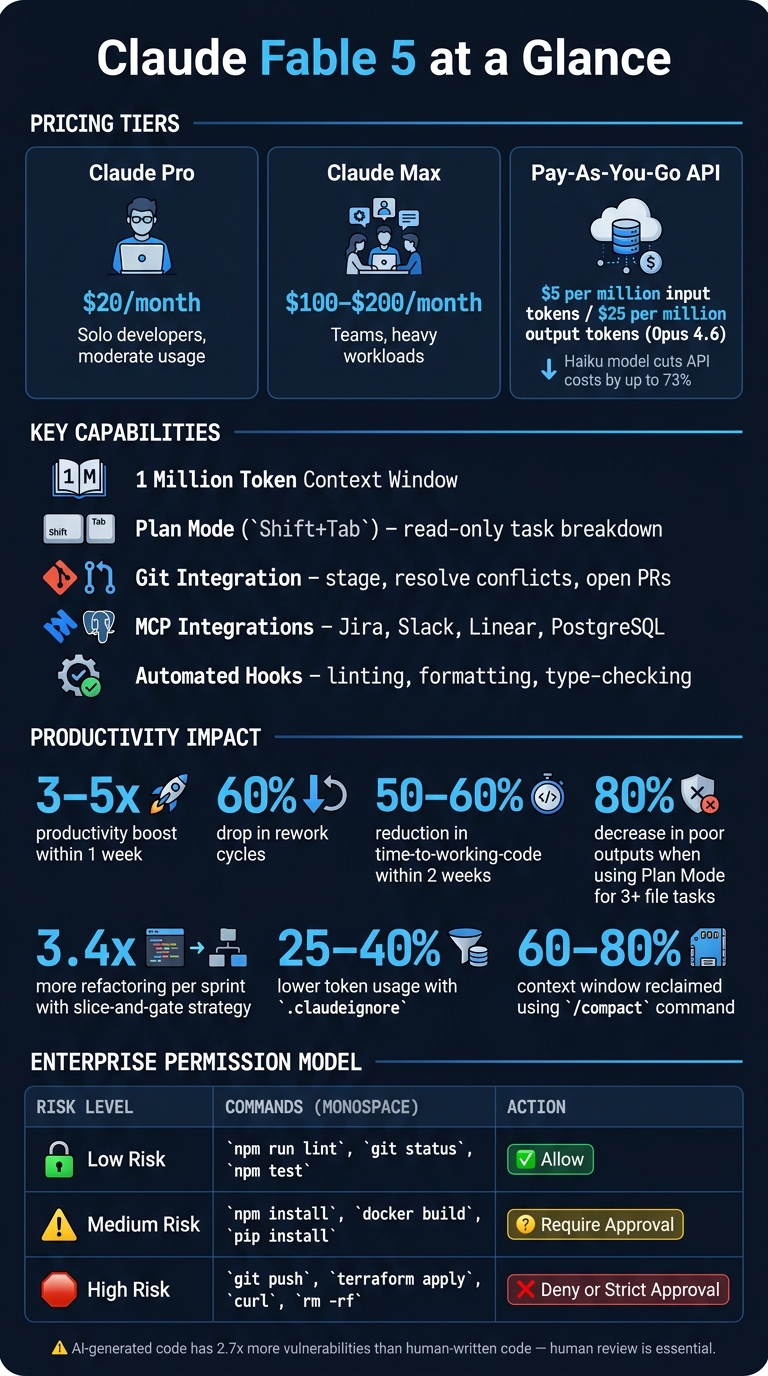
- Cost-Effective API Options: Subscription plans from $20/month or pay-as-you-go pricing starting at $5 per million tokens.
Setup Steps:
- Install the CLI: Use Node.js or a shell script to set up the Claude CLI.
- Configure API Key: Export your API key in your shell configuration file.
- Create a
CLAUDE.mdFile: Outline project conventions for better AI guidance. - Use
.claudeignore: Exclude unnecessary directories to optimize token usage.
Workflow Highlights:
- Use Plan Mode for multi-file tasks to improve output quality.
- Set up hooks for automated checks like linting, formatting, and type-checking.
- Employ Writer/Reviewer Sessions for unbiased code reviews.
- Structure workflows with atomic tasks and automated test gates for long-term projects.
Claude Fable 5 is transforming how developers manage large projects by streamlining workflows, reducing rework cycles, and improving productivity. By combining clear planning, automated processes, and human oversight, it provides a scalable solution for tackling even the most complex coding challenges.
Claude Fable 5: Pricing, Performance & Productivity Stats
My Dev Workflow for Large System using Claude Code
Setting Up Claude Fable 5 in Your Development Environment
To get started with Claude Fable 5, you'll need to choose an access method, configure your API, and integrate it with your tools. These steps provide the groundwork for using Claude Fable 5 effectively in large-scale projects and code management.
Understanding Access Options
Claude Fable 5 offers two main ways to access its features. The first is through a subscription plan:
- Claude Pro: Designed for solo developers with moderate usage, priced at $20/month.
- Claude Max: Aimed at teams or heavier workloads, costing $100–$200/month.
The second option is pay-as-you-go API access, which charges $5 per million input tokens and $25 per million output tokens for models like Opus 4.6. For tasks like exploratory reads or smaller sub-tasks, the lighter Haiku model can cut API costs by up to 73% compared to using Opus for everything.
Configuring API and Tooling
Before diving in, ensure Node.js (v18+) is installed. Then, install the CLI globally with this command:
npm install -g @anthropic-ai/claude-code
For macOS and Linux users, a native shell script is also available. Once the CLI is set up, export your API key in your shell configuration file (like .zshrc or .bashrc):
export ANTHROPIC_API_KEY="your_key_here"
Next, navigate to your project root and execute the /init command. This scans your codebase and creates a CLAUDE.md file. This Markdown file acts as a guide for the agent, outlining your build commands, coding conventions, and project architecture for every session.
"The presence of this file [CLAUDE.md] is the single biggest difference between Claude Code 'kind of helping' and Claude Code 'writing code that fits your conventions on the first try.'" - Yash Shah, Engineering Lead
Keep the CLAUDE.md file concise - under 200 lines - to avoid overwhelming the model. You can also use a .claudeignore file to exclude unnecessary directories like node_modules, build artifacts, and binaries. This can lower token usage by 25–40%. With these configurations in place, you’re ready to integrate Claude Fable 5 into your workflow.
Integrating with Developer Workflows
Claude Fable 5 seamlessly integrates with development workflows. It is git-aware, meaning it can stage changes, resolve merge conflicts, and even open pull requests using the GitHub CLI (gh). Additionally, it works with tools like Jira, Slack, Linear, and PostgreSQL through the Model Context Protocol (MCP). By adding a server entry to .claude/mcp.json, the agent can pull tickets, read CI logs, or directly inspect your database schema.
To further streamline your workflow, set up hooks in .claude/settings.json for tasks like running Prettier after edits or blocking force pushes. These automated steps ensure the AI produces clean and consistent output without requiring constant manual intervention.
"Claude Code wins on autonomy. Plan mode, subagents, hooks, headless -p, MCP across your stack, and the model's willingness to keep iterating against a test suite without a human in the loop." - Akashdeep Singh, Senior Frontend Developer
Using Claude Fable 5 to Manage Large-Scale Projects
Once you've set up your environment, Claude Fable 5 transforms into a reliable co-pilot for managing large-scale projects. The key lies in structuring clear goals, maintaining context over time, and ensuring your team stays on the same page.
Breaking Down Large Goals
Kick off large projects using Plan Mode (activated with Shift+Tab). This mode scans your codebase in a read-only state, offering a structured breakdown of tasks without making any changes. You can then review, annotate, and approve the plan before moving forward. Developers who use Plan Mode for tasks involving three or more files report an 80% decrease in poor outputs compared to those who skip this step.
For more intricate features, the Spec-First Interview Pattern is a game-changer. This process helps refine requirements into a SPEC.md file. Claude prompts you with questions about requirements, edge cases, and UI details, then generates a PLAN.md file. This plan divides the work into manageable phases - typically around five - so you can tackle one phase at a time while keeping the context focused.
"The quality of output is a direct function of the quality of context." - Stan Sedberry, Generative, Inc.
For architectural planning, the /model opusplan command leverages the Opus model for high-level reasoning, then switches to the faster Sonnet model for implementation. This approach ensures quality where it matters most. The result is a structured workflow that seamlessly supports long-term, autonomous projects.
Setting Up Multi-Day Autonomous Workflows
Large projects often stretch over several days or weeks. Back in April 2026, Simon Last, co-founder of Loom, documented how he ran an AI coding agent continuously for 13 days on real production tasks. His system relied on atomic task files with clear acceptance criteria, automated test gates, and a persistent CLAUDE.md file to serve as project memory. Each completed task triggered a git commit, creating a clean audit trail and enabling single-command rollbacks.
"The agent's capabilities remain identical; what changes is the infrastructure that constrains, validates, and recovers from the agent's inevitable errors." - SitePoint Team
A lightweight Bash script orchestrated tasks, feeding them sequentially to the Claude CLI. This ensured that each task began with a fresh context window, avoiding the drift that often occurs after about an hour of continuous work. Using the /compact command between phases reclaimed 60–80% of the context window, keeping multi-day workflows stable and consistent. This approach works hand-in-hand with the earlier planning phase, ensuring every task aligns with the project's broader goals.
Coordinating Teams with Claude Fable 5
While planning and automation are vital, effective team coordination takes project management to the next level. Files like PLAN.md or CLAUDE.md, committed to the repository, act as a single source of truth for the entire team, reducing the risk of context loss from scattered conversations.
A practical way to coordinate is by rotating Claude through three roles: Lead Planning Agent (responsible for the architectural blueprint), Implementer Agent (handles specific phases), and Reviewer Agent (validates work against the master plan). Each role transition becomes a natural checkpoint for human review. Claude also integrates directly with tools like Linear, Slack, and GitHub via MCP servers, automating tasks such as pulling tickets and posting deployment notes.
For larger teams, appointing a dedicated Agent Manager - someone with both project management and engineering expertise - can help oversee permissions, shared skills, and governance policies. This ensures consistency and prevents fragmented setups across teams.
sbb-itb-212c9ea
Writing, Refactoring, and Reviewing Code with Claude Fable 5
Single-File and Multi-File Code Generation
For straightforward tasks like creating a utility function, updating a configuration file, or drafting a README, a direct prompt is usually all you need. In these cases, Plan Mode adds unnecessary complexity. However, when dealing with tasks that span three or more files, Plan Mode becomes a game-changer. By activating it (using Shift+Tab or /plan), Claude Fable 5 starts by analyzing dependencies in a read-only state and then lays out a step-by-step plan before making any changes.
The recommended workflow involves four steps: Trigger, Review Plan, Request Edits, and Approve/Execute. This ensures everyone is aligned before any modifications happen.
"Plan Mode is the difference between 'trusting the agent' and 'trusting the plan, then trusting the agent to follow the plan.'" - Maxime Le Morillon
For programming languages like Java or C++, integrating the Language Server Protocol (LSP) via MCP allows for precise symbol searches.
| Task Type | Recommended Approach |
|---|---|
| Single-file edit or content generation | Direct prompt |
| Multi-file refactor | Plan Mode |
| Bug fix with unknown root cause | Plan Mode |
| Large migration | Plan Mode with phased approval |
Large-Scale Refactors and Migrations
When tackling large-scale refactors, it’s easy to fall into the trap of treating the entire task as one massive change. A smarter method is the "slice-and-gate" strategy: divide the refactor into smaller, manageable slices (each under 400 lines) and review each slice thoroughly before moving to the next. This involves checking the diff, running relevant tests, and confirming everything is in a stable state.
Before making any structural changes, it’s crucial to have Claude Fable 5 generate characterization tests. These tests capture the module’s current behavior, serving as a safety net to catch unexpected regressions during the refactor. Teams that adopted the slice-and-gate method reported completing 3.4 times more refactoring per sprint compared to teams using unstructured prompts.
For architectural migrations, the Strangler-Fig pattern is a reliable approach. This involves introducing new code alongside the old, migrating call sites incrementally, and eventually removing the legacy code. This method ensures the codebase remains deployable throughout the process. To keep the focus sharp, start Claude Fable 5 sessions within the relevant package or service directory instead of the repository root. This minimizes the risk of unintended global changes.
Code Review and Self-Verification
After implementing or refactoring code, ensuring its quality is non-negotiable. A useful technique is the Writer/Reviewer split: one session (Session A) handles the implementation, while another session (Session B), with a fresh and unbiased perspective, reviews the work and provides feedback.
"The Writer/Reviewer pattern is the most valuable use. Session A implements. Session B (fresh context, no bias toward what was just written) reviews. Session A applies the feedback." - Cadence Blog
In addition to manual reviews, PostToolUse hooks can automate quality checks. With a simple configuration, you can run linters, formatters like Prettier, and type-checkers (e.g., pnpm typecheck) after every edit. This ensures that code is always formatted and error-free. A well-maintained CLAUDE.md file can further streamline this process by defining project-specific standards, such as enforcing "TypeScript strict mode" or banning inline styles. These rules load automatically at the start of every session.
In agentic mode, Claude Fable 5 can even take automation a step further by running test suites, analyzing failure logs, and iteratively refining the code until all tests pass - without requiring human intervention. Together, these practices help maintain consistency and quality across even the most complex projects.
Best Practices and Governance for Enterprise Use
When integrating AI tools like Claude Fable 5 into enterprise workflows, safety, compliance, and oversight are critical to ensure smooth and secure operations.
Safety, Compliance, and Data Handling
The biggest risk in enterprise AI deployments often lies in misconfiguration rather than the AI itself. To mitigate this, make sure sensitive files - such as .env files, SSH keys, and credential files - are excluded from production environments. You can set this up in your CLAUDE.md file with rules such as "Do not log raw payment payloads" or "Do not return database errors to clients." These rules act as a baseline that automatically applies at the start of every session.
For industries like healthcare, finance, or legal that operate under strict regulations, it's advisable to run Claude Fable 5 in isolated development containers or ephemeral virtual machines. This setup limits the scope of potential issues, keeping credentials and network access tightly controlled. Additionally, restricting the context to relevant subdirectories helps manage both exposure and costs.
"Claude Code enterprise adoption is not a capability question. It is a configuration and discipline question." - LowCode Agency
Setting Guardrails and Monitoring AI Workflows
Guardrails are most effective when they are deterministic, meaning they enforce rules automatically rather than just offering suggestions. For instance, you can configure PreToolUse hooks in settings.json to block edits to critical files like authentication middleware or billing logic. Similarly, Stop hooks can ensure tasks are not marked complete until all test suites pass, adding an extra layer of quality control.
To manage command-level risks, use a three-tier permission model:
| Permission Level | Command Examples | Recommended Policy |
|---|---|---|
| Low Risk | npm run lint, git status, npm test |
Allow (no approval needed) |
| Medium Risk | npm install, docker build, pip install |
Ask (require approval) |
| High Risk | git push, terraform apply, curl, rm -rf |
Deny or require strict approval |
Route all traffic from the AI model and tools through a corporate proxy or LLM gateway. This allows you to monitor prompts, tool arguments, and destinations. Exporting OpenTelemetry data to a centralized SIEM can help track decisions and identify policy drift over time. Anthropic has also set a June 5, 2026, deadline for administrators to disable "auto mode" and "bypass permissions mode" via managed settings - these modes will remain active by default if not explicitly turned off.
"The safest approach is to enforce that choice through managed settings rather than relying on user behavior or one-off Desktop toggles." - Vantage Point
Human-In-The-Loop Workflows
While automation can streamline processes, it doesn't eliminate the need for human oversight. Studies show that AI-generated code contains about 2.7 times more vulnerabilities than human-written code, with only 55% meeting basic security standards. This makes human review a non-negotiable step in the workflow.
Key practices for maintaining oversight include:
- Routing all AI-generated code through pull requests for review.
- Reviewing architectural changes in Plan Mode before making edits.
- Conducting adversarial reviews using fresh Claude sessions to identify potential issues.
Separating the roles of "Writer" and "Reviewer" ensures that every piece of AI-generated work undergoes thorough scrutiny. This step cannot be replaced by automation or hooks. Additionally, appoint a Directly Responsible Individual (DRI) or "Agent Manager" to oversee AI configurations, permissions, and policy updates across teams. Without clear accountability, governance rules are more likely to erode over time.
Conclusion
Claude Fable 5 is reshaping how large-scale development workflows are managed. It’s not just about autocomplete - it operates more like a junior engineer with shell access, capable of planning, executing, and verifying tasks across an entire codebase.
The numbers speak for themselves. Developers using structured workflows with Claude Fable 5 have reported 3–5x productivity boosts within a week, a 60% drop in rework cycles, and a 50–60% reduction in time-to-working-code within just two weeks of consistent use. These impressive results come from real-world production environments, including massive multi-million-line monorepos and older legacy systems.
But success isn’t just about the model itself - it’s also about the ecosystem supporting it.
"The ecosystem built around the model - the harness - determines how Claude Code performs more than the model alone." - Anthropic
To get the most out of Claude Fable 5, it’s essential to build a solid infrastructure. This means layering CLAUDE.md files, setting up deterministic hooks, rotating roles between Planning, Implementation, and Review agents, and having a dedicated Agent Manager to keep configurations up to date. These steps ensure reliable, scalable workflows powered by AI.
FAQs
How do I decide what folder scope to give Claude Fable 5?
When deciding on the folder scope for your task, it's essential to align it with your current needs. If you're working on a specific area, start with a subdirectory. This keeps Claude focused on the relevant information and prevents exceeding context limits.
If your task involves multiple packages or spans a larger portion of the project, then it's appropriate to use the repository root as your scope. Additionally, by scoping tasks to specific directories and utilizing per-directory CLAUDE.md files, you ensure that Claude processes only the necessary details. This approach helps maintain an efficient and well-organized workspace.
What hooks should I set up first for safer automation?
To make automation safer, start by implementing these three key hooks:
-
PreToolUse: For commands like Bash, restrict potentially harmful actions such as
rm -rfor unauthorizedgit pushon protected paths. - PostToolUse: After edits, automatically run a linter on modified files. This ensures any issues are flagged right away.
- Stop Hook: Before marking tasks as complete, trigger your full test suite. This prevents incomplete or faulty work from slipping through.
These hooks help maintain both safety and quality in your automated processes.
How can teams prevent context drift on multi-day work?
To keep projects on track over several days, it's important to use structured and persistent context, along with disciplined session management. Make sure to document project-wide architecture, rules, and conventions in hierarchical CLAUDE.md files. Divide larger tasks into smaller, manageable subtasks, and use the /compact command to summarize history and free up token space. For intricate tasks, take advantage of plan mode to ensure logical consistency. Additionally, offload recurring expertise into reusable skills, hooks, or plugins to help you stay focused on your immediate objectives.