Creative Tools
Beyond Midjourney: Testing the Most Photorealistic AI Image Tools of the Year
Stop defaulting to one generator—match tools to the job by realism, text accuracy, control, speed, or legal risk.
Beyond Midjourney: Testing the Most Photorealistic AI Image Tools of the Year
Midjourney is still the best pick for raw photorealism, but it is no longer the best default. Based on same-day tests across portraits, products, interiors, and text-heavy ads, I’d use Midjourney for image quality, GPT Image 2 for prompt accuracy, Adobe Firefly for safer commercial use, Flux for exact product and lighting control, Ideogram for text, and Stable Diffusion for local control.
If you want the short version, here it is:
- Best-looking images: Midjourney v7
- Best prompt follow-through: GPT Image 2 and Flux 1.1 Pro
- Best for legal peace of mind: Adobe Firefly 3
- Best for readable text: Ideogram 3.0
- Best for local workflows: Stable Diffusion
- Best fit depends on the job, not hype—especially when choosing the best AI tools for designers
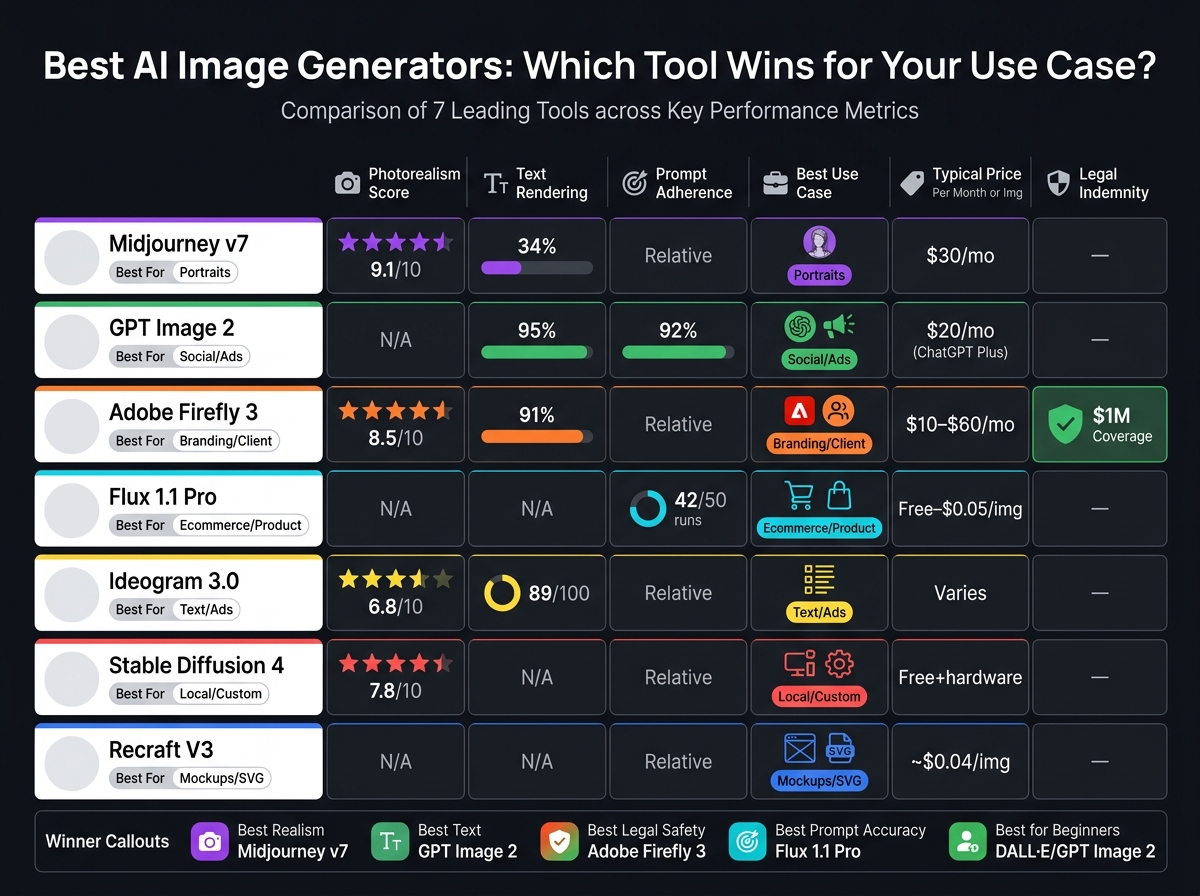
A few numbers make the split clear:
- Midjourney: 9.1/10 photorealism, but only 34% text rendering
- GPT Image 2: 92% prompt adherence and 95% text rendering
- Adobe Firefly 3: 91% text accuracy with up to $1 million indemnity for enterprise users
- Flux 1.1 Pro: matched prompt details in 42 out of 50 runs
- Ideogram 3.0: 89/100 for text rendering
- DALL·E 3: about 8–9 seconds per image, making it a simple entry point
So if you’re choosing one tool for everything, I wouldn’t. That’s the main takeaway. The best option changes based on what can fail first: realism, text, control, speed, or legal risk.
Quick Comparison
| Tool | Best Use | Main Strength | Main Trade-off | Typical Price |
|---|---|---|---|---|
| Midjourney v7 | Portraits, polished visuals | Best photorealism | Weak text, less exact prompt follow-through | $30/month |
| GPT Image 2 | Social posts, prompt-heavy jobs | Strong prompt accuracy and text | Can cost more at scale | Included with ChatGPT Plus ($20/month) or API pricing |
| Adobe Firefly 3 | Client work, brand teams | Safer commercial terms, Adobe editing flow | Output can feel more stock-like | $10–$60/month |
| Stable Diffusion 4 | Local setups, brand consistency | Deep control with LoRAs and ControlNet | Steeper setup and hardware needs | Free local use plus hardware |
| Flux 1.1 Pro | Ecommerce, product, architecture | Literal prompt execution | No indemnity | Free local or about $0.04–$0.05/image |
| Ideogram 3.0 | Ads, posters, text-heavy graphics | Strong text rendering | Lower realism than Midjourney | Varies by plan |
| Recraft V3 | Mockups, SVG text work | Top typography and SVG output | Less cinematic image style | About $0.04/image |
I’d sum it up like this: use Midjourney when the image itself has to look best, but switch tools when the brief has strict text, layout, product, or legal demands.
Best AI Image Generators 2024: Side-by-Side Tool Comparison
How We Tested Each Tool
Every tool in this comparison got the same prompts on the same day. We used default settings only. No custom models, no LoRAs, and no prompt tuning. For local tools like Stable Diffusion and Flux, all tests ran on the same hardware: an RTX 4090 GPU with standardized WebUI setups.
Before scoring, all outputs were anonymized. Commercial photographers reviewed image quality, while IP attorneys checked licensing and commercial-use terms.
Prompts and Test Scenes Used
We used four standard prompts that reflect common professional use cases.
- Lifestyle portrait: "Close-up portrait of a 40-year-old woman with freckles, natural lighting from window left, shallow depth of field, shot on Fuji 400H film"
- Studio product shot: "Stainless steel water bottle, matte black finish, placed on gray concrete, single LED panel light from top right at 45 degrees, no shadows on background"
- Real estate interior: "Vintage bookstore interior, wooden shelves, warm amber lighting, morning light from large front windows"
- Ad creative with text: "Neon sign reading exactly 'AIJournal 2026' in bold sans-serif font, rain-slicked city street at night"
These prompts included lens, lighting, and composition details so we could see how well each tool followed instructions.
Scoring Criteria
Each tool was scored across six criteria. Realism quality looked at skin texture, lighting consistency, bokeh accuracy, and film grain. Prompt adherence measured how many requested details - like objects, colors, placement, and lighting - showed up correctly in the image. Editing control covered features such as inpainting, outpainting, and region-based masking.
Consistency tracked anatomical accuracy across 10+ runs of the same prompt, with extra attention on hands and faces. Generation speed was measured as the average time from prompt submission to final image delivery. Commercial practicality was reviewed by IP attorneys and included training data disclosure, copyright ownership terms, and indemnification coverage.
For professional use, commercial licensing was treated as a pass/fail gate. After that, realism carried the most weight. Those standards shape the tool-by-tool results that come next.
sbb-itb-212c9ea
Tool-by-Tool Results: Where Each Generator Performs Best
Each image generator has a clear sweet spot. Midjourney is still the top pick for photorealism, GPT Image is best at following prompts closely, Adobe Firefly is the safer bet for commercial work, Flux is strongest at literal prompt execution, and Ideogram stands out when readable text matters. The next section turns those test results into picks based on use case and budget.
Midjourney vs. DALL·E/GPT Image vs. Adobe Firefly
Midjourney v7 set the visual standard. In blind panel reviews by commercial photographers, it scored 9.1/10 for photorealism and stayed strongest for portraits and skin texture. The catch? It often missed more detailed composition requests, which pulled its prompt adherence score down to 6.8/10 (often requiring an image to prompt tool to reverse-engineer successful styles).
GPT Image 2 flipped that tradeoff. It came out ahead on prompt accuracy and character consistency, with 92% prompt adherence. It also handled text much better than Midjourney. DALL·E 3, by comparison, stayed the weaker baseline for raw image quality and anatomy, with a photorealism score of 6.4/10.
Adobe Firefly 3 sat between the two. It was the top option for commercial use and also one of the best for text rendering, reaching 91% accuracy. For enterprise users, it adds up to $1 million in contractual indemnification.
So the split is pretty simple: use Midjourney for beauty, GPT Image for prompt-heavy briefs, and Firefly for client-safe work.
| Feature | Midjourney v7 | GPT Image 2 | Adobe Firefly 3 |
|---|---|---|---|
| Photorealism | 9.1/10 | Lower than Midjourney | 8.5/10 |
| Text Rendering | 34% | 95% | 91% |
| Editing Control | Moderate | High | Best (Photoshop-native) |
| Monthly Price | Standard ($30) | Included with ChatGPT Plus ($20) | Creative Cloud All Apps ($55–$60) |
Midjourney vs. Stable Diffusion Tools vs. Flux
Flux 1.1 Pro was the top tool for following prompts literally. It matched material and lighting instructions in 42 out of 50 test runs. That made it a strong fit for product and architecture images, where exact prompt execution matters more than style or mood.
"Midjourney gives you images you want to use. FLUX gives you the image you asked for. They're solving different problems." - Elena Marquez, Product Photographer
Stable Diffusion 4 is built more for power users. On default settings, it scored 7.8/10 for photorealism, but that doesn't show its full range. With community LoRAs and ControlNet, it can be tuned for a specific product, lighting setup, or brand look and deliver repeatable results. The downside is the setup. If you want to run it yourself, you'll likely need local GPU hardware, and the learning curve is steeper.
Use Flux when you need accurate product or architecture renders. Use Stable Diffusion when deep control and repeatability matter most.
For power users, the tradeoff comes down to control versus convenience.
| Feature | Midjourney v7 | Stable Diffusion 4 | Flux 1.1 Pro |
|---|---|---|---|
| Customization | Low (closed system) | Highest (LoRAs/ControlNet) | High (API/weights) |
| Output Quality | Best (aesthetic) | Variable | Best (technical) |
| Setup Complexity | Low (web UI) | High (local/GPU) | Moderate (API) |
| Cost Scaling | Fixed subscription | Free locally; hardware required | Per-image/API (~$0.04) |
Where Ideogram Stands Out for Text and Ad Creatives
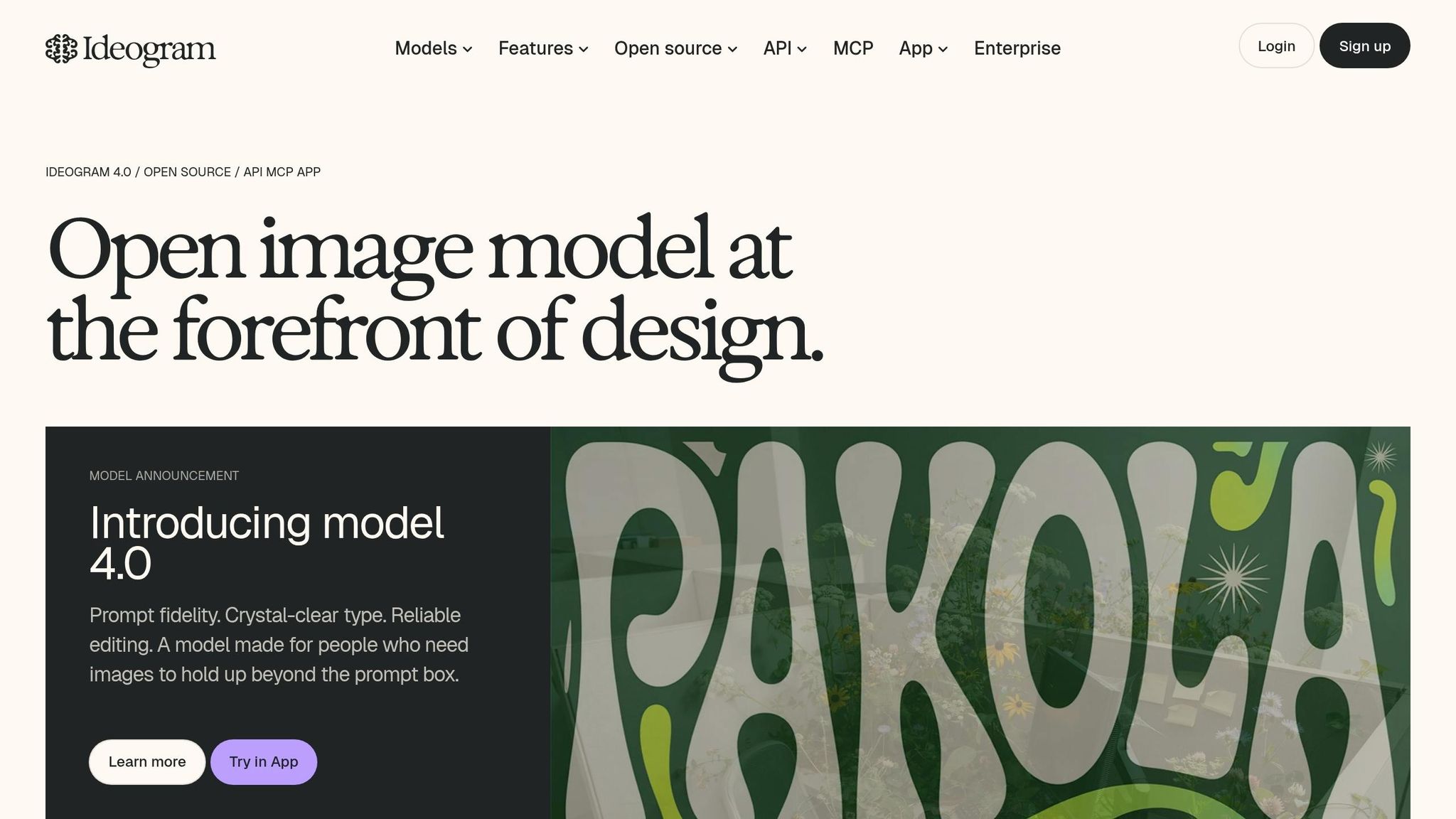
Once the job becomes text-first, the ranking shifts fast. Ideogram 3.0 scored 89/100 for text rendering. That makes it the practical pick for social graphics, banner ads, and promo mockups where the copy has to stay readable and the layout needs to feel ready for an ad placement.
Midjourney still wins on realism, but that's not always the point. If you're building posters, logos, or other text-heavy graphics, Ideogram is simply the better fit.
| Feature | Ideogram 3.0 | Midjourney v7 |
|---|---|---|
| Text Rendering | 89/100 | 34% |
| Best for ads and text-heavy graphics | High (posters, logos) | Moderate (moodboards) |
| Overall Realism | 6.8/10 | 9.1/10 |
| Typography Style | Best (design-focused) | Poor (texture-focused) |
Best Tool by Use Case and Budget
The right tool depends on the job. Ecommerce, branding, social content, and mockups each reward a different mix of strengths. When you weigh realism, prompt accuracy, editing control, consistency, speed, and price, a few tools rise to the top. The table below turns those scores into practical picks.
Top Picks for Ecommerce, Branding, Social Media, and Mockups
Flux 1.1 Pro is the top pick for ecommerce. It follows prompts well, so product details like color, material, and texture are more likely to show up correctly in the final image. It also gives you room on price: you can run it locally with no per-image fee after hardware, or use the API for about $0.05 per image.
For branding campaigns and client-facing work, Adobe Firefly is the safest enterprise option. It includes contractual copyright indemnification up to $1 million for enterprise accounts.
For social media and ad creatives, GPT Image 2 stands out. Its reasoning pass helps it handle spatial layouts better than most tools before it renders the image.
For mockups where text has to look right, Recraft V3 is the clear pick. It ranks #1 on the Artificial Analysis Text-to-Image Arena for typography and supports scalable SVG output.
| Use Case | Best Tool | Fit and Trade-off | Typical Price (USD) |
|---|---|---|---|
| Ecommerce | Flux 1.1 Pro | Strong product-detail consistency; no legal indemnification | Free (local) to ~$0.05/image via API |
| Branding | Adobe Firefly | $1M legal indemnity and Adobe app integration; slower, more stock-like output | $10–$55/mo |
| Social Media | GPT Image 2 | Reasoning pass aids layouts and text; higher-volume use can get expensive | ~$0.04/image via API |
| Mockups | Recraft V3 | #1 for text rendering and scalable SVG output; less cinematic than Midjourney | ~$0.04/image |
Beginner-Friendly Tools vs. Options for Power Users
Workflow matters just as much as image quality.
DALL·E 3 inside ChatGPT is the easiest place to start. It has the fastest cloud generation at 8–9 seconds per image, and you don't need any special prompt syntax. Adobe Firefly is also an easy fit for anyone already using Adobe apps.
If you want more control, Flux 1.1 Pro and Stable Diffusion running locally are better choices. Both support ComfyUI workflows, LoRA fine-tuning, and ControlNet for more consistent brand output. Midjourney v7 lands somewhere in between. It isn't as technical as Flux, but you still need to learn its interface and prompt style.
Conclusion: Choosing the Right Tool Instead of Defaulting to Midjourney
Midjourney v7 still leads when the job calls for pure photorealism. But that doesn’t make it the right pick every time. The smarter move is to choose based on the point where things can go wrong first: realism, text, legal risk, or control. If you default to Midjourney every time, you’ll miss tools that fit the work better.
This gap shows up fast in day-to-day use. Midjourney also falls behind on text accuracy, prompt follow-through, and commercial protection. That makes it a poor default for many teams and use cases.
Key Points to Remember
Pick the tool based on the part of the job with the most risk.
- Need text? Use Ideogram.
- Need legal cover? Use Adobe Firefly.
- Need precise product specs? Use Flux Pro.
- Need an easy chat-based workflow? Use DALL·E/GPT Image.
- Need local control? Use Stable Diffusion.
FAQs
Which tool is best if I need both realism and readable text?
For a strong mix of photorealism and readable text, Adobe Firefly 3 is a top pick. It delivers 91% text-rendering accuracy along with high-quality photographic detail.
If clear text is the main priority, Ideogram 3.0 stands out for legible typography. GPT Image 2 is another solid choice for marketing visuals, UI mockups, and layouts that need both realism and accurate text.
How much local setup do I need for more control?
For maximum control, you’ll need a more technical setup. In most cases, that means running open-source models on your own machine or using tools like ComfyUI. You’ll usually need specialized hardware too, including a GPU with at least 12 GB of VRAM.
Hosted versions are much easier to get started with. But if you want deeper customization - like fine-tuning styles or plugging the model into a professional workflow - you’ll mostly get that through local installs or API-based setups. The learning curve is steeper, no doubt. The trade-off is more ownership and fewer limits from the platform.
What should I prioritize first: image quality, speed, or legal safety?
Put your business needs first - there’s no one-size-fits-all ranking here.
- Pick Adobe Firefly 3 when legal safety and enterprise security are at the top of the list.
- Pick Midjourney when image quality matters most for editorial work or brand visuals.
- Pick tools like Flux when speed and accuracy matter most in high-volume workflows.
The main idea is simple: match the tool to your biggest constraint instead of chasing benchmark scores.