Creative Tools
Top AI Image & Art Generators in 2026: Midjourney, Flux, Firefly & More
Compare top AI image tools by artistry, photorealism, text accuracy, speed and licensing to choose the right tool.
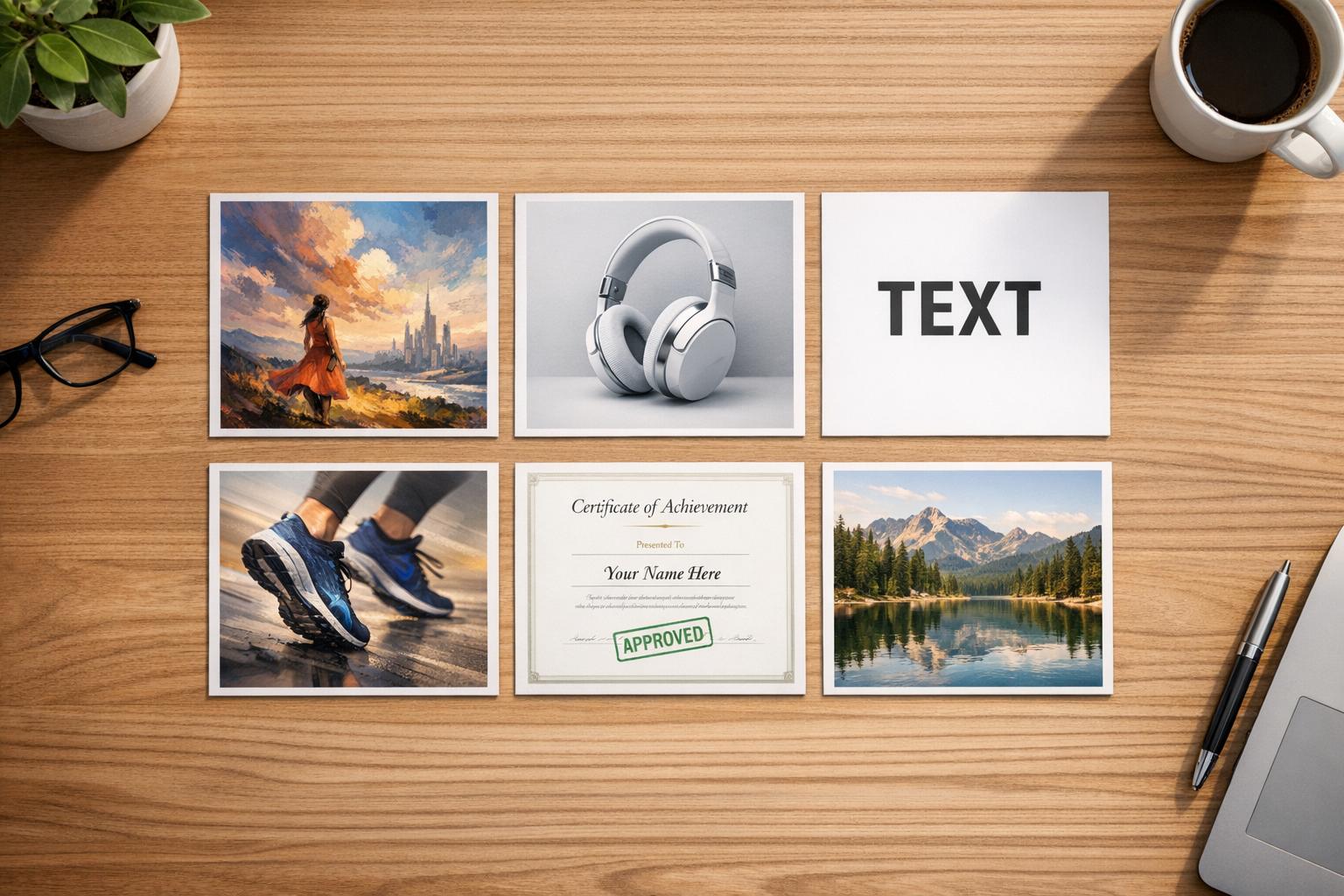
Top AI Image & Art Generators in 2026: Midjourney, Flux, Firefly & More
AI image generators have become essential tools in 2026, each excelling in specific areas like artistry, realism, or text accuracy. Here's a quick breakdown of the top tools and their standout features:
- Midjourney V8 Alpha: Best for cinematic visuals and artistic imagery. Known for its stunning lighting and color grading but struggles with text rendering, though you can use an image to prompt tool to refine your inputs.
- Flux 2 Pro: Leading in photorealism and speed, generating DSLR-quality images in as little as 4.5 seconds. Great for precise, lifelike outputs.
- Adobe Firefly: Prioritizes legal safety with IP-compliant image generation. Ideal for regulated industries but offers less variety in creative styles.
- Nano Banana Pro: Excels in physics-aware rendering and multilingual text generation, making it a solid choice for high-volume production.
- Ideogram V3: The go-to for accurate text rendering in images, perfect for logos, posters, and packaging designs.
Quick Comparison
| Tool | Best For | Key Feature | Limitation | Speed | Price |
|---|---|---|---|---|---|
| Midjourney | Artistic visuals | Cinematic lighting | Poor text rendering | ~30 sec | $10/month |
| Flux 2 Pro | Photorealism | Speed and precision | High hardware requirements | ~4.5 sec | $0.02–$0.06/image |
| Adobe Firefly | Commercial safety | IP-compliant content | Limited creative variation | Fast | $9.99/month |
| Nano Banana Pro | Multilingual rendering | Physics-aware generation | Max resolution of 1K | <10 sec | $20/month |
| Ideogram | Text-heavy designs | Accurate typography | Weak for abstract visuals | ~8 sec | $8/month |
Each tool serves a unique purpose, allowing professionals to combine them for specific project needs. Many creators also integrate open-source options like Stable Diffusion for greater control over the generation process. Whether you're creating stunning visuals, lifelike photos, or text-perfect designs, there's a solution tailored for your workflow.
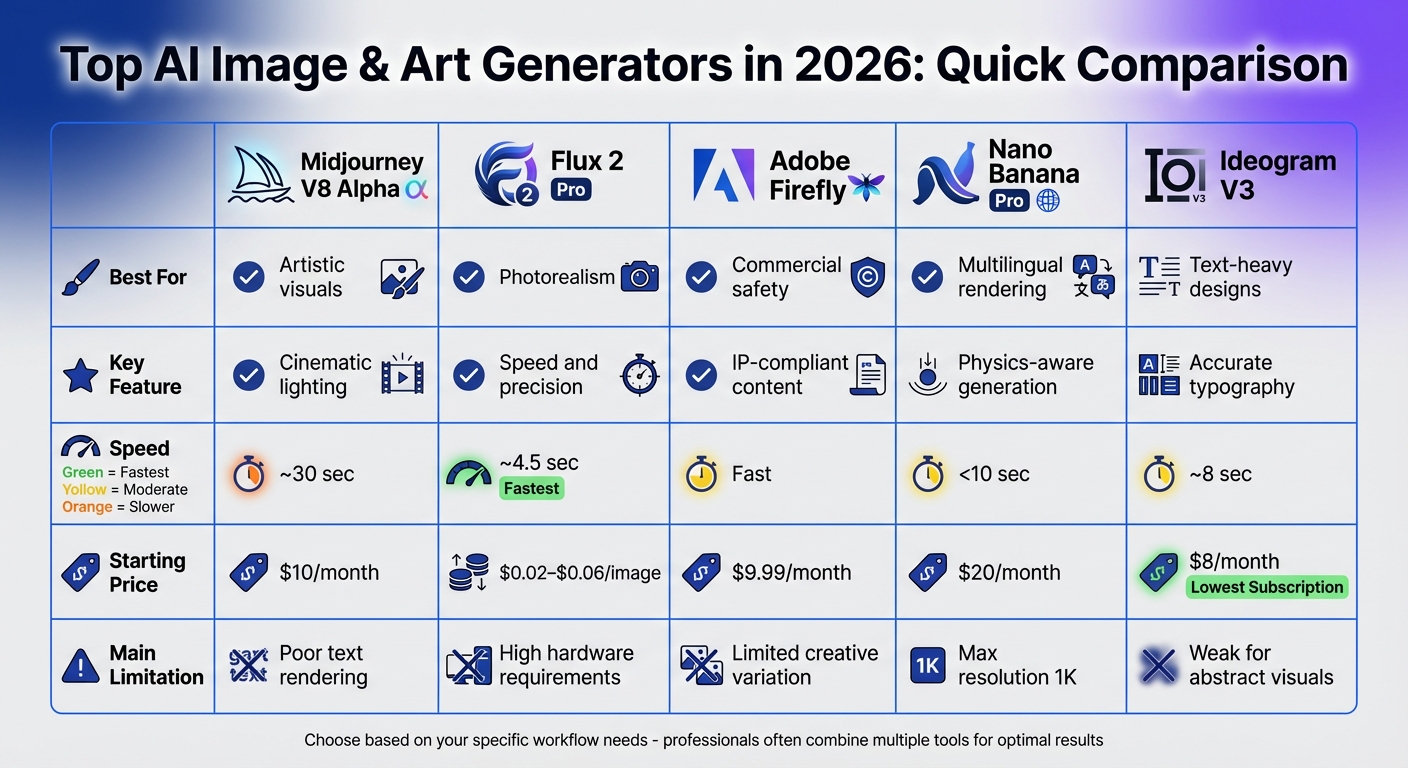
AI Image Generator Comparison 2026: Features, Speed, and Pricing
AI Image Generators Ranked from Worst to Best (2026)
sbb-itb-212c9ea
1. Midjourney
Midjourney's V8 Alpha, released in March 2026, continues to dominate when it comes to creating visually stunning, artistic images. Known for its "soulful" lighting and cinematic feel, the platform excels at producing images that look carefully crafted. If you're focused on delivering visually striking branding, editorial illustrations, or concept art, Midjourney remains a top choice.
"If you want pure beauty, Midjourney remains undefeated." – Emmett Miller, Co-Founder, Miniloop
Prompt Adherence
From V7 (April 2025) to the current V8 Alpha, Midjourney has prioritized "speed-to-polish", offering high-quality results with minimal effort in crafting prompts. While it captures mood and artistic coherence exceptionally well, it lacks the granular control over specific details that some other tools, like Flux 2, provide. This balance makes it highly efficient for projects where cinematic quality is key.
Realism
Midjourney shines in delivering cinematic realism with vibrant color grading and thoughtful composition. However, it doesn't quite match Flux 2 Pro's capabilities in achieving strict photorealism, particularly for elements like skin textures and lighting accuracy. For example, in July 2024, the creative agency Superside used Midjourney to generate over 750 realistic images in less than 12 hours, cutting their design time by 90% and saving an estimated $1.4 million. To achieve more photographic accuracy, users can apply the --style raw parameter, which minimizes the tool's automatic enhancements. Despite its strengths in visuals, Midjourney struggles with rendering text accurately.
Text Generation Accuracy
When it comes to text rendering, Midjourney falls short. Spelling errors and illegible text are common, making it less suitable for projects that require logos, typography, or text-heavy designs. These limitations often necessitate using additional tools or manual adjustments in post-production. For those needing to refine output, tools like Photo AI can help enhance image quality.
Pricing
| Plan | Price | Key Features |
|---|---|---|
| Basic | $10/month | ~200 images per month |
| Standard | $30/month | Standard generation features |
| Pro | $60/month | Unlimited "relaxed" generation for high volume |
| Mega | $120/month | Highest volume tier |
Midjourney does not offer a substantial free tier - only limited trials via Discord. For professionals, the Pro plan at $60/month is often the go-to option for consistent, high-volume work.
Access Methods
While Midjourney now offers a polished web interface in addition to its Discord functionality, the absence of a public API limits automated workflows. This is a notable drawback for users looking to integrate the tool into larger systems.
Strengths and Weaknesses
- Strengths: Exceptional artistic quality, a wide variety of style options, 5x faster rendering with V8 Alpha, and native 2K output.
- Weaknesses: Poor text rendering, no public API, potential copyright risks from major companies like Disney and Warner Bros, and a steep learning curve for mastering prompt creation.
"Midjourney leads for artistic quality and coherence - still the default for creative professionals." – ToolCenter
2. Flux
Flux 2 Pro has set the standard for photorealistic image generation and precision in following prompts for 2026. If you're aiming for DSLR-quality images with lifelike textures and lighting, Flux delivers. In standardized tests, it scored an impressive 92% in prompt adherence, outperforming competitors. This makes it a top choice for handling complex instructions, including tasks requiring precise quantities and spatial arrangements.
"If the test is 'does this look like a photograph taken by a professional photographer,' Flux 2 wins this category by a meaningful margin in 2026." – Cliprise
Prompt Adherence
Flux 2 excels at following detailed prompts, whether it's rendering "exactly five apples" or managing intricate compositions. However, while its literal interpretation is spot-on, it doesn't include built-in artistic style presets like some other tools. Users looking for specific artistic effects will need to carefully craft their prompts. On the bright side, its open-weight models allow for customization using LoRA adapters or fine-tuning with personalized datasets.
Realism
In blind tests, 73% of Flux 2's outputs were mistaken for real photographs, outperforming Midjourney (65%) and DALL-E 3 (58%). It's particularly strong in areas like product photography, architectural designs, and lifestyle imagery, where realism is crucial. Details such as skin pores and fabric textures are rendered with minimal AI artifacts. That said, some users feel the images can sometimes look overly polished, giving them a slightly clinical feel.
Text Generation Accuracy
When it comes to generating text within images, Flux achieves around 60% accuracy - better than Midjourney's 40% but behind Google Imagen 3's 85%. While this is a step forward, the feature still isn't perfect. It can reduce the need for post-processing in marketing materials, but users should not expect flawless results.
Pricing
Flux offers flexible pricing options to suit different needs. API access through providers like fal.ai, Replicate, or Black Forest Labs ranges from $0.02 to $0.06 per image. For those on a tighter budget, the Flux.1 Schnell model costs as little as $0.003 per image, while the premium Flux.1 Pro is priced at $0.055 per image. High-volume users can generate 500 images per month for about $27.50 via API, making it a competitive alternative to standard $30/month plans.
For those with the right hardware, self-hosting is free. However, the full Flux model requires up to 90 GB of VRAM, though quantized versions can run on consumer GPUs with at least 24 GB. Additionally, the Flux [klein] 4B model is available under the Apache 2.0 license, allowing for full commercial use. Subscription bundles, starting at $9.99/month, also include Flux access through various platforms.
Access Methods
Flux stands out for its range of access options, catering to diverse workflows. You can access it via API through providers like Black Forest Labs or Replicate, integrate it directly into Adobe Photoshop (thanks to a $140M partnership with Meta), or self-host using open-weight models through ComfyUI. This decentralized approach offers flexibility, whether you prefer cloud-based workflows or private, self-hosted setups.
Strengths and Weaknesses
Flux 2 showcases the industry's push to blend photorealism with precise prompt adherence, making it a go-to tool for both professional and creative projects. Key strengths include:
- Exceptional speed, generating images in roughly 4.5 seconds (6–7 times faster than some competitors)
- Industry-leading prompt accuracy
- Native resolution of up to 4 megapixels
- Open-source flexibility, enabling customization
These features have led to widespread adoption, including partnerships with Adobe and Meta.
"Flux 2 has become the best overall AI image generator for prompt adherence and realism." – Apatero Studio
On the downside, local hosting requires high-end hardware, and the tool's polished outputs can sometimes lack artistic flair. It also struggles with complex scenes featuring multiple interacting figures, occasionally producing artifacts in details like hands. Additionally, it doesn't currently support native inpainting or outpainting features.
3. Firefly
Adobe Firefly 4 stands out for its emphasis on commercial safety, as it is trained exclusively on licensed Adobe Stock and public domain content. This makes it an excellent choice for enterprise workflows that require intellectual property protections. Since its public launch, Firefly has generated over 9 billion images, according to Adobe.
Prompt Adherence
When it comes to interpreting prompts, Firefly takes a more cautious approach. In tests involving complex prompts, it successfully rendered five out of eight requested elements, earning a score of 7/10. While it performs well in commercial workflows, it falls short compared to models like GPT Image 1.5 and Flux 2 in handling prompts that require precise spatial relationships or multiple elements. Firefly prioritizes safety and realism, but this focus sometimes results in outputs that resemble stock photos rather than highly creative visuals.
"Firefly's training on ethically sourced content means its creative range is more constrained than Midjourney." – Sameer Khan, AI Business Weekly
Realism
Firefly scores a solid 7/10 in photorealism, producing clean and polished images that are particularly suited for e-commerce and marketing purposes. However, some users find the results somewhat generic. It lags behind Flux-based models, which scored 9.2/10 in the same category. Firefly excels in its Photoshop-integrated features like Generative Fill and Expand, which allow users to modify existing images seamlessly while maintaining contextual accuracy. This blend of quality and workflow integration makes it a strong option for professionals.
Text Generation Accuracy
Text rendering is an area where Firefly struggles, with an accuracy rating of approximately 6/10. This performance is noticeably weaker than that of competitors like GPT Image 1.5 and Ideogram 3.0, which achieve around 95% accuracy.
Pricing
Firefly offers flexible pricing options based on the number of generative credits:
| Plan | Monthly Price | Generative Credits | Key Features |
|---|---|---|---|
| Free | $0 | 25 | Basic features, watermarked output |
| Standard | $9.99 | 2,000 | Standard image features, no watermarks |
| Pro | $19.99 | 4,000 | Access to partner models (Flux 2 Pro, Imagen 4) |
| Premium | $199.99 | 50,000 | Video models (Veo 3.1, Runway Gen 4.5) |
Firefly is also included in Adobe Creative Cloud subscriptions, which start at approximately $59.99/month for the All Apps plan. However, it’s worth noting that using premium partner models within higher-tier plans consumes more credits per image than Adobe’s native models.
Access Methods
Firefly integrates seamlessly with Adobe Creative Cloud, offering multiple access points. Users can work with it through the dedicated web portal (firefly.adobe.com), a mobile app, or directly within Adobe tools like Photoshop, Illustrator, and Adobe Express. This deep integration simplifies iterative editing and enhances creative workflows. Additionally, Adobe automatically attaches "Content Credentials" to Firefly-generated images, providing a digital label to confirm that the image was AI-generated.
Strengths and Weaknesses
Firefly’s standout feature is its commercial safety. For industries that require strict copyright compliance, it’s the go-to tool for regulated environments and professional campaigns. It supports text prompts in over 100 languages and has received a 4.5/5 rating from 205 community reviews.
"Adobe Firefly unleashed our creativity. It's a magic machine that helps us play, explore, and innovate, without compromising speed or safety." – Michael Meurer, Global Design Lead
That said, Firefly’s creative output can feel limited compared to other models, especially in terms of artistic flair. Additionally, its credit-based pricing system can be confusing, particularly when using partner models. For tasks requiring highly accurate text rendering or complex spatial arrangements, alternatives like GPT Image 1.5 or Ideogram 3.0 may be better options.
4. Nano Banana Pro
Nano Banana Pro is built on the Gemini 2.5 Flash Image architecture, offering a budget-friendly solution for high-volume production. Its physics-aware generation system is designed to understand real-world mechanics like gravity and fluid dynamics, which helps it interpret prompts more effectively than many other tools on the market. In testing, it scored 8/10 for prompt adherence, surpassing Midjourney v7 (6/10) but falling slightly behind GPT Image 1.5 (9/10). CNET praised it as "the best AI image generation tool we've ever tested, hands down".
Prompt Adherence
Nano Banana Pro excels at following detailed prompts, generating results in under 10 seconds. It also supports multilingual text rendering, handling languages like Chinese, Arabic, and Cyrillic. Other tools like Bing Image Creator also offer accessible ways to generate visuals from text descriptions. However, it occasionally struggles with labeling objects in very complex scenes. Despite this, its speed and consistency make it ideal for straightforward production tasks.
Realism
When it comes to realism, Nano Banana Pro achieves scores between 8 and 9/10, particularly in areas like natural lighting and skin textures. However, it still faces challenges with overly perfect faces and recurring issues like six-fingered hands. Its maximum resolution is capped at 1024×1024 pixels, which is sufficient for web graphics but may fall short for print or high-DPI displays. By comparison, its successor, Nano Banana 2, supports up to 4K resolution and scores 9.2/10 in realism.
Text Generation Accuracy
Text rendering remains a weaker point for Nano Banana Pro, with a score of 7/10. Since its release, the model has not undergone significant updates in typography, making it less effective at handling complex text layouts compared to tools like GPT Image 1.5 (9.5/10) and Ideogram 3.0 (95% accuracy).
Pricing
Nano Banana Pro is priced competitively at $0.039 per image (flat rate for up to 1K resolution), with input tokens costing $0.30 per million. A free tier with watermarked images is available through Gemini, and Google AI Studio allows for limited free use. Subscription services and third-party aggregators offer high-volume access at rates ranging from $15 to $25 per month.
"Nano Banana Pro at $0.039 per image remains an excellent value proposition, especially when accessed through aggregator platforms that offer even better rates."
– AI Free API
These pricing options make it an attractive choice for users with diverse needs.
Access Methods
You can access Nano Banana Pro via the Google Gemini API (model ID: gemini-2.5-flash-image), Google AI Studio, or through third-party web apps. Some platforms even support 26 languages in their interfaces. Additionally, its integrated tools for in-painting (Smart Mask) and out-painting (Canvas Expand) allow for seamless iterative editing.
Strengths and Weaknesses
Nano Banana Pro shines in high-volume workflows where affordability and efficiency are key. Its editing tools are great for maintaining character consistency and refining details. Rose Calvert, a Visual Content Strategist at Acroan, highlights its strengths:
"Nano Banana Pro is the all-rounder that's quietly winning, especially its ability to merge reference images".
That said, the model has its limitations, including the 1K resolution cap, recurring anatomical inaccuracies, and outdated text rendering features. For projects requiring maximum detail, it’s best used for initial edits, with final refinements completed using other tools.
5. Ideogram
Ideogram has carved a niche in AI image generation by excelling at rendering text accurately. While other tools often struggle with typography, Ideogram V3 achieves an impressive 90–95% accuracy in spelling and layout. This makes it a go-to option for designers working on logos, product packaging, and social media graphics. Since its V3 launch in March 2025, the platform has expanded its capabilities, delivering high-quality images that consistently top human-led quality benchmarks with the highest ELO ratings.
Prompt Adherence
When it comes to following detailed text instructions, Ideogram leads the pack. It processes prompts of up to 150–160 words and typically generates results in about 8 seconds. While this is faster than tools averaging 30 seconds, it’s slightly slower than those completing tasks in around 4.5 seconds. Built-in templates and presets for posters, logos, and anime provide users with added control, streamlining the creative process.
"If your images need text, Ideogram is the only choice. Everything else still struggles with spelling."
– Emmett Miller, Co-Founder, Miniloop
Realism
In "Realistic" mode, Ideogram produces lifelike images with natural lighting and shadows. However, it falls short compared to tools like Flux 2 Pro and Midjourney V7 when it comes to intricate textures and complex scenes. Users may notice occasional issues such as deformations, irregular finger shapes, or proportion inconsistencies. These limitations make it better suited for graphic design projects rather than detailed fine art.
Text Generation Accuracy
Text rendering is where Ideogram truly excels. It achieves approximately 95% accuracy in handling multi-line and stylized text, even on 3D surfaces or within complex layouts. For best results, enclose the intended text in quotes (e.g., "a sign that reads 'OPEN'"). The tool supports multiple languages, including English, Spanish, Italian, and French, with growing support for Chinese and Arabic.
Pricing
Ideogram offers a dual-credit system with options for both free and paid plans. The Free plan provides 10 slow credits weekly, while the Basic plan starts at $8/month. The Plus plan, at $20/month, includes private mode and unlimited slow credits. Choosing annual billing offers savings of 20–30%.
| Plan | Monthly Price | Priority Credits | Key Features |
|---|---|---|---|
| Free | $0 | 0 | 10 slow credits/week, public-only output |
| Plus | $20 | 1,000/mo | Private mode, unlimited slow credits |
| Pro | $60 | 3,500/mo | Batch CSV generation, API access |
"The Plus plan is where Ideogram really transforms into a professional-grade tool... Honestly, this plan is the baseline for anyone using Ideogram for business."
– Kenneth Pangan, Writer and Marketer, eesel AI
These flexible pricing tiers make it easy for users to select a plan that fits their needs, whether for occasional use or high-volume production.
Access Methods
Most users access Ideogram through its web-based interface, though an iOS app is also available. For those on the Pro subscription, API access unlocks advanced features like batch CSV generation, ideal for large-scale workflows. The platform also includes tools like Magic Fill for inpainting and Remix for iterative design. However, for more complex multi-layer compositions, external software like Photoshop may be a better fit.
Strengths and Weaknesses
Ideogram’s standout typography accuracy and competitive pricing make it a strong choice for graphic designers and small business owners focused on text-heavy visuals. Tools like the Color Palette Lock allow for precise brand consistency by letting users input specific hex codes. Additionally, access to 4.3 billion preset style combinations provides plenty of creative freedom. On the downside, the platform isn’t as effective for abstract or highly stylized artistic imagery, and its "unsafe" content filters can sometimes be overly restrictive. The credit expiration policy (use it or lose it) might also frustrate users with irregular workloads, though $4 top-up credits do roll over month-to-month.
"If you need a stunning fantasy landscape, use Midjourney. If you need that landscape with a readable sign, use Ideogram."
– MindStudio
Pros and Cons
From our detailed reviews, here’s a breakdown of the strengths and weaknesses of each AI image generator. Each tool shines in different areas, catering to varied creative and technical needs. Some tools even specialize in photo-realistic and watercolor styles for specific marketing needs.
Midjourney v7 is the top choice for those seeking artistic and cinematic visuals. It’s a favorite among creatives who value aesthetics, but its lack of an official API makes it less suitable for technical workflows.
Flux 2 Pro dominates in photorealism and speed, generating images in just 4.5 seconds - 6 to 7 times faster than Midjourney. Its open-source weights offer great flexibility, but setting it up can be tricky for users without a technical background.
Adobe Firefly stands out for its commercial IP indemnification, thanks to its use of licensed content for training. This makes it ideal for regulated industries and commercial campaigns, though it provides less creative variety compared to Midjourney.
Nano Banana Pro impresses with physics-aware generation and its ability to render multilingual text (including Chinese, Arabic, and Cyrillic) in stunning 4K resolution. However, its free-tier images come with watermarks, which could be a drawback.
Ideogram v3 has solved a major challenge in AI image generation: creating legible text. It’s perfect for logos, posters, and social media graphics, though it struggles with abstract or highly stylized visuals.
Here’s a quick comparison to help you weigh your options:
| Tool | Best For | Key Strength | Major Limitation | Speed | Starting Price |
|---|---|---|---|---|---|
| Midjourney v7 | Artistic/Cinematic | Visual storytelling | No API | ~30 sec | $10/mo |
| Flux 2 Pro | Photorealism | Speed, open-source | Technical setup | ~4.5 sec | $0.02–$0.06/image |
| Adobe Firefly | Commercial Safety | IP indemnification | Limited creative variation | Fast | $9.99/mo |
| Nano Banana Pro | 4K Photorealism | Physics-aware, multilingual | Watermarks (free tier) | <10 sec | $20/mo |
| Ideogram v3 | Typography | Text accuracy | Weak on abstract art | ~8 sec | $8/mo |
"The most important truth about AI image generation in 2026: the quality of your output depends far more on your prompt than on which tool you choose."
– LumiChats Blog
This comparison helps creative professionals pinpoint the right tool for their needs. Whether you’re looking for stunning hero visuals with Midjourney, DSLR-quality photos with Flux 2 Pro, IP-safe content with Adobe Firefly, or text-perfect designs with Ideogram, there’s a tool tailored for your project.
Conclusion
By 2026, the world of AI image generation has shifted from relying on one dominant tool to embracing a diverse ecosystem, where each platform shines in its own niche. The real question now is: which tool fits your specific production needs?
Each platform offers distinct advantages based on its specialization. Midjourney v7 is perfect for artistic storytelling and cinematic visuals, making it a favorite for concept art and editorial projects. Flux 2 Pro stands out for its DSLR-quality photorealism, delivering results in just 4.5 seconds - ideal for e-commerce photography and realistic portraits. Adobe Firefly, built on licensed Adobe Stock content, ensures commercial safety with full intellectual property protections, making it a go-to for enterprise campaigns and regulated industries. For text-heavy designs like logos, posters, and social media graphics, Ideogram v3 achieves impressive text accuracy of 90–95%. Meanwhile, Nano Banana Pro supports multilingual text (including Chinese, Arabic, and Cyrillic) and features physics-aware rendering for effects like gravity and fluid dynamics. This level of focused specialization reflects a broader trend fueled by the rapid growth of the AI image generation market.
This booming market has encouraged professionals to adopt multiple tools instead of relying on just one. For example, creative agencies might use Midjourney for hero visuals, Flux for product photography, and Ideogram for text-based graphics - all within the same project.
Ultimately, the best choice comes down to your specific needs, workflow, and goals. Enterprise teams prioritizing legal safeguards might lean toward Adobe Firefly, while social media teams benefit from the speed of Ideogram and Flux. And when artistic vision takes center stage, Midjourney’s aesthetic capabilities remain unmatched.
FAQs
Which tool should I use for my exact project?
The best AI image generator depends on what you're looking to achieve:
- If you're after artistic or cinematic visuals, Midjourney delivers stunning aesthetics that stand out.
- For precise interpretations of prompts, DALL-E 3 (available through ChatGPT) is a great option.
- When photorealism is your goal, Flux 2 sets the standard for lifelike results.
- Need images for commercial use with clear copyright safety? Adobe Firefly is your go-to.
Your choice should align with your main priorities - whether that's style, accuracy, realism, or licensing needs.
Can I use these images commercially without copyright risk?
AI-generated images are often suitable for commercial use, but this hinges on the licensing rules of the tool you’re using. For instance, Adobe Firefly is regarded as fully copyright-safe as of 2026. However, other tools might impose different limitations, so it’s crucial to carefully review their terms to avoid any legal issues.
What’s the best workflow if I need both realism and readable text?
To create AI-generated images that are both realistic and easy to read, it's best to use tools tailored for each task. Start with a tool like Flux 2 to generate a photorealistic base image. Once your image is ready, use a model such as Imagen 4 to overlay or edit text, as it specializes in producing clear and legible text. This approach allows you to achieve visually appealing results with well-rendered, readable text.