AI Ethics And Governance
Don't Fall Behind: The Biggest AI Launches & Trends This August 2026
August 2026 cut model costs, made 1M-token contexts standard, advanced agents and multimodal tools, and tightened security and EU transparency.

Don't Fall Behind: The Biggest AI Launches & Trends This August 2026
August 2026 changed the AI buying math fast. I’d focus on four things right away: OpenAI’s new GPT-5.6 lineup, lower model prices, 1-million-token context becoming normal, and tighter rules around agent access and EU transparency.
If I had to sum up the month in plain English, it would be this:
- Costs dropped for high-volume AI work, with GPT-5.6 Luna at $0.20 per 1 million input tokens
- Long-context use got more usable, with several models now handling 1 million tokens
- Agents moved closer to day-to-day work, but they still need strict permissions and human checks
- Vertical tools kept gaining ground, especially in science, commerce, and coding
- Risk went up too, with new security warnings around coding agents and tool access
- Compliance matters more now, especially after the EU’s new transparency rules started on August 2, 2026
Here’s the bottom line: if you run a team, I’d test low-cost drafting, document work, and source-based research now. But I would hold back on open-ended coding agents in production until security, permissions, and review steps are locked down.
TOP AI Trends and Tools of 2026 You NEED to Know | August Update
sbb-itb-212c9ea
Quick Comparison
| Area | What changed in August 2026 | Why I think it matters |
|---|---|---|
| OpenAI | GPT-5.6 Sol and Luna replaced older usage patterns | Fewer retries, more control over effort, lower spend on routine tasks |
| Pricing | Luna dropped to $0.20 per 1M input tokens | Cheap enough for higher-volume workflow use |
| Context size | 1M-token context now common across several models | Full repos, long document sets, and large research packets fit in one pass |
| Agents | More repo-level and multi-step automation tools launched | Better for repeated work, but only with tight controls |
| Multimodal | Voice, documents, and media workflows improved | Less app switching for teams working across files and formats |
| Vertical AI | Science, commerce, and industry tools moved faster | Teams want tools that fit one job well, not broad demos |
| Security & policy | Black Hat warnings and EU rules added pressure | AI access now needs review, logging, and limits |
What stood out most to me was not one single launch. It was the pattern. Models are getting cheaper, longer-context is becoming normal, and buyers are putting more weight on control than on raw model hype.
That shift matters because many companies still aren’t ready on the data side. The article points out that 75% of mid-market leaders say AI is paying off, but only 6% say their data is ready to scale it. Add to that 10,970 U.S. job cuts tied to AI in July 2026, and the message is hard to miss: AI is moving into budgets, staffing, and workflow design now, not later.
I’d treat August as a “pick your tests carefully” month. Good areas to try first are source-heavy research, repeat admin work, and document-heavy production. Areas I’d watch more closely are AI tools for software developers, broad tool access, and any setup where an agent can touch live systems without approval.
That’s the lens I’d use for the rest of this roundup.
The Biggest AI Model and Platform Launches in August 2026
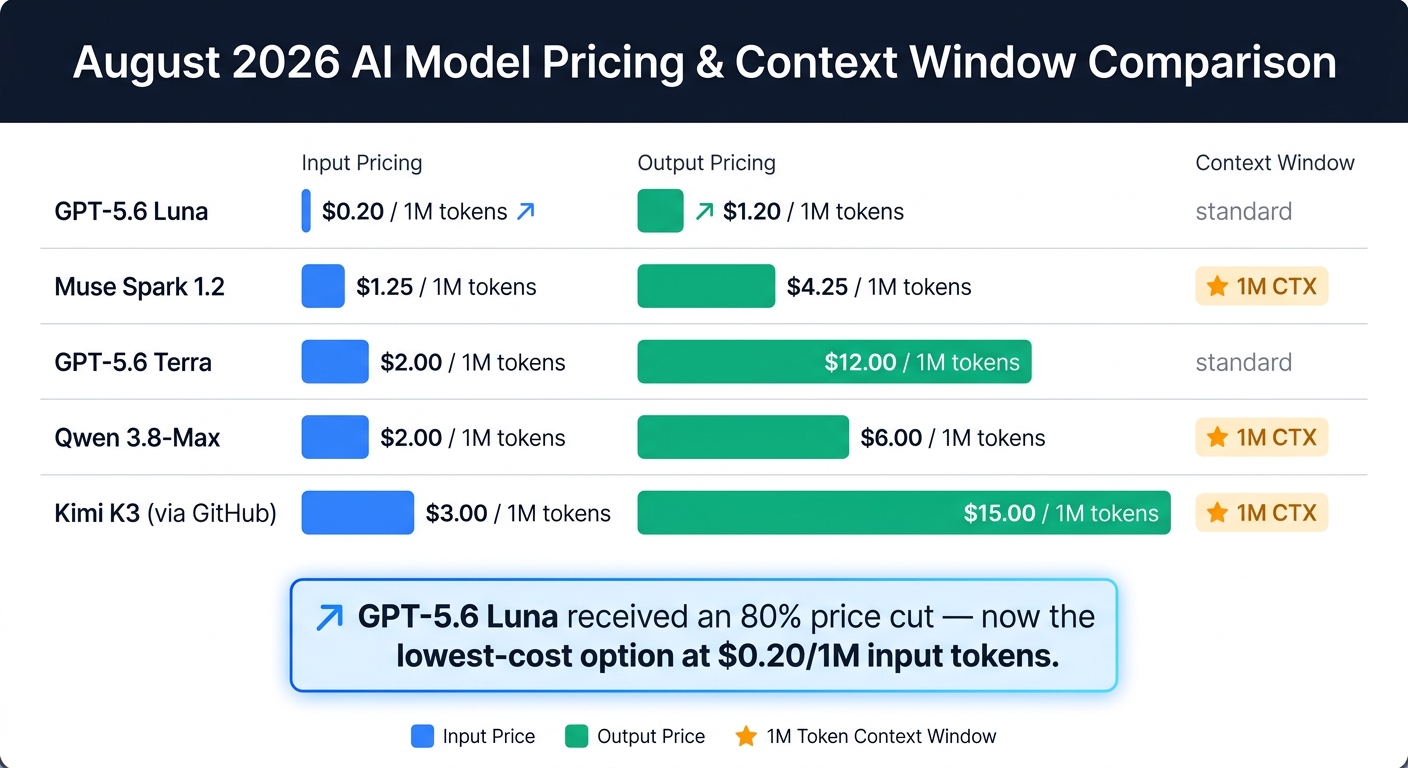
August 2026 AI Model Pricing & Context Window Comparison
August 2026 brought a wave of launches that changed pricing, context limits, and how people work day to day.
OpenAI Updates: GPT-5.6 Sol, GPT-5.6 Luna, and What Changed for Daily Work
On August 6–7, 2026, OpenAI reorganized ChatGPT around one main model for paid users: GPT-5.6 Sol. That move replaced separate "instant" and "thinking" modes with a reasoning slider, so users can decide how much effort the model puts into a task.
Free users were shifted to GPT-5.6 Luna. Luna adds a "Think" button for harder prompts and, starting the week of August 10, removes text conversation limits. In internal evaluations, Sol reduced factual errors by 68% and Luna by 62% compared with GPT-5.5 Instant. Voice also now works with file uploads and Projects, which means users can talk through document analysis instead of bouncing between chat and files.
The big impact here isn't just token cost. It's that teams can get to a finished answer with fewer retries, less back-and-forth, and less wasted time.
Other August 2026 Model Releases Worth Watching
August wasn't just about OpenAI.
Meta's Muse Code launched as a terminal-based coding agent built for repo-level automation. It can plan, write, and validate code across whole repositories. Under the hood, it runs on Muse Spark 1.2, which has a 1-million-token context window and better GPU kernel optimization. API pricing is $1.25 per million input tokens and $4.25 per million output tokens.
Alibaba's Qwen 3.8-Max targets agentic workflows at scale. It uses 2.4 trillion parameters and scored 86% on OSWorld-Verified. Pricing lands at $2.00 per million input tokens and $6.00 per million output tokens.
GitHub also made a move that matters for teams with tighter controls. It added Kimi K3 to Copilot and launched MCP (Model Context Protocol) server allowlists, giving organizations one place to control which external tools and data sources agents can reach. For IT and security teams, that's a much cleaner setup than letting agents roam wherever they want.
Pricing and Context-Window Updates That Affect Buying Decisions
This month's pricing changes are big enough to shape tool selection and budget planning. Luna's 80% price cut to $0.20 per million input tokens makes it a clear pick for high-volume, lower-stakes automation.
| Model | Input (per 1M tokens) | Output (per 1M tokens) |
|---|---|---|
| GPT-5.6 Luna | $0.20 | $1.20 |
| GPT-5.6 Terra | $2.00 | $12.00 |
| Muse Spark 1.2 | $1.25 | $4.25 |
| Qwen 3.8-Max | $2.00 | $6.00 |
| Kimi K3 (via GitHub) | $3.00 | $15.00 |
Those numbers say a lot about where day-to-day usage is heading. August 2026 is the first month where 1-million-token contexts - now standard across Qwen 3.8-Max, Muse Spark 1.2, and Kimi K3 - start to feel practical for normal repository and document workflows.
For teams making spend calls, that context ceiling matters more than it might seem at first glance. A model that can hold an entire repo, a long contract set, or a thick research packet changes how work gets assigned. Instead of chopping files into smaller pieces, teams can run larger tasks in one pass and choose models based on workflow fit, not just sticker price.
These launch details point to a bigger pattern: AI is shifting from headline features to operational control.
The August 2026 Trends Changing How People Use AI
August’s launches point to three clear shifts: agents are starting to handle real work, multimodal tools are getting more practical, and vertical AI is moving faster than broad, catch-all experiments. That matters for budgets, team workflows, and how companies buy software.
AI Agents and Automation Are Moving Into Real Work
This month’s agent releases made one thing clear: long-running, unattended automation is getting closer to everyday use. But it’s not smooth yet. Agents still make bad early assumptions in longer tasks, and those small mistakes can snowball before anyone spots them. That’s why debugging now means finding the first wrong step, not just checking the final output.
"AI is shifting from prompts to repeatable workflows."
That idea helps cut through a lot of noise. For most teams, the first question isn’t which model to use. It’s whether the task has the right inputs, tools, and approval rules to run the same way each time.
A simple way to think about the current options:
- Rule-based automation: Best for simple, predictable triggers. Low governance overhead.
- AI-native agent platforms: Better for complex, multi-step project work. Needs access controls and clear approval rules.
- Vertical agents: Built for industry-specific tasks. Needs domain safety guardrails.
The business takeaway is pretty grounded: controlled automation beats open-ended autonomy. For most teams, the smart move right now is to check exactly what permissions a new agent needs and add a manual kill switch before it touches anything in production.
That same shift - from flashy demos to repeatable work - is also showing up in multimodal tools.
Multimodal AI Is Now More Useful for Content, Documents, and Media
Adobe’s unified ChatGPT plugin brought more than 70 tools into one chat interface in August 2026, which lets creative teams go from brief to finished asset without bouncing between apps. For teams buried in documents, that can mean fewer handoffs and shorter review cycles.
Another shift this month showed up in real-time voice. Models like SeedRealtime and GPT-Live moved past rigid turn-taking rules by using joint audio-visual cues to decide when to speak and when to stay quiet. In plain English: conversations feel less clunky. For customer intake or live coaching, that’s a big step. For production use at scale, it still feels early.
| Tool Type | Best Use Case | Key August 2026 Change |
|---|---|---|
| Unified creative plugin | Brief-to-asset production & document editing | 70+ tools in one interface |
| Real-time voice | Customer intake & triage | Real-time back-and-forth voice without turn-taking |
| Video/audio generation | High-resolution content creation | Native stereo audio in 2K video |
There’s still a catch. Video-language models continue to struggle with crowded, fast-moving footage. So while multimodal AI can speed up brief-to-asset work and intake workflows in a meaningful way, teams should still verify outputs before using it for complex media tasks.
Industry-Specific AI Tools Are Gaining Ground Faster Than General-Purpose Experiments
For a lot of teams, the buying decision now comes down to one thing: fit for a single workflow. Not broad capability on a sales deck.
Claude Science added 60+ specialized scientific skills in August 2026, aimed at lab research and drug discovery workflows. On the commerce side, Shopify said traffic and orders reaching merchants through AI services tripled year-over-year in Q2 2026. That’s a strong sign that domain-specific AI is already affecting revenue, not just trimming busywork.
"Enterprises that were asking for one specific model 60 days ago now want model choice across coding, customer service, HR, and sales automation." - Brad Menezes, CEO, Superblocks
The pattern here is hard to miss. Narrower tools are gaining ground because they fit how teams already work. When domain rules matter most, vertical tools are beating general-purpose models on both accuracy and speed of adoption.
What US Businesses, Creators, and Professionals Should Do Next
August's launches now fall into two clear buckets: tools to test now and releases to watch before you spend money or change how your team works.
Some are ready for a pilot. Others still need guardrails. So the practical move is simple: pilot what can save time now, delay what still looks shaky, and block anything that adds avoidable risk.
What to Test Now for Fast Productivity Gains
Test GPT-5.6 Sol on source-heavy research and multi-step planning. For routine drafting, use a lower effort setting so you don't burn time or budget where you don't need to.
For creative and document-heavy teams, try the Adobe ChatGPT Plugin on one real project this month. It pulls Photoshop, Firefly, Acrobat, and Premiere into one workflow, which makes it a good fit for teams that bounce between design, video, and docs all day.
If your team spends too much time on repeat admin work, run a trial of Asana's Agentic Work Management on one repeatable task with a clear output. Start small. Pick a task where success is easy to spot.
What to Monitor Before Spending Money or Changing Workflows
Some August 2026 launches look promising, but most teams should watch them a bit longer before making bigger moves.
Meta's Muse Code is still in beta, so keep it limited to non-production experiments for the next 30 to 90 days.
Security also needs your attention right now. Researchers at Black Hat USA 2026 showed that public GitHub issues can hijack coding agents for remote code execution and credential theft. If you use these tools, update Claude Code to 2.1.163 and Gemini CLI to 0.39.1 right away.
There's one more deadline to act on. Before August 14, decide whether to accept Claude Code's new "Auto Mode" default or set manual overrides in your managed settings.
And if your team uses GitHub Spark, export everything before August 31, 2026, because the service is being retired.
August 2026 AI Developments Worth Remembering
Taken together, August’s launches pointed to the same shift: AI is getting cheaper to run, easier to control, and more useful for specific jobs. August also made two buying signals much clearer: more controllable reasoning and lower-cost access to long-context models. For U.S. teams, that changes the buying math. Model choice now depends less on headline capability and more on how hard the task is.
The next signal has less to do with raw model quality and more to do with connection and governance. Open standards are making agent skills easier to move across tools like VS Code, GitHub Copilot, and ChatGPT. That sounds great on paper, but it comes with a plain security lesson: agents need sandboxing, permission checks, and human approval before they touch sensitive systems.
That same pattern is also pushing AI away from broad demos and toward tools built for one job. Industry-specific AI kept moving forward, with Cisco Antares aimed at security testing and Nvidia Alpamayo 2 Super aimed at autonomous vehicles. General-purpose AI still matters. But right now, the fastest gains are showing up in tools built for a single workflow.
For readers trying to keep up without drowning in updates, a curated tool directory is one of the fastest ways to narrow the field. Most professionals can’t track every launch by hand. AI Apps at aiapps.com is a curated directory of 1,900+ AI tools across writing, design, business, productivity, video, and more, with advanced filters, verified listings, and curated categories that help U.S. businesses, creators, and professionals turn this month’s noise into testable options.
FAQs
Which AI tasks should I pilot first?
For August 2026, put agentic workflows first. Focus on systems built for orchestration and specialized, long-running work. Start with setups that support persistent subagents, especially for repository-scale coding or shared team work management.
It also makes sense to pilot model routing as a cost-control move. Use frontier models when a task calls for deep reasoning, and shift routine work to more efficient models when you can. That split can help teams avoid spending top-tier model budget on simple jobs.
Finally, look into tools for agentic resource discovery. These can help you manage, publish, and automate internal workflows without turning the whole process into a mess.
How do I choose between low-cost and high-reasoning models?
Choose based on cost per successful outcome, not just per-token price. That’s the number that tells you what you’re actually paying.
Use high-reasoning models for complex, multi-step agentic workflows where accuracy and low human involvement matter most. They often cost more upfront, but they can save time and cut down on fixes later.
For high-volume, repetitive tasks, lower-cost models are often enough. The capability gap has gotten smaller, so paying more doesn’t always buy you much.
There’s another catch: your stack matters as much as the model. If your agent setup retries tasks too often or keeps reloading the same context, costs can climb fast. In that kind of setup, even a strong model turns into an expensive one.
Before you ship anything to production, run your own benchmarks. Don’t lean on headline pricing alone. Test for success rate, retries, latency, and the amount of cleanup your team still has to do.
What safeguards do AI agents need before production use?
Before production use, AI agents need clear limits and close oversight.
A few guardrails matter most:
- Apply least-privilege access
- Keep audit logs of all activity
- Use a tested kill switch
- Treat all external inputs as untrusted
- Require human approval for high-impact actions
- Isolate agent runs in separate workspaces
These safeguards help cut security risk and improve day-to-day reliability.