Productivity
How to Use AI to Plan Your Entire Week in 10 Minutes (Step-by-Step Guide for Beginners)
Use AI calendar and task tools to create a prioritized weekly schedule in 10 minutes and keep it on track with quick daily check-ins.
How to Use AI to Plan Your Entire Week in 10 Minutes (Step-by-Step Guide for Beginners)
Planning your week doesn’t have to be stressful or time-consuming. With AI tools, you can create a complete schedule in just 10 minutes. These tools analyze your tasks, priorities, and availability to build a custom plan for work, personal goals, and everything in between. Here’s how you can get started:
- Prepare your inputs: List last week’s progress, fixed events, and top priorities.
- Choose the right tools: Use AI-powered calendar assistants like Reclaim AI or task managers like Motion. You can also use Any.do for simple task management.
- Plan your week: Let AI organize your tasks and refine the schedule to fit your productivity peaks.
- Maintain daily check-ins: Review and adjust your plan as needed to stay on track.
How I Use AI to Plan My Week in 10 Minutes
sbb-itb-212c9ea
Step 1: Gather Your Inputs Before Using AI
Think of AI as your assistant - ready to help but reliant on clear instructions. The more detail you provide upfront, the better your weekly plan will turn out. Skipping this prep work could leave you with a schedule that misses the mark. Start by assembling all the information your AI tool will need to understand your week.
"AI changes this by taking on the cognitive scaffolding - the sorting, sequencing, and structuring - so your brain can focus on the decisions that actually require human judgment." - TheLogic.tech
Review Last Week's Progress
Begin by reflecting on what you achieved last week. This quick review helps you build a more balanced plan.
Look over completed tasks and note anything still in progress. Highlight high-priority items that didn’t get finished - they shouldn’t fall off the radar. This step helps the AI reprioritize effectively and ensures nothing critical is overlooked.
List Your Fixed Events
Fixed events act as the backbone of your schedule, so make sure to document them before using the AI tool. These are commitments that can’t be moved, such as:
- Meetings (e.g., Monday, 9:00–9:30 AM team standup)
- Appointments (e.g., Wednesday, 2:00–3:00 PM dentist visit)
- Recurring calls (e.g., Thursday, 11:00 AM–12:00 PM client meeting)
By outlining these non-negotiable time blocks, you ensure the AI won’t schedule tasks during periods when you’re unavailable.
Set Your Top Priorities for the Week
Defining clear priorities ensures the AI aligns your schedule with what matters most. Identify 3–5 key outcomes for the week. Be as specific as possible. For instance, instead of saying “work on the proposal,” try “complete the first draft of the Q3 client proposal.”
This approach pays off: users who focus on outcome-oriented goals report task completion rates of up to 90%, compared to 50% with traditional to-do lists. A smaller, more focused list of goals often leads to better results.
Pull All Your Tasks Into One Place
Before sitting down with your AI, gather all your tasks in one spot. This “brain dump” can include:
- Emails
- Notes from apps
- Project threads
- Mental to-do lists
Don’t worry about sorting them - leave that part to the AI. As productivity expert David Allen explains:
"The weekly review is the critical success factor for marrying your larger commitments to your day-to-day activities." - David Allen
Once you’ve compiled your fixed events, priorities, and tasks, your AI will have all the context it needs to create a schedule that works seamlessly for you.
Step 2: Choose and Set Up Your AI Tools
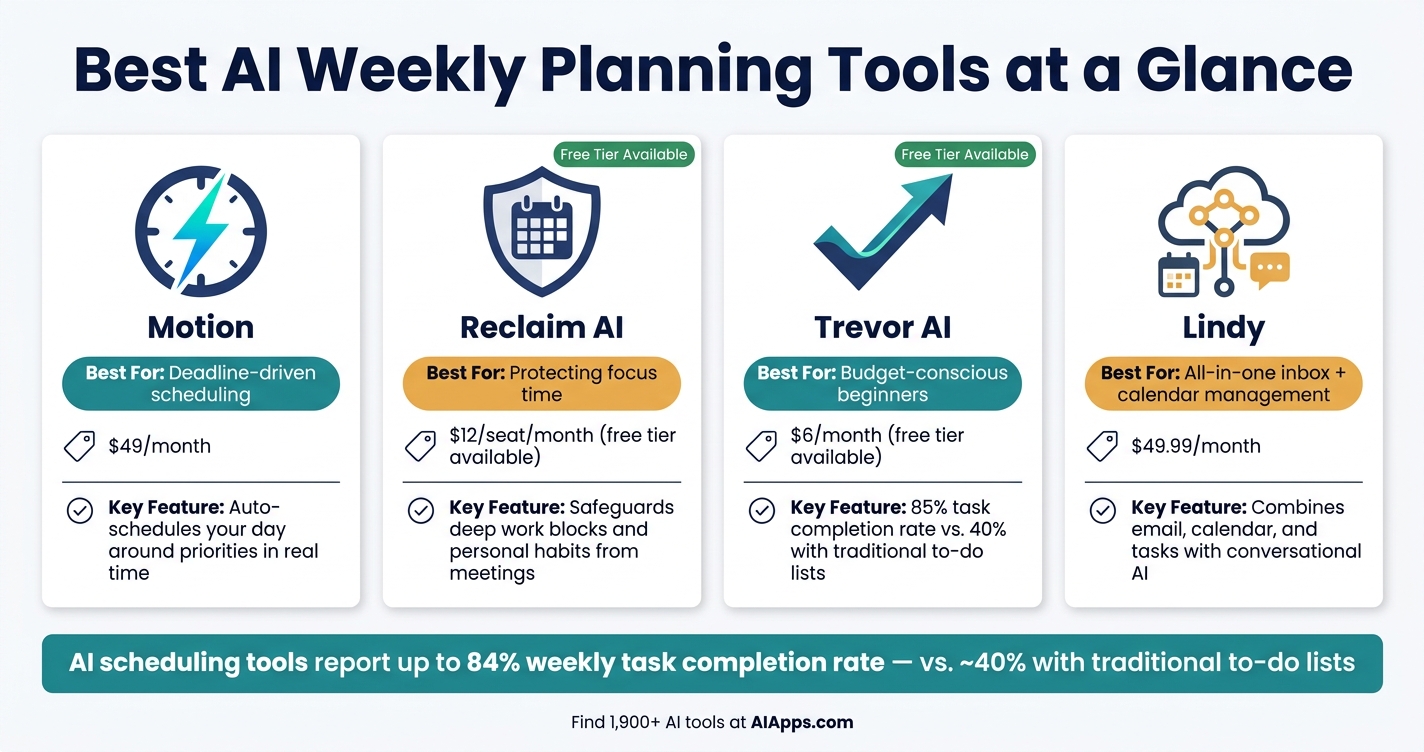
Best AI Planning Tools Compared: Price, Features & Best Use Case
With your inputs ready, it’s time to pick the right AI tools to transform that information into a functional schedule. These tools will take your raw data and turn it into an efficient, adaptable plan. At the core, you’ll need two types of tools: an AI calendar assistant and an AI task manager. Everything else is optional but can enhance your workflow.
Find Tools Using AI Apps
AI Apps simplifies your search by offering a directory of over 1,900 AI tools, neatly categorized by purpose and use case. Instead of wading through endless reviews, you can filter options for productivity, calendar management, or task tracking. This makes it easy to find tools that align with your needs, especially if you're new to this space.
Pick an AI Calendar Assistant
When choosing an AI calendar assistant, go for one that does more than just display your schedule - it should actively manage it. Look for features like bi-directional syncing with platforms like Google Calendar or Microsoft Outlook, smart rescheduling, and focus time protection to ensure uninterrupted deep work.
For professionals juggling meetings and tasks, Reclaim AI (priced at $12 per seat per month, with a free personal tier) excels at safeguarding your focus time and personal habits from being overtaken by meetings. On the other hand, Trevor AI, available at just $6 per month with a free tier, boasts an impressive 85% task completion rate, far outperforming traditional to-do lists, which average around 40%.
"Really loving Trevor. It's a daily habit for me now and my mind clutter had reduced significantly." - Denis Cutura, Managing Director, Decocorp
Choose an AI Task Manager
An effective task manager should streamline your to-do list by organizing and scheduling tasks automatically. Features like natural language input (e.g., "Call client Friday at 10 AM"), auto-scheduling based on deadlines, and quick adjustments for unexpected changes are essential.
Motion (priced at $49 per month for individuals) is ideal for those with tight deadlines, as it automatically schedules your day around your priorities and adjusts in real time. If you prefer a more budget-friendly option, Trevor AI offers a simple interface that integrates tasks directly into your calendar. For users seeking an all-in-one solution, Lindy (starting at $49.99 per month) combines email, calendar, and task management with a conversational AI interface.
| Tool | Best For | Starting Price |
|---|---|---|
| Motion | Deadline-driven scheduling | $49/month |
| Reclaim AI | Protecting focus time | $12/seat/month (free tier) |
| Trevor AI | Budget-conscious beginners | $6/month (free tier) |
| Lindy | All-in-one inbox + calendar | $49.99/month |
Optional Add-On Tools for Better Planning
Once your main tools are set, you can explore add-ons to fine-tune your planning process. Tools like Notion AI or ClickUp Brain can automatically pull action items from meeting notes, ensuring nothing gets overlooked. For recurring habits - like morning workouts or daily reviews - tools such as Keel and Reclaim AI let you prioritize these routines upfront, with the AI filling in the rest.
If manual entry feels like a chore, Firemind offers voice-based note-taking, allowing you to quickly record ideas and have them organized automatically. Users report saving an average of 35 minutes each morning with this feature.
With these AI tools set up, you’re ready to plan your week in just 10 minutes.
Step 3: Plan Your Week in 10 Minutes with AI
With your AI productivity tools ready to go, it’s time to combine your inputs and craft a realistic weekly plan.
Set Up Your Calendar and Define Your Hours
First, sync your calendars - whether it’s Google Calendar, Outlook, or iCloud - so the AI can access your current schedule and avoid conflicts. Then, clearly outline your working hours. For instance, you might say, “I’m available weekdays from 9:00 AM to 5:00 PM.” To protect your most productive hours, block out time for deep work, like 9:00 AM to 11:30 AM, and set boundaries such as “no meetings before 11:00 AM” or “add a 15-minute buffer between tasks.” These guardrails help keep your schedule manageable and focused.
"If you don't schedule the work, you're scheduling failure." - Rui Sousa and Luis Sousa, Founders, The AI Break
Input Your Goals and Tasks
Once your calendar is set, start feeding the AI your goals and tasks. AI tools can interpret plain language, so you can say something like, “Plan my week around a 2-hour deep-work block each morning,” or list tasks along with their durations, priority levels, and deadlines. Be as specific as possible with task names - write "Review and respond to client proposal" instead of just "Emails" - to give the AI better context. If there are tasks you want to delegate or skip, let the AI know so it can focus on what matters most.
Let the AI Create Your Schedule
After you’ve entered your tasks and goals, the AI will organize them into your available time slots, avoiding overlaps with existing events. Some tools, like Temporal, even let you adjust your schedule through natural language commands. For example, you could say, “Move my design review to Thursday; I need focus time.” Early adopters of AI scheduling tools have reported task completion rates of up to 84% each week. Once the AI generates your plan, take a moment to refine it so it aligns with your productivity peaks.
Review and Fine-Tune Your Schedule
Think of the AI-generated plan as a draft, not the final version. Review it to ensure your most demanding tasks align with your peak energy hours. Group similar tasks together to reduce context switching, which research shows can cost 20 to 40 minutes of productivity per switch. Most AI tools let you easily drag, drop, or resize tasks or even chat with the AI to tweak your schedule.
Automate Recurring Routines
Finally, lock in your weekly essentials - like morning workouts, meal prep, or family time - by setting them as recurring blocks in your AI tool. Platforms like Reclaim AI allow you to establish these routines upfront, ensuring they’re automatically accounted for each week. Once these are set, your AI can generate a fresh, personalized weekly plan in seconds, saving you time and keeping your schedule consistent week after week.
Step 4: Keep Your AI-Driven Plan Working Week After Week
Once your AI-generated plan is in place, the key to success lies in maintaining it through consistent daily actions.
Do a Quick Daily Check-In
A well-crafted weekly plan only works if you follow through each day. Start your mornings with a quick 2–3 minute check-in, asking your AI something like: "What should I focus on today, considering my deadlines and calendar?" This simple step connects your weekly goals to your daily priorities.
If your day takes an unexpected turn, a 30-second query to your AI can help you quickly adjust and reprioritize. Some AI tools even go the extra mile by spotting unfinished tasks from the previous day and suggesting how to fit them into your current schedule. A brief mid-week check-in - say, on Wednesday - can also help you course-correct before the week slips away.
Use AI to Break Big Tasks Into Smaller Steps
Big, vague tasks can easily become roadblocks. For example, if "Finish project proposal" lingers on your to-do list all week, the problem might be that it's too vague to act on. Ask your AI to clarify what "done" looks like and break the task into 3–7 actionable steps.
"If everything feels urgent, you don't have priorities. You have anxiety." - The AI Break
Breaking tasks into smaller pieces also makes scheduling easier. For instance, a 25-minute sub-task can fit neatly into a small gap in your day, whereas a larger block of time might be harder to come by. These adjustments not only keep your day organized but also ensure steady progress. Wrap up your week by consolidating these insights during a weekly review.
Reflect on Your Week Before Starting the Next One
Set aside 30–60 minutes at the end of the week - Sunday afternoon or Friday at 4:00 PM works well - for a review session. Look back at your completed tasks and calendar notes, then ask your AI: "What recurring challenges or deferred tasks should I address?" A good benchmark for success is completing 70% to 80% of your planned tasks. If you're consistently below this range, it might mean your plan is overly ambitious rather than a reflection of your abilities.
"A 60% accurate plan executed consistently beats a 100% accurate plan you never finish constructing." - Plan With AI Editorial Team
Use this time to tie up loose ends - like responding to unanswered emails, making pending decisions, or rescheduling deferred tasks - so you can start the next week with a clean slate.
Update Your Preferences as You Learn What Works
Your initial AI-generated schedule is just the beginning. As you notice patterns in how you work, tweak your tool's settings. For example, if tasks regularly take longer than expected, apply a 1.5x time multiplier to your estimates - most tools allow you to set this as a default. If your completion rate remains below 70%, it’s a clear sign to further adjust your time estimates.
You can also tag tasks by energy level (high, medium, low), enabling the AI to schedule more demanding work during your peak productivity hours. Each adjustment you make helps train the AI to create even better schedules in the future.
Conclusion: Start Planning Your Week with AI Apps
With your inputs set and an AI-powered schedule in place, you're ready to bring order to your week. What once felt chaotic can now transform into a well-structured, manageable plan.
Key Takeaways
This guide shifts the way you approach planning. By providing clear inputs - like your tasks, fixed events, and key priorities - you let AI handle the heavy lifting. The result? A smoother, more efficient planning process.
To keep things running smoothly, focus on three habits: prepare your inputs before starting, limit your weekly goals to those that truly matter, and view your AI-generated plan as a flexible guide. Quick daily check-ins (just 2–3 minutes) and a weekly review will help you stay adaptable and on track.
"Outcomes without calendar time are intentions. Calendar time without outcomes is busyness." - Plan With AI Editorial Team
Adopting this mindset can make all the difference in how you approach your week.
Your Next Steps with AI Apps
The easiest way to dive in? Choose one of these essential tools for beginners and commit to a planning session this week. Need help finding the right fit? AI Apps has you covered. With a directory of over 1,900 AI tools, sorted by category, use case, and pricing, you’ll quickly find the ideal calendar assistant, task manager, or AI planner for your workflow - whether you're managing a team, freelancing, or just trying to keep life organized.
AI tools evolve quickly, and AI Apps ensures you're always up-to-date with the latest releases and featured tools. Bookmark it as your go-to resource whenever you want to explore new options or upgrade your current setup.
FAQs
What should I do if AI keeps overbooking my day?
If your AI assistant ends up overbooking your day, start by reviewing its access to your calendar. Make sure it can see all private events to avoid double-booking. Next, update your available hours within the tool to better reflect your working limits. You might also want to reduce the number of tasks assigned each day and include buffer time between appointments. These adjustments can help create a schedule that's more manageable and aligned with your actual workflow.
How do I estimate task durations if I’m not sure?
To estimate how long tasks might take when you're unsure, you can ask AI for time suggestions based on your specific tasks and limitations. Here are a few tips to improve accuracy:
- Include a buffer: Increase your initial time estimate by about 20% to account for any underestimations.
- Block extra time: If a task seems like it will take 30 minutes, schedule 45 minutes. For something that feels like an hour, plan for 75–90 minutes instead.
- Use duration tags: Label your tasks with estimated times (e.g., [30m], [1h]) so AI tools can better understand and assist with planning.
How can I protect deep-work time from meetings?
Blocking dedicated focus time on your calendar can be a game-changer for productivity. Treat these blocks as non-negotiable, and let AI tools handle the rescheduling of flexible meetings or suggest alternatives that better match your energy peaks. Mark yourself as "busy" during these periods to avoid overlapping bookings, and make sure your team is aware of these boundaries.
To cut down on interruptions, group meetings into designated time slots. This way, your deep-work hours remain untouched, allowing you to dive into tasks without distractions.