Productivity
Game Over: The Mind-Blowing AI Tools That Just Changed Everything
Pick the AI tools that remove your biggest workflow bottlenecks—one generalist, one research tool, and specialists only when needed.

Game Over: The Mind-Blowing AI Tools That Just Changed Everything
AI tools are no longer just helpers. In 2026, they can research, draft, design, edit video, and write code - and workers using them report about 40% productivity gains, while developers using AI coding tools say they are 55% faster on average.
If I had to sum up this article in one line, it’s this: there is no single best AI tool - there is a best tool for the bottleneck in front of you. ChatGPT is the broad all-in-one option, Claude is best for long documents and deep writing, Perplexity is built for cited research, Midjourney leads on image quality, Runway is for short-form AI video, GitHub Copilot fits daily coding work, and AI Apps helps you find tools by use case, price, and skill level.
If you want the short answer, here it is:
- Use ChatGPT if you want one tool for many tasks
- Use Claude if you work with long files, policy docs, or dense writing
- Use Perplexity if you need sources you can check
- Use Midjourney if image quality matters most
- Use Runway if you need AI video editing and short clips
- Use GitHub Copilot if you write code inside an IDE
- Use AI Apps if you need a starting point to sort through tool options
The main takeaway: pick one main tool, then add others only when they save time or improve output.
Quick Comparison
| Tool | Best Fit | Main Output | Watch Out For |
|---|---|---|---|
| AI Apps | Finding tools by workflow | Tool lists and filters | Listings and pricing can change |
| ChatGPT | General work across teams | Text, code, files, agent tasks | Long writing can lose tone |
| Claude | Long-form writing and analysis | Long docs, memos, reviews | No native image generation |
| Perplexity | Fast research with sources | Cited answers and briefs | Source quality still needs review |
| Midjourney | Polished images | Art, mockups, campaign visuals | Public generations on lower plans |
| Runway | Short AI video work | Video clips and edits | Credit costs add up fast |
| GitHub Copilot | Daily software development | Code completions, chat, agents | Less useful for big architecture calls |
So if you’re choosing fast, I’d keep it simple: ChatGPT for breadth, Claude for deep text work, Perplexity for research, and a specialist only when your job needs images, video, or code help.
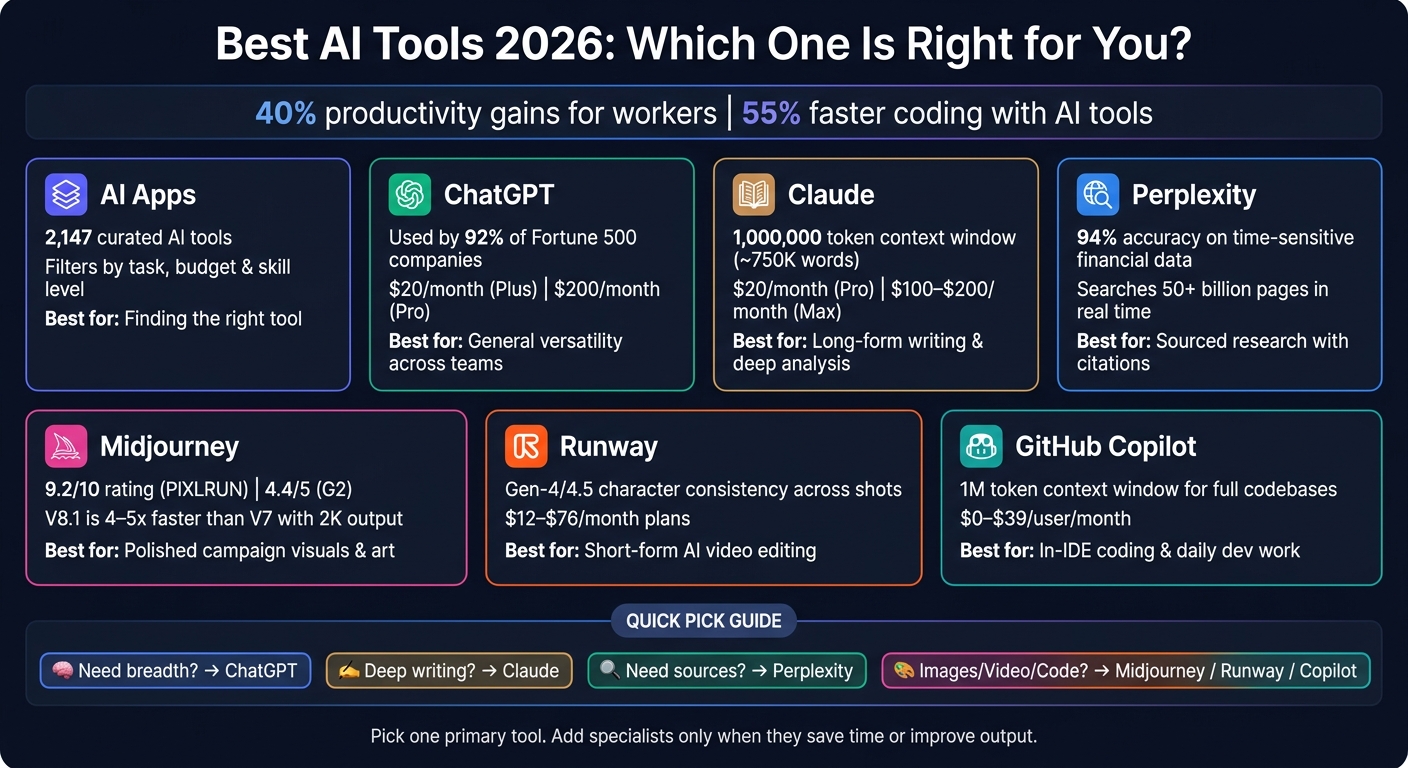
Best AI Tools 2026: Side-by-Side Comparison Guide
46 AI Tools in 2026 You Actually Need (By Category)
sbb-itb-212c9ea
1. AI Apps
AI Apps (aiapps.com) is a curated directory of 2,147 AI tools, sorted by task, budget, subject, and skill level.
It also groups tools by specific workflows, including automated lead generation, predictive retail pricing, and AI tutoring. On top of that, it marks requirements like 3D skills or URL input, which makes filtering a lot easier.
The directory includes user ratings too. FindTalent holds a 4.9/5 rating, while 10Web and Yamete.gg both come in at 4.8/5.
That said, a directory is just the starting point. Prices can change fast, and listings don’t always keep up with product updates, so the main thing is finding the right fit: whether a tool works with your files, apps, and day-to-day workflow. With the list narrowed down, the next sections look at the tools that do the actual work.
2. ChatGPT
ChatGPT is the broadest all-purpose option in this group. It works best when you want one tool to handle research, drafting, and execution in the same place. 92% of Fortune 500 companies currently use it, and the big update is ChatGPT Work, a GPT-5.6-powered agent that can run multi-step tasks across email, Slack, calendars, and code repos.
ChatGPT Work can produce deliverables like spreadsheets, slide decks, reports, and websites through an always-on cloud workspace. That means it can keep working even when your device is turned off.
A good business example came in July 2026, when Virgin Atlantic used ChatGPT Work to benchmark passenger experiences against competitors. A research cycle that usually took several weeks was cut down to a few hours.
There are limits, though. Long-form writing can start to lose tone control after about 1,500 to 2,000 words , making it crucial to choose the right AI writing tool for specific projects, and context gets weaker in documents above 200,000 tokens. Pricing is simple: Plus costs $20/month and includes ChatGPT Work access, while Pro costs $200/month for heavier usage.
If you need deeper long-form reasoning and tighter control over writing, Claude is next.
3. Claude

Claude is the long-document specialist. While ChatGPT tends to spread across more types of work, Claude goes deeper on accuracy and detail. Its top models - Opus 4.8 and Sonnet 5 - support a context window of up to 1,000,000 tokens, or about 750,000 words and 500+ pages in one session. In plain English, that means Claude can read a full legal case file, an entire board package, or a large codebase (making it one of the best AI tools for legal professionals) and still point back to something buried halfway through.
That scale becomes useful fast. If you give Claude a 90-page policy document and tight rules like "flag GDPR violations, use these headings, don't mention X," it tends to stick with those instructions from start to finish. A lot of models start strong and then wander. Claude usually doesn't. That's a big deal in compliance-heavy work, where one missed instruction can turn into a problem later. In early 2026, Air France-KLM used Claude to process long aviation regulations and produce compliance checklists, which cut manual review time by 50%.
Claude also tends to write cleaner long-form copy, with fewer clichés and less hedging, which helps in policy work, contract review, and audit-heavy deliverables. And when it doesn't know something, it's more likely to say so instead of making up an answer. For high-stakes work, that's often the better tradeoff.
There are a few limits. Claude has no native image generation, its web search is slower, and Pro includes about 45 messages every 5 hours. It also can't run code natively, so any code-checking has to happen in another tool.
Pricing starts with a free tier with Sonnet 5 and daily message limits. Paid plans include:
- Pro at $20/month
- Team at $25/seat/month
- Max at $100–$200/month for heavy agentic workloads
Claude fits work that calls for careful reasoning across large amounts of text. Next: Perplexity, the research-first tool with citations built in.
4. Perplexity
If Claude shines with long documents, Perplexity stands out for sourced research. It searches 50+ billion pages in real time and gives you clickable citations you can check on the spot. That makes it less like a plain search tool and more like a research workflow you can verify as you go. It’s a strong fit for analysts, journalists, lawyers, and anyone who needs sourced answers fast.
In testing, Perplexity hit 94% accuracy on time-sensitive financial data such as stock prices. Its Deep Research feature can turn a hard question into a structured brief in about 3 to 10 minutes.
A few features make that process smoother:
- Focus Modes narrow results to areas like academic or financial sources.
- Spaces keeps files, threads, and instructions together in one project workspace.
That said, the limits are worth noting. Perplexity can still cite lower-authority sources, including Reddit threads, without clearly warning you about source quality, so manual checking is still a must for high-stakes decisions. It also doesn’t keep memory across separate chats. And while it’s great for research, it’s not the tool you’d pick first for drafting or coding.
Pricing is simple. The free plan includes unlimited Quick Search and about five Pro Searches per day. Pro costs about $20/month and adds unlimited Pro Search, Deep Research, file uploads, and model switching. Max costs about $200/month and adds priority access plus more autonomous computer features.
When the research part is finished, the next move is often visuals - and that’s where Midjourney comes in.
5. Midjourney
Midjourney is the strongest AI image tool for polished, professionally composed visuals. It holds a 9.2/10 rating from PIXLRUN and a 4.4/5 score on G2. The lighting, composition, texture, and color mood tend to feel deliberate, not random. In many cases, the image looks close to finished before anyone even opens Photoshop.
It works best at the front of the creative process. Think mood boards, concept work, campaign ideas, product mockups, and storyboards. Teams use it to replace stock photos, move asset creation along faster, and improve engagement. V8.1 also made standard generations 4 to 5 times faster than V7 and added native 2K output.
Its biggest brand edge is style consistency. That matters a lot when a team needs every asset to look like it came from the same campaign, not five different hands. The --sref (Style Reference) and --cref (Character Reference) flags help teams lock in a visual identity and reuse it across a full campaign, even when several people are making images. So instead of rebuilding prompts again and again, teams can keep the same visual language from one asset to the next. As Ethan Mollick said:
"Midjourney v7 produces work that would have taken a junior designer hours. Not the conceptual work - that's still you. But the execution: visual options, refinements, style explorations."
The trade-offs are pretty practical. V8.1 still lands at only 55% to 60% accuracy on short text prompts. It also has trouble with exact placement and strict composition. On the pricing side, generations are public by default on Basic and Standard plans, so client work usually means stepping up to the Pro tier at $60/month for Stealth Mode. There’s also no official public API, which makes pipeline automation harder. And Midjourney does not offer copyright indemnification, so IP risk stays with the user.
Plans range from $10/month to $120/month. For most creators, the practical move is to start with Standard. The Basic plan’s image limit disappears fast, and Standard gives you more room to work. A common setup is to use Relax Mode while testing ideas, then save Fast GPU hours for final renders. Companies with more than $1 million in annual revenue must use Pro or Mega for commercial work.
When still images need to move, Runway takes over.
6. Runway
Runway takes AI beyond still images and into shot-based video editing. It’s built for video editors, not just people typing prompts. And unlike text-only generators, it gives you hands-on controls like Motion Brush, camera moves, and keyframes.
Its biggest day-to-day strength is character consistency across shots. The Gen-4/4.5 @reference system keeps a subject’s identity in place - face, wardrobe, and style - across multiple clips. That matters a lot for narrative projects and brand work, where one off-looking shot can break the whole thing. Filmmakers and video editors in major media teams already use Runway in production and marketing workflows.
Aleph is what sets Runway apart from simpler generators. It can make in-context video edits on footage you already have, like relighting a scene, removing an object, or shifting a camera angle. That kind of work used to eat up hours. Now it can take minutes. There’s also Act-Two, which maps facial expressions and body movement from a webcam recording onto an AI character, almost like a motion capture setup.
The downsides are pretty clear too. Native generation usually tops out at 720p at 24fps, and 4K is only available through upscaling. In practice, that can lead to soft, waxy close-ups. Cost is another issue: Gen-4.5 uses 12 to 25 credits per second, so one 10-second clip can cost 120 to 250 credits. And yes, failed generations still use credits, so it’s smart to plan for a few retries before you get a usable shot.
Privacy may also be a sticking point. Runway trains on user inputs and outputs by default on all plans except Enterprise, which can be a problem for sensitive client material. Pricing runs from $12/month to $76/month. A practical setup is to use the lower-cost Gen-4 Turbo at 5 credits per second for rough drafts, then move to Gen-4.5 for final renders.
For software work, GitHub Copilot fills a similar role in code.
7. GitHub Copilot
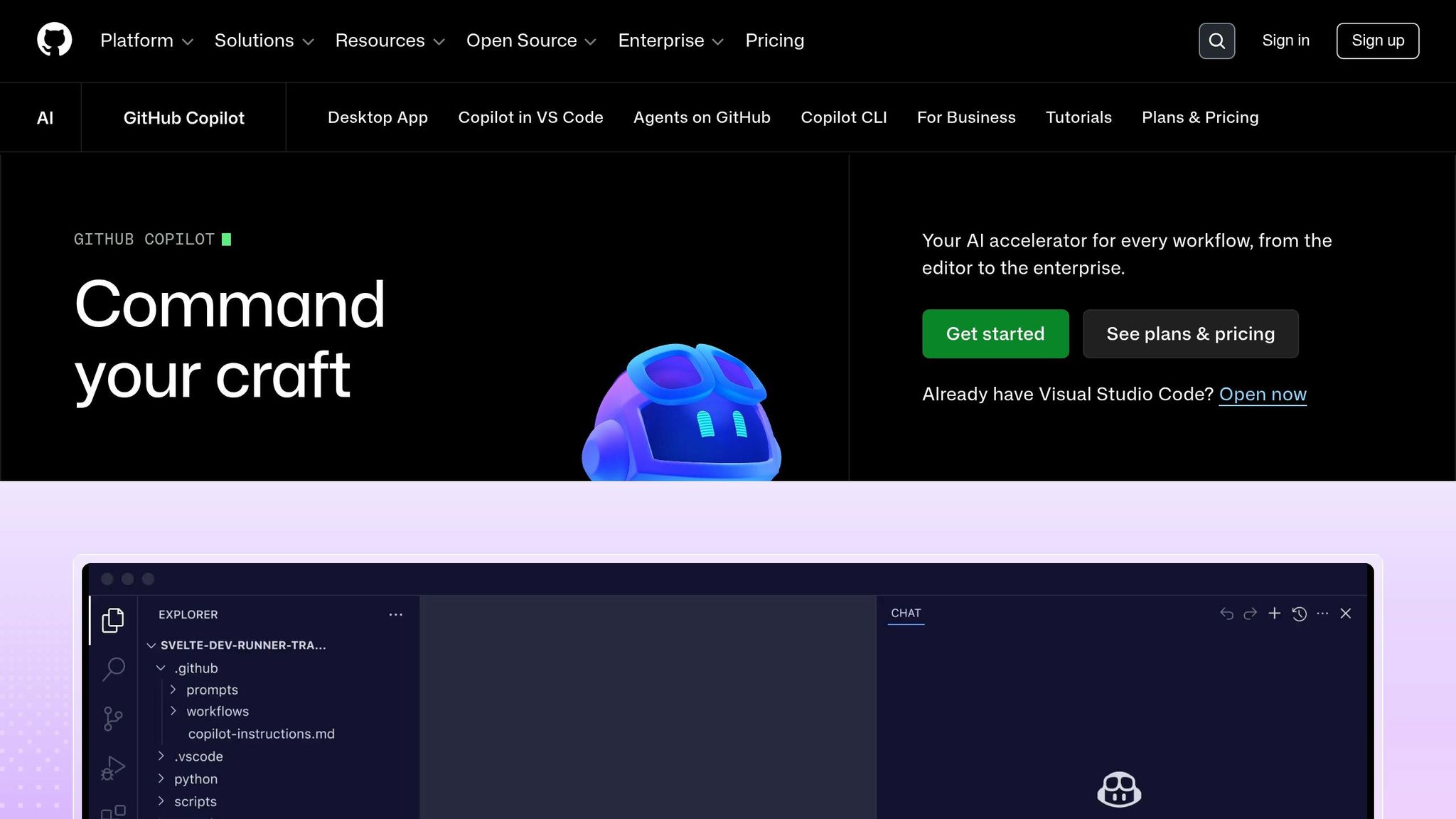
GitHub Copilot comes in three main modes: inline completions, Copilot Chat for in-editor reasoning and debugging, and Agent Mode for multi-file changes. It works inside VS Code, Visual Studio, JetBrains IDEs, Neovim, Xcode, and Eclipse, so support across IDEs is broad. For software teams, that usually means shipping faster and spending less time on manual scaffolding.
Copilot is at its best with routine dev work. Think boilerplate, CRUD endpoints, React components, test scaffolding, and issue-to-PR automation. The Copilot app now works as a desktop hub for parallel agent sessions in isolated git worktrees, and its 1M-token context window can handle entire codebases for whole-repo refactors.
Developers can also choose a model based on the task at hand. The menu includes OpenAI GPT-5.5, Anthropic Claude Opus 4.8, and Google Gemini 3.1 Pro. That gives teams a lot of speed and consistency, especially when they want codebase-wide automation instead of one-off code suggestions.
For regulated teams, the compliance side is strong. Business and Enterprise plans include IP indemnification, SOC 2 Type 2 certification, SSO, and a no-train guarantee. That can matter a lot in finance, healthcare, and other tightly controlled settings.
There are tradeoffs, though. On June 1, 2026, GitHub shifted chat and agent modes to usage-based AI Credits, while basic completions stayed unlimited. In plain English, the entry point is simple, but cost planning gets murkier once teams lean hard on chat and agents. Also, interaction data from Free, Pro, and Pro+ plans is used for model training by default unless users opt out by hand.
Agent Mode does a solid job on well-scoped tasks. But when the work starts touching system design, messy dependencies, or big architectural calls, a person still needs to steer the ship.
Pricing starts at $0 for 2,000 completions, 50 chat requests, and 50 agent minutes per month. Pro costs $10/month, Business costs $19/user/month, and Enterprise costs $39/user/month. Next comes a side-by-side look at where Copilot fits best against the other tools in this lineup.
Side-by-Side Comparison Across Key Criteria
By 2026, these tools look close on raw capability. What separates them is workflow fit.
They’re best thought of as workflow accelerators. Each one is built to help with a certain kind of work: writing, research, visuals, video, or code. And each one tends to shine when used for the right bottleneck. So instead of chasing benchmark scores, match the best AI tools for entrepreneurs to the job that slows your team down.
Here’s the short version: writing, research, visuals, video, and code each point to a different winner.
| Tool | Best For | What It Produces | Highest-Value Use Case | Main Limitation |
|---|---|---|---|---|
| ChatGPT | General versatility | Text, images, voice, code | Teamwide drafting and ideation | Writing can feel generic or over-explained |
| Claude | Writing and analysis | Nuanced prose, code, long docs | Long-form analysis and strategy memos | No native image generation |
| Perplexity | Sourced research | Cited text reports | Fast fact-checking and competitive research | Less suited for creative or polished writing |
| Midjourney | Artistic visuals | High-resolution images | Campaign visuals and concept art | Workflow is less intuitive for new teams |
| Runway | AI video | Short video clips | Ad concepts and short social clips | 10-second clip limits; credit-heavy pricing |
| GitHub Copilot | Coding productivity | Code completions and docs | Daily coding and bug fixing | Struggles with high-level architecture decisions |
The pattern is pretty clear: generalists cut friction, while specialists go deeper.
Perplexity and GitHub Copilot often deliver the fastest time-to-value. Why? They handle narrow, high-friction tasks - research and boilerplate coding - without much setup. You can start using them almost right away.
Midjourney and Runway are different. They usually take more practice if you want pro-level output. But once a team gets comfortable with them, the upside is much higher for image and video work.
ChatGPT is the broadest generalist in the group. Claude is more of a writing-and-analysis specialist. If you need breadth across many tasks, pick ChatGPT. If your work leans on long documents, deeper reasoning, and stronger prose, Claude is often the better fit.
At the end of the day, the best tool isn’t the one with the flashiest demo. It’s the one that removes the biggest slowdown in your workflow.
Pros and Cons
Each tool shines in a different workflow, and each comes with a catch. So the question isn’t which one is “best.” It’s which tradeoff fits the job.
| Tool | Pros | Cons | Best For |
|---|---|---|---|
| ChatGPT | Most versatile; strong mobile app; Microsoft 365 integration | Writing can feel generic; hallucinations still occur at about 6.2% | Generalists & solo professionals |
| Claude | Best prose and long-context reasoning | No native image generation; limited real-time web browsing on the free tier | Writers, strategists & senior developers |
| Perplexity | Fast, sourced research; Model Council for comparing model outputs | Less polished for final drafting; limited creative writing utility | Researchers, journalists & analysts |
| Midjourney | Best-looking images; limited workflow flexibility | No free plan; Discord-based interface; no video generation | Designers, artists & marketers |
| Runway | Best for short-form video for production use; professional Motion Brush tool | Expensive credit system; 10-second clip limit | Video creators & social marketers |
| GitHub Copilot | Best for in-IDE coding; multi-model support | Struggles with high-level architecture decisions; weak on niche libraries | Software engineers & dev teams |
These tradeoffs matter more than the headline price, because most of these tools sit in a pretty similar monthly range. In practice, the better choice often comes down to the kind of work you do most.
Claude is the stronger pick for long documents and deep reasoning. ChatGPT works better if you need breadth, multimodal features, and an all-around assistant.
A simple way to handle it: pick one primary tool, then lean on free tiers for secondary tasks.
Conclusion
After looking at writing, research, visuals, video, and code, one thing stands out: the best AI tool isn’t the one with the longest feature list. It’s the one that removes your biggest bottleneck.
Here’s how that shakes out:
- Claude stands out for long-form reasoning and writing.
- ChatGPT is the most flexible all-in-one pick for voice, images, and data analysis.
- Perplexity fits best when you need sourced, verifiable research.
- Midjourney leads in artistic image quality.
- Runway is the most mature option for professional video production.
- GitHub Copilot makes the most sense for developers working inside an IDE.
That leads to a simple stack, not one single winner. In most cases, you’ll want one generalist, one research tool, and one specialist only when the job calls for it.
To put this into practice this week, look at the five AI tasks you repeat most often or explore AI automation tools to streamline your workflow. Then keep only the tools that either save time or make the output better. If a tool saves you an hour a week, it can pay for itself pretty fast.
Start with one gap. Prove that it helps. Then add more only if you need them.
FAQs
Which AI tool should I start with first?
For most people, ChatGPT is the best place to begin. It handles a lot in one place: writing, brainstorming, coding, and image generation. That makes it a strong starting point for your AI workflow.
Once you’ve got the basics down, bring in other tools when the job calls for them. Use Claude for complex writing or long-document analysis, Perplexity for research with verified citations, and Cursor for advanced coding.
How do I choose between ChatGPT and Claude?
Choose based on your workflow, not raw intelligence. Both offer state-of-the-art performance.
Pick Claude for long-form writing, coding, or document analysis, especially if you need strong instruction-following and a large context window.
Pick ChatGPT if you want a more all-in-one tool, with multimodal features, voice interaction, and custom GPTs.
When is a specialist AI tool worth paying for?
A specialist AI tool is worth paying for when it fixes a specific, repeat problem in your workflow better than a general-purpose assistant.
It may be time to upgrade if the tool:
- saves you a meaningful amount of time
- gives you more reliable output with less manual cleanup
- works well with tools like Google Workspace, Notion, or GitHub
- delivers clear value that makes the price make sense
Put simply, if you're using it often and it removes friction from work you do again and again, paying for it can be an easy call.