Digital Transformation
10 AI Tools That Replace Your Entire SaaS Stack in 2026
10 AI platforms that consolidate CRM, marketing, support, project management, and analytics to cut SaaS costs.

10 AI Tools That Replace Your Entire SaaS Stack in 2026
AI tools are reshaping how businesses operate in 2026. Instead of managing 47 disconnected SaaS apps, companies are turning to unified AI platforms that consolidate workflows, save money, and reduce inefficiencies. These tools automate tasks across marketing, customer support, project management, and analytics, helping businesses cut costs by up to 70% and save countless hours.
Here are 10 AI tools transforming SaaS stacks today:
- AI Apps: Combines email, CRM, and spreadsheets into one system, offering no-code agent builders and usage-based pricing.
- Notion AI: Centralizes notes, tasks, and documents with AI agents for meeting notes and enterprise search.
- ClickUp AI: Replaces over 20 tools with features like AI Super Agents and automated meeting notes.
- HubSpot Breeze AI: Integrates marketing, sales, and customer service with autonomous agents for content creation and lead generation.
- Zapier AI: Automates workflows across 8,000+ apps with visual mapping and AI-driven tasks.
- Gumloop: Simplifies multi-step workflows with drag-and-drop automation and credit-based pricing.
- Replit Agent: Merges design, development, and deployment into one workspace for faster project delivery.
- Jasper AI: Automates content creation, SEO, and marketing tasks with centralized tools.
- Zendesk AI: Handles customer support, analytics, and task automation with AI agents and no-code workflows.
- Looker Studio AI: Links data, transforms it, and creates visualizations with natural language commands.
Key Benefits:
- Cost Savings: Replace multiple subscriptions with single platforms, saving thousands annually.
- Efficiency: Automate up to 80% of routine tasks, cutting time spent on repetitive work.
- Scalability: Support both solo entrepreneurs and large enterprises with flexible pricing and features.
These tools are leveling the playing field for startups and solo founders, allowing them to operate like larger teams at a fraction of the cost. Whether you're managing a small business or scaling an enterprise, these AI platforms can simplify operations and improve productivity.
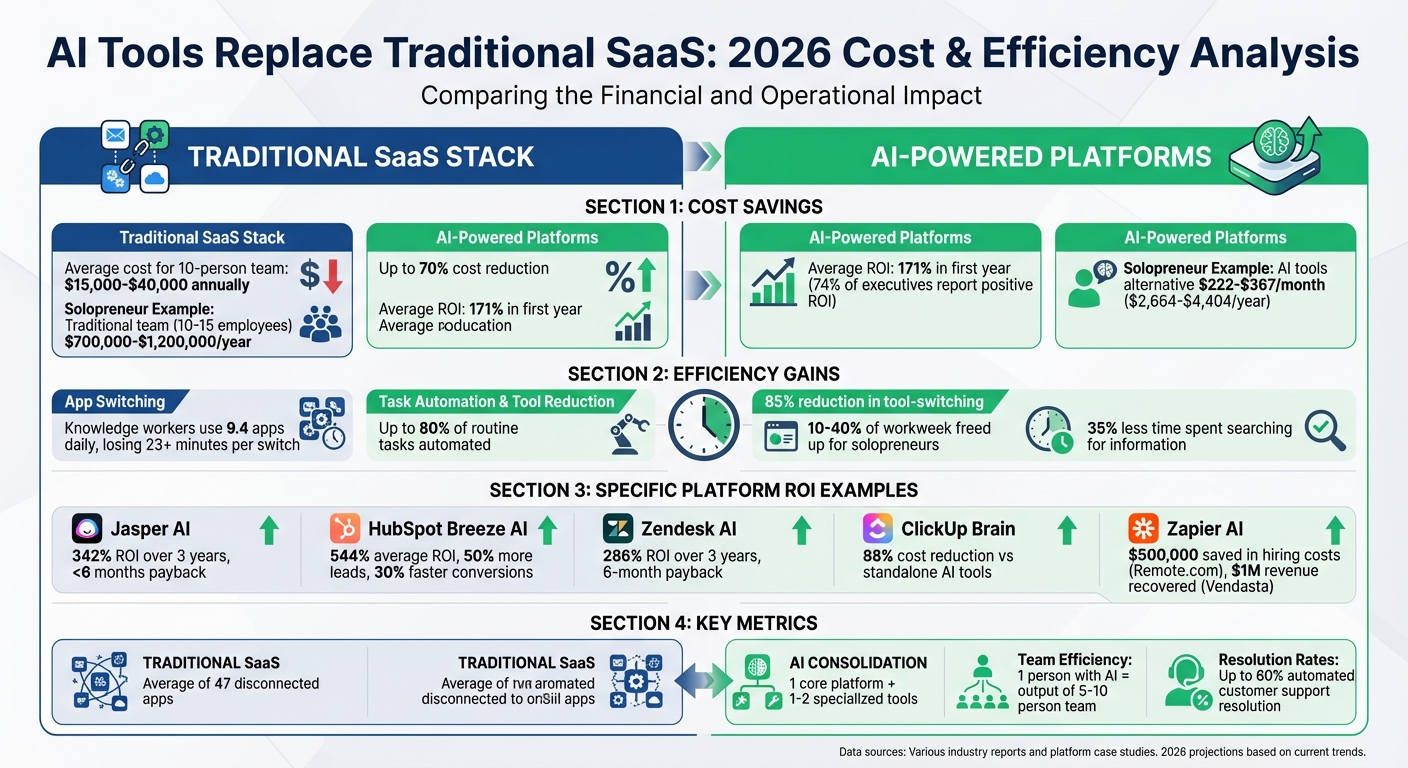
AI Tools vs Traditional SaaS: Cost Savings and ROI Comparison 2026
1. AI Apps
All-in-one capabilities to replace multiple SaaS tools
AI Apps acts as a central hub for your business, bringing together tools like email, CRM, and spreadsheets into a seamless system where data moves effortlessly. It eliminates the need for multiple apps by offering on-demand software that activates for tasks like billing, marketing, or legal work and disappears once the job is done.
With its no-code agent builders, you can create custom AI agents using simple English instructions. These agents can handle tasks like SEO writing, content creation, code review, or lead qualification for sales professionals. For instance, a single command can update your CRM, log a Jira ticket, and generate a financial report all at once.
"Stop being the glue that holds 47 apps together. AMOS is the unified layer where capabilities, data, and intelligence converge." - AMOS Labs
This integration simplifies workflows and helps businesses cut costs significantly.
Cost-effectiveness compared to traditional SaaS stacks
Switching to AI Apps can lead to up to 70% savings compared to traditional SaaS expenses. The platform’s usage-based pricing ensures you only pay for tasks performed, avoiding the waste of unused software licenses. Among those adopting agentic AI, 74% of executives reported a positive ROI within the first year, with an average return of 171%.
Organizations have seen monthly savings of over $2,000 and an 85% reduction in tool-switching. Rather than juggling multiple renewals and integrations, you get a single bill and a platform that adjusts to your processes, making operations smoother and more cost-effective.
sbb-itb-212c9ea
2. Notion AI

All-in-one capabilities to replace multiple SaaS tools
Notion AI evolved into an AI-driven workspace after significant updates in late 2025 and early 2026. With its block-based architecture, users can create tailored systems for managing notes, documents, tasks, and wikis.
One standout feature is the Notion Agent, which can handle complex, multi-step tasks for up to 20 minutes. It pulls context from Notion pages and connected apps like Slack, Google Drive, and GitHub. Morgane Palomares, VP of Marketing at Braintrust, shared her experience with Notion Agents in 2026, saying:
"All our teams, docs, and workflows are in Notion, and it's listening to Slack. When your agents have full context across the company, that's what makes them useful".
Another game-changer is AI Meeting Notes, which eliminates the need for standalone transcription tools. It transcribes calls and generates summaries directly within Notion, cutting post-call documentation time from 30–45 minutes to under 5 minutes. Additionally, the platform’s Enterprise Search allows users to query across Notion and integrated tools like Jira and Gmail, all from one place.
Cost-effectiveness compared to traditional SaaS stacks
Switching to Notion can slash costs by up to 50%, compared to juggling multiple specialized SaaS tools. For $20 per user per month, the Notion Business subscription grants access to advanced AI models like GPT-5, Claude Opus 4.1/4.6, and Gemini 3 - making separate $20/month subscriptions for each model unnecessary.
Ben Levick, Head of AI & Operations at Ramp, highlighted how Notion Agents streamlined repetitive tasks company-wide in 2026:
"If it's something that's repetitive, we have a Notion Agent for it".
Users also report spending 35% less time searching for information when using Notion as a centralized knowledge hub. This efficiency makes it a practical choice for businesses of all sizes, from startups to large enterprises.
Scalability for startups, creators, and enterprises
Notion’s cost savings make it easy to scale, whether you’re a solopreneur or part of a global enterprise. The platform can grow from a personal knowledge base into a full-scale enterprise solution without requiring a complete overhaul. By 2026, Notion serves over 100 million users worldwide, including 62% of Fortune 100 companies and more than 50% of Y Combinator startups.
For solopreneurs, consolidating workflows into Notion can free up 10–40% of their workweek. The free tier offers unlimited pages for individuals, while the $20/user/month Business plan unlocks advanced tools like the Notion Agent, AI Meeting Notes, and Enterprise Search. Enterprise users also gain access to features like SAML SSO, SCIM provisioning, and audit logs for enhanced security.
3. ClickUp AI
A unified workspace to replace multiple tools
ClickUp offers an all-in-one AI-powered workspace, combining tasks, documents, chat, whiteboards, time tracking, CRM, and dashboards. This consolidation can replace over 20 separate tools that many businesses currently rely on.
The platform’s ClickUp Brain MAX serves as an intelligence layer, understanding the context of your tasks, documents, and team discussions. Features like the AI Notetaker automatically join meetings on Zoom, Teams, or Google Meet to record, transcribe, and generate action items. The Enterprise Search allows users to search across ClickUp and connected external apps like Slack, Google Drive, and GitHub - all from one interface. Additionally, AI Super Agents can independently manage complex workflows, such as client onboarding or sprint planning. Users have reported saving an average of 1.1 days per week and completing tasks three times faster with ClickUp AI.
This integration reduces the need for multiple subscriptions, simplifying operations for businesses.
Cost savings compared to traditional SaaS tools
ClickUp’s integrated platform can save small businesses over $15,000 annually by replacing multiple premium AI tools like Claude, Gemini, and ChatGPT. ClickUp Brain alone is estimated to cut costs by approximately 88% compared to purchasing standalone AI products.
Path8 Productions, led by Founder and Executive Producer Pat Henderson, consolidated six communication tools into ClickUp, reducing meeting preparation time by 60%. The transition took less than eight weeks. Henderson shared:
"We were spending too much time updating different systems that weren't talking to each other. It slowed us down and increased the chance of things falling through the cracks."
ClickUp’s pricing is competitive, with the Unlimited Plan starting at $7 per month and the Business Plan at $12 per month. AI features are available as add-ons beginning at $9 per user per month.
Seamless integration with existing workflows
ClickUp Brain is deeply integrated into the workspace, pulling context from tasks, documents, chats, and external tools like Salesforce, Jira, and GitHub. Preethi Anchan, Senior Content Editor at ClickUp, explained:
"ClickUp Brain replaces scattered AI tools that generate content without understanding real execution. It reads live tasks, docs, comments, fields, and history across the workspace to offer Contextual AI."
The Talk to Text feature allows users to dictate updates and tasks up to four times faster than typing. Meanwhile, ClickUp Automations enable multi-step workflows, such as assigning an engineer to a bug task triggered by a Datadog alert. High-performing teams often limit their toolkit to fewer than nine platforms, whereas low-performing teams manage 15 or more tools, leading to inefficiencies.
These integrations make it easier for teams to scale their operations effectively.
Tailored for startups, creators, and enterprises
ClickUp’s Small Business Suite provides enterprise-grade tools and AI for teams of 5–100. Solopreneurs can begin with the Unlimited Plan and AI features to automate content creation and task management, potentially saving over 10 hours per week. The platform has received high ratings, with a 4.7/5 score on G2 (from over 8,700 reviews) and Capterra (from over 3,800 reviews).
For larger organizations, AI Dashboards offer executive insights and identify delivery risks, while Super Agents handle complex workflows across departments. After consolidating tools into ClickUp, 97% of users reported increased efficiency, and 88% noted better collaboration. Zeb Evans, Founder & CEO of ClickUp, highlighted:
"Small businesses are the heartbeat of opportunity. We built ClickUp Small Business Suite so entrepreneurs could spend less time on busywork and more time building their dreams."
4. HubSpot Breeze AI
All-in-one Capabilities to Replace Multiple SaaS Tools
HubSpot Breeze AI combines marketing, sales, and customer service into one streamlined platform, integrated directly into its Smart CRM. This eliminates the need for juggling multiple tools and subscriptions. With over 80 AI-powered features built into the system, it replaces the need for separate tools like content creation software, social media managers, sales prospecting tools, data enrichment services, and customer support platforms.
The platform features "Breeze Agents" - autonomous AI tools that handle entire workflows. For example:
- The Content Agent produces articles and social posts in your brand's voice.
- The Prospecting Agent identifies potential customers and sends personalized outreach emails around the clock.
- The Customer Agent resolves support inquiries automatically, achieving an average resolution rate of 47%, which can exceed 60% for companies with comprehensive knowledge bases.
Take the Franchise Brokers Association as an example: they saw a 250% increase in daily SEO-optimized content production and boosted lead generation by 216% using Breeze AI.
Breeze Intelligence enhances CRM records with over 40 detailed data points, such as industry, revenue, and technology insights. Bradley Poole, Chief Revenue Officer at ResellerRatings, shared his experience:
"The impact of Breeze prospecting agent has been remarkable... It's crafting emails that outperform some of our US-based BDRs in quality and engagement."
This level of functionality not only simplifies operations but also delivers major cost savings.
Cost-effectiveness Compared to Traditional SaaS Stacks
Breeze AI’s all-in-one approach can lead to substantial financial savings. Instead of paying for multiple high-cost subscriptions, its credit-based pricing model charges about $1 per customer conversation. Plans start at $15 per month for the Starter tier, $800 per month for Professional, and $3,600 per month for Enterprise users.
The return on investment speaks volumes. Companies using Breeze AI report an average ROI of 544%, with 50% more leads and 30% faster conversion times. For instance:
- Agicap, a fintech company, saved 750 hours per week and increased deal velocity by 20%.
- Kaplan reduced customer service response times by 30%.
- Sandler saw a 25% rise in engagement and a fourfold increase in sales leads.
By automating CRM tasks and lead generation, Breeze AI reduces time spent on non-selling activities by 66%, allowing teams to grow revenue without expanding their workforce.
Ease of Integration with Existing Workflows
Breeze AI integrates directly into the HubSpot platform, making it easy to access customer context without complicated data syncing. Breeze Copilot is available via the HubSpot interface, browser extensions, and mobile devices, enabling users to draft content, research companies, and summarize records wherever they are working.
The platform combines structured CRM data with unstructured information like emails and call transcripts, enriched by external data from 200 million buyer profiles. Companies such as Aerotech have reported a 67% increase in win rates and 56% faster deal closings thanks to automated sales research and lead qualification. Similarly, Transkribus resolved 60% of customer inquiries automatically. This seamless integration helps businesses scale efficiently.
Scalability for Startups, Creators, and Enterprises
Breeze AI’s flexibility makes it suitable for businesses of all sizes, from startups to large enterprises. Startups can implement Breeze within 90 days, moving quickly from setup to automated forecasting and optimization. The Breeze Studio feature allows for no-code customization of AI agents, making advanced tools accessible even to small teams and independent creators.
For larger enterprises, Breeze offers predictive lead scoring and AI-driven revenue forecasting. Andy Pitre, EVP of Product at HubSpot, explains:
"Until now, we haven't seen a complete AI solution for businesses... With Breeze, businesses finally get it all. AI that's agile, intuitive, and embedded, not just with popular LLMs, but your customer data."
The platform also includes tools like Content Remix, which allows creators to turn one blog post into a full-scale marketing campaign with social posts, landing pages, and emails. This makes it an adaptable solution for businesses looking to streamline operations and scale effectively.
5. Zapier AI
All-in-One Platform to Replace Multiple Tools
Zapier AI has evolved into a platform that orchestrates workflows through four main components: Canvas for visual workflow mapping, Interfaces for creating custom apps and forms, Tables for storing and enriching data, and Central/Agents for autonomous AI assistants. Together, these features can replace several standalone tools.
With Zapier Agents, you can automate research-heavy tasks like web searches or knowledge retrieval across 8,000 apps. Meanwhile, Copilot simplifies automation by creating workflows from plain-text instructions. For instance, you can say, "Build a lead qualification system that enriches contacts and routes them to sales", and Copilot will handle the rest.
The Zapier MCP (Model Context Protocol) connects external AI tools like ChatGPT or Claude to over 30,000 actions within Zapier’s app library. This integration has enabled users to automate more than 200 million AI tasks, with 23 million AI-related tasks running monthly.
This streamlined approach translates into measurable financial and operational benefits.
Cost Savings Over Traditional SaaS Tools
Zapier AI can significantly cut costs by replacing multiple point solutions priced at $15–$50/month. A 10-person team, for example, could save between $15,000 and $40,000 annually. On average, organizations using Zapier AI report cost reductions of up to 70% and an ROI of 171%.
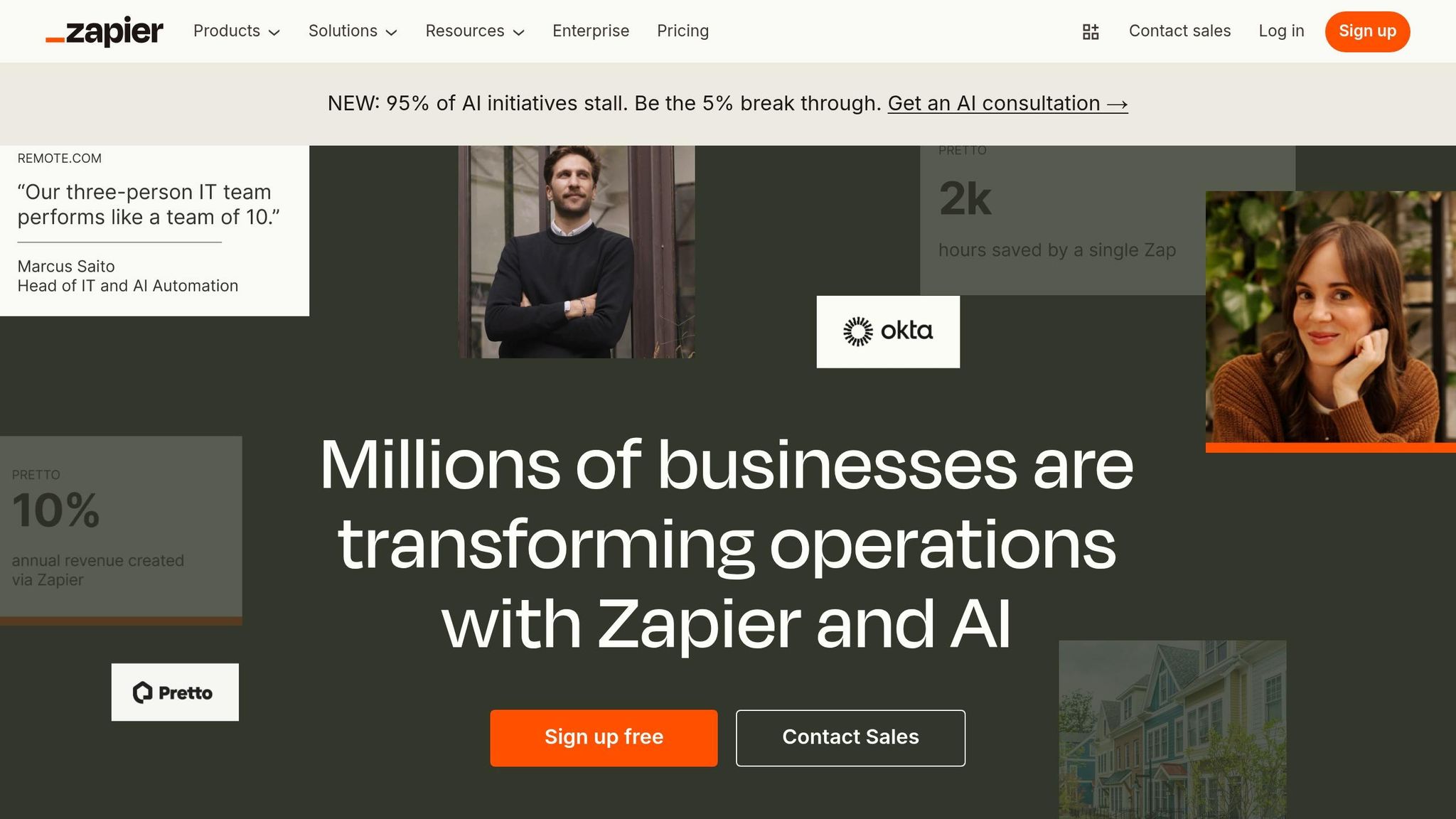
In April 2025, Remote.com introduced an AI-powered IT helpdesk via Zapier, which resolved 27.5% of tickets for its 1,700 employees. Marcus Saito, Head of IT and AI Automation at Remote.com, stated:
"Zapier makes our team of three seem like a team of ten."
This implementation saved $500,000 in hiring costs and reclaimed 2,219 workdays each month.
Similarly, Vendasta leveraged Zapier to build an AI-driven lead enrichment system that recovered $1 million in potential revenue and saved 282 workdays annually. Jacob Sirrs, a Marketing Operations Specialist, shared:
"Because of automation, we've seen about a $1 million increase in potential revenue. Our reps can now focus purely on closing deals - not admin."
Zapier AI’s pricing starts at $19.99/month for the Professional plan, which includes 750 tasks. A Free plan with limited AI capabilities and 100 tasks per month is also available for trial.
Smooth Integration with Existing Tools
Zapier connects with nearly 8,000 apps and offers over 30,000 specific actions - far more than most competitors. This extensive library makes it easy to integrate with your current toolset.
For example, Okta implemented a custom Slack escalation bot in November 2025, reducing support escalation times from 10 minutes to just seconds. The bot now handles 13% of all Workforce Identity escalations. Korey Marciniak, Senior Manager of Customer Support Strategy and Operations at Okta, remarked:
"Zapier improves the quality of life for our teams. I don't need a highly technical team - I just need the right tools."
Zapier also includes features like AI Guardrails to detect sensitive data, toxic language, and potential security risks in workflows. Tools like Slack approvals ensure human oversight for AI-generated content and critical decisions.
Scalability for Teams of All Sizes
Zapier AI is designed to scale with ease, whether you're a small startup or a large enterprise. It empowers non-technical users, or "citizen builders", to create AI workflows, helping startups grow without needing a dedicated engineering team. By early 2026, 97% of Zapier users were leveraging AI features daily.
The platform’s modular design allows businesses to start small and expand as needed, deploying specialized agents for tasks like routing, research, and writing. These agents work together, sharing context to manage complex workflows. The "AI by Zapier" tool also lets users switch between AI models from OpenAI, Anthropic, and Google without reconfiguring workflows, keeping systems up-to-date with the latest advancements.
For larger organizations, Zapier offers enterprise-level governance features, including SOC 2 Type II compliance, SSO, SCIM provisioning, and detailed audit logs. Enterprise plans start at around $750 per month and include custom task allocations. With over 350 million AI tasks completed for more than one million companies, Zapier AI demonstrates its ability to handle operations at any scale.
6. Gumloop
All-in-One Capabilities to Replace Multiple SaaS Tools
Gumloop is designed to simplify workflows by combining traditional automation "Flows" with autonomous AI "Agents" that can think independently and use tools without constant input. This setup eliminates the need for multiple specialized SaaS tools, offering a single platform solution. Users can deploy agents tailored for specific tasks like Data Analysis, CRM, or Customer Support, all within a unified system. These agents work together seamlessly to manage complex workflows across various departments.
The platform provides access to major AI models, such as GPT-5.4, Claude 3.5, and Gemini, without requiring separate API keys or subscriptions for each. With over 130 app integrations and support for Model Context Protocol (MCP) servers, Gumloop ensures its agents can operate across an entire tech stack. For non-technical users, the "Gummie" meta-agent simplifies the process, allowing them to create complex workflows just by describing their goals in plain English.
In March 2025, Gumloop introduced a token efficiency update that doubled the efficiency of its agents, effectively halving credit costs for the same workload. The platform has earned high ratings, including 4.8/5 on G2 and 5/5 on Product Hunt, for enabling users to create powerful, no-code AI agents. This focus on streamlined, intelligent workflows aligns with the broader trend of consolidating tools into single, efficient platforms.
Cost-Effectiveness Compared to Traditional SaaS Stacks
Gumloop’s pricing model is designed to save users money, particularly for complex workflows. Instead of charging per task or step, the platform uses a credit-based system, which can be 30% to 50% cheaper than traditional automation platforms for multi-step AI processes. All plans include unlimited nodes and flows, ensuring scalability without escalating costs. The free tier provides 5,000 credits monthly - enough to test and run initial workflows.
The Pro plan starts at $37/month and includes over 20,000 credits, unlimited seats, and unlimited triggers. In early 2026, Gumloop secured a $50 million Series B funding round, led by Benchmark, reflecting strong confidence in its approach. Sarah Miller from AI Creative Blog highlighted Gumloop’s affordability, stating:
"For complex, multi-step AI flows, Gumloop is almost always 30-50% cheaper because it doesn't penalize you for having a sophisticated logic path with many nodes."
Ease of Integration with Existing Workflows
Gumloop integrates effortlessly into existing workflows, offering a user-friendly, drag-and-drop interface that requires no coding skills. The "Gummie" AI copilot further simplifies the process by automatically generating workflows based on goals described in natural language. Users can interact with agents directly through platforms like Slack, Teams, or email, eliminating the need for a separate dashboard. For example, tagging @Gumloop in Slack allows users to query data warehouses or update CRM records instantly.
With over 130 native integrations and support for MCP servers, Gumloop connects easily to both popular and niche tools. For enterprise users, the platform offers Gumstack, a security feature that audits and monitors AI activities across the organization, including interactions with third-party tools like ChatGPT and Cursor. Ev Randle, a Partner at Benchmark, remarked:
"The incredible adoption & expansion we're seeing within enterprises firsthand is a testament to the depth of this team's commitment to their users & customers."
Scalability for Startups, Creators, and Enterprises
Gumloop is designed to scale with its users, whether they are individual creators or large enterprises. The free plan includes one seat and one active trigger, while the Pro plan - starting at $37/month - offers unlimited seats and triggers. Enterprise plans provide additional features like Role-Based Access Control (RBAC), SSO/SAML support, audit logs, and Virtual Private Cloud (VPC) deployment.
The platform has seen strong adoption, with referral signups achieving a 38% onboarding completion rate - eight times higher than those from paid ads. Gumloop is also SOC 2 Type II and GDPR compliant, and it offers zero data retention (ZDR) agreements for third-party AI models. Gartner predicts that by the end of 2026, 40% of enterprise applications will include task-specific AI agents, positioning Gumloop as a key player in this evolving landscape. Its scalability aligns with the growing emphasis on efficient, streamlined business operations across industries.
7. Replit Agent
All-in-One Capabilities to Replace Multiple SaaS Tools
Replit Agent 4 brings together design, development, and deployment in a single workspace, eliminating the need for juggling multiple tools. Its Design Canvas allows users to quickly create and tweak UI variants, applying updates directly to production code - removing the traditional back-and-forth between design and development. With this unified approach, a single project can produce web apps, mobile apps (using React Native/Expo), slide decks, data visualizations, and even marketing videos. All of these outputs share the same backend and design language.
Replit achieved a $9 billion valuation in March 2026 following a $400 million Series D funding round and now boasts a community of over 50 million builders. Impressively, Agent 4 resolves about 75% of errors on its first try, showcasing a significant leap in efficiency compared to earlier versions.
Its ability to execute tasks in parallel simplifies processes like authentication, database design, and frontend development. Additionally, built-in infrastructure supports PostgreSQL, user authentication, object storage, and one-click cloud deployment. SaaS connectors integrate seamlessly with tools like Stripe, Notion, Slack, and Linear, streamlining workflows and reducing complexity.
Cost-Effectiveness Compared to Traditional SaaS Stacks
Replit Agent 4 offers a clear financial advantage by replacing the need for separate subscriptions to design tools, IDEs, and deployment services. The Replit Core plan is priced at $25/month and includes full access to Agent features and production hosting. For those needing more advanced capabilities, the Replit Pro plan costs $95/month (billed annually) and supports up to 15 collaborators, private deployments, and access to more powerful models. Recent tests have shown that Replit Agent 4 can deliver production-ready deployments up to 10× faster.
Alex Meyers, Principal Product Manager at Gusto, shared his experience:
"This makes my life as a Product Manager 10x easier. Rather than writing requirements and waiting for Figmas, I can show, not tell."
Ease of Integration with Existing Workflows
Replit Agent 4 is designed to fit seamlessly into existing workflows, offering over 30 built-in connectors and support for hundreds more via the Model Context Protocol (MCP). This allows users to interact directly with tools like Notion, Slack, and BigQuery from within its chat interface. For example, users can pull data or create Linear tickets without leaving the platform. The "Plan Mode" feature further enhances productivity by automatically generating structured task lists before execution, which helps teams review architectural decisions and dependencies. A Kanban-style task board also helps manage requests, sequence tasks, and handle dependencies efficiently.
Doug Rodermund, Principal Program Manager at Zillow, highlighted the collaboration benefits:
"Agent 4 unlocks true collaboration and real-time learning - now our teams can design and build with our closest partners live."
Scalability for Startups, Creators, and Enterprises
Replit Agent 4 stands out as a tool that simplifies workflows and reduces the need for multiple SaaS solutions. It’s particularly empowering for non-technical users - like designers, product managers, and students - enabling them to create production-ready software using natural language instead of traditional coding. For startups, the platform accelerates MVP development by autonomously managing tasks across frontend, backend, database, and deployment. Enterprises, on the other hand, can leverage features like parallel task execution, SSO/SAML, SOC 2 compliance, and VPC peering, available through custom pricing plans. Whether it’s web apps, mobile apps, landing pages, or data visualizations, projects remain unified by a consistent backend and design language.
Barak Hirchson, Co-Founder & Chief AI Officer at Payouts.com, summed it up perfectly:
"The parallel task execution is a game-changer for us... the ability to submit tasks simultaneously with full visibility before anything merges is exactly how we've wanted to work."
8. Jasper AI
All-in-One Capabilities to Replace Multiple SaaS Tools
Jasper AI has grown from being just a writing assistant to a comprehensive marketing automation platform that can manage your entire content workflow. It combines tools and features that would usually require separate subscriptions - like SEO optimization, AI-powered writing, image generation, and research tools - into one seamless platform.
With Marketing Agents, Jasper takes care of tasks like campaign planning, SEO audits, and in-depth research. Jasper IQ acts as a centralized decision-making hub, embedding your brand voice, style guides, and company knowledge into all content outputs - essentially replacing traditional brand governance tools. For collaboration, the Jasper Canvas offers a shared workspace where teams can work together in real time, manage document versions, and streamline workflows, cutting down the need for external content management systems.
According to a 2026 Forrester TEI Study, Jasper delivers an impressive 342% ROI over three years, with a payback period of under six months. Marketing teams using Jasper report a 50% boost in efficiency and a 35% reduction in time spent searching for information. Additionally, Jasper’s long-form blog posts are considered 70-80% publish-ready, outperforming competitors, which average around 40-50%.
These features not only simplify complex workflows but also result in considerable cost savings.
Cost-Effectiveness Compared to Traditional SaaS Stacks
Jasper serves as a centralized system for marketing tasks, dynamically assigning work to the most effective models and eliminating the need for multiple subscriptions to different AI tools. The platform offers flexible pricing:
- The Creator plan is $39 per month (billed annually) and includes one seat, unlimited word generation, two brand voices, SEO mode, and access to Jasper Art.
- The Pro plan costs $59 per month (annual billing) and supports up to five seats, unlimited brand voices, and advanced collaboration tools.
- For larger teams, the Business tier offers custom pricing and includes unlimited users, Marketing Agents, API access, SOC2 compliance, and SSO.
Companies are already seeing results. WalkMe, a digital adoption platform, saved over 3,000 hours of manual work and achieved a 2X ROI by adopting Jasper for enterprise content automation. Similarly, the marketing agency MERGE reports saving between 1 and 4 hours per team member each week by using Jasper for campaign asset creation.
Ease of Integration with Existing Workflows
Jasper’s ability to integrate seamlessly with existing tools adds to its appeal. For instance, it syncs with SharePoint to automatically update and organize key documents within Jasper’s system. The Model Context Provider (MCP) extends Jasper’s intelligence to external software, allowing it to access and utilize company data across various platforms. Finalized content can then be directly transferred to collaboration tools like SharePoint, eliminating the hassle of manual downloads and version tracking.
Jasper’s training capabilities are also impressive. After being trained on just 7-12 company documents, the platform achieves 90% tone consistency. Mason Johnson, Technical Product Marketing Manager at Jasper, highlights the platform’s evolution:
"Agents move Jasper from generating content to executing real marketing work."
Scalability for Startups, Creators, and Enterprises
Jasper’s flexibility makes it a great fit for creators, agencies, and large enterprises alike. Solopreneurs can use the Creator plan to replace multiple subscriptions for writing, basic SEO, and image generation. Agencies benefit from the Business tier’s unlimited brand voices, which allow them to manage multiple clients while maintaining strict brand guidelines. Enterprises, on the other hand, can leverage Knowledge Base Connectors to sync SharePoint folders directly, ensuring content remains accurate and on-brand. Jasper also supports advanced CRM integrations, SSO, and API access for custom workflows.
9. Zendesk AI
All-in-One Capabilities to Replace Multiple SaaS Tools
Zendesk AI has transformed into a comprehensive Resolution Platform that brings together customer support, analytics, and workflow automation under one roof. Its five main components - AI Agents, Service Knowledge Graph, Actions & Integrations, Governance & Control, and Measurement & Insights - streamline operations by replacing the need for separate tools like quality assurance systems, workforce management software, and contact center solutions.
The platform’s autonomous AI agents use advanced technology to manage complex queries and perform tasks across backend systems like Shopify, Jira, and Salesforce. With no-code tools such as Action Builder and App Builder, teams can set up custom workflows simply by describing them in natural language. Austin Lacey, Zendesk's Director of Chatbots, AI & Automation, emphasizes this simplicity:
"Using our AI agent builder, we simply describe business procedures in natural language and the AI agent is ready to go. No flows, no code, no developer support needed."
Zendesk AI also caters to internal IT and HR needs with tools like IT Asset Management and Service Catalogs. Additionally, it incorporates voice, video calls, and screen sharing directly into its interface, eliminating the need for traditional contact center solutions. This integrated approach not only simplifies operations but also helps businesses save money by consolidating multiple tools into one.
Cost-Effectiveness Compared to Traditional SaaS Stacks
By automating up to 80% of support requests, Zendesk AI significantly reduces labor costs, which typically make up 80–90% of overall support expenses. A Forrester Total Economic Impact™ study revealed that Zendesk AI delivers a 286% ROI over three years, with most customers recouping their investment within six months. Pricing starts at $19 per agent per month (annual billing), with the Suite Professional tier available for around $55 per agent per month. Eligible startups can take advantage of six months of free access. By combining workforce management, quality assurance, and conversational AI into one platform, businesses can cut down on multiple SaaS subscriptions.
The financial benefits are clear in real-world applications. Laura McDonald, Director of Customer Happiness, reported a 60% first contact resolution rate and $434,000 in annual savings within just three months of using Zendesk AI. Similarly, Raz Razaq, Head of Customer Contact Experience Technology, achieved a 39% automated resolution rate, saving $100,000 in the same timeframe.
Ease of Integration with Existing Workflows
Zendesk AI seamlessly integrates with existing systems using Knowledge Connectors, which sync external sources like Google Drive, SharePoint, and Confluence directly into its reasoning engine. It also utilizes the Model Context Protocol (MCP) to provide instant access to data across systems, allowing AI agents to handle complex, multi-step tasks without requiring manual data transfers.
For example, Freedom Furniture used Zendesk's AI-powered insights to improve case routing and escalation, cutting resolution times by over 90% and increasing customer satisfaction by nearly 20%. Meanwhile, Rotho, a European manufacturer, leveraged Zendesk Copilot to unify knowledge sources, tripling team productivity. These capabilities make Zendesk AI a flexible tool that adapts to diverse operational needs.
Scalability for Startups, Creators, and Enterprises
Zendesk AI’s unified platform is designed to scale with businesses of all sizes, offering pre-trained industry solutions for sectors like financial services, insurance, IT, HR, travel, retail, software, and education. Startups benefit from six months of free access, while enterprises gain advanced features like AI-driven reporting, intelligent triage, and streamlined workforce management.
For instance, María de la Plaza, Head of Community Operations at SoundCloud, used Zendesk QA to analyze 100% of customer conversations. This allowed her team to identify knowledge gaps and update Help Center content, leading to better agent performance and improved customer satisfaction. At Ingram Micro, Regional CIO Alicia Monroe highlighted how automated task routing through Zendesk AI enhanced productivity and operational efficiency:
"Zendesk AI will provide value by automating tasks and routing tickets, allowing us to respond to customers faster and enabling our associates to focus on high-value activities."
10. Looker Studio AI
Combining Data Connection, Transformation, and Visualization
Looker Studio AI brings together data connection, transformation, and visualization in one web-based platform, eliminating the need for separate tools for ETL, dashboards, and presentations. Thanks to its Gemini integration, you can use natural language commands to handle complex tasks. For instance, you can simply ask, "Compare last year's organic search traffic", instead of manually creating formulas.
With support for over 800 data sources and 600+ partner connectors, Looker Studio AI can seamlessly pull data from platforms like Google Ads, GA4, BigQuery, Facebook Ads, Salesforce, and Shopify - all without writing a single line of code. It even automates the creation of Google Slides presentations directly from your dashboards. Plus, with its 1 million token context window, it can analyze large-scale business documentation to deliver actionable insights. This unified approach ensures smoother data workflows and more informed decision-making across your organization.
Affordable Compared to Traditional BI Tools
The base Looker Studio platform is free for both creators and report viewers, offering cost-effective data visualization without licensing fees. For those who need enterprise-level features, Looker Studio Pro is available at just $9 per user per project per month - far less than traditional business intelligence tools.
A great example of its impact is Wpromote, a performance marketing agency that adopted Looker Studio in 2026 as part of its Polaris platform. By integrating over 1,400 data sources through BigQuery and Looker Studio, they cut the time needed to roll out new client reports from days to mere minutes. They also achieved 98% accuracy in revenue forecasting. The platform's intuitive drag-and-drop interface further reduced the need for specialized data analysts, leading to significant savings in personnel costs.
Seamless Integration with Existing Systems
Looker Studio fits effortlessly into existing workflows, especially for those already using the Google Cloud ecosystem. It integrates directly with tools like BigQuery, Google Sheets, and Google Ads, removing the need for costly third-party middleware or custom APIs. Its conversational analytics feature allows users to generate calculated fields and complex formulas using plain English, making it accessible even for non-technical users.
For organizations dealing with GA4 quota limits or performance timeouts, Looker Studio can push data into BigQuery for smoother operations. Additionally, the Looker Studio API enables teams to automate asset management and migration, offering scalability for DevOps teams.
Flexibility for All Sizes: From Startups to Enterprises
Looker Studio AI is designed to grow with its users, from individual creators to large enterprises. Startups and solo entrepreneurs can stick with the free version as long as needed, while expanding businesses can opt for the Pro tier at $9 per user per month to access team management features. As data requirements increase, users can easily transition from spreadsheets to BigQuery cloud data warehousing without disruption.
For larger organizations, the Pro tier introduces features like team workspaces and Google Cloud project linking, making it easier to manage access to reports and data at scale. Enterprises needing advanced capabilities, such as detailed data modeling and row-level security, can upgrade to the full Looker product within Google Cloud. By consolidating multiple functionalities into one platform, Looker Studio AI reduces SaaS complexity, making it ideal for marketing teams, financial analysts, and enterprises managing intricate data governance.
AI Broke The SaaS Model, Here's What's Next
Conclusion
The move from traditional SaaS tools to AI-powered platforms isn’t just a cost-cutting measure - it’s transforming how work gets done. Knowledge workers juggle an average of 9.4 apps daily, losing over 23 minutes of focus with each switch. By consolidating workflows into AI-native platforms, you can eliminate the constant need to switch contexts and reclaim valuable time for productive work.
This shift doesn’t just save time - it saves money, too. Traditional SaaS stacks are expensive, while streamlined AI solutions are far more affordable . For example, solopreneurs can now use AI tools to replace tasks that once required a team of 10–15 employees, spending just $222–$367 per month instead of the $700,000–$1,200,000 those teams would cost annually. It’s no wonder more companies are thriving with smaller teams or even solo operators.
"The founders who win aren't the ones with the best tools - they're the ones who picked good enough tools and moved." - SaaSRanger
A practical approach is the "1+2 model": one core platform paired with one or two specialized tools to address your biggest challenges. To optimize your current stack, apply the 15-day rule: if a tool doesn’t noticeably reduce task time within two weeks, it’s likely adding more mental strain than value. Start by tackling your most time-intensive tasks, then expand with additional tools as needed. This strategy not only boosts efficiency but also sets the stage for long-term success.
The playing field between solo operators and small teams has leveled. With the right AI stack, one person can now deliver the output and consistency of a team of 5–10 by integrating essential functions into a unified system . Whether you’re a startup founder, solo creator, or part of a growing business, these tools provide the leverage needed to compete at a scale that was once unimaginable. The real question isn’t whether you should adopt AI tools - it’s how quickly you can implement them to stay ahead.
FAQs
Which single tool should I start with?
A good starting point is OpenClaw Personal OS. This platform brings together tools like Gmail, Notion, and Slack into one AI-powered system. By running directly on your own machine, it streamlines your workflow and eliminates the need for juggling multiple SaaS apps.
How do I migrate data from my current tools?
To move your data, start by setting up your new AI platform to work with your existing tools. This can be done using APIs, integrations, or import/export features. Pinpoint which tools you need to migrate, connect them to the AI platform, and transfer your data. Make sure the connections allow for continuous syncing and run tests to ensure everything is transferred accurately and is accessible in the new system.
How do I keep AI automation secure and compliant?
Keeping AI automation secure and compliant requires a combination of proactive strategies and adherence to industry standards. Here are some key practices to follow:
- Continuous Monitoring: Regularly track AI systems for unusual activity or vulnerabilities. This helps catch potential issues early and ensures the system operates as intended.
- Identity-Based Security and Zero Trust: Implement security measures like identity verification and the zero trust model, which assumes no user or device is automatically trustworthy. This approach minimizes unauthorized access.
- API and Data Access Management: Authenticate and authorize every API call and data access request. Logging these actions provides a clear record for audits and troubleshooting.
- Training Data Validation: Periodically review and validate training datasets to ensure they remain accurate, unbiased, and secure.
- Protect Intellectual Property: Safeguard proprietary algorithms and data to prevent misuse or theft.
- Adversarial Attack Monitoring: Stay vigilant against adversarial attacks, which can manipulate AI systems to produce incorrect results.
- Regulatory Compliance: Stay informed about regulations like GDPR, HIPAA, and the EU AI Act. Aligning with these standards not only reduces the risk of non-compliance but also helps prevent data breaches.
By combining these practices, organizations can build AI systems that are both secure and compliant, reducing risks and ensuring trustworthiness.