Productivity
July AI Software Wrap-Up: New Apps, Updates, and Trends
July roundup of AI tools: agent-style workflows, multimodal creators, voice/desktop updates, and notable model price cuts.
July AI Software Wrap-Up: New Apps, Updates, and Trends
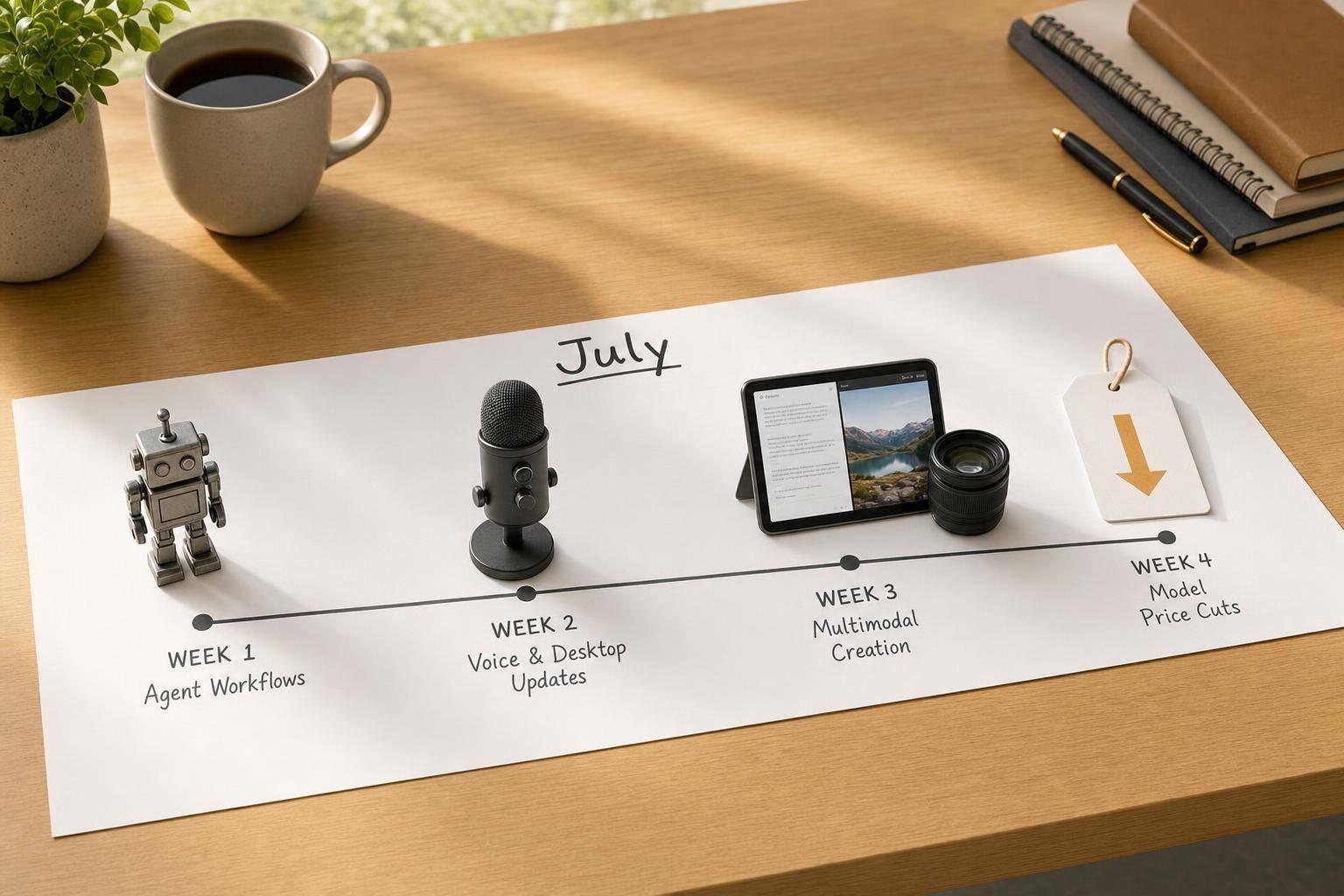
July 2026 was about one thing: AI tools started doing more of the job for you. I saw three clear shifts right away: more agent-style tools, more text-image-audio-video features in one place, and lower prices on major models.
If you just want the short version, here it is:
- AI agents moved closer to daily work instead of one-off chat prompts
- Multimodal tools became normal across writing, video, and research apps
- Prices dropped in ways that matter for teams and solo users
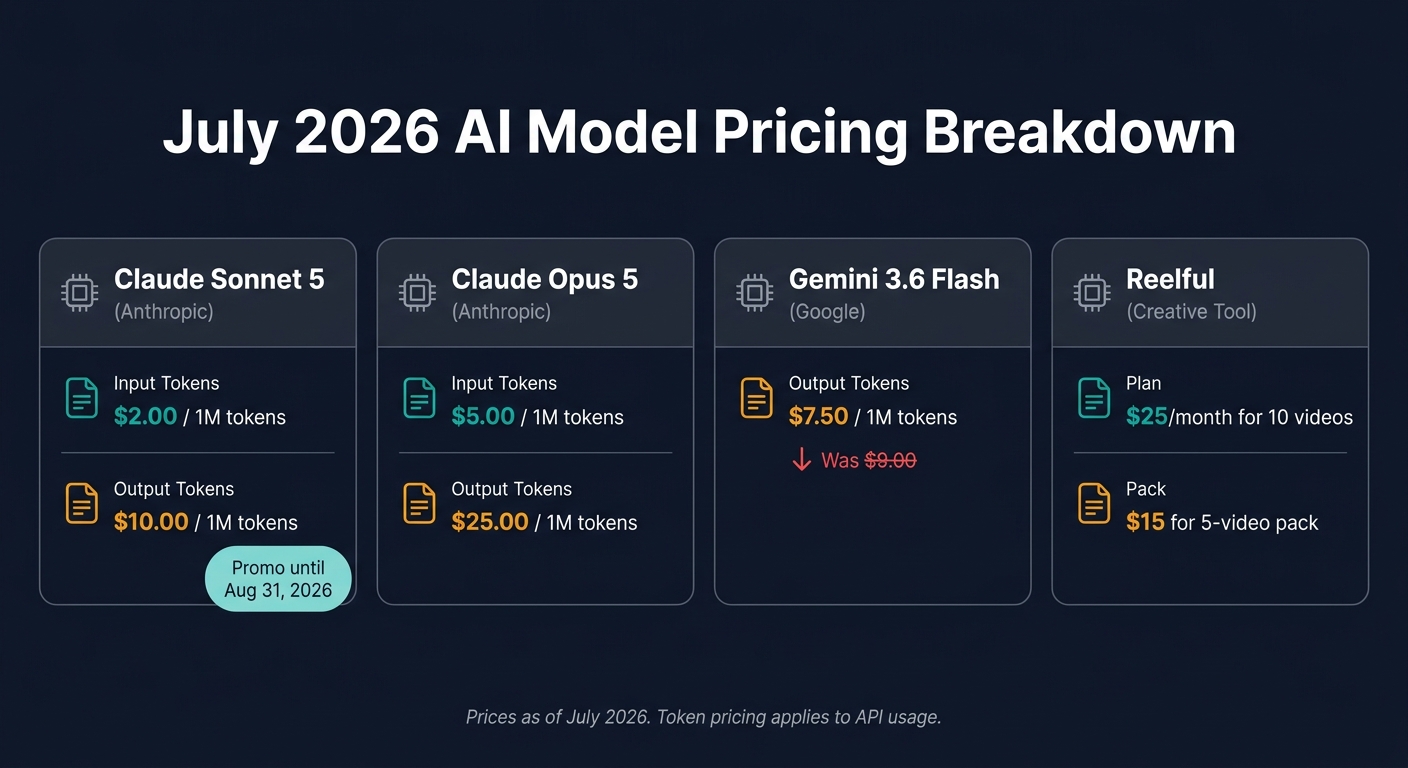
- Claude Sonnet 5 launched at $2 per million input tokens and $10 per million output tokens through August 31, 2026
- Gemini 3.6 Flash cut output pricing to $7.50 per million tokens, down from $9.00
- Voice and desktop use grew with updates to ChatGPT and Claude
- Safety checks and phased rollouts showed up more often with big releases
I’d look at July this way: if you write, research, build, or make videos, you now have more tools that can handle multi-step work with less manual effort. And if you pay for AI often, pricing changed enough that it may be time to review your stack.
A few names stood out to me:
- OpenWorker for local-first desktop automation
- Gemini Notebook for working with uploaded files and code
- FLUX 3 for image and video output from one prompt
- GPT-Live and Claude voice mode for hands-free work
- Reelful for turning camera roll clips into short videos
Here’s the part I’d act on now: pick one workflow, like inbox handling, research, or short-form video tools, and test one tool against your current setup. That’s the easiest way to see whether the new wave of AI saves time or just adds one more app.
Below, I’ll break down the launches, updates, pricing moves, and usage patterns that mattered most in July.
New AI apps launched in July
New tools for writing, research, and productivity
July’s writing and research launches leaned toward done-for-you output, not just prompt replies.
Gemini Notebook now runs sandboxed code on uploaded PDFs or transcripts. That means you can analyze source files and turn them into charts without bouncing between tools. It has already reached more than 30 million people across 600,000 organizations, so this update drops straight into a lot of existing workflows.
For solo professionals who need finished work, not another chat window, OpenWorker takes a different route. It’s an open-source, local-first desktop agent that drafts documents, sorts inboxes, and writes replies. Since it runs on your machine and lets you bring your own API key, you keep more control over your data and can watch API spend more closely.
Claude Opus 5 also arrived as a top-tier model for long research threads, coding, and multi-step tasks. Pricing starts at $5 per million input tokens and $25 per million output tokens.
New tools for images, video, and creative work
Creative launches followed the same idea: less hands-on editing, faster output.
Reelful, an iOS app, turns camera roll footage into polished TikTok- and Instagram Reels-style videos on its own, with AI-generated scripts, voiceovers, and captions. It’s aimed at founders and creators who want short-form video from clips they already have. Plans start at $25/month for 10 videos, and 5-video packs start at $15.
Google Video Remix in Google Photos lets you edit 10-second clips with text prompts, including relighting and background swaps. In Google Vids, Gemini Omni now lets users create Personal Avatars from a selfie and voice recording for training or announcement videos without recording video. For teams that make internal content on a regular basis, that can shave off a lot of production time.
FLUX 3 adds another launch in the same lane. It’s a multimodal model that generates high-quality images and 20-second video clips with native audio from a single text or image prompt. That makes it handy for product mockups, social assets, or quick concept visuals without hopping between apps.
How to find July launches on AI Apps
If you want to keep up with launches like these, AI Apps makes that easier. You can use the directory to filter 1,900+ tools by workflow, budget, and use case.
sbb-itb-212c9ea
Top 5 FREE AI Tools in July 2026 That Will Save You Hours Every Day
These tools are perfect for anyone looking to streamline your workflow with AI automation and reclaim lost hours.
Major July updates to widely used AI software
July 2026 AI Model Pricing Comparison
ChatGPT and Claude updates that affect daily work
Beyond brand-new launches, some of July’s biggest changes came from tools people already use all the time.
On July 23, 2026, OpenAI rolled out GPT-Live in the ChatGPT desktop app for macOS and Windows. This voice mode can listen and speak at the same time, which makes hands-free coding and research much easier. Access is limited to paid plans: Plus, Pro, Business, Enterprise, and Education.
Claude also got a voice update that matters for day-to-day work. Its refreshed voice mode runs on Opus and Sonnet models, and it can take action inside connected apps like Gmail, Google Calendar, and Notion. Free users can test the beta on Haiku with one connected tool.
Microsoft 365 Copilot added more choice, too. Users can now switch between GPT-5.6 and Claude Sonnet 5 based on the job they need done. Copilot Notebooks can also turn raw notes into Word, Excel, or PowerPoint files on their own.
The next set of changes showed up most in image, video, and writing work.
Image and video platform updates creators should watch
For creators, the clearest changes landed in video, avatars, and writing tools.
In Google Vids, Personal Avatars now let users make clips from a script after a single face-and-voice capture. It’s a simple setup: record once, then turn text into video clips. Every AI-generated clip includes an invisible SynthID digital watermark. The feature is available on Google AI Pro/Ultra or Workspace Business/Enterprise plans.
Google also updated AI tools for writers that many people use every day. Gmail’s Help me write now includes a refinement bar for edits like "make it shorter" or "add a call to action." Google Docs also added support for 11 new languages, including Mandarin, Polish, and Turkish.
July AI trends shaping how people and businesses use AI
The launches and updates above point to three bigger shifts in how people pick and use AI software.
Agentic AI moves into daily work
Agentic AI is starting to show up in everyday work, not just polished demos. Tools like Alteryx Agent Studio let business analysts turn current data workflows into autonomous agents that run inside Slack or Microsoft Teams without IT stepping in. A simple rule works well here: use agents for repetitive, low-risk tasks, and keep people involved when mistakes would be expensive or hard to fix.
Content creation gets faster and more multimodal
That same move toward more independent tools is changing content creation too. Creators can go from prompt to finished asset with fewer handoffs and faster output. Google’s Video Remix is a good example: creators can swap backgrounds or relight a 10-second clip with conversational prompts right inside Google Photos.
Fit and governance matter more than novelty
As these tools get more capable, governance starts to matter more than the wow factor. Frontier models are turning into core infrastructure, with pre-release safety reviews and export controls shaping what users can access. More tools now include effort settings that let people choose between faster responses and deeper reasoning.
Before you add any new AI tool to your stack, ask two direct questions:
- Where does my data go?
- What can this tool do on its own?
The Grok add-in for Excel, for example, sends document data to external servers, so it makes sense to check permissions before connecting sensitive files. If a tool can’t give a clear answer to both questions, it’s probably not ready for your workflow.
Conclusion: Which July AI changes are worth acting on now
July 2026 made one thing clear: AI is getting more useful, not just more flashy. The biggest wins came from tools that cut steps out of everyday work.
For most readers, July’s changes fit into two main buckets: automation and multimodal creation. That’s the pattern running through the month: fewer prompts, more finished output. OpenWorker and FLUX 3 point in the same direction - more automation, more multimodal output, and fewer manual steps.
Gemini 3.6 Flash looks like the most useful update for teams and researchers because it cuts cost while improving day-to-day performance. For creators, Reve 2.1 stands out for a simpler reason: its layer-based editing lets you change one part of an image without rebuilding the whole scene. That means faster edits and less manual work.
The trends to watch through the rest of 2026 are effort dials, agentic defaults, and multimodal consolidation. More tools are moving toward effort-based pricing, and that pattern will likely show up in more products before the year ends. If you create content as a freelancer, test multimodal tools. If you work on a team, pay attention to automation. If you’re just getting started, pick one workflow and learn it well.
If you want to move on these changes now, start with tools that match a specific workflow. Use AI Apps to filter 1,900+ tools by use case, budget, and workflow, then begin with the July launches.
FAQs
Which July AI tool is best for my workflow?
It depends on the work you do most and how much hands-on control you want.
- Microsoft 365 Copilot: a good fit if you already live in Microsoft 365 and want to turn Copilot Notebooks into Word, Excel, and PowerPoint files.
- Perplexity Personal Computer: useful for cross-platform enterprise work that spans apps and local files.
- Claude Cowork, ChatGPT desktop, or OpenWorker: strong picks for repeatable automation, developer workflows, or local-first document and data work.
How should I evaluate AI pricing changes for my team?
Look past per-token pricing and focus on the total cost per completed task. Agentic workflows can burn through a lot of tokens, so a model that seems cheaper at first can end up costing more if it needs retries or manual cleanup.
Measure throughput, speed, and token efficiency. Pick the model that consistently gets your team’s work done with less hand-holding. Before you scale, also check API access, regional limits, and support for long-running, multi-step workflows.
What should I check before using an AI agent with my data?
Before you connect an AI agent to your data, check privacy and control settings first. That step matters more than most people think.
Look at whether your information is used to train the vendor’s systems, whether data use is set to opt-out by default, and how each setting works on its own. Don’t assume one master switch covers everything. In many tools, it doesn’t.
You’ll also want to confirm your API access and U.S. rollout region. On top of that, review governance features such as policy guardrails or authorized action lists, so you stay in control of sensitive information.